
Treequest
A Tree Search Library with Flexible API for LLM Inference-Time Scaling
Install / Use
/learn @SakanaAI/TreequestREADME
TreeQuest





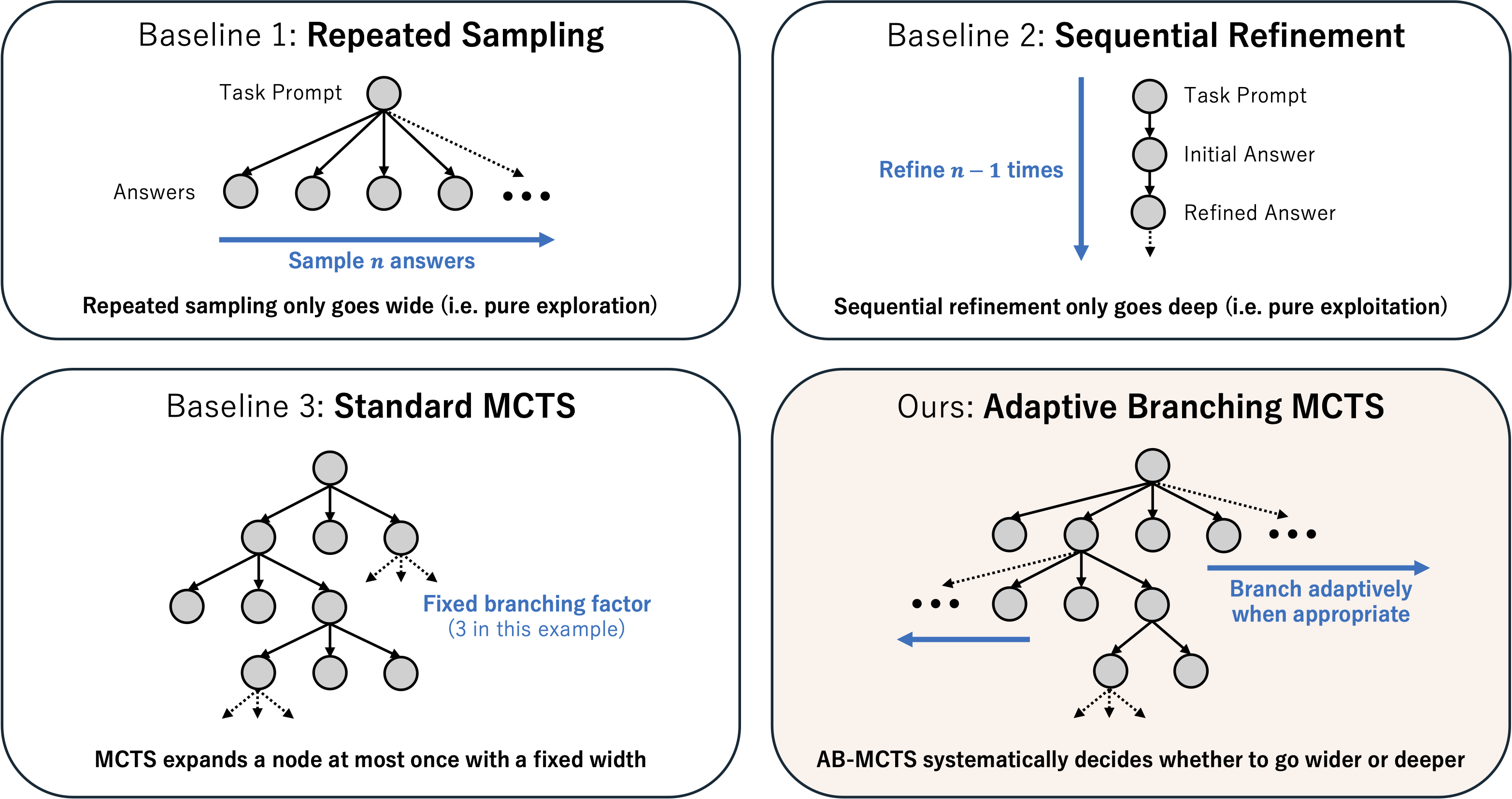
A flexible answer tree search library featuring AB-MCTS, useful for (but not limited to) LLM inference-time scaling.
Quick Start
import random
from pathlib import Path

import treequest as tq

# Each node is associated with a user-definable `state`.
State = str

# 1. Define a function to be used for node generation.
def generate(parent_state: State | None) -> tuple[State, float]:
    """Generates new states and scores based on the parent state."""
    if parent_state is None: # None represents the expansion from root.
        new_state = "Initial state"
    else:
        new_state = f"State after {parent_state}"

    score = random.random() # A score for the new state; It should be normalized to the [0, 1] range.
    return new_state, score

# 2. Instantiate the algorithm and a search tree object.
algo = tq.ABMCTSA()
search_tree = algo.init_tree()

# 3. Run the search with a generation budget (10 in this case).
for _ in range(10):
    search_tree = algo.step(search_tree, {'Action A': generate})

# 4. Extract the best score and state.
best_state, best_node_score = tq.top_k(search_tree, algo, k=1)[0]
print(f"Best state: {best_state}, Score: {best_node_score}")

# 5. Visualize the search tree.
output_file_basename = Path("ab_mcts_a_search_tree")
tq.render(search_tree, output_file_basename, format="html")  # Generates `ab_mcts_a_search_tree.html`
Alternatively, you can use an ask–tell interface with batched AB-MCTS sampling steps:
import random
import treequest as tq

State = str

def generate(parent_state: State | None) -> tuple[State, float]:
    ...

generate_fns = {"Action A": generate}
actions = list(generate_fns.keys())

# We use batch_size=5 here
batch_size = 5

# It runs AB-MCTS sampling step with 5 processes in parallel
algo = tq.ABMCTSM(max_process_workers=batch_size)
search_tree = algo.init_tree()

total_budget = 50
num_steps = total_budget // batch_size
for _ in range(num_steps):
    # ask_batch returns a list of `Trial` object, which has action, parent_state and trial_id attrs
    search_tree, trials = algo.ask_batch(search_tree, batch_size, actions)

    for trial in trials:
        result = generate_fns[trial.action](trial.parent_state)
        # Call tell method with trial_id to update search_tree
        search_tree = algo.tell(search_tree, trial.trial_id, result)

best_state, best_node_score = tq.top_k(search_tree, algo, k=1)[0]
In particular for AB-MCTS-M, each step call can be slow. If you encounter slow execution, prefer ask_batch over step.
Please note that using a large batch_size can skew the search-tree shape (i.e., the tree may become too wide), so it is best to avoid overly large batch_size, see PROFILING.md for example trees.
We recommend batch_size<=5 as a starting point.
Features
- Easy-to-use API with customizable node generation and node scoring logic.
- AB-MCTS-A and AB-MCTS-M, as well as Multi-LLM AB-MCTS support (See our paper for algorithm details).
- Checkpointing and resuming searches.
Installation
First, install uv. Then you can install TreeQuest with the following command:
uv add "treequest[all]"
Alternatively, you can use pip to install TreeQuest:
pip install "treequest[all]"
There are optional dependencies for ABMCTS-M and visualization features. You can install them with:
# with all dependencies
uv add "treequest[all]"

# without dependencies
uv add treequest

# with individual dependencies
uv add "treequest[abmcts-m]"
uv add "treequest[vis]"
Usage
Using an LLM as a Node Generator
You can use any object as a node state. You only need to define a generating function that returns a (state, score) tuple and takes the parent state as an argument:
import dataclasses

import treequest as tq

@dataclasses.dataclass
class State:
    llm_answer: str
    score: float

def generate(parent_state: State | None) -> tuple[State, float]:
    """Generate a new node by calling an LLM."""
    if parent_state is None:
        state = initial_generation()
    else:
        state = refine_answer(parent_state.llm_answer, parent_state.score)

    return state, state.score

def initial_generation() -> State:
    """
    Call LLM API to generate an initial answer.
    """
    ...

def refine_answer(llm_answer: str, score: float) -> State:
    """
    Call LLM API to refine an answer.
    """
    ...


algo = tq.ABMCTSM()
search_tree = algo.init_tree()
for i in range(20):
    search_tree = algo.step(search_tree, {'Action Label': generate})
    # Logging best node during the search.
    if (i + 1) % 5 == 0:
        best_interim_state, _ = tq.top_k(search_tree, algo, k=1)[0]
        print(f"Iteration {i+1}: Best state so far = {best_interim_state}")

best_state, _ = tq.top_k(search_tree, algo, k=1)[0]
print(f"Best Answer: {best_state.llm_answer}, Best Score: {best_state.score}")
Using Multiple LLMs (and Beyond)
TreeQuest supports multiple action types. For example, you can provide multiple generation functions backed by different LLMs to represent different action types:
from functools import partial

import treequest as tq

def generate(llm_name: str, parent_state=None):
    """
    Call LLM API using litellm, vllm, etc., to generate a new node
    """
    ...
    return new_state, new_score

llm_names = ["o4-mini", "gemini-2.5-pro"]
# Create dict of different actions backed by different LLMs.
generate_fns = {llm_name: partial(generate, llm_name=llm_name) for llm_name in llm_names}

algo = tq.StandardMCTS()
search_tree = algo.init_tree()
for _ in range(20):
    search_tree = algo.step(search_tree, generate_fns)
The variation is not limited to LLM types; you can use different prompts, actions, scoring logic, etc. in generate_fns.
Batch Semantics and Concurrency
- Algorithms are stateless objects; the evolving tree/search state is ret
