
Mongo.Migration
On-the-fly migrations with MongoDB C# Driver
Install / Use
/learn @SRoddis/Mongo.MigrationREADME





Mongo.Migration
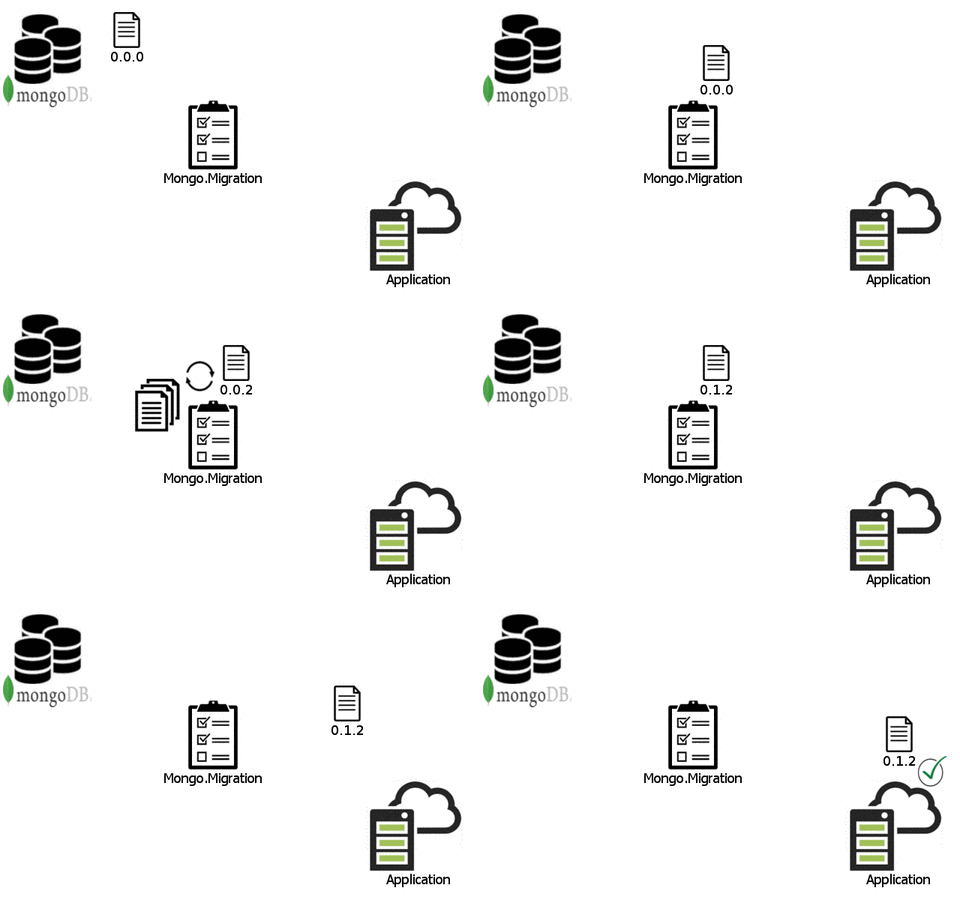
Mongo.Migration is designed for the MongoDB C# Driver to migrate your documents easily and on-the-fly.
No more downtime for schema-migrations. Just write small and simple migrations.
**Edit**
With version 3.0.0 of Mongo.Migration I added the possibility to run migrations on StartUp. In order to keep the core of Mongo.Migration in focus, it is still possible to run migrations at runtime (on-the-fly). In addition, there is now the option of executing migrations at the start of the application.
**PLEASE NOTE** If you use on-the-fly migration updates, aggregation pipeline and projections are not handled, because they don’t use serialization. You have to handle them yourself.
With version 4.0.0 of Mongo.Migration was added the possibility to run database migrations on StartUp. Now exist additional option of executing migrations which can manipulate the mongo database insert documents, rename collections and other operations that you need. It's more generic operations than only manipulate document when exists.
Installation
Install via nuget https://www.nuget.org/packages/Mongo.Migration
PM> Install-Package Mongo.Migration
Document migrations quick Start
.Net Framework
- Initialize
MongoMigrationbehind theMongoClient. (Mongo2Go)
// Init MongoDB
var runner = MongoDbRunner.Start(); // Mongo2Go
var client = new MongoClient(runner.ConnectionString);

// Init MongoMigration
MongoMigrationClient.Initialize(client);
.Net Core
1.1 Add MongoMigration with the StartupFilter (IMongoClient has to be registered at the DI-container before)
public void ConfigureServices(IServiceCollection services)
{
    services.AddMvc();

    _client = new MongoClient( _configuration.GetSection("MongoDb:ConnectionString").Value);

    services.AddSingleton<IMongoClient>(_client);

    services.AddMigration();
}
1.2 Add MongoMigration with the StartupFilter add connection setting to use separate client
public void ConfigureServices(IServiceCollection services)
{
    services.AddMvc();

    _client = new MongoClient( _configuration.GetSection("MongoDb:ConnectionString").Value);

    services.AddSingleton<IMongoClient>(_client);

    services.AddMigration(new MongoMigrationSettings
    {
        ConnectionString = _configuration.GetSection("MongoDb:ConnectionString").Value,
        Database = _configuration.GetSection("MongoDb:Database").Value,
        VersionFieldName = "TestVersionName" // Optional
    });
}
- Implement
IDocumentor addDocumentto your entities to provide theDocumentVersion. (Optional) Add theRuntimeVersionattribute to mark the current version of the document. So you have the possibility to downgrade in case of a rollback.
[RuntimeVersion("0.0.1")]
public class Car : IDocument
{
    public ObjectId Id { get; set; }

    public string Type { get; set; }

    public int Doors { get; set; }

    public DocumentVersion Version { get; set; }
}
- Create a migration by extending the abstract class
DocumentMigration<TDocument>. Best practice for the version is to use Semantic Versioning but ultimately it is up to you. You could simply use the patch version to count the number of migrations. If there is a duplicate for a specific type an exception is thrown on initialization.
public class M001_RenameDorsToDoors : DocumentMigration<Car>
{
    public M001_RenameDorsToDoors()
        : base("0.0.1")
    {
    }

    public override void Up(BsonDocument document)
    {
        var doors = document["Dors"].ToInt32();
        document.Add("Doors", doors);
        document.Remove("Dors");
    }

    public override void Down(BsonDocument document)
    {
        var doors = document["Doors"].ToInt32();
        document.Add("Dors", doors);
        document.Remove("Doors");
    }
}
(Optional)If you choose to put your migrations into an extra project, add the suffix".MongoMigrations"to the name and make sure it is referenced in the main project. By convention Mongo.Migration collects all .dlls named like that in your bin folder.
Compile, run and enjoy!
How to use document migration
With version 3.0.0 of Mongo.Migration I added the possibility to run migrations on StartUp. In order to keep the core of Mongo.Migration in focus, it is still possible to run migrations at runtime (on-the-fly). In addition, there is now the option of executing migrations at the start of the application.
Document migration at runtime
See Quick Start
Document migration on startup
If you want to run migrations on StartUp, the only thing you have to do is add the attribute CollectionLocation.
Now all migrations you add for a IDocument will be executed at StartUp.
    [CollectionLocation("Car", "TestCars")]
    public class Car : IDocument
    {
        public ObjectId Id { get; set; }

        public string Type { get; set; }

        public int Doors { get; set; }

        public DocumentVersion Version { get; set; }
    }
Additionally you can fix the version of the document with StartUpVersion
    [StartUpVersion("0.1.1")]
    [CollectionLocation("Car", "TestCars")]
    public class Car : IDocument
    {
        public ObjectId Id { get; set; }

        public string Type { get; set; }

        public int Doors { get; set; }

        public DocumentVersion Version { get; set; }
    }
**PLEASE NOTE**
Mongo.Migration uses the IStartUpFilter for .net core.
Maybe you want to read this article, to check if there is a better option to migrate with Mongo.Migration at StartUp.
Document migration on startup and at runtime
This is an example how you can use both. At startup the version will be 0.0.1 and at runtime, when a document will be deserialized the version will be migrated to 0.1.1
    [RuntimeVersion("0.1.1")]
    [StartUpVersion("0.0.1")]
    [CollectionLocation("Car", "TestCars")]
    public class Car : IDocument
    {
        public ObjectId Id { get; set; }

        public string Type { get; set; }

        public int Doors { get; set; }

        public DocumentVersion Version { get; set; }
    }
Annotations
RuntimeVersion
Add RuntimeVersion attribute to mark the current version of the document. So you have the possibility to downgrade in case of a rollback.
If you do not set the RuntimeVersion, all migrations will be applied.
[RuntimeVersion("0.0.1")]
public class Car : IDocument
...
CollectionLocation
Add CollectionLocation attribute if you want to migrate your collections at startup. This attribute tells Mongo.Migration where to find your Collections.
[CollectionLocation("Car", "TestCars")]
public class Car : IDocument
...
StartUpVersion
Add StartUpVersion attribute to set the version you want to migrate to at startup. This attribute limits the migrations to be performed on startup
[StartUpVersion("0.0.1")]
public class Car : IDocument
...
Database migrations quick start
.Net Framework
- Initialize
MongoMigrationbehind theMongoClient. (Mongo2Go)
// Init MongoDB
var runner = MongoDbRunner.Start(); // Mongo2Go
var client = new MongoClient(runner.ConnectionString);

// Init MongoMigration
 MongoMigrationClient.Initialize(
                client,
                new MongoMigrationSettings()
                {
                    ConnectionString = runner.ConnectionString,
                    Database = "TestCars"
                },
                new LightInjectAdapter(new LightInject.ServiceContainer()))
.Net Core
1.1 Add MongoMigration with the StartupFilter (IMongoClient has to be registered at the DI-container before)
public void ConfigureServices(IServiceCollection services)
{
    services.AddMvc();

    _client = new MongoClient( _configuration.GetSection("MongoDb:ConnectionString").Value);

    services.AddSingleton<IMongoClient>(_client);

    services.AddMigration(new MongoMigrationSettings()
                         {
                             ConnectionString = runner.ConnectionString,
                             Database = "TestCars"
                         });
}
1.2 Add MongoMigration with the StartupFilter add connection setting to use separate client
public void ConfigureServices(IServiceCollection services)
{
    services.AddMvc();

    services.AddMigration(new MongoMigrationSettings
    {
        ConnectionString = _configuration.GetSection("MongoDb:ConnectionString").Value,
        Database = _configuration.GetSection("MongoDb:Database").Value,
        DatabaseMigrationVersion = new DocumentVersion(2,0,0) // Optional
    });
}
- Create a migration by extending the abstract class
DatabaseMigration. Best practice for the version is to use Semantic Versioning but ultimately it is up to you. You could simp
Related Skills
node-connect
347.2kDiagnose OpenClaw node connection and pairing failures for Android, iOS, and macOS companion apps
frontend-design
108.0kCreate distinctive, production-grade frontend interfaces with high design quality. Use this skill when the user asks to build web components, pages, or applications. Generates creative, polished code that avoids generic AI aesthetics.
openai-whisper-api
347.2kTranscribe audio via OpenAI Audio Transcriptions API (Whisper).
qqbot-media
347.2kQQBot 富媒体收发能力。使用 <qqmedia> 标签,系统根据文件扩展名自动识别类型(图片/语音/视频/文件)。
