
NetStatus
Internet speed & offline status monitor. Upload, download, ping, latency dashboard display
Install / Use
/learn @Ryandev/NetStatusREADME
NetStatus
NetStatus is designed as an always-on dashboard WebUI to track internet connectivity It will periodically recheck its connection & provide a live view of status, online or off. speed up/down & latency
Live: http://netstatus.ryanpowell.dev
This project was intended for use with Raspberry Pi + 3.5" LCD display, however it supports multiple devices, aspect-ratios
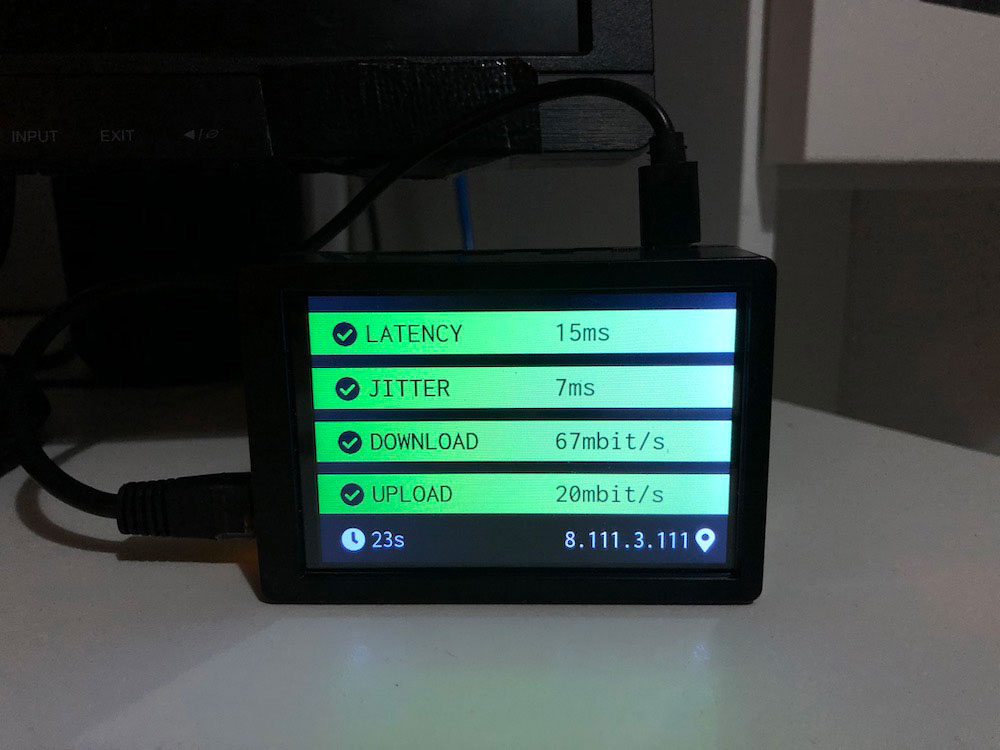 Device setup instructions for Raspberry PI, (flasing image, package installs, autostart setup) RPI
Features
- Offline notifications
- Periodic netspeed speed checks (latency, jitter, upload/download speed)
- Configurable
- Easy to run (Docker)
- Optimized for small screens, however designed to work on any screensize or orientation,
Screenshots
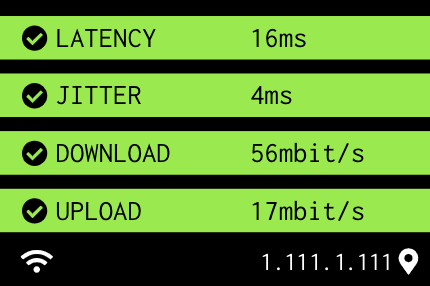
Everything ok
No network connection found/lost

Latency/Upload error status & download warning status
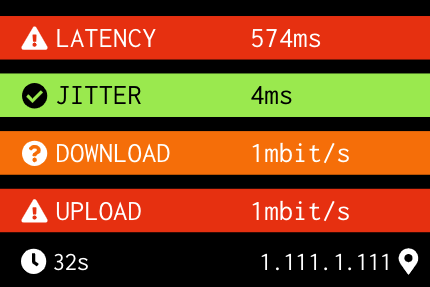
Bottom row: left is the time elapsed since the last speed test. Right is your public IP address
When the WiFi icon is showing, a new speed-test is underway, display will be updated once all results are in
Run
Options:
- Load url https://netstatus.ryanpowell.dev in Browser
- Build project & serve static files (Download project, run
npm run build& serve contents from ./build) - Deploy locally with Docker below & open http://localhost:80
- Deploy with balena (more details below)
Docker Deployment
Run below (supports amd64, arm64 & arv7, aka PC, Pi4, Pi3)
sudo docker run --name netspeed -d --restart=always -p 80:80 ryandev/netspeed
Docker Configurables
| Name | Description | Environment name | Value units | Default value |
|-------------------------------------------|-----------------------------------------------------------------------------------------------------------------------------------------------------------------------------------------------|--------------------------------|-------------|-------------------------|
| Frequency of ping checks | How frequently to fetch a favicon to check if the network is there. This is needed as navigator.isOnline implmentation varies across browsers | REACT_APP_PINGINTERVAL | Seconds | 15 |
| Which websites to check connectivity with | Used with the above parameter, a random website from this list is pulled and the favicon is fetched from. To override this value please set as a JSON array | REACT_APP_PINGWEBSITES | N/A | See config/ping.ts |
| Speed test interval | How frequently to check network speed (latency, jitter, upload & download speed) | REACT_APP_TESTINTERVAL | Seconds | 300 |
| Speed test servers | List of speed test servers to use to test speed against. Configuration is passed to Librespeed, for more info see the config or Librespeed/speedtest website | REACT_APP_SERVERCONFIGURATIONS | N/A | See config/speedtest.ts |
| Upload warning threshold | Threshold at which the color of the upload status will be shown as a warning. Example: if after a speed test the upload speed is less than REACT_APP_UPLOADWARN then display as warning | REACT_APP_UPLOADWARN | Mbit/s | 4 |
| Upload error threshold | Same as above except for displaying as error status | REACT_APP_UPLOADERROR | Mbit/s | 1 |
| Download warning theshold | | REACT_APP_DOWNLOADWARN | Mbit/s | 8 |
| Download error threshold | | REACT_APP_DOWNLOADERROR | Mbit/s | 1 |
| Latency warning threshold | | REACT_APP_LATENCYWARN | ms | 40 |
| Latency error threshold | | REACT_APP_LATENCYERROR | ms | 100 |
| Jitter warning threshold | | REACT_APP_JITTERWARN | ms | 50 |
| Jitter error threshold | | REACT_APP_JITTERERROR | ms | 100 |
All configurables can be found under src/config/*.ts
Docker Deployment Example
Set speed test interval to 10mins, ping checks every 1min, & latency warn threshold to 20ms
sudo docker run --name netspeed -d --restart=always -p 80:80 --env REACT_APP_TESTINTERVAL=600 --env REACT_APP_PINGINTERVAL=60 --env REACT_APP_LATENCYWARN=20 ryandev/netspeed:arm64
Balena Deployment Example
You can use balenaCloud to deploy this project to Raspberry Pis and other single board computers in just a few clicks, avoiding the need to manually configure any software packages.

or, manually:
- Install the balena CLI tools
- Login with
balena login - Download this project and from the project directory run
balena push <appName>where<appName>is the name you gave your balenaCloud application in the first step
Attributions
- Librespeed - SpeedTest
- FontAwesome - Iconography
- Bootstrap - HTML Layout
- Inconsolata, Google fonts - Typography
License
MIT
