
GPStitch
Visual web interface for creating video overlays with GPS telemetry data. Supports GoPro, DJI (SRT), GPX and FIT files. Visual editor with real-time preview, batch rendering, and custom templates.
Install / Use
/learn @Romancha/GPStitchREADME
GPStitch





A visual web interface for creating video overlays with GPS telemetry data. Wraps the powerful gopro-overlay library with an intuitive UI.
Features
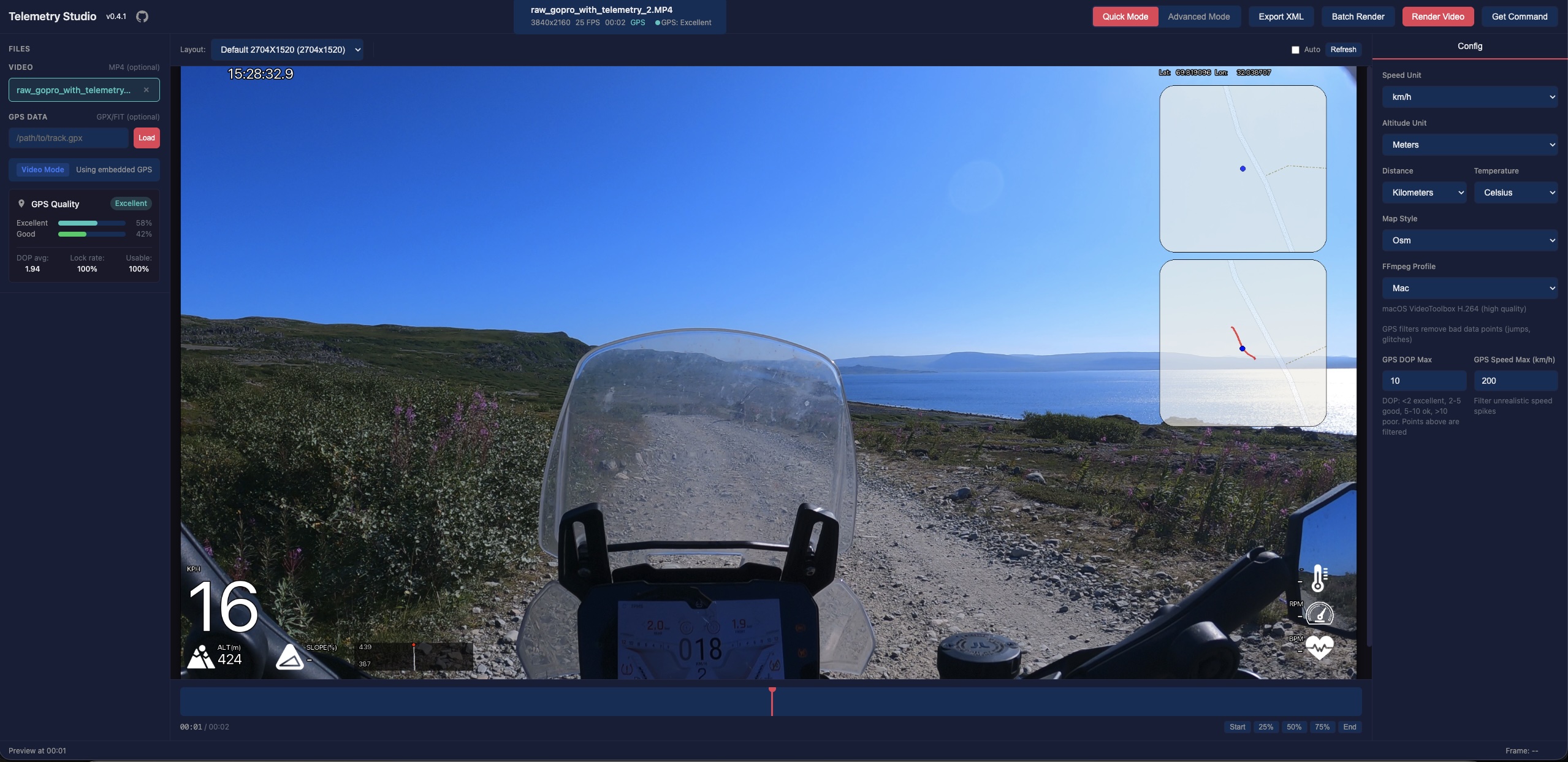
- Quick Mode — Select from predefined layouts, customize units and map styles
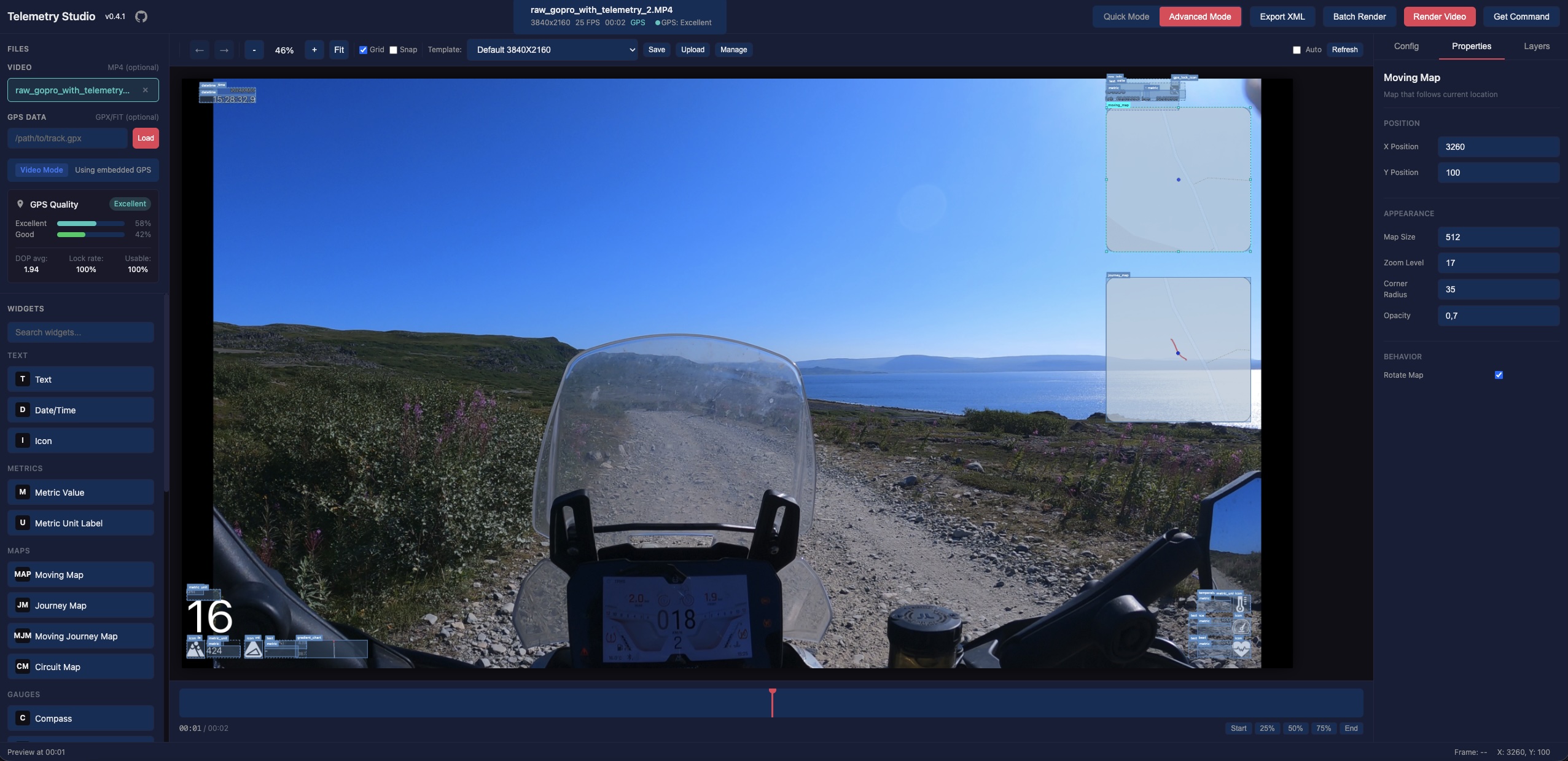
- Advanced Mode — Visual drag-and-drop editor for creating custom overlay layouts
- Live Preview — See your overlay in real-time as you configure it
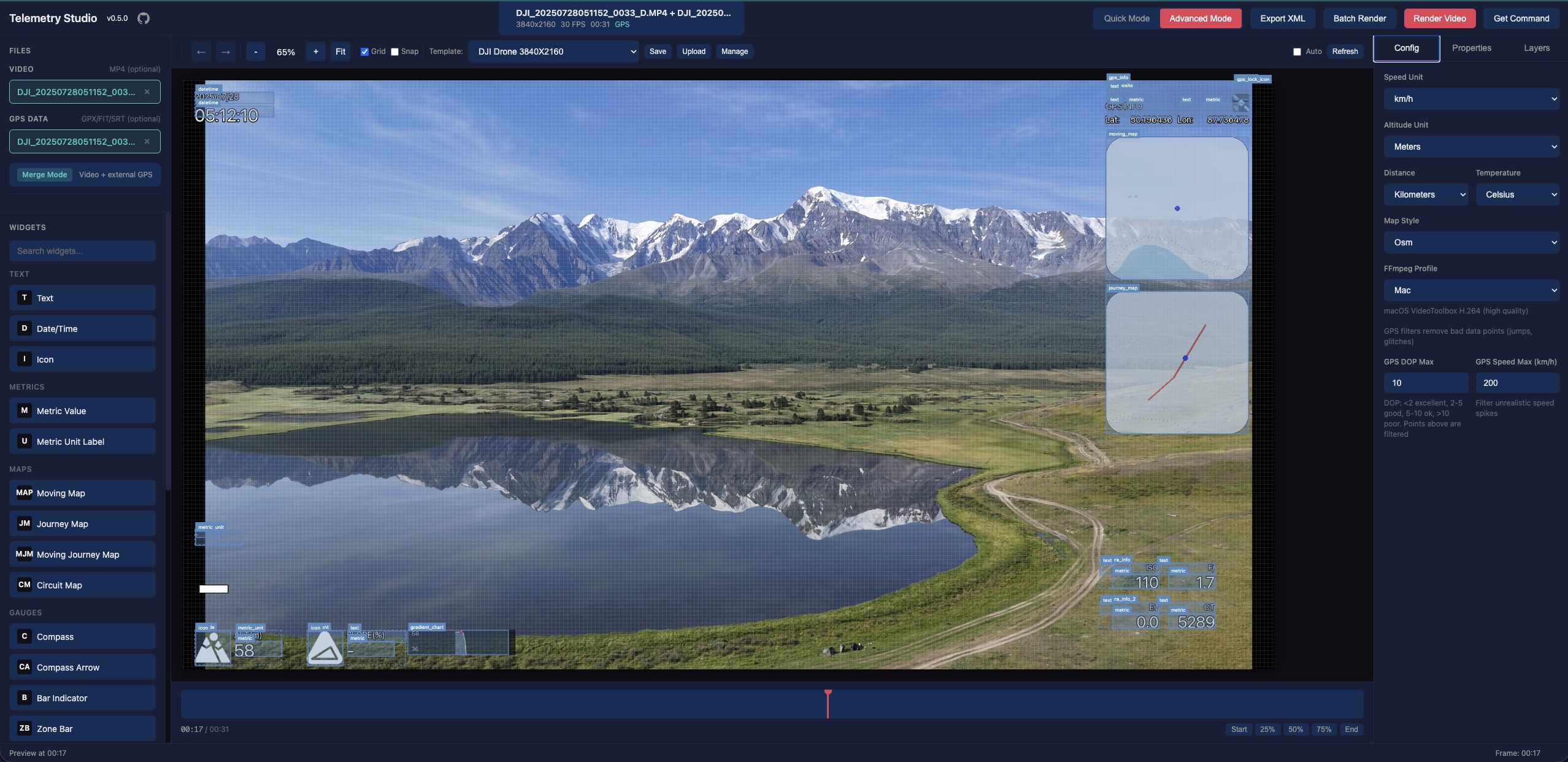
- DJI Drone Support — Automatic SRT telemetry parsing with timezone and time alignment auto-detection
- DJI Osmo Action Support — Automatic detection of embedded GPS from DJI GPS Bluetooth Remote Controller (Action 4/5/6) — no secondary file needed
- Non-GoPro Video Support — Use any video with external GPX/FIT/SRT files for GPS data
- Vertical Video Support — Automatic rotation detection and correct overlay rendering
- GPS Quality Analysis — Automatic signal quality check with warnings before rendering
- Template Management — Save and load custom templates
- Batch Rendering — Process multiple files with the same settings
- Shared GPX Batch Render — Apply a single GPX track to multiple videos with automatic odometer offset per video
- Background Jobs — Render videos in the background with progress tracking
- Overlay-Only Mode — Render transparent telemetry overlays (no video) for compositing in Final Cut Pro, DaVinci Resolve, etc.
Screenshots
Quick Mode
Simple configuration with predefined layouts. Perfect for quick renders.
Advanced Mode
Full visual editor with drag-and-drop widgets. Create custom layouts with complete control.
DJI Drone Support
Use DJI drone videos with SRT telemetry files. Timezone offset and time alignment are automatically detected from video metadata, supporting different DJI models and firmware versions.
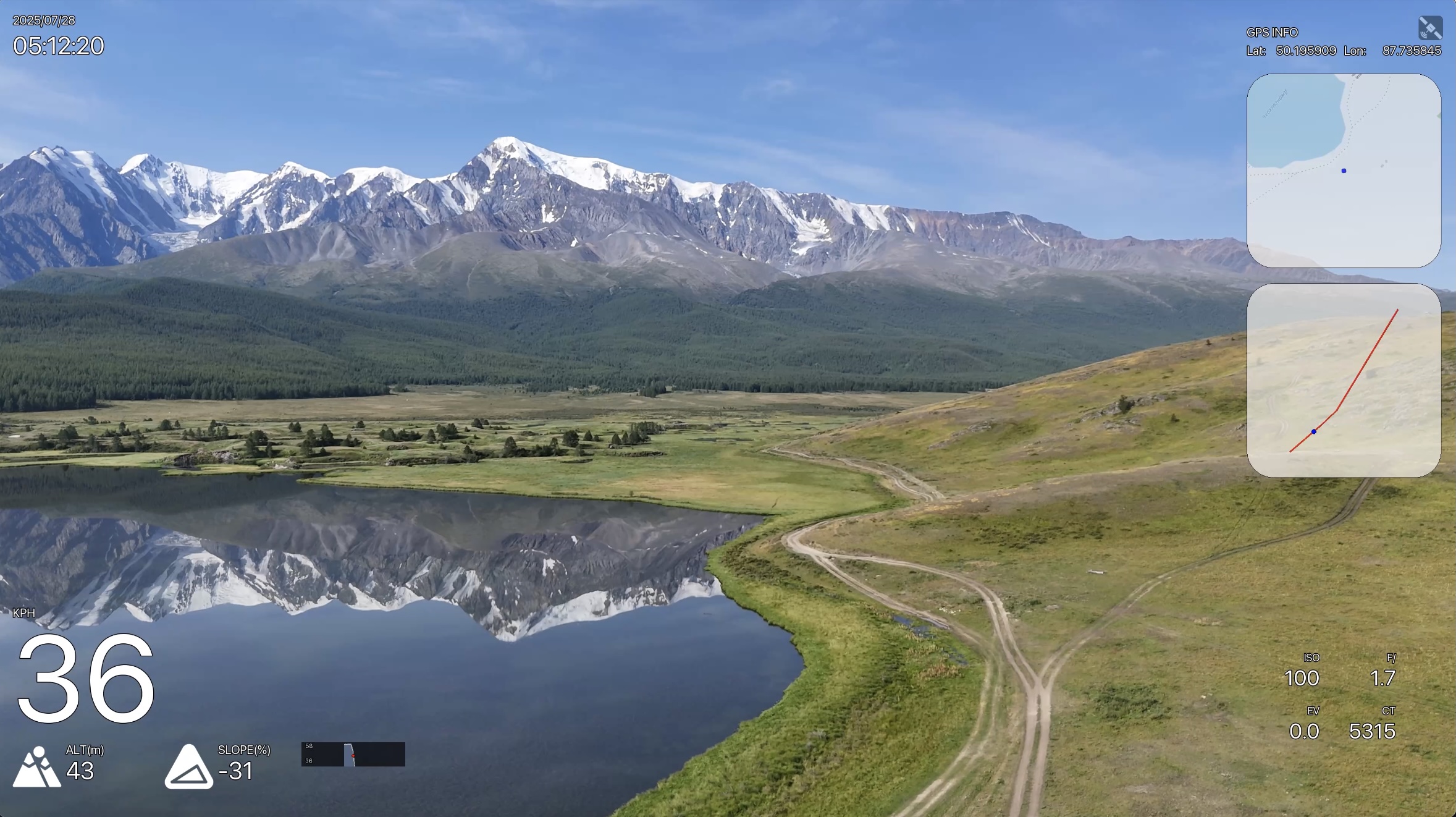
Camera metrics (ISO, shutter, f-number, EV, color temperature) from SRT files are displayed directly on the video overlay.
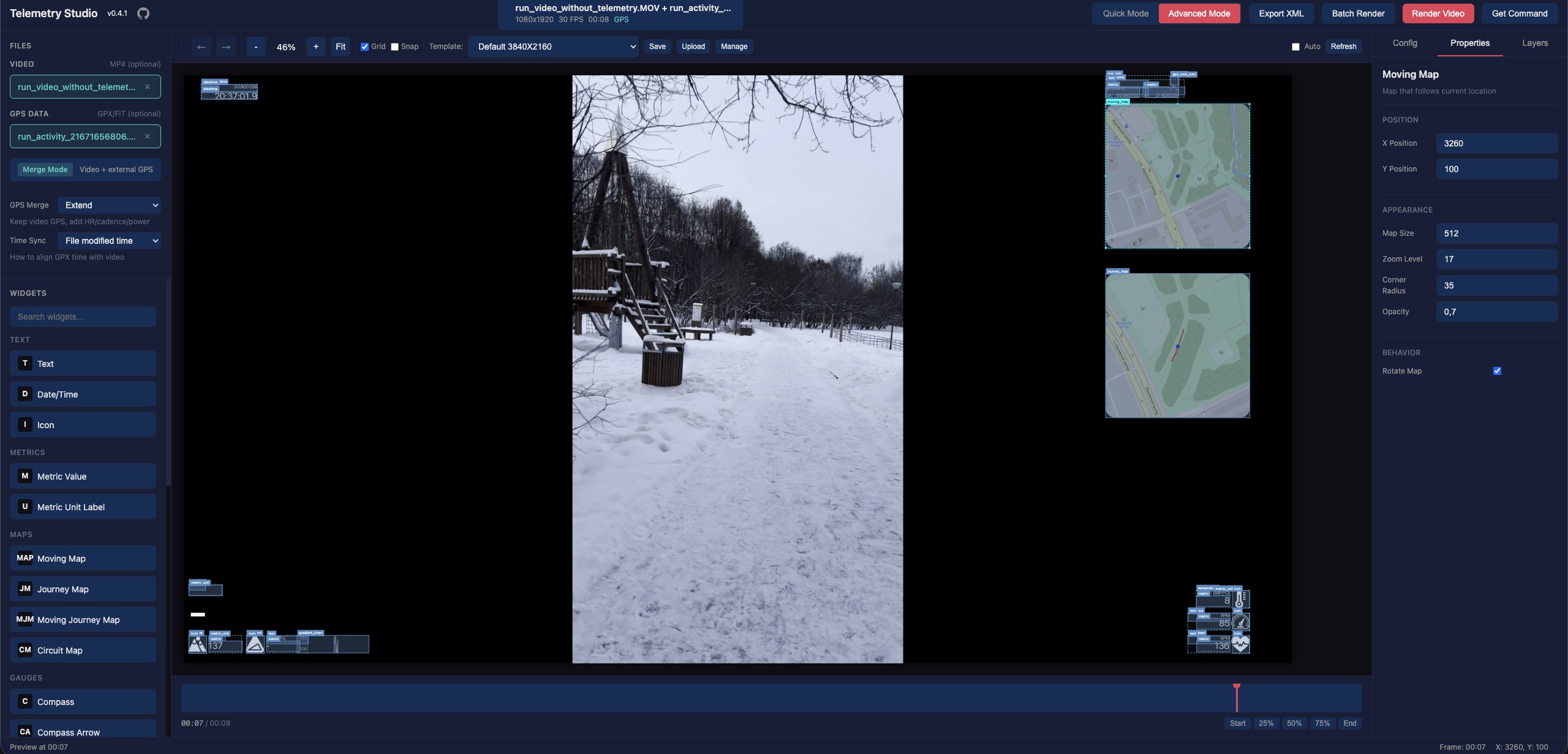
External GPX & Vertical Video
Use any video with external GPX/FIT files. Vertical videos are automatically detected and rendered correctly.
Batch Rendering
Process multiple videos at once with the same overlay settings.
<p align="center"> <img src="https://raw.githubusercontent.com/Romancha/GPStitch/main/docs/images/batch_create.png" width="400" alt="Batch Create"/> <img src="https://raw.githubusercontent.com/Romancha/GPStitch/main/docs/images/batch_progress.png" width="400" alt="Batch Progress"/> </p>Shared GPX Batch Render
Apply a single GPX track to multiple videos recorded during the same activity. Each video automatically gets an odometer offset calculated from its creation time relative to the GPX track start, so the overlay shows the correct absolute distance from the beginning of the track.
Overlay-Only Mode
Render telemetry overlays with a transparent background — without any source video. Use a GPX, FIT, or SRT file as the primary input, and GPStitch will generate a video with an alpha channel that you can layer on top of your footage in any video editor (Final Cut Pro, DaVinci Resolve, Premiere Pro, etc.).
How to use:
- Upload a GPX, FIT, or SRT file as the primary file (no video needed)
- Configure your overlay layout and widgets as usual
- Select an encoding profile with transparency support:
- MOV (PNG) — Lossless quality, best compatibility with Final Cut Pro and DaVinci Resolve (large files)
- VP9 — Good quality with alpha channel, smaller files
- VP8 — Alpha channel support, widest browser compatibility
- Render — the output is a video with a transparent background ready for compositing
Command-Line Rendering
GPStitch includes gpstitch-dashboard, a CLI command that works as a drop-in replacement for gopro-dashboard.py with all GPStitch patches applied (DJI support, timecode preservation, audio copy, etc.).
Use the "Get Command" button in the UI to generate a ready-to-run gpstitch-dashboard command, then paste it into your terminal:
gpstitch-dashboard video.mp4 output.mp4 --layout xml --layout-xml layout.xml
This is useful for scripting, batch processing, or re-running renders without the UI.
Requirements
- Python 3.12+
- FFmpeg (must be installed and available in PATH)
- gopro-overlay (installed automatically)
Installation
pipx (recommended)
# Install FFmpeg first
# macOS:    brew install ffmpeg
# Ubuntu:   sudo apt install ffmpeg
# Windows:  choco install ffmpeg

# Install GPStitch
pipx install gpstitch

# Run (opens browser automatically)
gpstitch

# Or with custom host/port
gpstitch --host 127.0.0.1 --port 8080
Optional: Cairo widgets support
Some layouts (e.g. example, example-2) use cairo-based widgets (gauges, circuit maps). These require pycairo, which needs the cairo system library:
# 1. Install system library
# macOS:    brew install cairo pkg-config
# Ubuntu:   sudo apt install libcairo2-dev pkg-config python3-dev

# 2. Install with cairo support (new install)
pipx install 'gpstitch[cairo]'

# Or add to existing installation
pipx inject gpstitch pycairo
Without pycairo, GPStitch works normally — cairo layouts will be marked as unavailable in the UI.
From source
# Install uv if not already installed
curl -LsSf https://astral.sh/uv/install.sh | sh

# Clone the repository
git clone https://github.com/Romancha/GPStitch.git
cd gpstitch

# Install dependencies
uv sync

# Run the application
uv run gpstitch
Then open http://localhost:8000 in your browser.
Supported Input Files
| Type | Formats | Description |
|------|---------|-------------|
| Video | .mp4, .mov, .avi | Video files (GoPro and DJI Action files may contain embedded GPS) |
| GPS Data | .gpx, .fit, .srt | External GPS tracks — GPX, FIT, or DJI SRT telemetry (optional) |
Time Sync
When using a non-GoPro video with an external GPS file (GPX/FIT), the video and GPS track need to be aligned in time. GPStitch provides three synchronization modes in the Time Sync dropdown:
Auto (Recommended)
Automatically aligns the video to the GPS track using the video's embedded creation_time metadata (set by the camera when recording starts). GPStitch extracts this timestamp via ffprobe and cross-validates it against the GPS track's time range.
Timezone auto-detection: Some cameras (e.g., Insta360, certain DJI models) incorrectly write local time into the creation_time field instead of UTC as required by the MP4 specification. GPStitch detects this by checking whether the video time window overlaps with the GPS data — if it doesn't, it automatically tries alternative timestamps (file created date) and selects the one that best matches the GPS track.
If no valid creation_time is found in the video metadata, GPStitch falls back to the file's creation date (less reliable, shown as a warning in the UI).
Use GPX Timestamps
Skips time alignment entirely. The GPS data is used as-is without synchronization with the video. This mode is useful when:
- The GPX file has been manually trimmed to exactly match the video segment
- You want the overlay to display the full GPS track regardless of video timing
Manual Offset
Works the same as Auto (uses video metadata for alignment), but allows you to apply a manual correction in seconds (+ or -). Use this when the automatic alignment is close but slightly off — for example, if the camera's clock was not perfectly synchronized with GPS time.
The UI shows the base timestamp and the adjusted result so you can see exactly how the offset is applied.
Note: For DJI drones with SRT files, time synchronization is handled automatically — the Time Sync options are not shown because GPStitch detects the correct alignment from the SRT telemetry data.
Configuration
Environment variables (prefix: GPSTITCH_):
| Variable | Default | Description |
|----------|---------|-------------|
| HOST | 0.0.0.0 | Server host |
| PORT | 8000 | Server port |
| LOCAL_MODE | true | Use local file paths instead of uploads |
| TEMPLATES_DIR | ~/.gpstitch/templates | Custom templates directory |
| ENABLE_GOPRO_PATCHES | true | Enable runtime patches for gopro-overlay |
| USE_WRAPPER_SCRIPT | true | Use wrapper script for rendering |
You can also use a .env file in the project root.
Runtime Patches
GPStitch includes runtime patches for gopro-overlay that add:
- Timecode preservation — Maintains original video timecode for Final Cut Pro compatibility
- Audio stream copy — Preserves audio without re-encoding
- Metadata preservation — Keeps original vi
Related Skills
openhue
350.8kControl Philips Hue lights and scenes via the OpenHue CLI.
sag
350.8kElevenLabs text-to-speech with mac-style say UX.
weather
350.8kGet current weather and forecasts via wttr.in or Open-Meteo
casdoor
13.3kAn open-source AI-first Identity and Access Management (IAM) /AI MCP & agent gateway and auth server with web UI supporting OpenClaw, MCP, OAuth, OIDC, SAML, CAS, LDAP, SCIM, WebAuthn, TOTP, MFA, Face ID, Google Workspace, Azure AD
