
Npm Gamepadzilla
A plug-and-play gamepad frontend framework for HTML5 mobile games, supporting both virtual and physical joysticks. No scripting required.
Install / Use
npx skills add RodrigoDornelles/npm-gamepadzillaInstalls into whichever agent you are using.
README
:t-rex: GamepadZilla la la!


A plug-and-play gamepad frontend framework for HTML5 mobile games, supporting both virtual and physical joysticks. No scripting required.
- :octocat: source code: https://github.com/rodrigodornelles/npm-gamepadzilla
- :gorilla: demo website: https://rodrigodornelles.github.io/npm-gamepadzilla
| :video_game: Preview | :joystick: Features |
| :------------------- | :------------------- |
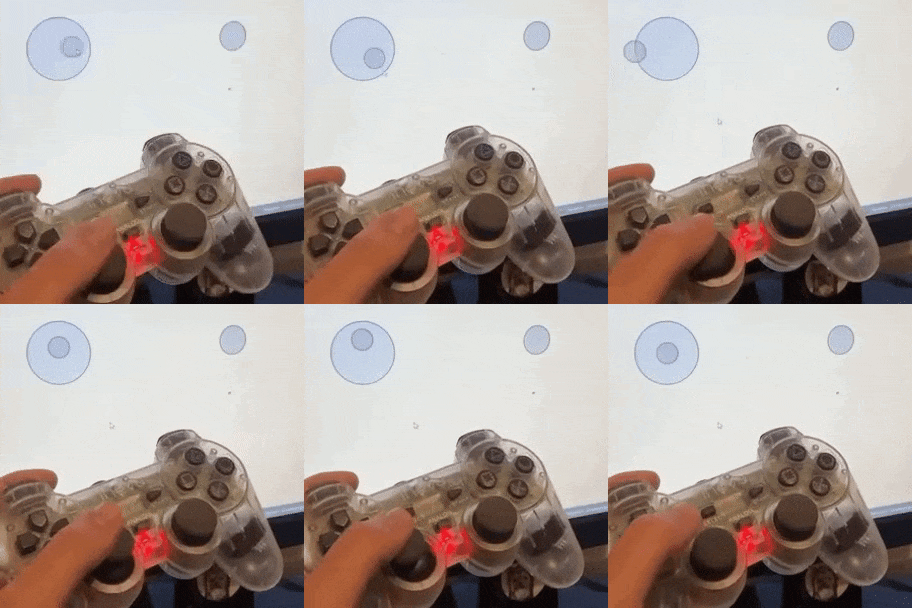 | gpz is fast. (no DOM manpulation)<br/><br/>gpz is easy. (no Javascript needed, use only html5 attributes)<br/><br/>gpz is pure. (made with only typescript without dependencies)<br/><br/>gpz hates the van's old-man! |
showcase
post your open-source game using gamepadzilla!
| game | stack | source | | :--- | :---- | :----: | | Coco Battle Royale 2 | C, Assembly 6502, WebAssembly, Html, gampadzila.js | :octocat:repo | | Pong<br/>CapyBird<br/>AsteroidsTV<br/> | Lua, Gly Engine, WebAssembly, Html, gampadzila.js | :octocat:repo |
How to use
- import library with npm or cdn. :minibus:
- create html5 canvas elements with class
gpz-joyorgpz-btnand configure data attributes.
<!DOCTYPE html>
<html>
    <head>
        <script src='https://cdn.jsdelivr.net/npm/gamepadzilla@1/dist/gamepadzilla.js'></script>
    </head>
    <body style="touch-action: none">
        <canvas
            class="gpz-joy"
            data-gpz-bind="ArrowUp ArrowLeft ArrowDown ArrowRight">
        </canvas>
        <canvas
            class="gpz-btn"
            data-gpz-bind="KeyF">
        </canvas>
    </body>
</html>
How to build
if you intend to contribute, let's rock! :guitar:
bun :rice:
bun run build
nodejs :rage1:
npm install
npm run build
container :whale2:
podman run --rm -v $(pwd):/app -w /app -it oven/bun bun run build
docker run --rm -v $(pwd):/app -w /app -it ove/bun bun run build
Cheatsheet
main classes
| html5 class | description |
| :---------: | :---------- |
| gpz-dpad | virtual digital pad for directional input. |
| gpz-joy | virtual stick or gamepad analog for directional input. |
| gpz-btn | virtual circle buttons with various console layouts. |
| gpz-btn4 | virtual set of four action buttons for game controls. |
data attributes
| html5 attribute | html5 class | description |
| :-------------: | :---------: |:----------- |
| data-gpz-bind | * | keyboard to emulate<br/>(follows anti-clockwise button pattern like:<kbd>W</kbd><kbd>A</kbd><kbd>S</kbd><kbd>D</kbd>) |
| data-gpz-vibrate | * | vibration animation when pressed for feedback | feedback vibration when interact |
| data-gpz-color | gpz-dpad<br/>gpz-btn | button colors when is not pressed |
| data-gpz-color-action | gpz-dpad<br/>gpz-btn | buttons colors when is pressed |
| data-gpz-size | gpz-dpad | size of shapes elements |
| data-gpz-offset | gpz-dpad | size of gap in elements |
This project is licensed under GNU Affero General Public License 3.0, please read the LICENSE file.
Related Skills
gortex
1.1kHigh-performance code-intelligence engine for AI agents and IDE, supports 257 languages, multi repositories, based on graph, with access via CLI, MCP Server, and API. AI coding agents teammate - expose only needed information, cutting token usage up to 50x. 100% local.
techrogue
TechRogue – Roguelike technical quiz for engineers. Usage: /techrogue | /techrogue build | /techrogue settings
cc-switch
125.6kA cross-platform desktop All-in-One assistant for Claude Code, Codex, OpenCode, OpenClaw, Grok Build & Hermes Agent. Only official website: ccswitch.io
cc-switch
125.7kA cross-platform desktop All-in-One assistant for Claude Code, Codex, OpenCode, OpenClaw, Grok Build & Hermes Agent. Only official website: ccswitch.io
