
Westwind.QueueMessageManager
.NET Library to provide a simple, two-way messaging queue for enabling offloading of long running operations to other processes/machines.
Install / Use
/learn @RickStrahl/Westwind.QueueMessageManagerREADME
Westwind.QueueMessaging
.NET Library to provide a simple, two-way messaging queue for enabling offloading of long running operations to other processes/machines####
The purpose of this library is to simplify async processing where long running processes need to be offloaded to background operations (say in an ASP.NET application) on seperate threads, external processes or to remote machines.
Unlike traditional First In First Out queue services this messaging solution allows for two-way messaging between the client and the async processing server, to allow for progress information, cancelation and completion information between the client and server doing the async processing.
This library provides a simple queue message manager that can be used to read and write message items with simple commands. Messages are popped off the 'queue' and can be read and written multiple times, allowing for two-way communication. Message items are generic and allow for a variety of data inputs and outputs as well as progress and message information stored which is stored in the data store and available for reading and writing any time. The queue message manager typically is used by the client to submit messages and read progress and completion information, and by the server to pop off messages, and then write progress and completion messages.
There's also a queue controller implementation that can run as a 'server' and handle incoming queue requests on a configurable number of threads. The controller can run asynchronously in the background until stopped and pops messages off the queue and passes them to processing events like StartProcessing(), ExecuteComplete(), ExecuteFailed().
You can hook up events to the queue controller to handle processing and completion events explicitly, or subclass the controller implementation and override existing handler methods to provide your own self-contained controller implementation. The queue controller can run inside of any kind of .NET application - web, console, desktop, service or OWin Host applications. This class is optional, but provides a very simple solution to handling incoming messages from any kind of .NET application in the background.
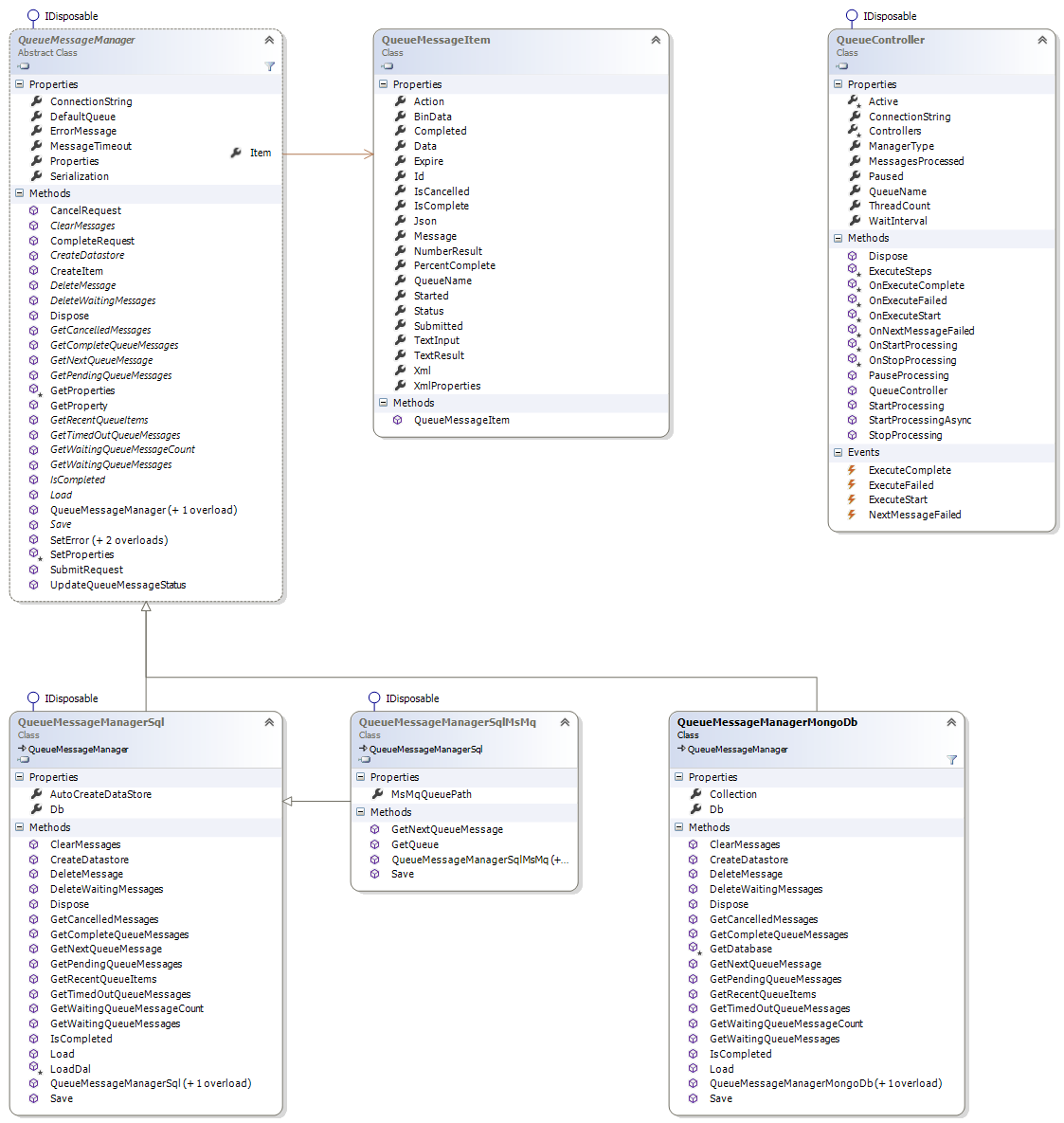
Data Providers
The implementation of this library is based on replacable data providers using the QueueMessageManager abstract class. The following providers are provided:
-
QueueMessageManagerSql A Sql Server based implementation appropriate for low to medium load of message items. (~500 msg/sec for pickups)
-
QueueMessageManagerMongoDb A MongoDb based implementation that is appropriate for high volume of message items. (~5000 msg/sec for pickups)
-
QueueMessageManagerSqlMsMq A hybrid implementation that uses MSMQ for actual ID value queueing and data storage of messages in SQL Server. Uses the same data model used for the QueueMessageManagerSql but provides much better scalability to avoid locked message retrieval bottlenecks. Appropriate for high volume of message items. (~10000 msg/sec for pickups)
The library uses a database server table to hold the 'message' information and processing instructions that can be accessed repeatedly by both the client and server to provide two-way communication during processing of a message. Messages are guaranteed to be picked up only once, and then are made available to both client and server to allow for status update information and for reading the actual message data.
The message data is generic so, you can pass any kind of string or string serializable data as input or receive it as result output. The message structure also supports generic progress messages and completion status.
Both client (QueueMessageManager) and server (QueueController) are provided by this library, and the server can be hosted in any kind of .NET application including console apps, services, Windows desktop apps (WinForms, WPF) and even inside of a ASP.NET or OWin self-hosted process and run in the background on its own threads.
Because the queue is running using a database server (optionally in conjunction with MSMQ) it's easy to scale to any machine that can access a supported db server. You can add additional threads, or additional machines to handle the remote processing as your load increases.
Currently only supports SQL Server, SQL Compact and MongoDb and a hybrid SQL Server + MSMQ as data stores.
###Typical Processing### A typical messaging process with the Queueing components goes like this:
- Client creates a message object and sets its properties to pass data in for processing. Typically you set the 'Action' property and one of the data fields to pass data like TextInput, BinaryData, Xml, JSON etc.
- Client submits a message with QueueMessageManager and SubmitRequest()
- Messages are identified by a unique ID and an 'action' used for routing
- Server (QueueController) polls for queue messages and pops off any pending queue items
- Server picks up the message by 'popping off' the next pending Queue message
- Server routes the message for processing to ExecuteStart/OnExecuteStart event/method
- QueueController class implements logic to handle processing of message requests by implementing ExecuteStart/ExecuteComplete/ExecuteFaile handlers
- Server starts processing the message asynchronously
- Server optionally writes progress information into Queue record as it processes
- Client can optionally query the message for progress information
- Server completes request and optionally writes result data into record
- Server fires ExecuteComplete or ExecuteFailed
- Client checks and finds completed message and picks up results from the Queue table
- Client picks out or deserializes completion data from queue record
###How it works### The client application interacts with the QueueMessageManager class to create, update and manage messages submitted to the queue. Clients typically create a message for processing, then check back occasionally for status updates and completion or cancellation.
The server application runs in the background as a service, daemon or simply on a separate thread either on the local or remote machine. The server picks up messages and processes them, which allows for asynchronous offloading of processing to a separate process or machine. The QueueController is a base class that provides for message polling, firing events when messages arrive. The implementation subclasses QueueController and overrides the various messaging handler methods like OnExecuteStart(), OnExecuteComplete() or OnExecuteFailed() to hook up custom processing. Operations running can also interact with the manager to provide progress and status information to the client.
###Creating and interacting with Messages via QueueMessageManager### The QueueMessageManager class provides methods for creating new queue entries and submitting them to the queue, for updating them and then cancelling or completing messages.
Typical client submission code looks like this:
var manager = new QueueMessageManagerSql();

string imageId = "10";

// Create a message object
// item contains many properties for pushing
// values back and forth as well as a  few message fields
var item = manager.CreateItem();
item.Action = "PRINTIMAGE";
item.TextInput = imageId;
item.Message = "Print Image operation started at " + DateTime.Now.ToString();
item.PercentComplete = 10;

// *** you can also serialize objects directly into the Xml property
// manager.Serialization.SerializeToXml(SomeObjectToSerialize);

// add an arbitrary custom properties - serialized to Xml
manager.Properties.Add("Time", DateTime.Now);
manager.Properties.Add("User", "ricks");

// Set the message status and timestamps as submitted
manager.SubmitRequest(item);

// actually save the queue message to disk
Assert.IsTrue(manager.Save(), manager.ErrorMessage);

// you can capture the message ID use it
// to load messages later
var queueId = item.Id;
Once messages have been submitted, a running QueueController can pick them up and start processing them.
If you capture the queueId you can use it to load an existing message and access in process properties like PercentComplete or Message or even some of the data fields to retrieve progress information or potentially in progress update data.
var manager = new QueueMessageManagerSql();

// assume you have held on to the queueId
string queueId = ...;

// load the message
item = manager.Load(queueId);

Assert.IsNotNull(item, manager.ErrorMessage);

if (item.Completed)
{
	// pick up a result value from one of
    // of the data or serialized fields
    string result = item.TextResult;

    DoSomeThingWithResult(result);

	return;
}

// Otherwise update the message any way you like
item.Message = "Updated @ " + DateTime.Now.ToString("t");
item.PercentComplete = 10;

// Save the the updated message to disk
Assert.IsTrue(manager.Save(), manager.ErrorMessage);

// or you can use high level methods
manager.UpdateQueueMessageStatus(messageText: "Updated @ " + DateTime.Now.ToString(), percentComplete: 10, autoSave: true);
Note that both client and server can write to the queue message and so pass messages back and forth. There are a number of fields available to hold input and output data as well as serialized data both in XML and binary form, plus you can use the Properties collection to push arbitrary values into the message.
The server typically runs a subclass of QueueController which is a multi-threaded polling operation that looks for queue messages. When a queue message is found the QueueController fires a series of events - ExecuteStart, ExecuteComplete, ExecuteFailed - to notify of new incoming messages to process. The customized code can then examine the QueueMessageItem for its properties to determin
