
CopterSim
A high-fidelity simulation model developed in Simulink that compatible with different types of multicopters.
Install / Use
/learn @RflySim/CopterSimREADME
CopterSim
A high-fidelity simulation model developed in Simulink that compatible with different types of multicopters. The model can be used to develop control algorithms in Simulink. The simulation model includes sensor data outputs that can be used to generate code to performe hardware-in-the-loop simulations for autopilot systems like Pixhawk/PX4 or Ardupilot. The fault-injection function allows testing the safety and reliability of the control algorithms.
Contact Info.<br>
Visit our Lab pages to contact us:<br>
http://rfly.buaa.edu.cn/index.html<br>
<br>
A video to present the hardware-in-the-loop simulation project based on this simulation model.<br>

How to use the files.<br>
- Open "Multicopter_vPC.slx" file with Matlab 2017b and later. Noteworthy, the Aerospace Blockset is required for MATLAB.<br>
- Click the "Run" button to run the Simulink model.<br>
 <br>
<br> - Click the "Compile" button to compile the model to C Code (Visual C++ 2015 or later is required).<br>
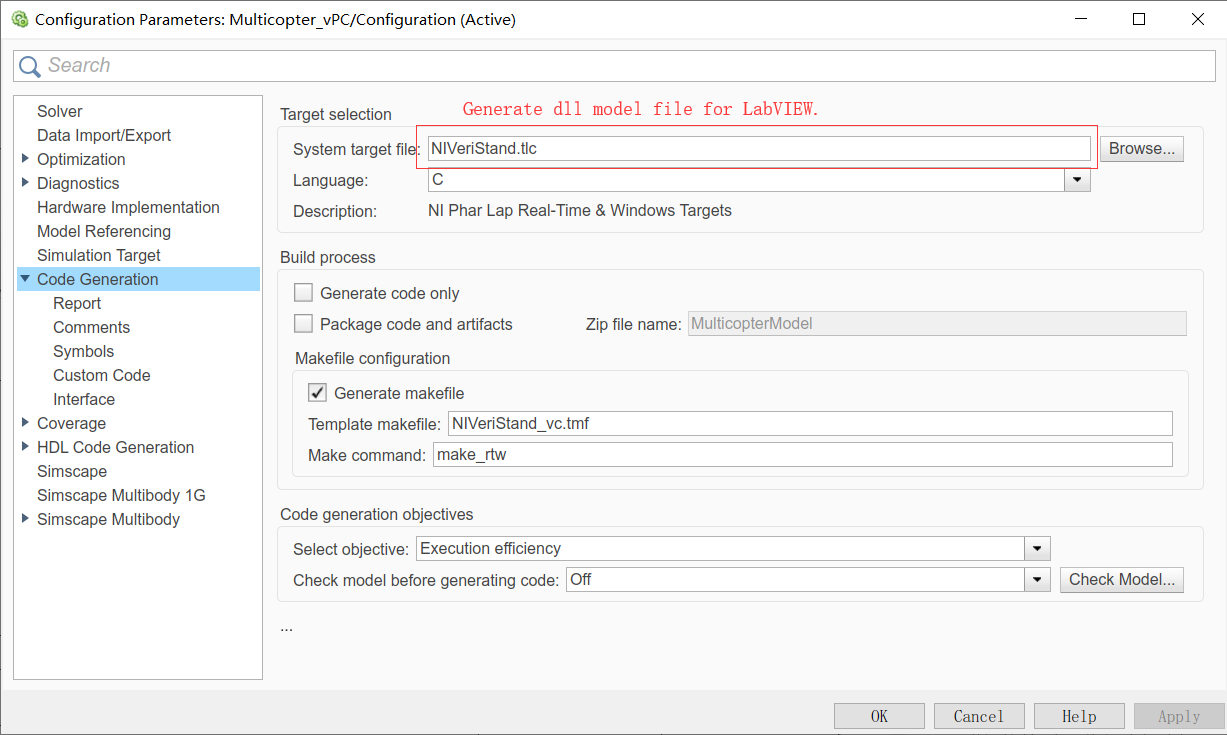
- Generate Code for LabVIEW for hardware-in-the-loop simulations. Configure the Simulink setting page according to the figure below.<br>
 <br>
<br> - Generate code for embedded system. Change the above "System target file" option to "ert.tlc".<br>
File structure.<br>
imgs: images for this Readme.md Tutorial.<br> Init.m: Initialization script automatically called before running the model File.<br> MavLinkStruct.mat: the bus Structs for the output and input signals<br> Multicopter_vPC.slx : the main Simulink model file.<br> SupportedVehicleTypes.docx : supported vehicle types.<br> MathModelDocEn.pdf : Mathematical derivation and simple modeling method for the simulatin model. <br> <br> <br>
Input and output Ports.<br>
inPWMs: input signal, ESC/motor control signal from the control system, eight-dimensional float vector, ranges from 0 to 1. <br>
Terrain: input signal, the current terrain height, one-dimensional float value, positive for the down direction, unit (m) <br>
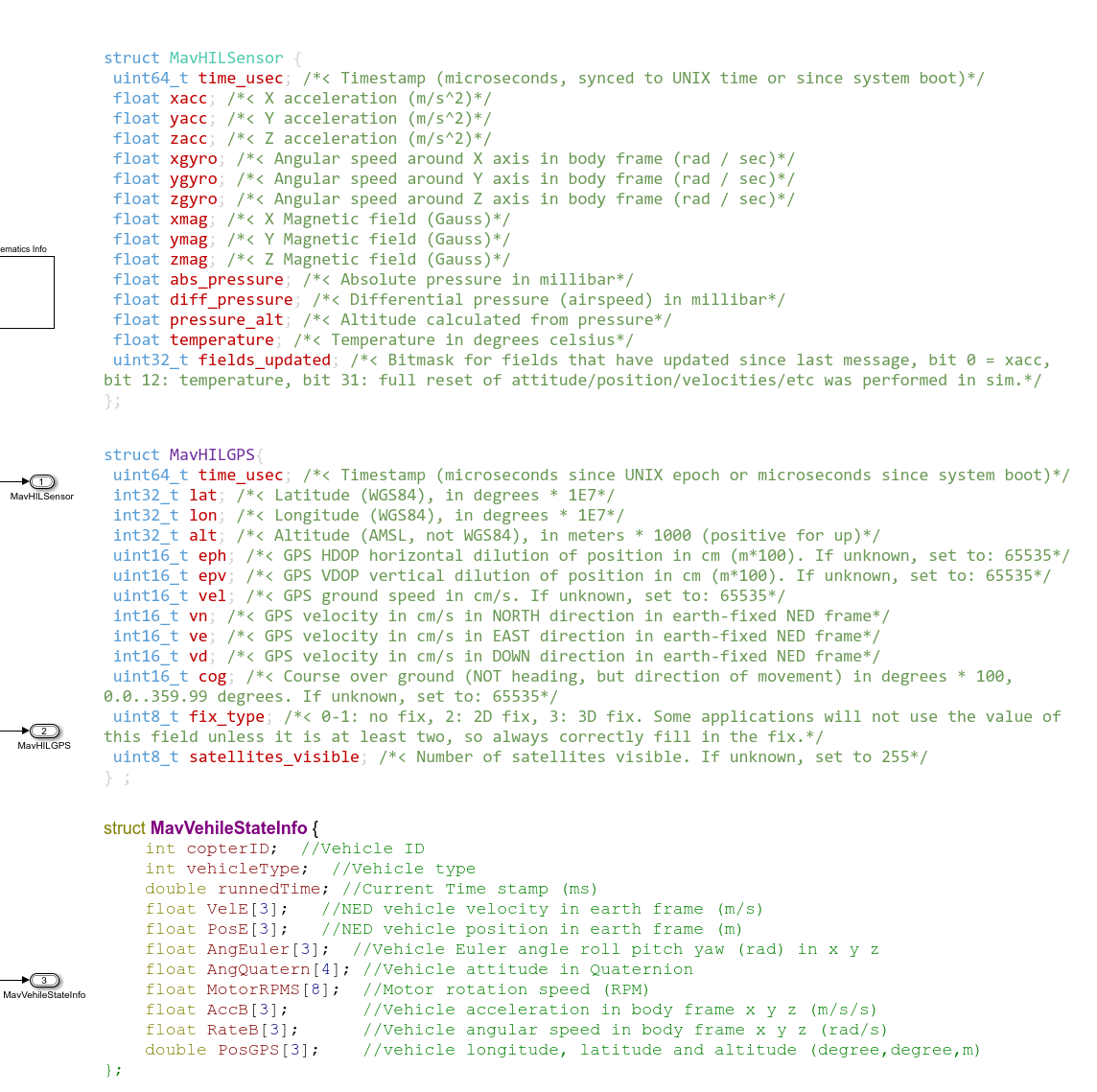
MavHILSensor: output signal, bus struct, contains sensor data required by the Autopilot system like PX4/Ardupilot <br>
MavHILGPS: output signal, bus struct, contains GPS data required by the Autopilot system like PX4/Ardupilot <br>
MavVehileStateInfo: output signal, bus struct, contains true state of the vehicle for the vehicle software simulation in Simulink <br>
the detailed definition for the above output structs are presented below. <br>
 <br>
<br>
Change vehicle types.<br>
The models cover all multicopter airframe for PX4 autopilot?http://dev.px4.io/en/airframes/airframe_reference.html <br>
Modify the parameter "ModelParam_uavType" in Init.m file to change the vehicle types.
The supported vehicle types include:
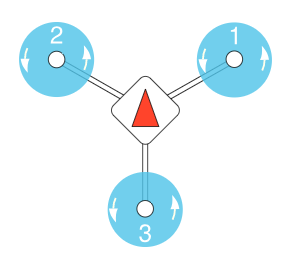
ModelParam_uavType = 1: Tricopter Y+<br>
 <br>
<br>
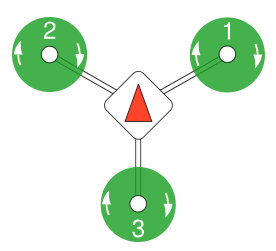
ModelParam_uavType = 2: Tricopter Y-<br>
<br>
<br>
ModelParam_uavType = 2: Tricopter Y-<br>
 <br>
<br>
<br>
ModelParam_uavType = 3: Quadrotor X <br>
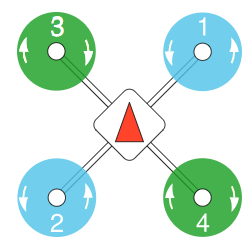 <br>
<br>
ModelParam_uavType = 4: Quadrotor +<br>
<br>
<br>
ModelParam_uavType = 4: Quadrotor +<br>
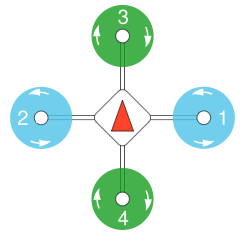 <br>
<br>
<br>
ModelParam_uavType = 5: Hexarotor x<br>
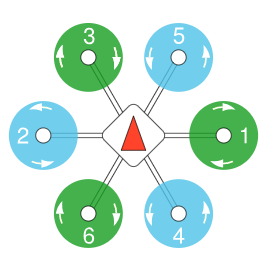 <br>
<br>
<br>
ModelParam_uavType = 6: Hexarotor +<br>
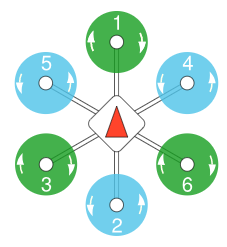 <br>
<br>
<br>
ModelParam_uavType = 7: Hexarotor Coaxial<br>
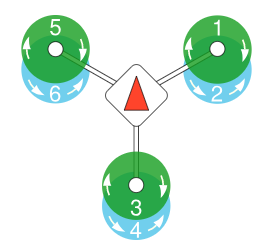 <br>
<br>
ModelParam_uavType = 8: Octorotor x<br>
<br>
<br>
ModelParam_uavType = 8: Octorotor x<br>
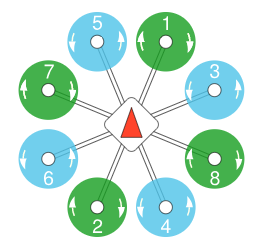 <br>
<br>
ModelParam_uavType = 9: Octorotor +<br>
<br>
<br>
ModelParam_uavType = 9: Octorotor +<br>
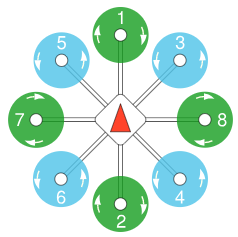 <br>
<br>
ModelParam_uavType = 10: Octorotor Coaxial<br>
<br>
<br>
ModelParam_uavType = 10: Octorotor Coaxial<br>
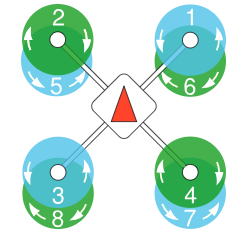 <br>
<br>
<br>
<br>
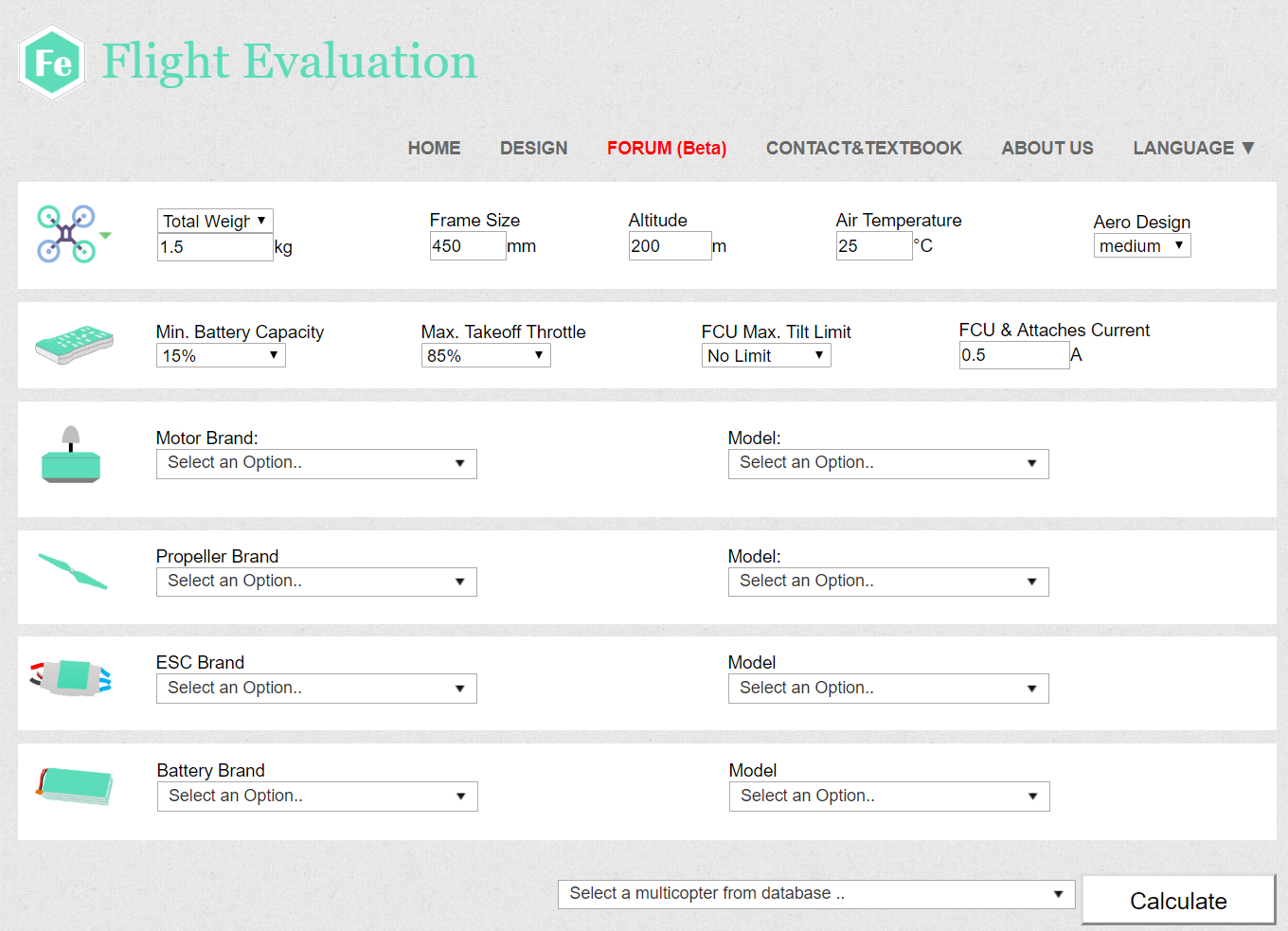
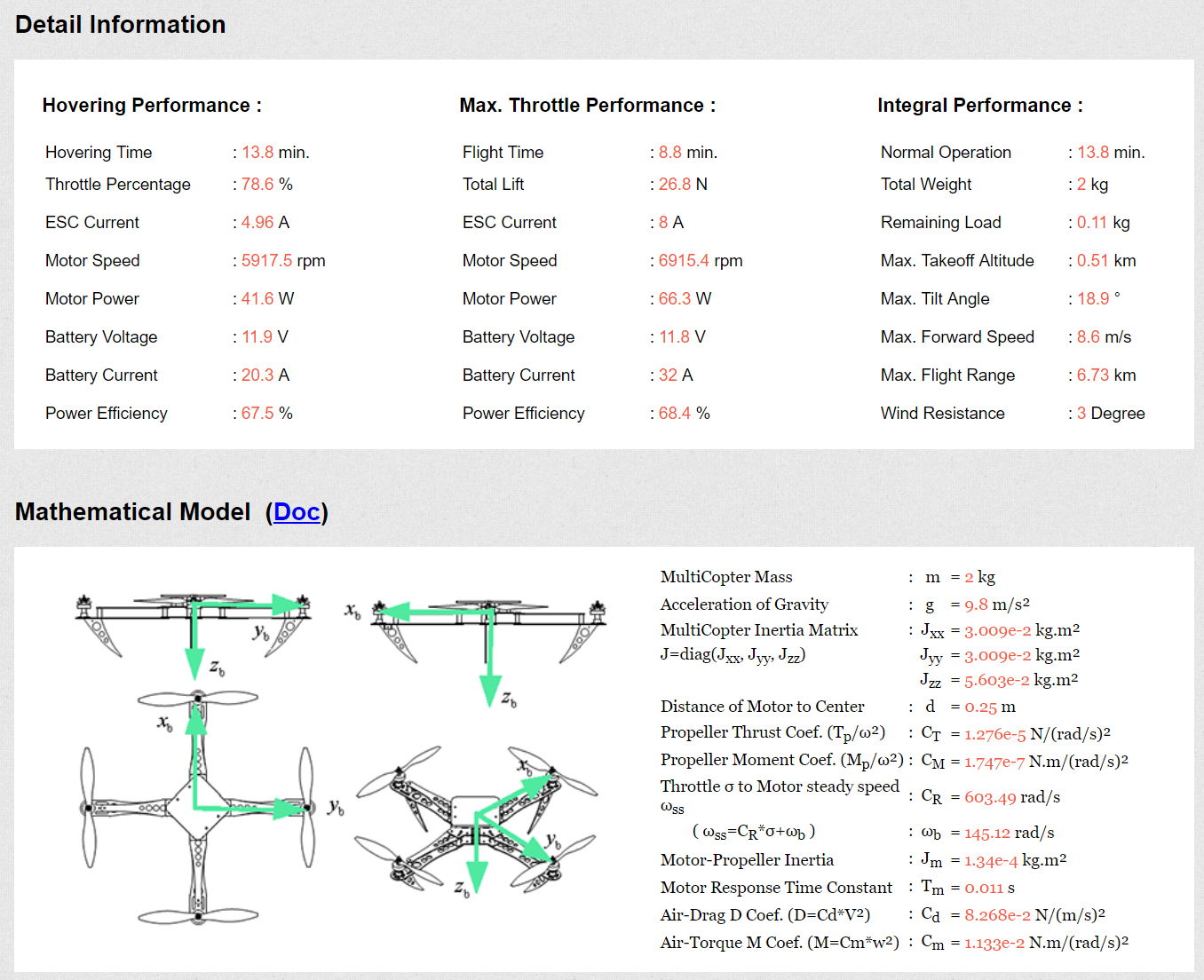
An online toolbox to quickly obtain the model parameters<br>
https://flyeval.com<br>
 <br>
<br>
 <br>
<br>
<br>
<br>
Modify model parameters and inject fault during flight.<br>
Change the corresponding parameters in Init.m file
load MavLinkStruct; % load the bus structs HILGPS MavLinkGPS MavLinkSensor MavVehileInfo<br> <br> %Initial condition<br> %set vehicle initial state. ModelInit_PosE = [0,0,0]; % Vehicle postion xyz in the NED earth frame (m)<br> ModelInit_VelB = [0,0,0]; % Vehicle speed xyz in the NED earth frame (m/s)<br> ModelInit_AngEuler = [0,0,0]; % Vehicle Euler angle xyz (roll,pitch,yaw) (rad)<br> ModelInit_RateB = [0,0,0]; % Vehicle angular speed xyz (roll,pitch,yaw) in the body frame (rad/s)<br> ModelInit_RPM = 0; %Initial motor speed (rad/s)<br> <br> %UAV model parameter<br> ModelParam_uavMass = 1.4; %Mass of UAV(kg)<br> ModelParam_uavJxx = 0.0241; % moment of inertia in body x axis<br> ModelParam_uavJyy = 0.0239; % moment of inertia in body y axis<br> ModelParam_uavJzz = 0.0386; % moment of inertia in body z axis<br> %Moment of inertia matrix<br> ModelParam_uavJ= [ModelParam_uavJxx,0,0;...<br> 0,ModelParam_uavJyy,0;...<br> 0,0,ModelParam_uavJzz];<br> ModelParam_uavType = int8(3); %X-type quadrotor£¬refer to "SupportedVehicleTypes.docx" for specific definitions<br> ModelParam_uavMotNumbs = int8(4); %Number of motors<br> ModelParam_uavR = 0.225; %Body radius(m)<br> <br> ModelParam_motorCr = 1148; %Motor throttle-speed curve slope(rad/s)<br> ModelParam_motorWb =-141.4; %Motor speed-throttle curve constant term(rad/s)<br> ModelParam_motorT = 0.02; %Motor inertia time constant(s)<br> ModelParam_motorJm = 0.0001287; %Moment of inertia of motor rotor + propeller(kg.m^2)<br> %M=Cm*w^2<br> ModelParam_rotorCm = 1.779e-07; %Rotor torque coefficient(kg.m^2)<br> %T=Ct**w^2<br> ModelParam_rotorCt = 1.105e-05; %Rotor thrust coefficient(kg.m^2)<br> ModelParam_motorMinThr = 0.05; %Motor throttle dead zone(kg.m^2)<br> <br> ModelParam_uavCd = 0.055; %Damping coefficient(N/(m/s)^2)<br> ModelParam_uavCCm = [0.0035 0.0039 0.0034]; %Damping moment coefficient vector(N/(m/s)^2)<br> ModelParam_uavDearo = 0.12; %Vertical position difference of Aerodynamic center and gravity center(m)<br> <br> ModelParam_GlobalNoiseGainSwitch =0; %Noise level gain<br> <br> %Environment Parameter<br> ModelParam_envGravityAcc = 9.8; %Gravity acceleration(m/s^2). not used.<br> ModelParam_envLongitude = 116.259368300000; %longitude (degree)<br> ModelParam_envLatitude = 40.1540302; %Latitude (degree)<br> ModelParam_GPSLatLong = [ModelParam_envLatitude ModelParam_envLongitude]; %Latitude and longitude<br> ModelParam_envAltitude = -41.5260009765625; %Reference height, down is positive<br> ModelParam_BusSampleRate = 0.001; %Model sampling rate<br> <br> ModelParam_timeSampBaro = 0.01; % Barometer data sample time<br> ModelParam_timeSampTurbWind = 0.01; % Atmospheric turbulence data sample time<br> %%%ModelParam_BattModelEnable=int8(0);<br> ModelParam_BattHoverMinutes=18; %time of endurance for the battery simulation <br> ModelParam_BattHoverThr=0.609; % Vehilce hovering time<br> <br> %GPS Parameter<br> ModelParam_GPSEphFinal=0.3; % GPS horizontal accuracy<br> ModelParam_GPSEpvFinal=0.4; % GPS vertical accuracy<br> ModelParam_GPSFix3DFix=3; % GPS fixed index<br> ModelParam_GPSSatsVisible=10; % GPS number of satellites<br> <br> %Noise Parameter<br> ModelParam_noisePowerAccel = [0.001,0.001,0.003];% accelerometer noise power xyz in Body frame<br> ModelParam_noiseSampleTimeAccel = 0.001; % accelerometer noise sample time<br> ModelParam_noisePowerOffGainAccel = 0.04; %accelerometer noise factor without motor vibration<br> ModelParam_noisePowerOffGainAccelZ = 0.03; %accelerometer Z noise factor without motor vibration<br> ModelParam_noisePowerOnGainAccel = 0.8; %accelerometer noise factor under motor vibration<br> ModelParam_noisePowerOnGainAccelZ = 4.5; %accelerometer Z noise factor under motor vibration<br> ModelParam_noisePowerGyro = [0.00001,0.00001,0.00001]; %gyroscope noise power xyz in Body frame<br> ModelParam_noiseSampleTimeGyro = 0.001; % gyroscope noise sample time<br> ModelParam_noisePowerOffGainGyro = 0.02; %accelerometer noise factor without motor vibration<br> ModelParam_noisePowerOffGainGyroZ = 0.025; %accelerometer noise Z factor without motor vibration<br> ModelParam_noisePowerOnGainGyro = 2; %accelerometer noise factor under motor vibration<br> ModelParam_noisePowerOnGainGyroZ = 1; %accelerometer Z noise factor under motor vibration<br> <br> ModelParam_noisePowerMag = [0.00001,0.00001,0.00001];<br> ModelParam_noiseSampleTimeMag = 0.01; %magnetometer sample time<br> ModelParam_noisePowerOffGainMag = 0.02; %magnetometer noise gain without motor magnetic field effect<br> ModelParam_noisePowerOffGainMagZ = 0.035;<br> ModelParam_noisePowerOnGainMag = 0.025; %magnetometer noise gain under motor magnetic field effect<br> ModelParam_noisePowerOnGainMagZ = 0.05;<br> ModelP
Related Skills
node-connect
349.0kDiagnose OpenClaw node connection and pairing failures for Android, iOS, and macOS companion apps
frontend-design
109.4kCreate distinctive, production-grade frontend interfaces with high design quality. Use this skill when the user asks to build web components, pages, or applications. Generates creative, polished code that avoids generic AI aesthetics.
openai-whisper-api
349.0kTranscribe audio via OpenAI Audio Transcriptions API (Whisper).
qqbot-media
349.0kQQBot 富媒体收发能力。使用 <qqmedia> 标签,系统根据文件扩展名自动识别类型(图片/语音/视频/文件)。
