RGSX
Multi Platforms Games Download Center . This repository is not affiliated with Batocera, Retrobat or Pixel Nostalgia RGS
Install / Use
/learn @RetroGameSets/RGSXREADME
🎮 Retro Game Sets Xtra (RGSX)
Discord Support • Installation • French Documentation • Troubleshoot / Common Errors •
A free, user-friendly ROM downloader for Batocera, Knulli, and RetroBat with multi-source support.
<p align="center"> <img width="69%" alt="main" src="https://github.com/user-attachments/assets/a98f1189-9a50-4cc3-b588-3f85245640d8" /> <img width="30%" alt="controls help" src="https://github.com/user-attachments/assets/38cac7e6-14f2-4e83-91da-0679669822ee" /> </p> <p align="center"> <img width="49%" alt="web interface" src="https://github.com/user-attachments/assets/71f8bd39-5901-45a9-82b2-91426b3c31a7" /> <img width="49%" alt="api menu" src="https://github.com/user-attachments/assets/5bae018d-b7d9-4a95-9f1b-77db751ff24f" /> </p>🚀 Installation
Quick Install (Batocera / Knulli)
SSH or Terminal access required:
curl -L bit.ly/rgsx-install | sh
After installation:
- Update game lists:
Menu > Game Settings > Update game list - Find RGSX under PORTS or Homebrew and ports
Manual Install (All Systems)
- Download: RGSX_full_latest.zip
- Extract:
- Batocera/Knulli: Extract
portsfolder to/roms/ - RetroBat: Extract both
portsandwindowsfolders to/roms/
- Batocera/Knulli: Extract
- Refresh:
Menu > Game Settings > Update game list
Manual Update (if automatic update failed)
Download latest release : RGSX_update_latest.zip
Installed paths:
/roms/ports/RGSX(all systems)/roms/windows/RGSX(RetroBat only)
🎮 Usage
First Launch
- Auto-downloads system images and game lists
- Auto-configures controls if your controller is recognized
- Controls broken? Delete
/saves/ports/rgsx/controls.jsonand restart
Keyboard Mode: When no controller is detected, controls display as [Key] instead of icons.
Pause Menu Structure
Controls
- View Controls Help
- Remap Controls
Display
- Layout (3×3, 3×4, 4×3, 4×4)
- Font Size (general UI)
- Footer Font Size (controls/version text)
- Font Family (pixel fonts)
- Hide Unknown Extension Warning
Games
- Download History
- Source Mode (RGSX / Custom)
- Update Game Cache
- Show Unsupported Platforms
- Hide Premium Systems
- Filter Platforms
Settings
- Background Music Toggle
- Symlink Options (Batocera)
- Web Service (Batocera)
- API Keys Management
- Language Selection
✨ Features
- 🎯 Smart System Detection – Auto-discovers supported systems from
es_systems.cfg - 📦 Intelligent Archive Handling – Auto-extracts archives when systems don't support ZIP files
- 🔑 Premium Unlocking – 1Fichier API + AllDebrid/Real-Debrid fallback for unlimited downloads
- 🎨 Fully Customizable – Layout (3×3 to 4×4), fonts, font sizes (UI + footer), languages (EN/FR/DE/ES/IT/PT)
- 🎮 Controller-First Design – Auto-mapping for popular controllers + custom remapping support
- 🔍 Advanced Filtering – Search by name, hide/show unsupported systems, filter platforms
- 📊 Download Management – Queue system, history tracking, progress notifications
- 🌐 Custom Sources – Use your own game repository URLs
- ♿ Accessibility – Separate font scaling for UI and footer, keyboard-only mode support
🔑 API Keys Setup
For unlimited 1Fichier downloads, add your API key(s) to
/saves/ports/rgsx/:
1FichierAPI.txt– 1Fichier API key (recommended)AllDebridAPI.txt– AllDebrid fallback (optional)RealDebridAPI.txt– Real-Debrid fallback (optional)Each file must contain ONLY the key, no extra text.
Downloading Games
- Browse platforms → Select game
- Direct Download: Press
Confirm - Queue Download: Press
X(West button) - Track progress in History menu or via popup notifications
Custom Game Sources
Switch to custom sources via Pause Menu > Games > Source Mode.
Configure in /saves/ports/rgsx/rgsx_settings.json:
{
  "sources": {
    "mode": "custom",
    "custom_url": "https://example.com/my-sources.zip"
  }
}
Note: If custom mode activated but Invalid/empty URL = using /saves/ports/rgsx/games.zip . You need to update games cache on RGSX menu after fixing URL.
🌐 Web Interface (Batocera/Knulli Only)
RGSX includes a web interface that launched automatically when using RGSX for remote browsing and downloading games from any device on your network.
Accessing the Web Interface
-
Find your Batocera IP address:
- Check Batocera menu:
Network Settings - Or from terminal:
ip addr show
- Check Batocera menu:
-
Open in browser:
http://[BATOCERA_IP]:5000orhttp://BATOCERA:5000- Example:
http://192.168.1.100:5000
- Example:
-
Available from any device: Phone, tablet, PC on the same network
Web Interface Features
- 📱 Mobile-Friendly – Responsive design works on all screen sizes
- 🔍 Browse All Systems – View all platforms and games
- ⬇️ Remote Downloads – Queue downloads directly to your Batocera
- 📊 Real-Time Status – See active downloads and history
- 🎮 Same Game Lists – Uses identical sources as the main app
Enable/Disable Web Service at Boot, without the need to launch RGSX
From RGSX Menu
- Open Pause Menu (Start/ALTGr)
- Navigate to Settings > Web Service
- Toggle Enable at Boot
- Restart your device
Port Configuration: The web service runs on port 5000 by default. Ensure this port is not blocked by firewall rules.
📁 File Structure
/roms/ports/RGSX/
├── __main__.py                # Entry point
├── controls.py                # Input handling
├── display.py                 # Rendering engine
├── network.py                 # Download manager
├── rgsx_settings.py           # Settings manager
├── assets/controls/           # Controller profiles
├── languages/                 # Translations (EN/FR/DE/ES/IT/PT)
└── logs/RGSX.log             # Runtime logs

/roms/windows/RGSX/
└── RGSX Retrobat.bat         # RetroBat launcher

/saves/ports/rgsx/
├── rgsx_settings.json        # User preferences
├── controls.json             # Control mapping
├── history.json              # Download history
├── rom_extensions.json       # Supported extensions cache
├── systems_list.json         # Detected systems
├── games/                    # Game databases (per platform)
├── images/                   # Platform images
├── 1FichierAPI.txt          # 1Fichier API key
├── AllDebridAPI.txt         # AllDebrid API key
└── RealDebridAPI.txt        # Real-Debrid API key
🛠️ Troubleshooting
| Issue | Solution |
|-------|----------|
| Controls not working | Delete /saves/ports/rgsx/controls.json + restart app, you can try delete /roms/ports/RGSX/assets/controls/xx.json too |
| No games ? | Pause Menu > Games > Update Game Cache |
| Missing systems on the list? | RGSX read es_systems.cfg to show only supported systems, if you want all systems : Pause Menu > Games > Show unsupported systems |
| App crashes | Check /roms/ports/RGSX/logs/RGSX.log or /roms/windows/logs/Retrobat_RGSX_log.txt |
| Layout change not applied | Restart RGSX after changing layout |
| Downloading BIOS file is ok but you can't download any games? | Activate custom DNS on Pause Menu> Settings and reboot , server can be blocked by your ISP. check any threat/website protection on your router too, especially on ASUS one|
Need help? Share logs from /roms/ports/RGSX/logs/ on Discord.
🤝 Contributing
- Bug Reports: Open GitHub issue with logs or post on Discord
- Feature Requests: Discuss on Discord first, then open issue
- Code Contributions:
git checkout -b feature/your-feature
# Test on Batocera/RetroBat
# Submit Pull Request
📝 License
Free and open-source software. Use, modify, and distribute freely.
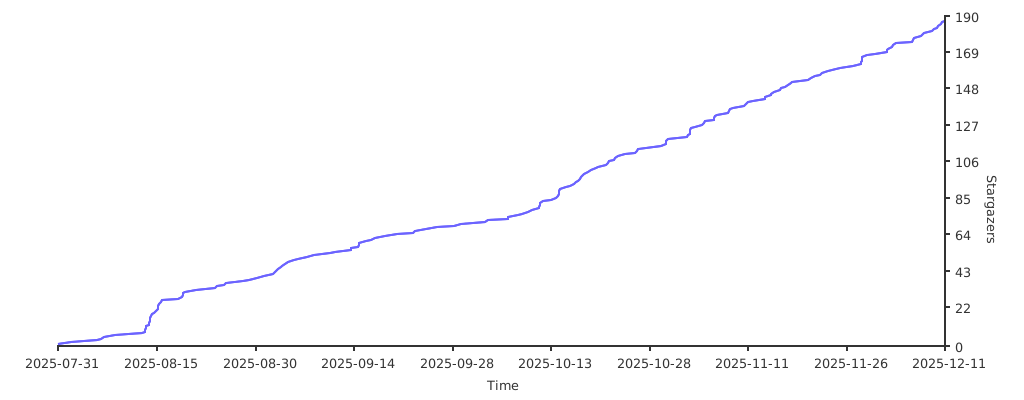
Thanks to all contributors, and followers of this app
If you want to support my project you can buy me a beer : https://bit.ly/donate-to-rgsx
Developed with ❤️ for the retro gaming community.