
qwen-code
An open-source AI coding agent that lives in your terminal.
Install / Use
claude mcp add QwenLM -- npx -y github:QwenLM/qwen-codeIf the server publishes to npm under a different name, use that package instead — check the repo README.
MCP Server
Model Context Protocol server
Quality Score
Category
AI & Machine LearningSupported Platforms
Tags
Our assessment of qwen-code
qwen-code scores 91/100 on our quality scale, 300th of 963 AI & Machine Learning skills we index (top 32%).
Its MCP Server is 9.5 KB long, well organised into 9 sections with 7 code examples: a thorough specification that gives an agent plenty to work with.
With 29,040 GitHub stars, it is one of the more widely adopted skills in the catalogue.
Maintenance, license and trust
- The repository was last updated today, so qwen-code is actively maintained.
- Our last check on 2026-10-20 found the source still online.
- It is released under the Apache-2.0 license, a permissive license that allows use, modification and commercial use with attribution.
- Its trust signals score 95/100, with 1 caution from licensing, adoption, age or documentation. These come from repository metadata, not a code audit — read the skill file before letting an agent act on it.
Safety scan
No issues foundOur scan of the whole file found no instruction hijacking, hidden characters, credential access, data exfiltration or destructive commands (2 minor notes below). An AI review of the same text found nothing harmful.
- noteInstalls by piping a downloaded script into a shellline 37
curl -fsSL https://qwen-code-assets.oss-cn-hangzhou.aliyuncs.com/installation/install-qwen-standalone.sh | bash - noteInstalls by piping a downloaded script into a shellline 43
irm https://qwen-code-assets.oss-cn-hangzhou.aliyuncs.com/installation/install-qwen-standalone.ps1 | iex
AI review by kimi-k2.7-code on 2026-09-24. Automated pattern scan on 2026-09-24. It catches known dangerous patterns, not every risk — read a skill before letting an agent act on it.
qwen-code compared with similar skills
All 4 of these similar skills score higher than qwen-code; compare them before choosing.
| Skill | Score | Stars | Updated | Format |
|---|---|---|---|---|
| qwen-code (this skill)by QwenLM | 91 | 29.0k | today | MCP Server |
| claude-memby thedotmack | 100 | 113.6k | today | CLAUDE.md |
| Agent-Reachby Panniantong | 100 | 109.3k | today | CLAUDE.md |
| Understand-Anythingby Egonex-AI | 100 | 91.0k | 11d ago | CLAUDE.md |
| headroomby headroomlabs-ai | 100 | 79.0k | today | CLAUDE.md |
Frequently asked questions
- How do I install qwen-code?
- Run
claude mcp add QwenLM -- npx -y github:QwenLM/qwen-code. The install tabs above show the steps for each supported agent. - Which AI agents does qwen-code work with?
- It is written for Claude Code and Claude Desktop, as a MCP Server file. Other agents that read the same format can often use it too.
- Is qwen-code safe to use?
- Our scan of the whole file found no instruction hijacking, hidden characters, credential access, data exfiltration or destructive commands (2 minor notes below). An AI review of the same text found nothing harmful. It is Apache-2.0-licensed and scores 95/100 on trust signals. Skills are instructions an agent will follow, so read the file before installing it and do not approve commands you do not understand.
- Is qwen-code still maintained?
- The repository was last updated today, so qwen-code is actively maintained.
Skill content
View source on GitHub



<a href="https://trendshift.io/repositories/15287" target="_blank"><img src="https://trendshift.io/api/badge/repositories/15287" alt="QwenLM%2Fqwen-code | Trendshift" style="width: 250px; height: 55px;" width="250" height="55"/></a>
The open-source AI coding agent that lives in your terminal.
<a href="https://qwenlm.github.io/qwen-code-docs/zh/users/overview">中文</a> | <a href="https://qwenlm.github.io/qwen-code-docs/de/users/overview">Deutsch</a> | <a href="https://qwenlm.github.io/qwen-code-docs/fr/users/overview">français</a> | <a href="https://qwenlm.github.io/qwen-code-docs/ja/users/overview">日本語</a> | <a href="https://qwenlm.github.io/qwen-code-docs/ru/users/overview">Русский</a> | <a href="https://qwenlm.github.io/qwen-code-docs/pt-BR/users/overview">Português (Brasil)</a> | <a href="https://qwenlm.github.io/qwen-code-docs/ko/users/overview">한국어</a>
</div>Why Qwen Code?
- Agentic out of the box — Auto-Memory, Auto-Skills, SubAgents, Agent Teams, and MCP. Dynamic workflows, zero setup.
- Open-source, inside and out — The framework and the Qwen models are open-source. They evolve together. No vendor lock-in.
- Multi-protocol — Supports OpenAI, Anthropic, Gemini, and Qwen APIs. Any third-party provider or local model (Ollama / vLLM). Switch at runtime.
- Beyond the terminal — IDE plugins, Desktop app, daemon mode, SDKs, and IM bots (Telegram / DingTalk / WeChat / Feishu).
[!TIP] Qwen Code is actively iterating on itself — using its own agent and models to file issues, submit PRs, review code, and run tests. Powered by the community, driven by AI.
Installation
Linux / macOS:
curl -fsSL https://qwen-code-assets.oss-cn-hangzhou.aliyuncs.com/installation/install-qwen-standalone.sh | bash
Windows:
irm https://qwen-code-assets.oss-cn-hangzhou.aliyuncs.com/installation/install-qwen-standalone.ps1 | iex
<details> <summary>NPM / Homebrew</summary>Restart your terminal after installation to ensure environment variables take effect.
NPM (requires Node.js 22+):
npm install -g @qwen-code/qwen-code@latest
Homebrew (macOS / Linux):
brew install qwen-code
Quick Start
qwen          # Launch interactive terminal UI
# Inside the session:
/auth         # Configure your provider and API key
See the Authentication Guide and Settings Reference for detailed setup.
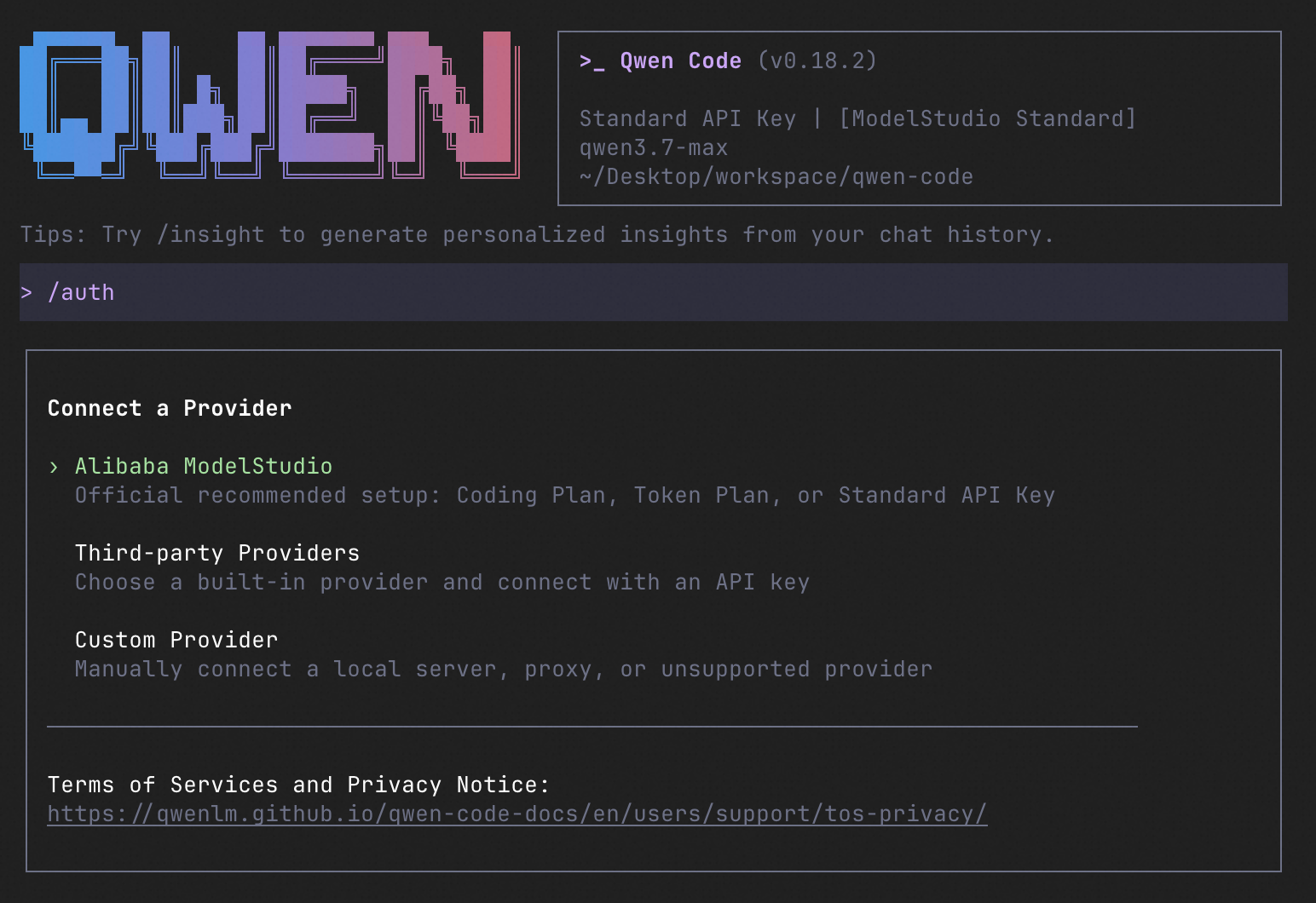
How to Use Qwen Code
| Mode | Command | Use Case |
| --------------- | --------------- | ----------------------------------------------------------------------------------------------------------------------------------------------------------------------------------------------------------------------------------------------- |
| Interactive | qwen | Terminal UI with rich rendering, @file references, slash commands |
| Headless | qwen -p "..." | Scripts, CI/CD, batch processing — no UI |
| IDE | — | VS Code, Zed, JetBrains |
| Desktop | — | Qwen Code Desktop — GUI for macOS, Windows, Linux |
| Daemon | qwen serve | Shared agent session over HTTP+SSE (ACP). Multiple clients, one agent. (experimental) Docs |
| SDK | — | TypeScript, Python, Java |
| IM Bot | qwen channel | Connect to Telegram, DingTalk, WeChat, or Feishu |
import asyncio

from qwen_code_sdk import is_sdk_result_message, query


async def main() -> None:
    result = query(
        "Summarize the repository layout.",
        {
            "cwd": "/path/to/project",
            "path_to_qwen_executable": "qwen",
        },
    )

    async for message in result:
        if is_sdk_result_message(message):
            print(message["result"])


asyncio.run(main())
Capabilities
If you know Claude Code, you already know Qwen Code — and then some. We've put significant effort into bringing Qwen Code to feature parity with Claude Code, improving both breadth and reliability across the board.
| Feature | Qwen Code | Claude Code |
| ------------------------------------------------------------------ | :-------: | :---------: |
| SubAgents, Agent Teams, Dynamic Workflows | ✓ | ✓ |
| Auto-Memory, Auto-Skills, Hooks | ✓ | ✓ |
| Built-in Skills (/review, /batch, /loop, /bugfix…) | ✓ | ✓ |
| MCP, Plan Mode, LSP Integration | ✓ | ✓ |
| Auto Mode, Sandbox, Git Worktrees | ✓ | ✓ |
| Computer Use (desktop automation) | ✓ | ✓ |
| IDE Plugins (VS Code / JetBrains / Zed) | ✓ | ✓ |
| SDK | ✓ | ✓ |
| Headless Mode, Session Management | ✓ | ✓ |
| Open-source — model and framework | ✓ | — |
| Multi-protocol (OpenAI / Anthropic / Gemini / Qwen + any provider) | ✓ | — |
| Agent Arena (multi-model head-to-head on same task) | ✓ | — |
| Daemon Mode — qwen serve (multi-client shared agent) | ✓ | — |
| IM Channels (Telegram / DingTalk / WeChat / Feishu) | ✓ | — |
Ecosystem
-
Qwen Code Desktop — Official desktop app for macOS, Windows, and Linux
-
AionUi — A modern GUI for command-line AI tools including Qwen Code
-
Gemini CLI Desktop — A cross-platform desktop/web/mobile UI for Qwen Code
-
🦞 Qwen Code Claw — Let other agents (Claude, Codex, etc.) delegate coding tasks to Qwen Code via ACP. Paste this prompt into your agent:
Use Qwen Code as a coding agent. First, fetch and read this skill reference:
https://raw.githubusercontent.com/QwenLM/qwen-code/refs/heads/main/.qwen/skills/qwen-code-claw/SKILL.md
Then follow the instructions inside to install, authenticate, and use Qwen Code via acpx for all coding tasks.
- Aliyun Model Studio CLI — Official CLI for Aliyun's AI platform (
bailian-cli). Extends Qwen Code with image/video generation, knowledge retrieval, app orchestration, and model deployment
Contributing
Contributions are welcome! See CONTRIBUTING.md for guidelines.
Acknowledgments
This project was originally based on Google Gemini CLI v0.8.2. We gratefully acknowledge the Gemini CLI team's excellent work. Starting from Qwen Code v0.1, we stopped syncing with upstream and began independent development as a multi-protocol, multi-platform agent framework with deep integrations for Qwen models and beyond.
Related Skills
claude-mem
113.6kPersistent Context Across Sessions for Every Agent – Captures everything your agent does during sessions, compresses it with AI, and injects relevant context back into future sessions. Works with Claude Code, OpenClaw, Codex, Gemini, Hermes, Copilot, OpenCode + More
Agent-Reach
109.3kGive your AI agent eyes to see the entire internet. Read & search Twitter, Reddit, YouTube, GitHub, Bilibili, XiaoHongShu — one CLI, zero API fees.
Understand-Anything
91.0kGraphs that teach > graphs that impress. Turn any code into an interactive knowledge graph you can explore, search, and ask questions about. Works with Claude Code, Codex, Cursor, Copilot, Gemini CLI, and more.
headroom
79.0kCompress tool outputs, logs, files, and RAG chunks before they reach the LLM. 20% fewer tokens for coding agents, 60-95% fewer tokens for JSON, same answers. Library, proxy, MCP server.

Languages
Trust signals
From repository metadata: license, adoption, age and documentation. Not a code audit — see the Safety scan above for what the skill file itself contains.