
WaveFox
Firefox CSS Theme/Style for manual customization
Install / Use
/learn @QNetITQ/WaveFoxREADME
WaveFox
Installation
Download Firefox / Download WaveFox / WaveFox Nightly
<details> <summary>WaveFox v1.9.149</summary>-
Minimum Requirements
- Firefox 149
- Windows / MacOS / Linux
-
Download the
chromefolder and put it in your user profile folder -
Go to
about:configand activate the keytoolkit.legacyUserProfileCustomizations.stylesheets
Optional
Tab Shapes
Shape 5
WaveFox.Tabs.Shape> 5
Shape 6
WaveFox.Tabs.Shape> 6
Shape 7
WaveFox.Tabs.Shape> 7
Shape 8
WaveFox.Tabs.Shape> 8
Shape 9
WaveFox.Tabs.Shape> 9
Shape 10
WaveFox.Tabs.Shape> 10
Shape 11
WaveFox.Tabs.Shape> 11
Shape 12
WaveFox.Tabs.Shape> 12
Windows 10 Transparency (Horizontal and Vertical tabs)
Install DWMBlurGlass. Configure to your liking and activate the keys below. Works only with the system theme.
WaveFox.Windows10.Transparency.Enabledandbrowser.tabs.inTitlebar > 1
Linux Transparency (Horizontal and Vertical tabs)
Requires Linux with transparency support. Works only with the system theme.
WaveFox.Linux.Transparency.Enabledandbrowser.tabs.inTitlebar > 1
Toolbar Transparency
Works only with the system theme.

WaveFox.Toolbar.Transparency> 1 or 2 or 3 or 4 andbrowser.tabs.inTitlebar > 1
Toolbar Roundings (Horizontal and Vertical tabs)
Ability to control the rounding of browser bar elements. <img width="1778" height="120" alt="изображение" src="https://github.com/user-attachments/assets/ec10f079-fabc-4bdf-bfa5-ccd3125d5792" />
WaveFox.Toolbar.Roundings> 1 or 2
Tab Bar Shadows
Works only with System / Light / Dark theme.

Shadows (Light Theme)
WaveFox.LightTheme.Tabs.Shadows> 1 or 2 or 3 or 4
Shadows (Dark Theme)
WaveFox.DarkTheme.Tabs.Shadows> 1 or 2 or 3 or 4
Tab Separators

WaveFox.Tabs.Separators> 1 or 2 or 3 or 4
Background For Inactive Tabs
WaveFox.Tabs.Background.Inactive.Enabled
Icons (firefox-csshacks / Lepton) / (Horizontal and Vertical tabs)
This is third-party code. I will update this code according to the original source.
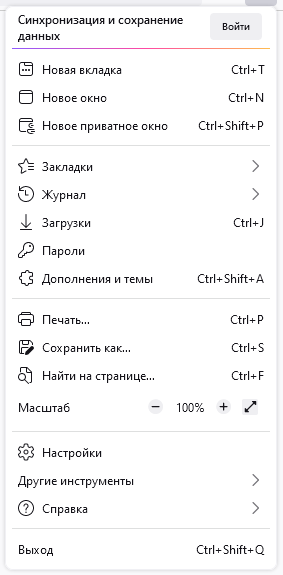
svg.context-properties.content.enabled(Required key)WaveFox.Icons> 1 or 2 (Required key)
The keys below are relevant only for the second option.
userChrome.icon.panel_fulloruserChrome.icon.panel_photonuserChrome.icon.libraryuserChrome.icon.paneluserChrome.icon.menuuserChrome.icon.context_menuuserChrome.icon.global_menuuserChrome.icon.global_menubaruserChrome.icon.1-25px_strokeuserChrome.icon.account_image_to_rightuserChrome.icon.account_label_to_rightuserChrome.icon.menu.fulluserChrome.icon.global_menu.mac
Drag Space

WaveFox.DragSpace.Tabs> 1 or 2 or 3WaveFox.DragSpace.TabBarLeftSide.DisabledWaveFox.DragSpace.TabBarRightSide.Disabled
Selected Tab Indicator
WaveFox.Tabs.SelectedTabIndicator.Enabled
Tabs Below URL (Floating Tabs Only)
WaveFox.TabsBelowURL.Enabledandbrowser.tabs.inTitlebar > 0
One Line (Floating Tabs Only)
WaveFox.OneLine> 1 or 2
Floating Web Page (Horizontal tabs)
WaveFox.WebPage.Floating.Enabled
Transparent Web Page (Experimentally) (Horizontal and Vertical tabs)
Works only with system theme. Requires transparency support from the operating system. The quality of this option depends heavily on the specific website.
WaveFox.WebPage.Transparency> 1 or 2 andbrowser.tabs.allow_transparent_browser(1 - New tab page only / 2 - All browser windows and all websites)WaveFox.WebPage.Background.Saturation> 1 or 2 or 3
Toolbar Autohide (Vertical tabs)
<img width="1727" height="918" alt="изображение" src="https://github.com/user-attachments/assets/bf786951-7633-4429-ada2-1639d2210263" />WaveFox.VerticalTabs.Toolbar.Autohide.Enabled
Experimental
Disables the ability to pin tabs by dragging. Some users find this feature annoying.
WaveFox.Experimental.Tabs.Pin_By_Dragging.Disabled
-
Minimum Requirements
- Firefox 140 ESR
- Windows / MacOS / Linux
-
Download the
chromefolder and put it in your user profile folder -
Go to
about:configand activate the keytoolkit.legacyUserProfileCustomizations.stylesheets
Optional
Tab Shapes
Shape 1
WaveFox.Tabs.Shape> 1
Shape 2
WaveFox.Tabs.Shape> 2
Shape 3
WaveFox.Tabs.Shape> 3
Shape 4
WaveFox.Tabs.Shape> 4
Shape 5
WaveFox.Tabs.Shape> 5
Shape 6
WaveFox.Tabs.Shape> 6
Shape 7
WaveFox.Tabs.Shape> 7
Shape 8
WaveFox.Tabs.Shape> 8
Shape 9
WaveFox.Tabs.Shape> 9
Shape 10
WaveFox.Tabs.Shape> 10
Shape 11
WaveFox.Tabs.Shape> 11
Shape 12
WaveFox.Tabs.Shape> 12
Windows 10 Transparency (Horizontal and Vertical tabs)
Install DWMBlurGlass. Configure to your liking and activate the keys below. Works only with the system theme.
WaveFox.Windows10.Transparency.Enabledandbrowser.tabs.inTitlebar > 1
Linux Transparency (Horizontal and Vertical tabs)
Requires Linux with transparency support. Works only with the system theme.
WaveFox.Linux.Transparency.Enabledandbrowser.tabs.inTitlebar > 1
Toolbar Transparency
Works only with the system theme.
WaveFox.Toolbar.Transparency> 1 or 2 or 3 or 4 andbrowser.tabs.inTitlebar > 1
Tab Bar Shadows
Works only with System / Light / Dark theme.
Shadows (Light Theme)
WaveFox.LightTheme.Tabs.Shadows> 1 or 2 or 3 or 4
Shadows (Dark Theme)
- `WaveFox.DarkT
