
Calcpad
Free and open source software for mathematical and engineering calculations.
Install / Use
/learn @Proektsoftbg/CalcpadREADME
Calcpad Readme
Project Website: https://calcpad.eu
Calcpad is free software for mathematical and engineering calculations. It represents a flexible and modern programmable calculator with Html report generator. It is simple and easy to use, but it also includes many advanced features:
- real and complex numbers (rectangular and polar-phasor formats);
- units of measurement (SI, Imperial and USCS);
- vectors and matrices: rectangular, symmetric, column, diagonal, upper/lower triangular;
- custom variables and units;
- built-in library with common math functions;
- vectors and matrix functions:
- data functions: search, lookup, sort, count, etc.;
- aggregate functions: min, max, sum, sumsq, srss, average, product (geometric) mean, etc.;
- math functions: norm, condition, determinant, rank, trace, transpose, adjugate and cofactor, inverse, factorization (cholesky, ldlt, lu, qr and svd), eigenvalues/vectors and linear systems of equations;
- custom functions of multiple parameters f(x; y; z; …);
- powerful numerical methods for root and extremum finding, numerical integration and differentiation;
- finite sum, product and iteration procedures, Fourier series and FFT;
- modules, macros and string variables;
- reading and writing data from/to text, CSV and Excel files;
- program flow control with conditions and loops;
- "titles" and 'text' comments in quotes;
- support for Html and CSS in comments for rich formatting;
- function plotting, images, tables, parametric SVG drawings, etc.;
- automatic generation of Html forms for data input;
- professional looking Html reports for viewing and printing;
- export to Word (*.docx) and PDF documents;
- variable substitution and smart rounding of numbers;
- output visibility control and content folding;
- support for plain text (*.txt, *.cpd) and binary (*.cpdz) file formats.
This software is developed using the C# programming language and the latest computer technologies. It automatically parses the input, substitutes the variables, calculates the expressions and displays the output. All results are sent to a professional looking Html report for viewing and printing.
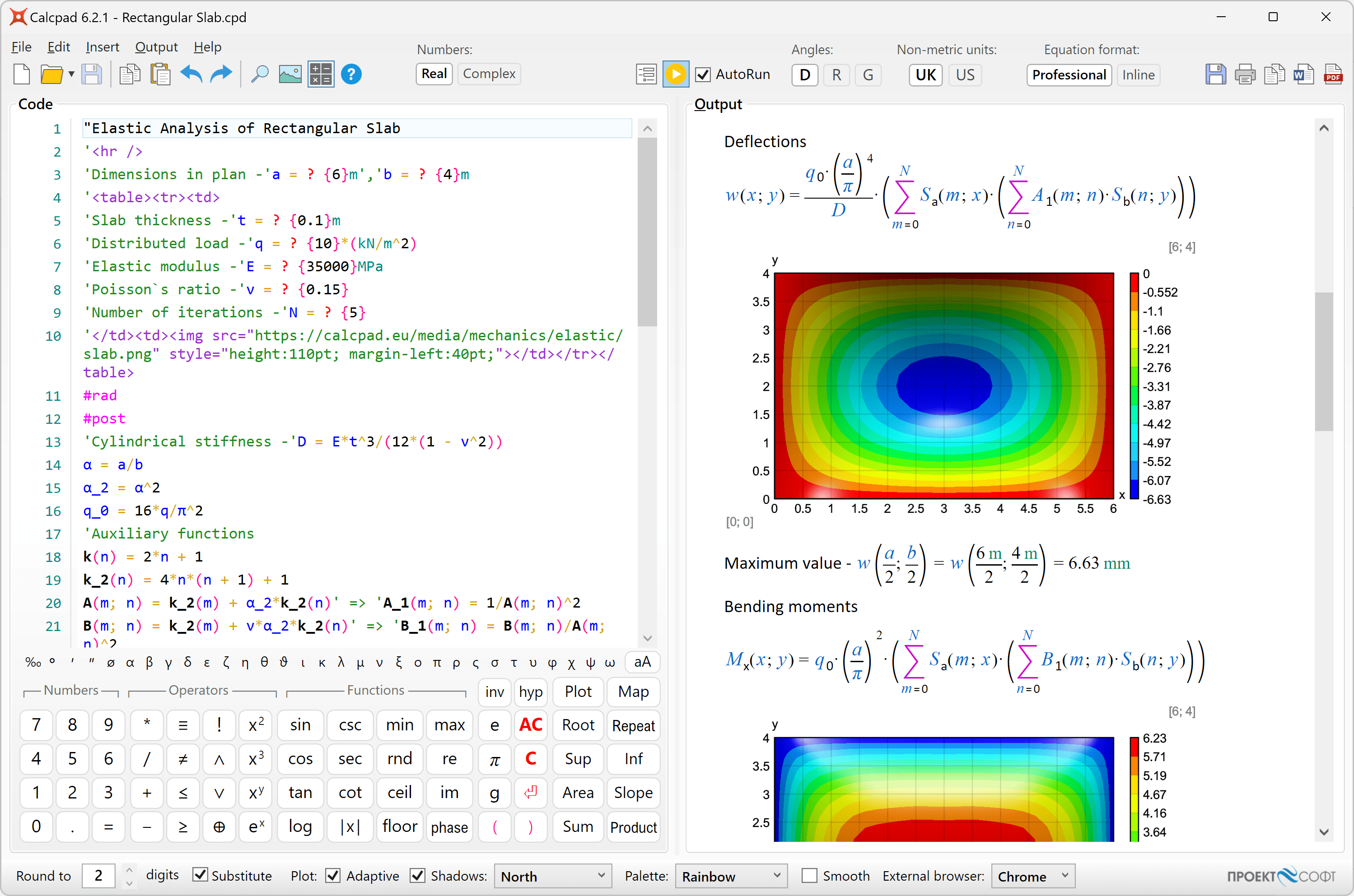
Fields of application
This software is suitable for engineers and other professionals that need to perform repetitive calculations and present them in official documentation such as calculation notes. They can automate this task efficiently by creating powerful and reliable Calcpad worksheets. It can also help teachers to prepare calculation examples, papers, manuals, books etc. Students can use it to solve various problems, prepare homeworks, theses etc.
Installation
The installation is performed by the automated setup program calcpad-VM-setup-en-x64.exe. Follow the instruction of the setup wizard. The software requires a 64 bit computer with Windows 10/11 and Microsoft .NET Desktop Runtime 10.0.
You can also use Calcpad directly in the browser from our website: https://calcpad.eu/Ide
Licensing and terms of use
This software is free for both commercial and non-commercial use. It is distributed under the MIT license:
Copyright © 2025 PROEKTSOFT EOOD®
Permission is hereby granted, free of charge, to any person obtaining a copy of this software and associated documentation files (the "Software"), to deal in the Software without restriction, including without limitation the rights to use, copy, modify, merge, publish, distribute, sublicense, and/or sell copies of the Software, and to permit persons to whom the Software is furnished to do so, subject to the following conditions:
The above copyright notice and this permission notice shall be included in all copies or substantial portions of the Software.
THE SOFTWARE IS PROVIDED "AS IS", WITHOUT WARRANTY OF ANY KIND, EXPRESS OR IMPLIED, INCLUDING BUT NOT LIMITED TO THE WARRANTIES OF MERCHANTABILITY, FITNESS FOR A PARTICULAR PURPOSE AND NONINFRINGEMENT. IN NO EVENT SHALL THE AUTHORS OR COPYRIGHT HOLDERS BE LIABLE FOR ANY CLAIM, DAMAGES OR OTHER LIABILITY, WHETHER IN AN ACTION OF CONTRACT, TORT OR OTHERWISE, ARISING FROM, OUT OF OR IN CONNECTION WITH THE SOFTWARE OR THE USE OR OTHER DEALINGS IN THE SOFTWARE.
Any scripts, developed with Calcpad are property of the respective authors. They can be used without additional limitations except those appointed by the authors themselves.
Acknowledgments
This project uses some additional third party components, software and design. They are re-distributed free of charge, under the license conditions, provided by the respective authors.
- The new and beautiful icons are created using icons8.com.
- The pdf export was made possible thanks to the wkhtmltopdf.org project.
- Some symbols are displayed, using the Jost* font family by indestructible type*, under the SIL open font license. Square brackets are slightly modified to suit the application needs.
How it works
The software is quick and easy to use. Just follow these simple steps:
- Enter text and formulas into the "Code" box on the left.
- Press F5 or click <img alt="Play" height="24" src="https://github.com/Proektsoftbg/Calcpad/blob/main/Help/Images/Play.png"> to calculate. Results will appear in the "Output" box on the right as a professionally formatted Html report.
- Click <img alt="PrintPreview" height="24" src="https://github.com/Proektsoftbg/Calcpad/blob/main/Help/Images/PrintPreview.png"> to print or <img alt="Copy" height="24" src="https://github.com/Proektsoftbg/Calcpad/blob/main/Help/Images/Copy.png"> to copy the output.
You can also export it to Html <img alt="Html" height="24" src="https://github.com/Proektsoftbg/Calcpad/blob/main/Help/Images/Save.png">, PDF <img alt="PDF" height="24" src="https://github.com/Proektsoftbg/Calcpad/blob/main/Help/Images/Pdf.png"> or MS Word <img alt="Word" height="24" src="https://github.com/Proektsoftbg/Calcpad/blob/main/Help/Images/Word.png"> document.
The language
Calcpad uses a simple programming language that includes the following elements:
- Real numbers: digits 0 - 9 and decimal point ".";
- Complex numbers: re ± imi (e.g. 3 - 2i);
- Vectors: [v₁; v₂; v₃; …; vₙ];
- Matrices: [M₁₁; M₁₂; … ; M₁ₙ | M₂₁; M₂₂; … ; M₂ₙ | … | Mₘ₁; Mₘ₂; … ; Mₘₙ]
- Variables:
- all Unicode letters;
- digits: 0 - 9;
- comma: " , ";
- special symbols: ′ , ″ , ‴ , ⁗ , ‾ , ø , Ø , ° , ∡ ;
- superscripts: ⁰ , ¹ , ² , ³ , ⁴ , ⁵ , ⁶ , ⁷ , ⁸ , ⁹ , ⁿ , ⁺ , ⁻ ;
- subscripts: ₀ , ₁ , ₂ , ₃ , ₄ , ₅ , ₆ , ₇ , ₈ , ₉ , ₊ , ₋ , ₌ , ₍ , ₎;
- " _ " for subscript;
Any variable name must start with a letter. Names are case sensitive. - Operators:
"!" - factorial;
"^" - exponent;
"/" - division;
"÷" - force division bar in inline mode and slash in pro mode (//);
"\" - integer division;
"⦼" - modulo (remainder);
"*" - multiplication;
"-" - minus;
"+" - plus;
"≡" - equal to;
"≠" - not equal to;
"<" - less than;
">" - greater than;
"≤" - less or equal;
"≥" - greater or equal;
"∧" - logical "AND";
"∨" - logical "OR";
"⊕" - logical "XOR";
"∠" - phasor A∠φ (<<);
"=" - assignment or definition of a variable, function or macro;
"←" - assignment to an outer level or global variable in block (<*); - Custom functions of type f (x; y; z; ... );
- Built-in functions:
Trigonometric:
sin(x) - sine;
cos(x) - cosine;
tan(x) - tangent;
csc(x) - cosecant;
sec(x) - secant;
cot(x) - cotangent;
Hyperbolic:
sinh(x) - hyperbolic sine;
cosh(x) - hyperbolic cosine;
tanh(x) - hyperbolic tangent;
csch(x) - hyperbolic cosecant;
sech(x) - hyperbolic secant;
coth(x) - hyperbolic cotangent;
Inverse trigonometric:
asin(x) - inverse sine;
acos(x) - inverse cosine;
atan(x) - inverse tangent;
atan2(x; y) - the angle whose tangent is the quotient of y and x;
acsc(x) - inverse cosecant;
asec(x) - inverse secant;
acot(x) - inverse cotangent;
Inverse hyperbolic:
asinh(x) - inverse hyperbolic sine;
acosh(x) - inverse hyperbolic cosine;
atanh(x) - inverse hyperbolic tangent;
acsch(x) - inverse hyperbolic cosecant;
asech(x) - inverse hyperbolic secant;
acoth(x) - inverse hyperbolic cotangent;
Logarithmic, exponential and roots:
log(x) - decimal logarithm;
ln(x) - natural logarithm;
log_2(x) - binary logarithm;
exp(x) - natural exponent;
sqr(x) or sqrt(x) - square root;
cbrt(x) - cubic root;
root(x; n) - n-th root;
Rounding:
round(x) - round to the nearest integer;
floor(x) - round to the smaller integer (towards -∞);
ceiling(x) - round to the greater integer (towards +∞);
**t
Related Skills
node-connect
328.6kDiagnose OpenClaw node connection and pairing failures for Android, iOS, and macOS companion apps
frontend-design
80.9kCreate distinctive, production-grade frontend interfaces with high design quality. Use this skill when the user asks to build web components, pages, or applications. Generates creative, polished code that avoids generic AI aesthetics.
openai-whisper-api
328.6kTranscribe audio via OpenAI Audio Transcriptions API (Whisper).
commit-push-pr
80.9kCommit, push, and open a PR
