
MicrosoftLogger.Analyzer
Analyzer helps you to find ILogger<CategoryName> with wrong category name and fix it
Install / Use
/learn @PavelStefanov/MicrosoftLogger.AnalyzerREADME
MicrosoftLogger.Analyzer
Analyzer helps you to find ILogger<TCategoryName> with wrong category name and fix it
Installation
To install MicrosoftLogger.Analyzer, run the following command:
dotnet add package MicrosoftLogger.Analyzer
Description
When you use Microsoft.Extensions.Logging.ILogger<TCategoryName>, you usually resolve it from dependency injection and set current class as the generic parameter.
The class is used as a category name in logs. You can filter logs by category, you can set a specific log level for category. Because of that, you must set the right class for the generic parameter of ILogger.
Often there are mistakes in ILogger<TCategoryName>. MicrosoftLogger.Analyzer analyzes class constructors and helps you to find and fix mistakes.
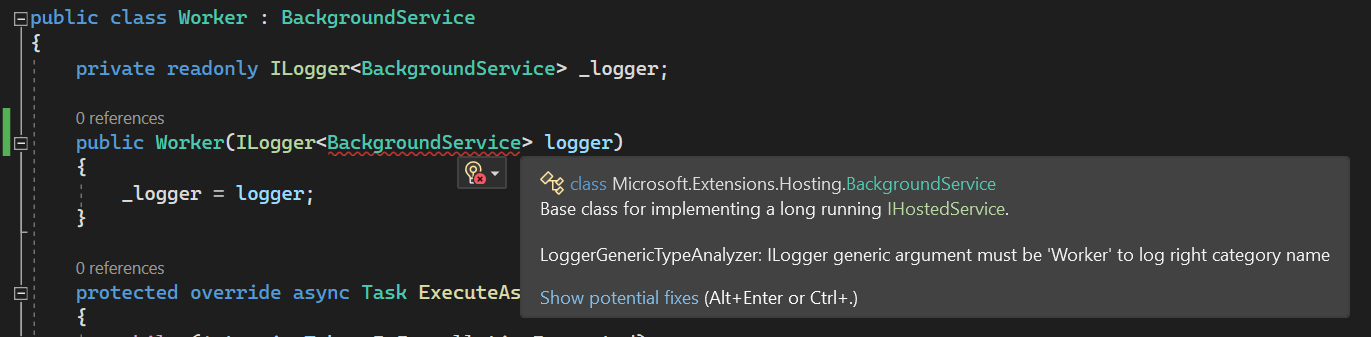
Alternatives
Here are a couple of well-known tools that can detect the same issue, along with reasons you might still prefer this analyzer:
-
ReSharper (Structured Logging Extension) provides the ContextualLoggerProblem rule. It can detect the problem, but it is not as straightforward to enforce during the build compared to using a lightweight NuGet analyzer package.
-
SonarAnalyzer for .NET provides rule S6672 ("Generic logger injection should match enclosing type"). This is a great option if your team already uses SonarQube or SonarCloud, but it can be relatively heavyweight if you only need this specific check.
