Bindgen
Binding and wrapper generator for C/C++ libraries
Install / Use
/learn @Papierkorb/BindgenREADME
Bindgen
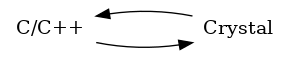
Standalone C, C++, and/or Qt binding and wrapper generator.

Installation
Add the dependency to shard.yml:
dependencies:
  bindgen:
    github: Papierkorb/bindgen
    version: ~> 0.7.0
Table of Contents
<!--ts-->- How To
- Projects using bindgen
- Mapping behaviour
- Features
- Architecture of bindgen
- Processors
- Advanced configuration features
- Platform support
- Contributing
- License
How To
When you have a Crystal project and want to bind to C, C++, or Qt libraries
with the help of bindgen, do as follows:
- Add bindgen to your project's
shard.ymlas instructed above under "Installation" and then runshards - Copy
lib/bindgen/assets/bindgen_helper.hppinto yourext/subdirectory, creating it if missing - Copy
lib/bindgen/TEMPLATE.ymlintoyour_template.yml(adjust the name to your linking) and customize it for the library you want to bind to - Run
lib/bindgen/tool.sh your_template.yml. This will generate the bindings, and by default place the outputs in theext/subdirectory - Develop your Crystal application as usual
Note: If you ship the output produced by bindgen along with your application,
then bindgen will not be not required to compile it. In that case, you can move
its entry in shard.yml from dependencies to development_dependencies.
The .yml file that you copy from TEMPLATE.yml will contain the complete
configuration template along with accompanying documentation embedded in
the comments.
If you prefer working with shorter files, you can simply remove all the
comments.
Projects using bindgen
You can use the following projects' .yml files as a source of ideas or syntax for your own bindings:
Have you created and published a usable binding with bindgen? Want to see it here? Send a PR!
Mapping behaviour
The following rules are automatically applied to all bindings:
- Method names get underscored:
addWidget() -> #add_widget- Setter methods are rewritten:
setWindowTitle() -> #window_title= - Getter methods are rewritten:
getWindowTitle() -> #window_title - Bool getters are rewritten:
getAwesome() -> #awesome? isgetters are rewritten:isEmpty() -> #empty?hasgetters are rewritten:hasSpace() -> #has_space?
- Setter methods are rewritten:
- On signal methods (For Qt signals):
- Keep their name for the
emitversion:pressed() -> #pressed - Get an
on_prefix for the connect version:#on_pressed do .. end
- Keep their name for the
- Enum fields get title-cased if not already:
color0 -> Color0
Features
| Feature | Support |
|--------------------------------------------------|---------|
| Automatic Crystal binding generation | YES |
| Automatic Crystal wrapper generation | YES |
| Mapping C++ classes | |
| +- Member methods | YES |
| +- Static methods | YES |
| +- Getters and setters for instance variables | YES |
| +- Getters and setters for static variables | YES |
| +- Constructors | YES |
| +- Overloaded operators | Partial |
| +- Conversion functions | TBD |
| Mapping C/C++ global functions | |
| +- Mapping global functions | YES |
| +- Wrapping as Crystal class | YES |
| Overloaded methods (Also default arguments) | YES |
| Copying default argument values | |
| +- Integer, float, boolean types | YES |
| +- String | YES |
| Enumerations | YES |
| Copying structures | YES |
| Custom type conversions between C/++ and Crystal | YES |
| Automatic type wrapping and conversion | YES |
| Integration with Crystals GC | YES |
| C++ Template instantiation for containers types | YES |
| Virtual methods | YES |
| Override virtual methods from Crystal | YES |
| Abstract classes | YES |
| Multiple inheritance wrapping | YES |
| Qt integration | |
| +- QObject signals | YES |
| +- QFlags types | YES |
| +- QMetaObject generation (mimic moc) | TBD |
| #define macro support | |
| +- Mapping as enumeration | YES |
| +- Mapping as constant (Including strings) | YES |
| Copying in-source docs | TBD |
| Platform specific type binding rules | YES |
| Portable path finding for headers, libs, etc. | YES |
Architecture of bindgen
Bindgen employs a pipeline-inspired code architecture, which is strikingly similar to what most compilers use.
The code flow is basically Parser::Runner to Graph::Builder to
Processor::Runner to Generator::Runner.

The Graph
An important data structure used throughout the program is the graph.
Code-wise, it's represented by Graph::Node and its sub-classes. The nodes
can contain child nodes, making it a hierarchical structure.
This allows to represent (almost) arbitrary structures as defined by the user configuration.
Say we're wrapping GreetLib. As any library, it comes with a bunch of
classes (Greeter and Listener), enums (Greetings, Type) and other stuff
like constants (PORT). The configuration file could look like this:
module: GreetLib
classes: # We copy the structure of classes
  Greeter: Greeter
  Listener: Listener
enums: # But map the enums differently
  Type: Greeter::Type
  Greeter::Greetings: Greetings
Which will generate a graph looking like this:
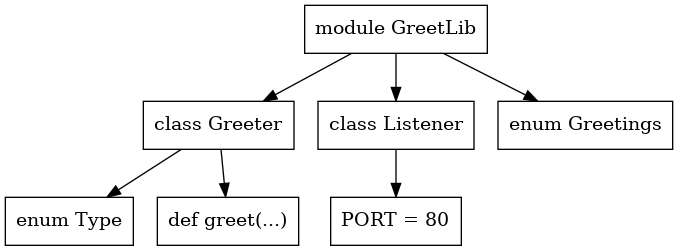
Note: The concept is really similar to ASTs used by compilers.
Parser step
This is the beginning of the actual execution pipeline. It calls out to the clang-based parser
tool () to read the C/C++ source code and write a JSON-formatted "database" onto
standard output. This is directly read by bindgen and subsequently parsed
as Parser::Document.
Graph::Builder step
The second step takes the Parser::Document and transforms it into a
Graph::Namespace. This step is where the user configuration mapping is used.
Processor step
The third step runs all configured processors in order. These work with the
Graph and mostly add methods and Calls so they can be bound later. But
they're allowed to do whatever they want really, which makes it a good place
to add more complex rewriting rules if desired.
Processors are responsible for many core features of bindgen. The TEMPLATE.yml
has an already set-up example pipeline.
Generator step
The final step now takes the finalized graph and writes the result into an output of one or more files. Generators do not change the graph in any way, and also don't build anything on their own. They only write to output.
Processors
The processor pipeline can be configured through the processors: array. Its
elements are run in the order they're defined, starting at the first element.
Note: Don't worry: The TEMPLATE.yml file already comes with the
recommended pipeline pre-configured.
There are three kinds of processors:
- Refining ones modify the graph in some way, without a dependency to a later generator.
- Generation processors add data to the graph so that the generators run later have all data they need to work.
- Information processors don't modify the graph, but do checks or print data onto the screen for debugging purposes.
The order in the configured pipeline is to have Refining processors first, Generation processors second. Information processors