VisiLens
A fast, local-first web GUI for exploring large CSV/Parquet/JSONL files. Powered by VisiData’s engine. Opens millions of rows instantly. Works with local files, SSH servers, and Jupyter. Your new data debugging lens.
Install / Use
/learn @PStarH/VisiLensREADME
VisiLens
Excel for Developers
Open 1M+ rows in seconds. Local-first, zero-config, instant preview.
A high-performance, local-first web GUI for exploring datasets. Instantly view, filter, and analyze CSV, Parquet, Excel, and JSON files using the power of VisiData without installing heavy spreadsheet software.





 <a href="https://pypi.org/project/vdweb/">
<img src="https://img.shields.io/pypi/v/vdweb.svg" alt="PyPI version" />
</a>
<a href="https://pypi.org/project/vdweb/">
<img src="https://img.shields.io/pypi/v/vdweb.svg" alt="PyPI version" />
</a>



English • 简体中文 • Español • 日本語 • Русский
Quickstart • Features • Installation • Usage • Architecture • Contributing
</div> <div align="center"> <img src="https://raw.githubusercontent.com/PStarH/VisiLens/main/assets/demo.gif" alt="VisiLens Demo" width="100%" /> </div>⚡ Quickstart
Get up and running in seconds. No database setup, no configuration.
# 1. Install via pip
pip install visilens

# 2. Open any file
visilens data.csv
Note: The PyPI package name is
vdweb, but the CLI tool isvisilens.
🚀 Why VisiLens?
Data exploration shouldn't require writing boilerplate Pandas code or waiting for heavy spreadsheet software like Excel to load. VisiLens is a modern CSV viewer and Parquet explorer that combines the raw speed of VisiData with a lightweight web interface.
- ⚡️ Load 1M rows in under 2 seconds: Powered by VisiData's highly optimized engine.
- 🔒 Local-First & Secure: Your data never leaves your machine. No cloud uploads, no external dependencies.
- 🛠 Zero Config: CLI-first workflow. Pipe data in, explore, and get back to coding.
- 🔌 Universal Support: Open CSV, TSV, JSON, Parquet, Excel, SQLite, and 50+ other formats.
✨ Features
- Instant Data Visualization: Just run
visilens data.csvto visualize large datasets instantly. - Backend-powered Sorting & Filtering: Perform complex queries on millions of rows using the VisiData engine.
- Column Manipulation: Change column types, rename columns, and edit data with an intuitive context menu.
- Advanced Filtering: Apply multiple filter conditions with support for regex pattern matching.
- Lightweight Data Grid: A virtualized React-based table view for smooth scrolling.
- Zero Config: No database setup required. Works as a standalone CSV/Parquet viewer.
📂 Supported Formats
VisiLens leverages VisiData's loaders to support a wide range of formats out of the box:
- Tabular:
.csv,.tsv,.xlsx(Excel),.parquet - Structured:
.json,.jsonl,.yaml - Database:
.sqlite,.db - Code:
.pcap(Wireshark),.xml,.htmltables
📊 Benchmarks
We take performance seriously. Here is how VisiLens compares when opening a 1,000,000 row CSV dataset on a standard MacBook Air (M2).
| Tool | Load Time (1M Rows) | Memory Footprint | Interactive Sorting | | :--- | :--- | :--- | :--- | | VisiLens | ~1.7s | Minimal (< 50MB Total) | Instant (Backend: < 0.4s) | | Excel | > 30s (Often Fails) | High (Blocking RAM) | Slow/Unresponsive | | Pandas-based GUI | > 15s (Cold Start) | High (Entire DF in RAM) | Sluggish (Non-Virtualized) | | Jupyter (print df) | Fast | Medium | Static Text |
Test Data: 1M rows, 3 columns (Mixed types). Numbers are from my MacBook Air M2 during real development use.
📦 Installation
VisiLens is available as a Python package.
pip install visilens
Note: VisiLens requires Python 3.10 or higher.
💻 Usage
Command Line Interface
The primary way to use VisiLens is via the command line.
# Open a CSV file
visilens data.csv

# Open a Parquet file
visilens large-dataset.parquet

# Open an Excel file
visilens spreadsheet.xlsx

# Launch without opening the browser automatically
visilens data.json --no-browser

# Specify a custom port
visilens data.csv --port 9000
Web Interface
Once launched, VisiLens opens in your default browser (usually http://localhost:8000).
- View Data: Scroll through your dataset efficiently.
- Sort: Click column headers to sort ascending/descending.
- Filter: Use the power filter bar to apply complex queries with multiple conditions.
- Column Operations: Right-click column headers to change types, rename columns, or access advanced options.
- Load New Data: (Coming Soon) Drag and drop files directly into the window.
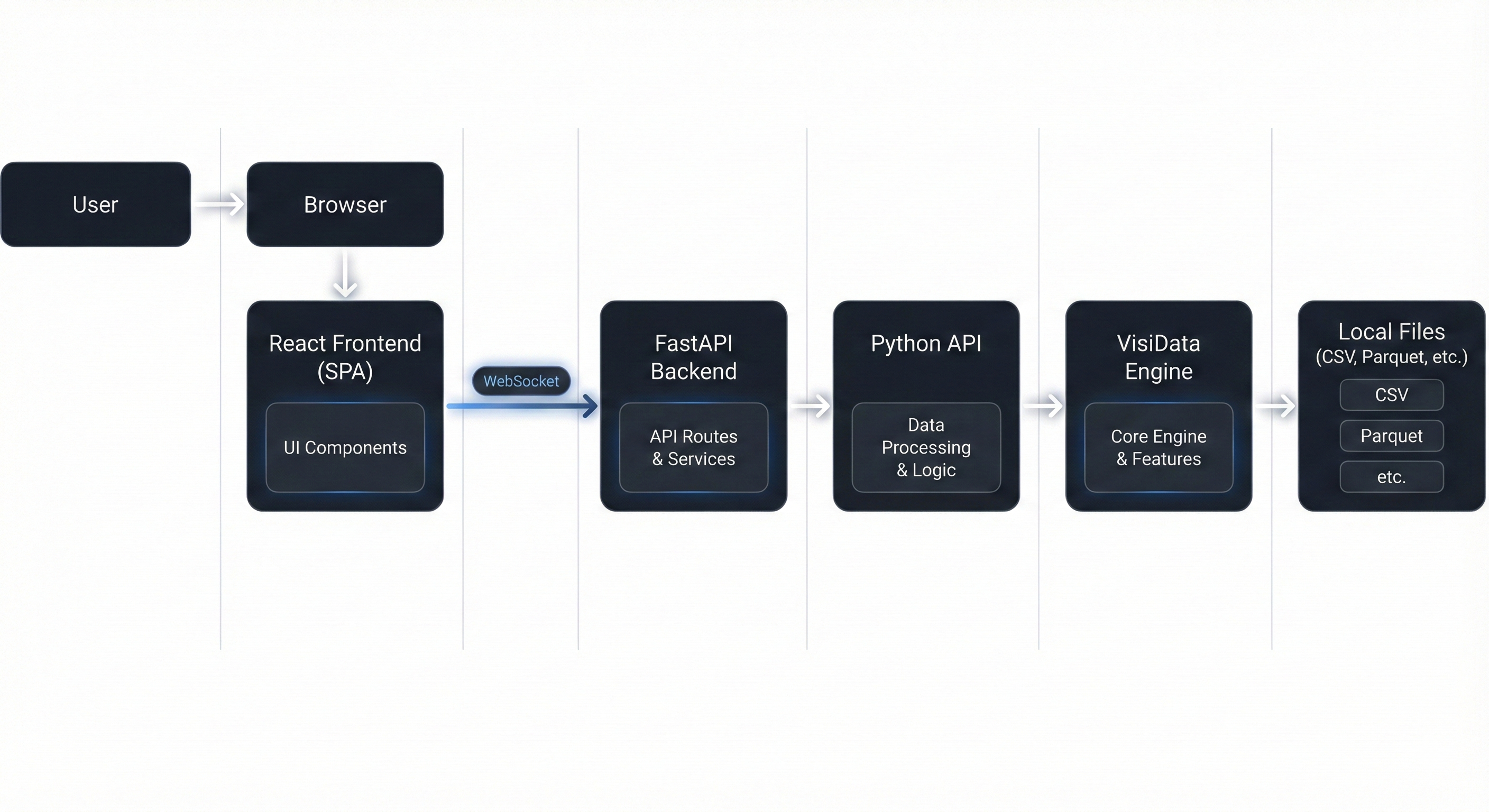
🏗 Architecture
VisiLens is built on a robust modern stack designed for performance:
- Backend: FastAPI server bridges VisiData and the browser.
- Communication: WebSockets stream slices on demand.
- Frontend: React grid renders only what you see.
📂 Project Structure
A quick look at the codebase to help you navigate:
VisiLens/
├── vdweb/               # 📦 The Python Package (PyPI)
│   ├── cli.py           #    Entry point (visilens command)
│   ├── core.py          #    VisiData integration logic
│   └── static/          #    Compiled frontend assets
├── backend/             # 🛠 Development Backend
│   └── main.py          #    FastAPI app for local dev
├── frontend/            # ⚛️ React Frontend
│   ├── src/             #    Source code
│   └── vite.config.ts   #    Build configuration
└── DOCUMENTATION/       # 📚 Multi-language docs & guides
🗺 Roadmap
We are actively working on making VisiLens the ultimate local data companion.
For a detailed breakdown of our feature strategy and technical implementation plan, please see ROADMAP.md.
- [x] v0.1: Core Engine, Virtual Scrolling, Sorting, Filtering.
- [x] v0.2: Column Type Conversion, Column Renaming, Advanced Filtering, Context Menu.
- [ ] Jupyter Integration: Launch VisiLens directly from a notebook cell (
visilens.view(df)). - [ ] Drag-and-drop file loading
- [ ] Plotting: Quick histograms and scatter plots via Vega-Lite.
- [ ] Cell Editing: Edit cells and save changes back to CSV/Parquet.
- [ ] SQL Support: Connect directly to SQLite/Postgres/DuckDB.
🛠 Development
Want to contribute? Great! Here's how to set up the development environment.
Prerequisites
- Python 3.10+
- Node.js 18+
- npm or pnpm
Setup
-
Clone the repository
git clone https://github.com/PStarH/VisiLens.git cd VisiLens -
Backend Setup
# Create virtual environment python -m venv .venv source .venv/bin/activate # or .venv\Scripts\activate on Windows # Install dependencies pip install -e ".[dev]" -
Frontend Setup
cd frontend npm install -
Run Locally
Terminal 1 (Backend):
uvicorn backend.main:app --reload --port 8000
Terminal 2 (Frontend):
cd frontend
npm run dev
- Build frontend assets (optional)
If you prefer to run only the Python CLI (without a separate Vite dev server), you can build the frontend once:
cd frontend
npm run build
This produces a production bundle under frontend/dist/ which is copied into vdweb/static/ for releases. End users then just run:
visilens path/to/data.csv
❓ FAQ
Q: Why is the package named vdweb but the command is visilens?
A: The project started as vdweb (VisiData Web). We rebranded to VisiLens to better reflect our vision. We kept the package name vdweb on PyPI to avoid breaking existing installs, but we recommend using the visilens command.
Q: Can I use this on a remote server?
A: Yes! You can run visilens data.csv --port 8080 --no-browser on a remote server and access it via SSH tunneling or directly if the port is exposed.
Q: Does it support editing data?
A: Currently, VisiLens is primarily for exploration and analysis. Basic cell editing is on our roadmap.
🌍 Help Us Improve Translations!
VisiLens is used globally, and we want to make it accessible to everyone. Our do