
Dablin
DAB/DAB+ receiver for Linux (including ETI-NI and EDI AF playback)
Install / Use
/learn @Opendigitalradio/DablinREADME
DABlin – capital DAB experience
DABlin plays a DAB/DAB+ audio service – from a live transmission or from a stored ensemble recording (ETI-NI, or EDI AF with ETI). Both DAB (MP2) and DAB+ (AAC-LC, HE-AAC, HE-AAC v2) services are supported.
The GTK GUI version in addition supports the data applications Dynamic Label and MOT Slideshow (if used by the selected service).
Screenshots
GTK GUI version

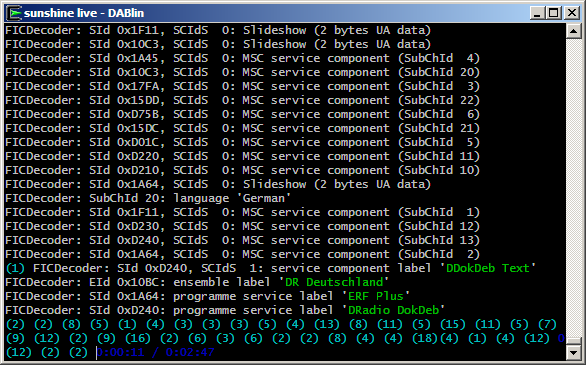
Console version

Requirements
General
Besides Git a C/C++ compiler (with C++11 support) and CMake are required to build DABlin.
On Debian or Ubuntu, the respective packages (with GCC as C/C++ compiler) can be installed using aptitude or apt-get, for example:
sudo apt-get install git gcc g++ cmake
Libraries
The following libraries are required:
- mpg123 (1.14.0 or higher)
- FAAD2
- SDL2
The GTK GUI version in addition requires:
- gtkmm
Usually the glibc implementation of iconv is available. If this is
not the case, in addition libiconv is required.
In rare cases, the target architecture does not support atomics. In
such a case, DABlin is linked against GCC's libatomic. This lib
usually is an (indirect) dependency of GCC itself.
On Debian or Ubuntu, mpg123, FAAD2, SDL2 and gtkmm are packaged and installed with:
sudo apt-get install libmpg123-dev libfaad-dev libsdl2-dev libgtkmm-3.0-dev
On Fedora, mpg123, SDL2, and gtkmm are all packaged and can be installed thus:
sudo dnf install mpg123-devel SDL2-devel gtkmm30-devel
FAAD2 is not packaged in the main Fedora repository, but it is available in RPM Fusion repository. Once you have added RPM Fusion to the repositories, FAAD2 may be installed by:
sudo dnf install faad2-devel
If you do not wish to, or cannot, add the RPM Fusion repositories, you will have to download FAAD2, perhaps from here, and build and install manually.
Alternative DAB+ decoder
Instead of using FAAD2, DAB+ channels can be decoded with FDK-AAC. You can also use OpenDigitalradio's fork, if already installed.
On Debian and Ubuntu, you can install FDK-AAC with:
sudo apt-get install libfdk-aac-dev
On Fedora, RPM Fusion is again needed and, if used, you can:
sudo dnf install fdk-aac-devel
When the alternative AAC decoder is used, the FAAD2 library mentioned above is no longer required.
After installing the library, to use FDK-AAC instead of FAAD2, you have to
have -DUSE_FDK-AAC=1 as part of the cmake command.
Audio output
The SDL2 library is used for audio output, but you can instead choose to output the decoded audio in plain PCM for further processing (e.g. for forwarding to a streaming server).
In case you only want PCM output, you can disable SDL output and
therefore omit the SDL2 library prerequisite. You then also have to
have -DDISABLE_SDL=1 as part of the cmake command.
To enable the raw PCM output to stdout, the -p parameter has to be used.
The PCM audio can also be prepended with a RIFF WAVE header using the -w
parameter instead. This uses the maximum value for length fields in order to
allow streaming. On any later audio format change (this also includes a service
change in the GUI version), a new RIFF WAVE header will be issued. As RIFF WAVE
requires samples to be in Little Endian (LE) order, this feature only makes
sense on a LE platform.
It is also possible to disable the output of any decoded audio and
instead output the current service as an untouched MP2/AAC stream to
stdout. This can be achieved by using the -u parameter.
Surround sound
Services with surround sound are only decoded from their Mono/Stereo core, as unfortunately there is no FOSS AAC decoder which supports the required Spatial Audio Coding (SAC) extension of MPEG Surround at the moment.
Precompiled packages and source-based Linux distributions
Official precompiled packages are available for the following Linux distributions (kindly maintained by Gürkan Myczko):
Starting with Debian 10 and Ubuntu 18.04, you can simply install DABlin from the official package sources (note that the GitHub version may be newer):
sudo apt-get install dablin
Some users kindly provide precompiled packages on their own:
- openSUSE (by Martin Hauke)
- CentOS (by Radio Bern RaBe 95.6); more info
For other distributions you may also want to check the Repology page.
Source-based Linux distributions:
- Gentoo (by Christian Affolter, as part of his delicious-absurdities-overlay)
Ubuntu 20.04, FAAD2 and HE-AAC v2 services
Ubuntu 20.04 currently ships a version of the FAAD2 library which can't decode HE-AAC v2 services (= SBR and PS) due to a bug. This affects FAAD2 version 2.9.0 and 2.9.1.
To address this, a more recent version of the library can be compiled.
First make sure, you have automake and libtool installed on your system.
sudo apt-get install automake libtool
Then continue with
git clone -b 2_9_2 https://github.com/knik0/faad2.git
cd faad2
./bootstrap
./configure
make
sudo make install
sudo ldconfig
Now DABlin (and all other applications) uses the newer lib version.
If the newer lib version shall only be used together with DABlin, the
two last commands must not be executed. Instead DABlin has always to be
invoked with the following prefix string (assuming the above commands
were executed in /home/my_user):
LD_LIBRARY_PATH=/home/my_user/faad2/libfaad/.libs/
Compilation
If the gtkmm library is available both the console and GTK GUI executables will be built, otherwise only the console executable will be built.
To fetch the DABlin source code, execute the following commands:
git clone https://github.com/Opendigitalradio/dablin.git
cd dablin
Note that by default the master branch is cloned which contains the
current stable version. The development takes place in the next branch
which can instead be cloned by appending -b next to the end of the
above git clone command line.
You can use, for example, the following command sequence in order to compile and install DABlin (for Ubuntu 20.04 please also see above):
mkdir build
cd build
cmake ..
make
sudo make install
Windows (Cygwin)
DABlin can also be compiled on Windows using Cygwin. The following Cygwin packages are required:
General:
- git
- make
- cmake
- gcc-core
- gcc-g++
DABlin specific (using FDK-AAC for DAB+ services):
- libmpg123-devel
- libfdk-aac-devel
- libSDL2-devel
- libiconv-devel
In addition for the GTK version:
- libgtkmm3.0-devel
Note that the GTK version requires an X server to run e.g. Cygwin/X!
Also note that Cygwin neither needs nor allows to sudo commands, so
just execute them without that prefix.
Unfortunately the Cygwin package of FDK-AAC doesn't seem to have been compiled with SBR support, so using FAAD2 for DAB+ services is recommended. However, FAAD2 has to be compiled and installed by hand, as there is no Cygwin package. This requires the following additional packages to be installed:
- autoconf
- automake
- libtool
When Cygwin is installed, all the aforementioned packages can be
preselected for installation by calling Cygwin's setup-<arch>.exe
with the following parameter:
-P git,make,cmake,gcc-core,gcc-g++,libmpg123-devel,libfdk-aac-devel,libSDL2-devel,libiconv-devel,libgtkmm3.0-devel,autoconf,automake,libtool
macOS
On macOS, the development environment can be installed by running
xcode-select. This installs Git and a C/C++ compiler (clang). All
other packages and development libraries can be installed using a
package manager such as Homebrew, for example:
xcode-select --install
brew install pkg-config cmake gtkmm gtkmm3 adwaita-icon-theme sdl2 fftw faad2 mpg123
Usage
The console executable is called dablin, the GTK GUI executable
dablin_gtk. Use -h to get an overview of all available options.
(Currently no desktop files are installed so it is not easy to start DABlin directly from GNOME Shell. For now, at least, start DABlin from a console.)
DABlin processes DAB ETI-NI or EDI recordings/streams (which may be
frame-aligned or not i.e. any data before/after an ETI/EDI frame is
discarded). If no filename is specified, stdin is used for input.
You just should specify the service ID (SID) of the desired service
using -s - otherwise initially no service is played. The GUI version
of course does not necessarily need this.
You can replay an existing recording as follows:
dablin -s 0xd911 mux.eti
In this case a progress indicator and the current position is displayed.
As an alternative a service label can be specified with the -l option.
Note that if the label contains spaces, it has to be enclosed by quotes
(or the spaces be properly escaped):
dablin -l "SWR1 RP" mux.eti
The parameter -1 (the number one, not the small letter L) simply plays
the first service found.
With the co
Related Skills
node-connect
351.4kDiagnose OpenClaw node connection and pairing failures for Android, iOS, and macOS companion apps
frontend-design
110.7kCreate distinctive, production-grade frontend interfaces with high design quality. Use this skill when the user asks to build web components, pages, or applications. Generates creative, polished code that avoids generic AI aesthetics.
openai-whisper-api
351.4kTranscribe audio via OpenAI Audio Transcriptions API (Whisper).
qqbot-media
351.4kQQBot 富媒体收发能力。使用 <qqmedia> 标签,系统根据文件扩展名自动识别类型(图片/语音/视频/文件)。
