
SeeAct
[ICML'24] SeeAct is a system for generalist web agents that autonomously carry out tasks on any given website, with a focus on large multimodal models (LMMs) such as GPT-4V(ision).
Install / Use
/learn @OSU-NLP-Group/SeeActREADME
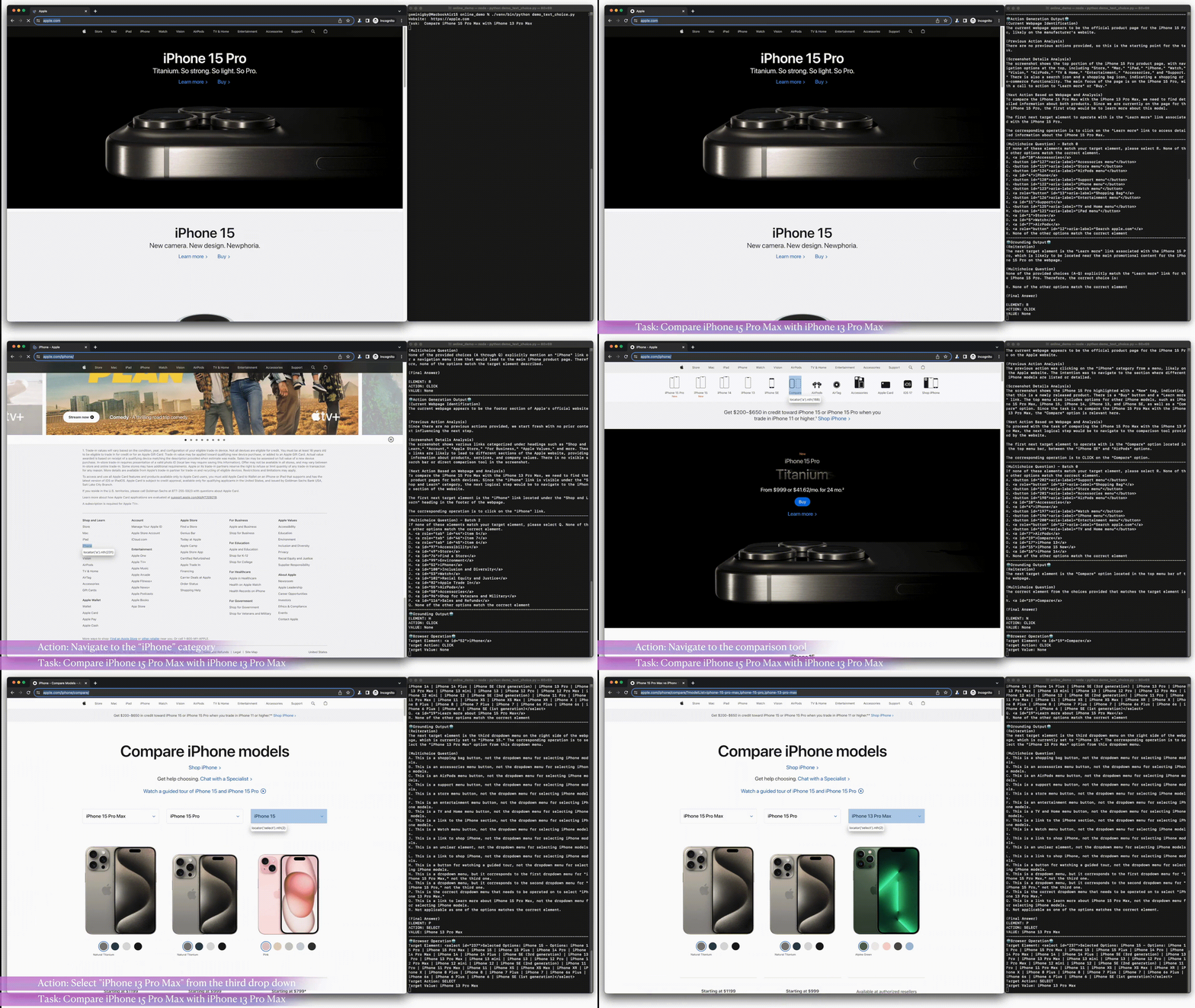
SeeAct is a system for <a href="https://osu-nlp-group.github.io/Mind2Web/">generalist web agents</a> that autonomously carry out tasks on any given website, with a focus on large multimodal models (LMMs) such as GPT-4V(ision). It consists of two main components: (1) A robust codebase that supports running web agents on live websites, and (2) an innovative framework that utilizes LMMs as generalist web agents.
-
2024/11/10: We have open-sourced SeeAct Chrome Extension source code! Try and have fun at SeeActChromeExtension!
-
2024/9/30: WebOlympus: An Open Platform for Web Agents on Live Websites has been accepted to EMNLP'24 Demo Track!
-
2024/8/17: Crawler mode added!
-
2024/7/9: Support SoM (Set-of-Mark) grounding strategy!
-
2024/5/18: Support for Gemini and LLaVA!
-
2024/5/1: SeeAct has been accepted to ICML'24!
-
2024/4/28: Released SeeAct Python Package, with many updates and many features on the way. Have a try with
pip install seeact -
2024/3/18: Multimodal-Mind2Web dataset released. We have paired each HTML document with the corresponding webpage screenshot image and saved the trouble of downloading Mind2Web Raw Dump.
SeeAct Tool
The SeeAct tool enables running web agents on live websites through PlayWright, serving as an interface between an agent and a web browser. It efficiently tunnels inputs from the browser to the agent, and translates predicted actions of the agent into browser events for execution. This tool can be used for running web agent demos and evaluating their performance on live websites.
Setup
- Create a conda environment and install dependency:
conda create -n seeact python=3.11
conda activate seeact
pip install seeact
- Set up PlayWright and install the browser kernels.
playwright install
Usage
import asyncio
import os
from seeact.agent import SeeActAgent

# Setup your API Key here, or pass through environment
os.environ["OPENAI_API_KEY"] = "Your API KEY Here"

async def run_agent():
    agent = SeeActAgent(model="gpt-4-turbo")
    await agent.start()
    while not agent.complete_flag:
        prediction_dict = await agent.predict()
        await agent.execute(prediction_dict)
    await agent.stop()

if __name__ == "__main__":
    asyncio.run(run_agent())
SeeActAgent Main Inputs
| Name | Description | Type | Default | Required |
|------|-------------|------|---------|:--------:|
| model | Prefered LLM model to run the task | str | gpt-4o | no |
| default_task | Default task to run | str | Find the pdf of the paper "GPT-4V(ision) is a Generalist Web Agent, if Grounded" | no |
| default_website | Default starting website | str | https://www.google.com/ | no |
| grounding_strategy | Grounding strategy <ul><li>text_choice: use text choices</li><li>text_choice_som: use text choices with set of marks</li></ul> | str | text_choice_som | no |
| config_path | Configuration file path | str | None | no |
| save_file_dir | Folder to save output files | str | seeact_agent_files | no |
| temperature | Termperature passed to LLM | num | 0.9 | no |
| crawler_mode | Flag to enable crawler mode | bool | False | no |
| crawler_max_steps | Max step to allow crawler to travel | int | 10 | no |
Supported Models
SeeAct starts with using OpenAI GPT4-V, and now it supports some other models.
Below is the list of currently supported models, to use any one of the model below, simpliy use SeeActAgent(model="gpt-4-turbo"), and specify the API key if needed.
| Provider | Model | Compatibility | API KEY | Note
|----------|-------|---------------|---------|:-----------:|
| OpenAI | gpt-4-vision-preview | High | OPENAI_API_KEY in env | |
| OpenAI | gpt-4-turbo | High | OPENAI_API_KEY in env | |
| OpenAI | gpt-4o | High | OPENAI_API_KEY in env | |
| Google | gemini-1.5-pro-latest | High | GEMINI_API_KEY in env | Rate limitting at 2 RPM by Google, need to add wait time in the code to work |
| Ollama | llava | Low | N/A | Install Ollama, start Ollama, pull llava |
API Keys
If you plan to use OpenAI family models, pass in the API Key in python or by environment variable
os.environ["OPENAI_API_KEY"] = "Your API KEY Here"
Your OpenAI API key is available at OpenAI account page.
To use Gemini, pass in the API Key in python or by environment variable
os.environ["GEMINI_API_KEY"] = "Your API KEY Here"
Your Google API key is available at Google AI Studio.
Configuration File
An alternative to provide SeeActAgent input parameters is to use a config file, once the config file is provided, it will override all other input paramters.
agent = SeeActAgent(config_path="demo_mode.toml")
Sample configuration files are available at src/config/.
Crawler Mode
In the new introduced crawler mode, SeeAct could randomly click any links on the given starting web page, and travel steps defined by crawler_max_steps.
Demo Mode
In the demo mode, SeeAct takes task and website from user terminal input. Run SeeAct in demo mode with the following command:
cd src
python seeact.py
Demo mode will use the default configuration file at src/config/demo_mode.toml.
Configuration
SeeAct is configurable through TOML files in src/config/.
These files enable you to customize various aspects of the system's behavior
via the following parameters:
is_demo: Settrueto allow task and website from user terminal input, setfalseto run tasks and websites from a JSON file (useful for batch evaluation).default_taskanddefault_website: Default task and website used in the demo mode.max_op: Maximum number of actions the agent can take for a task.save_file_dir: Directory path to save output results, including terminal logs and screenshot images.
Terminal User Input
After starting SeeAct, you'll be required to enter a task description
or you can press Enter to use the default task of finding our paper on arXiv.
Next, you need to input the website URL (please ensure it includes all necessary prefixes (https, www))
or you can press Enter to use the default Google homepage (https://www.google.com/).
Auto Mode
You can also automatically run SeeAct on a list of tasks and websites in a JSON file. Run SeeAct with the following command:
cd src
python seeact.py -c config/auto_mode.toml
In the configuration file, task_file_path defines the path of the JSON file.
It is default to ../data/online_tasks/sample_tasks.json, which contains a variety of task examples.
Customized Usage
For custom scenarios, modify the configuration files to adapt the tool to your specific requirements. This includes setting up custom tasks, adjusting experiment parameters, and configuring Playwright options for more precise control over the web browsing experience.
Safety and Monitoring
The current version is research/experimental in nature and by no means perfect. Please always be very cautious of safety risks and closely monitor the agent.
In the default setting (monitor = true), the agent will prompt for confirmation before executing every operation.
This setting pauses the agent before each operation, allowing for close examination, action rejection, and other human intervention like manually doing some operation when needed.
**You should always monitor the agent's predictions before execution to prevent harmful outcome
