
Pueue
:stars: Manage your shell commands.
Install / Use
/learn @Nukesor/PueueREADME
Pueue





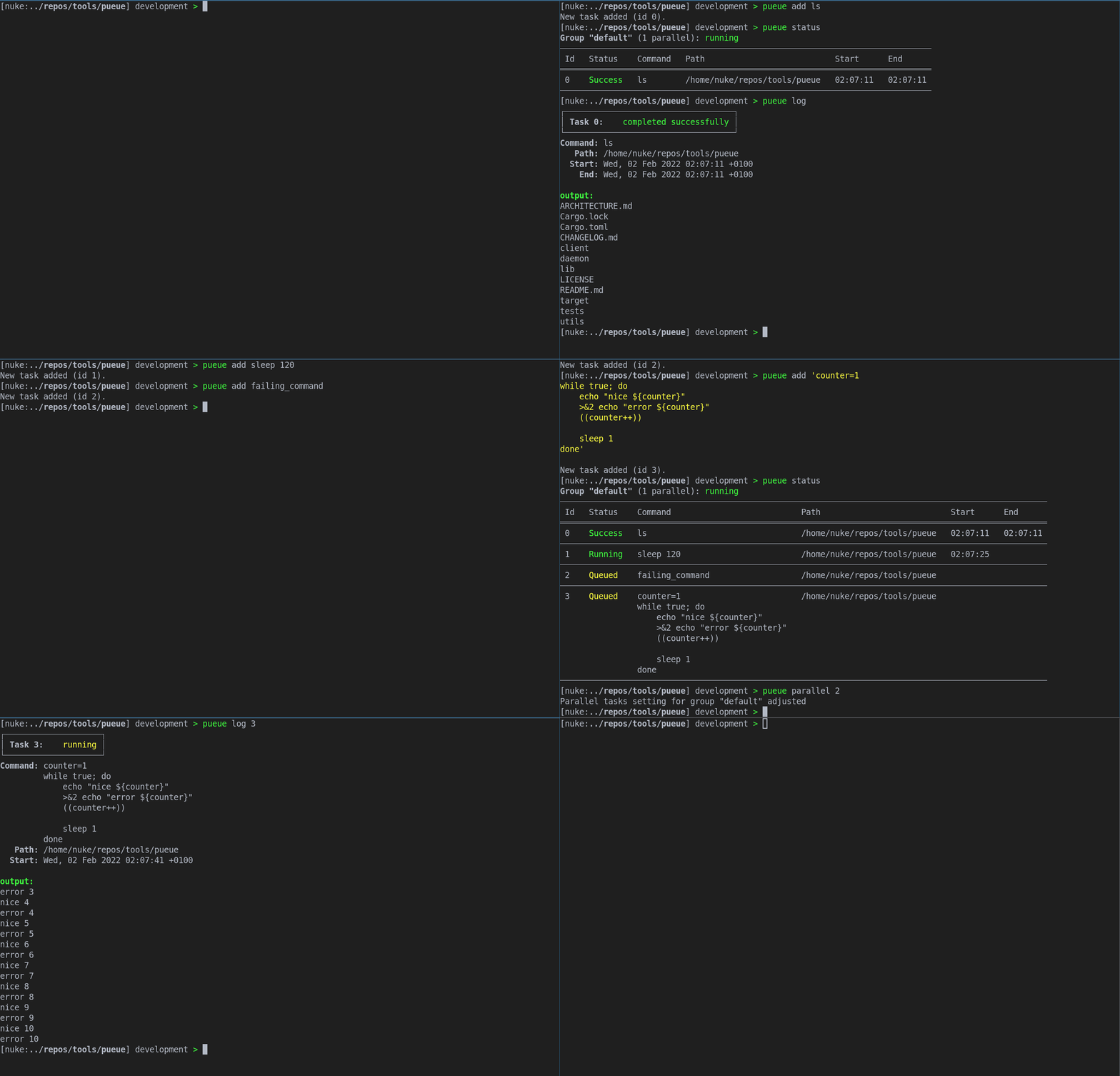
Pueue is a command-line task management tool for sequential and parallel execution of long-running tasks.
Simply put, it's a tool that processes a queue of shell commands. On top of that, there are a lot of convenient features and abstractions.
Since Pueue is not bound to any terminal, you can control your tasks from any terminal on the same machine. The queue will be continuously processed, even if you no longer have any active ssh sessions.
Pueue is considered feature-complete :tada:. All features that were planned have been added and only minor improvements, bug-fixes and regular maintenance work will get merged.
Features
- Scheduling
- Add tasks as you go.
- Run multiple tasks at once. You decide how many tasks should run concurrently.
- Change the order of the scheduled tasks.
- Specify dependencies between tasks.
- Schedule tasks to run at a specific time.
- Process interaction
- Easy output inspection.
- Send input to running processes.
- Pause/resume tasks, when you need some processing power right NOW!
- Task groups (multiple queues)
- Each group can have several tasks running in parallel.
- Pause/start tasks by a group.
- Background process execution
- The
pueueddaemon runs in the background. No need to be logged in. - Commands are executed in their respective working directories.
- The current environment variables are copied when adding a task.
- Commands are run in a shell which allows the full feature set of shell coding.
- The
- Consistency
- The queue is always saved to disk and restored on kill/system crash.
- Logs are persisted onto the disk and survive a crash.
- Miscellaneous
- A callback hook to, for instance, set up desktop notifications.
- JSON output for
logandstatusif you want to display info about tasks in another program. - A
waitsubcommand to wait for specific tasks, a group (or everything) to finish.
- A lot more. Check the -h options for each subcommand for detailed options.
- Cross Platform
- Linux is fully supported and battle-tested.
- MacOS is fully supported and on par with Linux.
- Windows is fully supported and working fine for quite a while.
- Why should I use it
- Advantages over Using a Terminal Multiplexer
What Pueue is not
Pueue is not designed to be a heavy-duty programmable (scriptable) task scheduler/executor.
The focus of pueue lies on human interaction, i.e. it's supposed to be used by a real person on some kind of OS.
See the Design Goals section
Due to this, the feature set of pueue and pueued as well as their implementation and architecture have been kept simple by design!
Even though it can be scripted to some degree, it hasn't been built for heavy-duty work like hundreds of tasks!
There's definitely the need for a complex task scheduler/executor with advanced API access and scheduling options, but this is the job for another project, as this is not what pueue has been built for.
Installation
There are a few different ways to install Pueue.
Package Manager
<a href="https://repology.org/project/pueue/versions"><img align="right" src="https://repology.org/badge/vertical-allrepos/pueue.svg?exclude_unsupported=1" alt="Packaging status"></a>
The preferred way to install Pueue is to use your system's package manager. This will usually deploy service files and completions automatically.
Pueue has been packaged for quite a few distributions, check the table on the right for more information.
Prebuild Binaries
Statically linked (if possible) binaries for Linux (incl. ARM), Mac OS and Windows are built on each release.
You can download the binaries for the client and the daemon (pueue and pueued) for each release on the release page.
Just download both binaries for your system, rename them to pueue and pueued and place them in your $PATH/program folder.
Via Cargo
Pueue is built for the current stable Rust version.
It might compile on older versions, but this isn't tested or officially supported.
cargo install --locked pueue
This will install Pueue to $CARGO_HOME/bin/pueue (default is ~/.cargo/bin/pueue)
From Source
Pueue is built for the current stable Rust version.
It might compile on older versions, but this isn't tested or officially supported.
git clone git@github.com:Nukesor/pueue
cd pueue
cargo build --release --locked --path ./pueue
The final binaries will be located in target/release/{pueue,pueued}.
How to Use it
Check the wiki to get started :).
There are also detailed sections for (hopefully) every important feature:
On top of that, there is a help option (-h) for all commands.
Interact with the Pueue daemon

Usage: pueue [OPTIONS] [COMMAND]

Commands:
  add            Enqueue a task for execution.
                     There're many different options when scheduling a task.
                     Check the individual option help texts for more information.

                     Furthermore, please remember that scheduled commands are executed via your system shell.
                     This means that the command needs proper shell escaping.
                     The safest way to preserve shell escaping is to surround your command with quotes, for example:
                     pueue add 'ls $HOME && echo "Some string"'
  remove         Remove tasks from the list. Running or paused tasks need to be killed first
  switch         Switches the queue position of two commands. Only works on queued and stashed commands
  stash          Stashed tasks won't be automatically started. You have to enqueue them or start them by hand
  enqueue        Enqueue stashed tasks. They'll be handled normally afterwards
  start          Resume operation of specific tasks or groups of tasks.
                     By default, this resumes the default group and all its tasks.
                     Can also be used force-start specific tasks.
  restart        Restart failed or successful task(s).
                     By default, identical tasks will be created and enqueued, but it's possible to restart in-place.
                     You can also edit a few properties, such as the path and the command, before restarting.
  pause          Either pause running tasks or specific groups of tasks.
                     By default, pauses the default group and all its tasks.
                     A paused queue (group) won't start any new tasks.
  kill           Kill specific running tasks or whole task groups..
                     Kills all tasks of the default group when no ids or a specific group are provided.
  send           Send something to a task. Useful for sending confirmations such as 'y\n'
  edit           Edit the command, path or label of a stashed or queued task.
                     By default only the command is edited.
                     Multiple properties can be added in one go.
  group          Use this to add or remove groups.
                     By default, this will simply display all known groups.
  status         Display the current status of all tasks
  format-status  Accept a list or map of JSON pueue tasks via stdin and display it just like "pueue status".
                     A simple example might look like this:
                     pueue status --json | jq -c '.tasks' | pueue format-status
  log            Display the log output of finished tasks.
                     Only the last few lines will be shown by default.
                     If you want to follow the output of a task, please use the "follow" subcommand.
  follow         Follow the output of a currently running task. This command works like "tail -f"
  wait           Wait until tasks are finished.
                     By default, this will wait for all tasks in the default group to finish.
                     Note: This will also wait for all tasks that aren't somehow 'Done'.
                     Includes: [Paused, Stashed, Locked, Queued, ...]
  clean          Remove all finished tasks from the list
  reset          Kill all tasks, clean up afterwards and reset EVERYTHING!
  shutdown       Remotely shut down the daemon. Should only be used if the daemon isn't started by a service manager
  parallel       Set the amount of allowed parallel tasks
                     By default, adjusts the amount of the default group.
