
Please
🙏 Please CLI - Minimalistic New Tab Page CLI Tool with a greeting, date and time, inspirational quotes and your personal tasks and to-do list
Install / Use
/learn @NayamAmarshe/PleaseREADME
For updates, questions and more:
<a href="https://t.me/iamnayam"> <img src="https://user-images.githubusercontent.com/25067102/209297095-a3db856f-b760-40bb-a68e-f3a3086e18c7.png" width="300px" /> </a> </div> <h1 align="center">🙏 Please - New Tab Page for your Terminal 🙏</h1> <h4 align="center">Get a beautifully formatted minimalistic new tab page with a greeting, date and time, inspirational quotes, your personal tasks and to-do list everytime you open the terminal with Please CLI.</h4> <p align="center"><img src="https://user-images.githubusercontent.com/25067102/173348894-09190c99-baff-477a-9b48-b4d3cff0f029.gif"></img></center>Version 0.3.1 is out now!
Upgrade with pip3 install please-cli --upgrade
📖 Table of Contents
- 🚀 Installation
- 🚑 Troubleshooting
- 👨💻 Commands
- 🧰 Additional Optional Configuration
- 🚮 Uninstalling
- ❤ Credits
🚀 Installation
Method 1:
-
Make sure you have Python 3 installed on your computer.
-
Open your terminal and paste the command below:
pip install please-cli # If you get an error about 'pip not found', just replace pip with pip3. -
To run please everytime you open the terminal:
# FOR BASH
echo 'please' >> ~/.bashrc

# FOR ZSH
echo 'please' >> ~/.zshrc

# FOR FISH
set fish_greeting please
Or if you prefer to run please once a day:
# FOR BASH echo 'please daily' >> ~/.bashrc # FOR ZSH echo 'please daily' >> ~/.zshrc # FOR FISH set fish_greeting please daily -
That's it! Check if
pleasecommand works in your terminal.
Method 2:
-
Go to the releases section.
-
Download the latest release WHL file.
-
Open terminal and paste the command below:
pip install --user ~/Downloads/please_cli*

# If you get an error about 'pip not found', just replace pip with pip3.
Change the path of the file if you downloaded it elsewhere.
-
To run please everytime you open the terminal:
# FOR BASH echo 'please' >> ~/.bashrc # FOR ZSH echo 'please' >> ~/.zshrc # FOR FISH set fish_greeting please -
That's it! Check if
pleasecommand works in your terminal.
Having trouble with installation or have any ideas? Please create an issue ticket :)
🚑 Troubleshooting
Getting a command not found: please error? That means the Python modules installation folder is not in PATH.
To fix this:
echo 'export PATH="$PATH:$HOME/.local/bin"' >> ~/.bashrc
and restart the terminal.
👨💻 Commands
Some of these commands may not be in the latest release.
# Show time, quotes and tasks
please

# Add a task
please add "TASK NAME"

# Delete a task
please delete <TASK NUMBER>

# Mark task as done
please do <TASK NUMBER>

# Edit task name
please edit <TASK NUMBER> <NEW NAME>

# Mark task as undone
please undo <TASK NUMBER>

# Show tasks even if all tasks are marked as done
please showtasks

# Move task to specified position
please move <OLD NUMBER> <NEW NUMBER>

# Toggle Time between 24 hours and 12 hours format
please changetimeformat

# Change your name
please callme "NAME"

# Delete all done tasks
please clean

# Reset all settings and tasks
please setup
🧰 Additional Optional Configuration
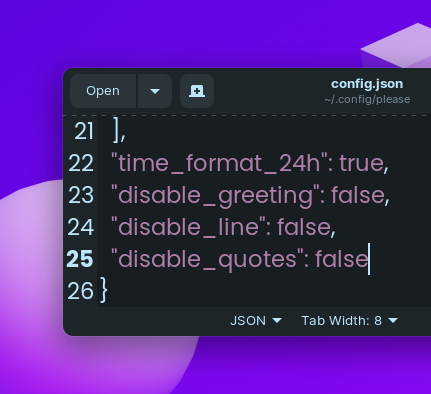
Remove Greeting in please's output
1.Navigate to ~/.config/please
2. Open config.json
3. Change "diable_greeting": false to "diable_greeting": true (All lowercase).
Remove Horizontal Line in please's output
1.Navigate to ~/.config/please
2. Open config.json
3. Change "diable_line": false to "diable_line": true (All lowercase).
Remove Quotes in please's output
1.Navigate to ~/.config/please
2. Open config.json
3. Change "diable_quotes": false to "diable_quotes": true (All lowercase).
💻 Local Development
- To get started, first install poetry:
curl -sSL https://install.python-poetry.org | python3 -
- Clone this project
cdto the project directory and run virtual environment:
poetry shell

# OR THIS, IF 'poetry shell' doesn't work

. "$(dirname $(poetry run which python))/activate"
- Install all dependencies:
poetry install
pleasewill be available to use as a command in the virtual environment after usingpoetry install.
- Finally, run the python script with:
python please/please.py
- To build a WHL package:
poetry build
- The package will be generated in dist folder, you can then use pip to install the WHL file.
- For Nayam: Publish the package with:
poetry publish -u <username> -p <password>
🚮 Uninstalling
Open your terminal and type:
pip uninstall please-cli
and also edit your .zshrc or .bashrc file and remove the line that says please at the end of the file.
♥ Credits
- Thanks to @CodePleaseRun & @guedesfelipe for their contributions.
- Thanks to @lukePeavey for the quotes.json file taken from quotable.io
Related Skills
node-connect
333.3kDiagnose OpenClaw node connection and pairing failures for Android, iOS, and macOS companion apps
claude-opus-4-5-migration
82.0kMigrate prompts and code from Claude Sonnet 4.0, Sonnet 4.5, or Opus 4.1 to Opus 4.5
frontend-design
82.0kCreate distinctive, production-grade frontend interfaces with high design quality. Use this skill when the user asks to build web components, pages, or applications. Generates creative, polished code that avoids generic AI aesthetics.
model-usage
333.3kUse CodexBar CLI local cost usage to summarize per-model usage for Codex or Claude, including the current (most recent) model or a full model breakdown. Trigger when asked for model-level usage/cost data from codexbar, or when you need a scriptable per-model summary from codexbar cost JSON.
