
NadeOCR
An easy and fast-to-use tool for scanning text anywhere with Google's Vision API and other third party services.
Install / Use
/learn @Natsume-197/NadeOCRREADME
NadeOCR
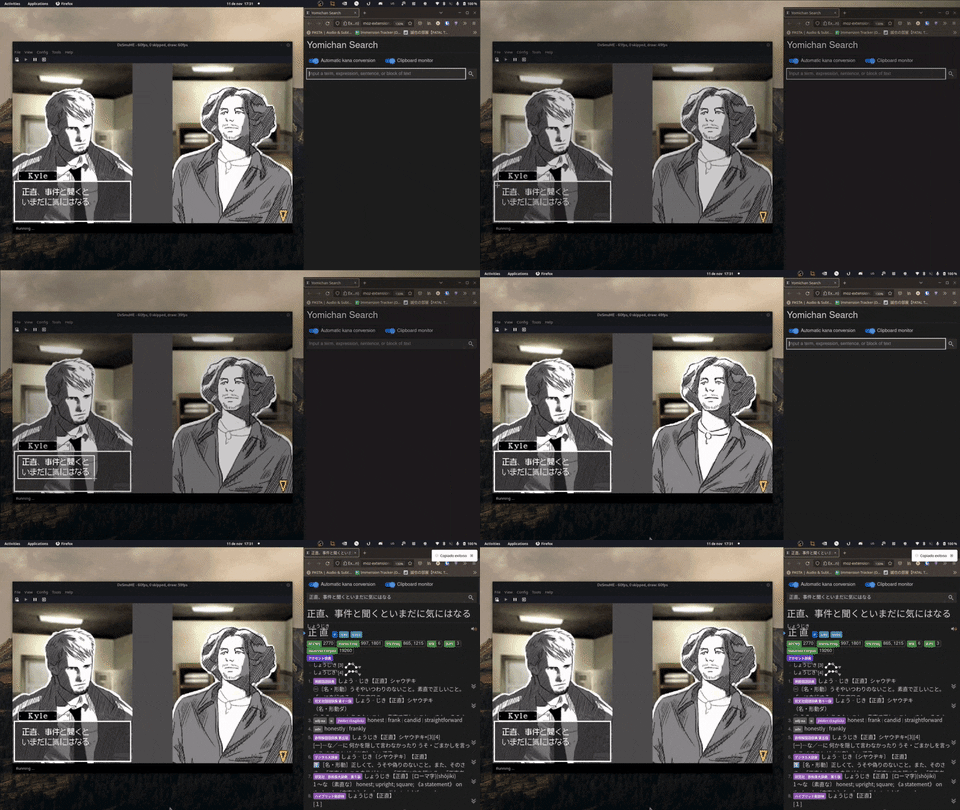
An easy and fast-to-use tool for scanning text anywhere with Google's Vision API and other third party services. This tool is mostly designed for Japanese learners, but should work for anyone else.
Features
- Compatible with Linux and Windows.
- Copy your scanned text immediately to your clipboard.
- Custom hotkeys for scanning quickly and anywhere on your screen.
- Supports a variety of OCR models, including Google's Vision API and Manga-OCR.
- Settings for removing new lines, copying line by line or using your own Regex filter.
Installation
Windows
- Download the latest zip file here.
- Decompress the file in the desired directory.
- Open the extracted folder and execute
NadeOCR.exe.
Note: you must have your google credentiales file credentials.json in order to use Google provider. More information here.
PIP (Windows/Linux)
- To install NadeOCR, run in command line:
pip install nadeocr
- To execute NadeOCR, run in command line:
nadeocr
How to build
Distribution files
You can build and generate distribution archives by using this command in the project's root:
python -m build
Windows
You can also generate an executable for any Windows machine higher than Windows 8 by using PyInstaller with this configuration:
pyinstaller --noconfirm --onedir --windowed --icon "NadeOCR/nadeocr/resources/assets/icon.ico" --name "NadeOCR_v1.0.0" --clean --add-data "NadeOCR/nadeocr;nadeocr/" --additional-hooks-dir "NadeOCR/nadeocr/resources/hooks" --hidden-import "huggingface_hub.repository" --hidden-import "huggingface_hub.hf_api" --collect-data "torch" --copy-metadata "torch" --copy-metadata "tqdm" --copy-metadata "regex" --copy-metadata "requests" --copy-metadata "packaging" --copy-metadata "filelock" --copy-metadata "numpy" --copy-metadata "tokenizers" --copy-metadata "importlib" --collect-data "unidic_lite" --hidden-import "unidic_lite" --collect-data "manga_ocr" --collect-data "toml" "NadeOCR/nadeocr/main.py"
Contributing
All contributions are appreciated. You are welcome to contribute whatever you think will be helpful, so feel free to create an issue or submit a pull request for review and discussion.
Please email me at jonathan.197ariza@gmail.com if you have any questions about the codebase.
Acknowledgements
This project wouldn't be possible without:
- Google's Vision API for detecting and recognising a wide variety of languages including, but not limited to, English, Japanese and Spanish.
- The awesome Manga-OCR model by Maciej Budyś for recognizing Japanese characters in manga.
Things to do
High priority
- Add support to PaddleOCR.
- Add multi-language (English) support to the PyQT GUI.
- Allow custom filters/colour/contrast for cropped images.
- Add Regex support.
Low priority
- Add Android support.
- Add support for running on startup (Windows/Linux).
License
This software is licensed under the GPLv3 (see [LICENSE) and uses third party libraries that are distributed under their own terms (see LICENSE-3RD-PARTY).

Related Skills
node-connect
350.1kDiagnose OpenClaw node connection and pairing failures for Android, iOS, and macOS companion apps
frontend-design
109.9kCreate distinctive, production-grade frontend interfaces with high design quality. Use this skill when the user asks to build web components, pages, or applications. Generates creative, polished code that avoids generic AI aesthetics.
openai-whisper-api
350.1kTranscribe audio via OpenAI Audio Transcriptions API (Whisper).
qqbot-media
350.1kQQBot 富媒体收发能力。使用 <qqmedia> 标签,系统根据文件扩展名自动识别类型(图片/语音/视频/文件)。
