
MinkowskiEngine
Minkowski Engine is an auto-diff neural network library for high-dimensional sparse tensors
Install / Use
/learn @NVIDIA/MinkowskiEngineQuality Score
Category
Education & ResearchSupported Platforms
Tags
README
Minkowski Engine



The Minkowski Engine is an auto-differentiation library for sparse tensors. It supports all standard neural network layers such as convolution, pooling, unpooling, and broadcasting operations for sparse tensors. For more information, please visit the documentation page.
News
- 2021-08-11 Docker installation instruction added
- 2021-08-06 All installation errors with pytorch 1.8 and 1.9 have been resolved.
- 2021-04-08 Due to recent errors in pytorch 1.8 + CUDA 11, it is recommended to use anaconda for installation.
- 2020-12-24 v0.5 is now available! The new version provides CUDA accelerations for all coordinate management functions.
Example Networks
The Minkowski Engine supports various functions that can be built on a sparse tensor. We list a few popular network architectures and applications here. To run the examples, please install the package and run the command in the package root directory.
| Examples | Networks and Commands |
|:---------------------:|:-------------------------------------------------------------------------------------------------------------------------------------------------------------------------------:|
| Semantic Segmentation | <img src="https://nvidia.github.io/MinkowskiEngine/_images/segmentation_3d_net.png"> <br /> <img src="https://nvidia.github.io/MinkowskiEngine/_images/segmentation.png" width="256"> <br /> python -m examples.indoor |
| Classification | 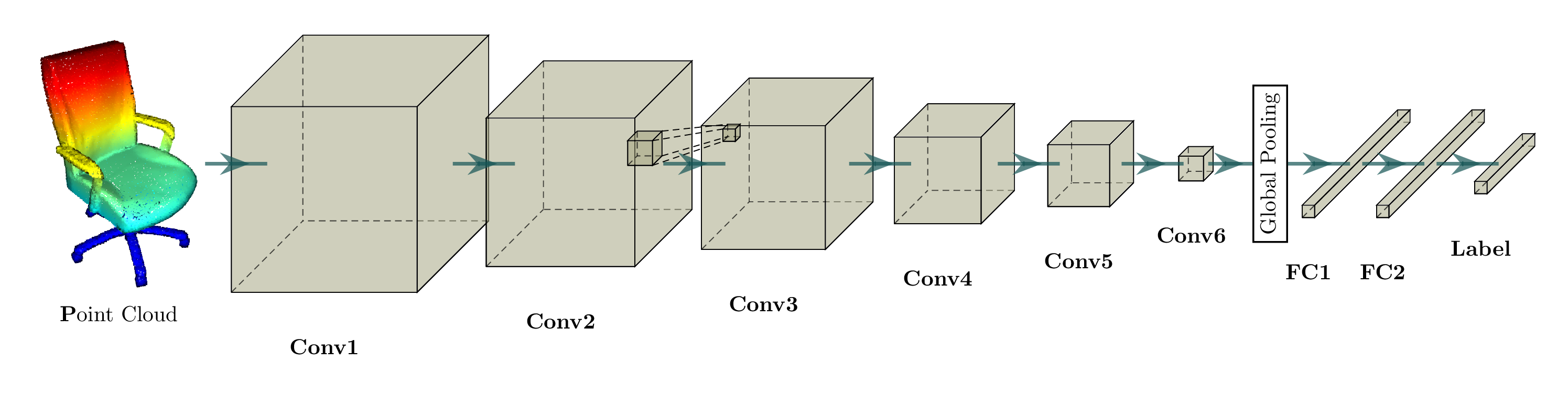 <br />
 python -m examples.classification_modelnet40 |
| Reconstruction | <img src="https://nvidia.github.io/MinkowskiEngine/_images/generative_3d_net.png"> <br /> <img src="https://nvidia.github.io/MinkowskiEngine/_images/generative_3d_results.gif" width="256"> <br /> python -m examples.reconstruction |
| Completion | <img src="https://nvidia.github.io/MinkowskiEngine/_images/completion_3d_net.png"> <br /> python -m examples.completion |
| Detection | <img src="https://nvidia.github.io/MinkowskiEngine/_images/detection_3d_net.png"> |
Sparse Tensor Networks: Neural Networks for Spatially Sparse Tensors
Compressing a neural network to speedup inference and minimize memory footprint has been studied widely. One of the popular techniques for model compression is pruning the weights in convnets, is also known as sparse convolutional networks. Such parameter-space sparsity used for model compression compresses networks that operate on dense tensors and all intermediate activations of these networks are also dense tensors.
However, in this work, we focus on spatially sparse data, in particular, spatially sparse high-dimensional inputs and 3D data and convolution on the surface of 3D objects, first proposed in Siggraph'17. We can also represent these data as sparse tensors, and these sparse tensors are commonplace in high-dimensional problems such as 3D perception, registration, and statistical data. We define neural networks specialized for these inputs as sparse tensor networks and these sparse tensor networks process and generate sparse tensors as outputs. To construct a sparse tensor network, we build all standard neural network layers such as MLPs, non-linearities, convolution, normalizations, pooling operations as the same way we define them on a dense tensor and implemented in the Minkowski Engine.
We visualized a sparse tensor network operation on a sparse tensor, convolution, below. The convolution layer on a sparse tensor works similarly to that on a dense tensor. However, on a sparse tensor, we compute convolution outputs on a few specified points which we can control in the generalized convolution. For more information, please visit the documentation page on sparse tensor networks and the terminology page.
| Dense Tensor | Sparse Tensor | |:---------------------------------------------------------------------------:|:----------------------------------------------------------------------------:| | <img src="https://nvidia.github.io/MinkowskiEngine/_images/conv_dense.gif"> | <img src="https://nvidia.github.io/MinkowskiEngine/_images/conv_sparse.gif"> |
Features
- Unlimited high-dimensional sparse tensor support
- All standard neural network layers (Convolution, Pooling, Broadcast, etc.)
- Dynamic computation graph
- Custom kernel shapes
- Multi-GPU training
- Multi-threaded kernel map
- Multi-threaded compilation
- Highly-optimized GPU kernels
Requirements
- Ubuntu >= 14.04
- CUDA >= 10.1.243 and the same CUDA version used for pytorch (e.g. if you use conda cudatoolkit=11.1, use CUDA=11.1 for MinkowskiEngine compilation)
- pytorch >= 1.7 To specify CUDA version, please use conda for installation. You must match the CUDA version pytorch uses and CUDA version used for Minkowski Engine installation.
conda install -y -c nvidia -c pytorch pytorch=1.8.1 cudatoolkit=10.2) - python >= 3.6
- ninja (for installation)
- GCC >= 7.4.0
Installation
You can install the Minkowski Engine with pip, with anaconda, or on the system directly. If you experience issues installing the package, please checkout the the installation wiki page.
If you cannot find a relevant problem, please report the issue on the github issue page.
Pip
The MinkowskiEngine is distributed via PyPI MinkowskiEngine which can be installed simply with pip.
First, install pytorch following the instruction. Next, install openblas.
sudo apt install build-essential python3-dev libopenblas-dev
pip install torch ninja
pip install -U MinkowskiEngine --install-option="--blas=openblas" -v --no-deps

# For pip installation from the latest source
# pip install -U git+https://github.com/NVIDIA/MinkowskiEngine --no-deps
If you want to specify arguments for the setup script, please refer to the following command.
# Uncomment some options if things don't work
# export CXX=c++; # set this if you want to use a different C++ compiler
# export CUDA_HOME=/usr/local/cuda-11.1; # or select the correct cuda version on your system.
pip install -U git+https://github.com/NVIDIA/MinkowskiEngine -v --no-deps \
#                           \ # uncomment the following line if you want to force cuda installation
#                           --install-option="--force_cuda" \
#                           \ # uncomment the following line if you want to force no cuda installation. force_cuda supercedes cpu_only
#                           --install-option="--cpu_only" \
#                           \ # uncomment the following line to override to openblas, atlas, mkl, blas
#                           --install-option="--blas=openblas" \
Anaconda
MinkowskiEngine supports both CUDA 10.2 and cuda 11.1, which work for most of latest pytorch versions.
CUDA 10.2
We recommend python>=3.6 for installation.
First, follow the anaconda documentation to install anaconda on your computer.
sudo apt install g++-7  # For CUDA 10.2, must use GCC < 8
# Make sure `g++-7 --version` is at least 7.4.0
conda create -n py3-mink python=3.8
conda activate py3-mink

conda install openblas-devel -c anaconda
conda install pytorch=1.9.0 torchvision cudatoolkit=10.2 -c pytorch -c nvidia

# Install MinkowskiEngine
export CXX=g++-7
# Uncomment the following line to specify the cuda home. Make sure `$CUDA_HOME/nvcc --version` is 10.2
# export CUDA_HOME=/usr/local/cuda-10.2
pip install -U git+https://github.com/NVIDIA/MinkowskiEngine -v --no-deps --install-option="--blas_include_dirs=${CONDA_PREFIX}/include" --install-option="--blas=openblas"

# Or if you want local MinkowskiEngine
git clone https://github.com/NVIDIA/MinkowskiEngine.git
cd MinkowskiEngine
export CXX=g++-7
python setup.py install --blas_include_dirs=${CONDA_PREFIX}/include --blas=openblas
CUDA 11.X
We recommend python>=3.6 for installation.
First, follow [the anaconda documen
Related Skills
best-practices-researcher
The most comprehensive Claude Code skills registry | Web Search: https://skills-registry-web.vercel.app
mentoring-juniors
Community-contributed instructions, agents, skills, and configurations to help you make the most of GitHub Copilot.
groundhog
399Groundhog's primary purpose is to teach people how Cursor and all these other coding agents work under the hood. If you understand how these coding assistants work from first principles, then you can drive these tools harder (or perhaps make your own!).
isf-agent
a repo for an agent that helps researchers apply for isf funding
