
Moodle
Moodle attendance bot, which automatically marks attendance on Moodle according to set timetable or by selecting a subject .With GUI and CLI interface.
Install / Use
/learn @Mysterious-Owl/MoodleREADME
Moodle
This program is basically to mark attendance and open moodle.<br> Just download the installer and run it! <br> Install Now <br><br> For video on how to install and setup-<br> https://www.youtube.com/watch?v=vzU-uWL1MRs <br>
Appreciation from PySimpleGui https://github.com/Mysterious-Owl/color-identification/issues/2
The creator of the library I used for creating this software
To mark automatically
Import the 'moodle.xml' file in 'Task Schedular' in Windows. <br>
Features:
- GUI console.
- Option to open browser or not.
- Multi-user support.
- Random Theme every time.
- CLI interface.
- Will mark attendance according to current time.
- Mark attendance of this particular subject.
- Opens moodle.
- Show time table.
- Highlight current period.
- Shows the list of all subject.
- Setting to change login ceredentials or attendance links.
- Show help.
- Logs status, so can be debugged esily.
- See automatic marking stats
Installer Features:
<ul> <li>GUI console. </li> <li>Browse directory to select installation location. </li> <li>Craetes desktop and start shortcut. </li> <li>Download required files. </li> </ul> <br>ScreenShots
Opening Screen
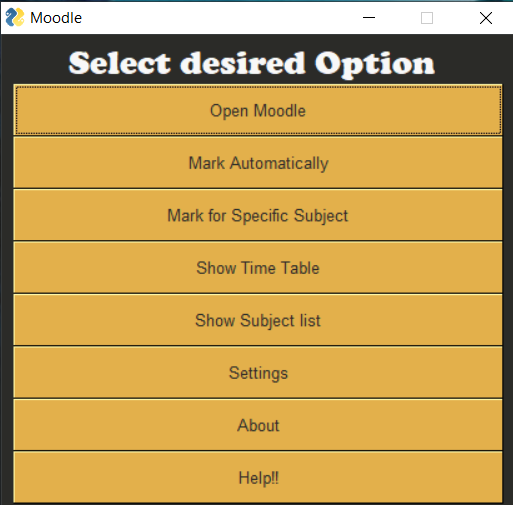 <br>
<br>
Time Table
 <br>
<br>
For More Visit Here
<br>
CLI commands:
<pre> (no arguments) Open GUI console. <br> auto Will mark attendance according to current time. <br> mark Mark attendance of this particular subject. <br> open Opens moodle. <br> tt Print time table. <br> subject Prints the list of all subject. <br> print Prints the auto attendance marking stats. <br> change Change settings <br> help Show help. <br> </pre> <br>NOTE
Install in any directory other than system because program will not be able to write/read the files without administrative priviledges
If chrome doesn't open, shows error, then try changing the version of chromdriver, download the version compatible with your chrome version and replace it in moodleprogram/config folder
<br>
