
Chispa
PySpark test helper methods with beautiful error messages
Install / Use
/learn @MrPowers/ChispaREADME
chispa





chispa provides fast PySpark test helper methods that output descriptive error messages.
This library makes it easy to write high quality PySpark code.
Fun fact: "chispa" means Spark in Spanish ;)
Installation
Install the latest version with
pip install chispa
Or if you use Poetry add this library as a development dependency with
poetry add chispa --group dev
Column equality
Suppose you have a function that removes the non-word characters in a string.
def remove_non_word_characters(col):
    return F.regexp_replace(col, "[^\\w\\s]+", "")
Create a SparkSession so you can create DataFrames.
from pyspark.sql import SparkSession

spark = (SparkSession.builder
  .master("local")
  .appName("chispa")
  .getOrCreate())
Create a DataFrame with a column that contains strings with non-word characters, run the remove_non_word_characters function, and check that all these characters are removed with the chispa assert_column_equality method.
import pytest

from chispa import assert_column_equality
import pyspark.sql.functions as F

def test_remove_non_word_characters_short():
    data = [
        ("jo&&se", "jose"),
        ("**li**", "li"),
        ("#::luisa", "luisa"),
        (None, None)
    ]
    df = (spark.createDataFrame(data, ["name", "expected_name"])
        .withColumn("clean_name", remove_non_word_characters(F.col("name"))))
    assert_column_equality(df, "clean_name", "expected_name")
Let's write another test that'll fail to see how the descriptive error message lets you easily debug the underlying issue.
Here's the failing test:
def test_remove_non_word_characters_nice_error():
    data = [
        ("matt7", "matt"),
        ("bill&", "bill"),
        ("isabela*", "isabela"),
        (None, None)
    ]
    df = (spark.createDataFrame(data, ["name", "expected_name"])
        .withColumn("clean_name", remove_non_word_characters(F.col("name"))))
    assert_column_equality(df, "clean_name", "expected_name")
Here's the nicely formatted error message:
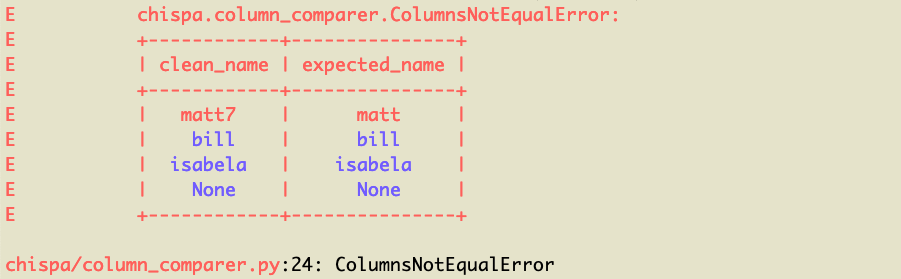
You can see the matt7 / matt row of data is what's causing the error (note it's highlighted in red). The other rows are colored blue because they're equal.
DataFrame equality
We can also test the remove_non_word_characters method by creating two DataFrames and verifying that they're equal.
Creating two DataFrames is slower and requires more code, but comparing entire DataFrames is necessary for some tests.
from chispa import assert_df_equality

def test_remove_non_word_characters_long():
    source_data = [
        ("jo&&se",),
        ("**li**",),
        ("#::luisa",),
        (None,)
    ]
    source_df = spark.createDataFrame(source_data, ["name"])

    actual_df = source_df.withColumn(
        "clean_name",
        remove_non_word_characters(F.col("name"))
    )

    expected_data = [
        ("jo&&se", "jose"),
        ("**li**", "li"),
        ("#::luisa", "luisa"),
        (None, None)
    ]
    expected_df = spark.createDataFrame(expected_data, ["name", "clean_name"])

    assert_df_equality(actual_df, expected_df)
Let's write another test that'll return an error, so you can see the descriptive error message.
def test_remove_non_word_characters_long_error():
    source_data = [
        ("matt7",),
        ("bill&",),
        ("isabela*",),
        (None,)
    ]
    source_df = spark.createDataFrame(source_data, ["name"])

    actual_df = source_df.withColumn(
        "clean_name",
        remove_non_word_characters(F.col("name"))
    )

    expected_data = [
        ("matt7", "matt"),
        ("bill&", "bill"),
        ("isabela*", "isabela"),
        (None, None)
    ]
    expected_df = spark.createDataFrame(expected_data, ["name", "clean_name"])

    assert_df_equality(actual_df, expected_df)
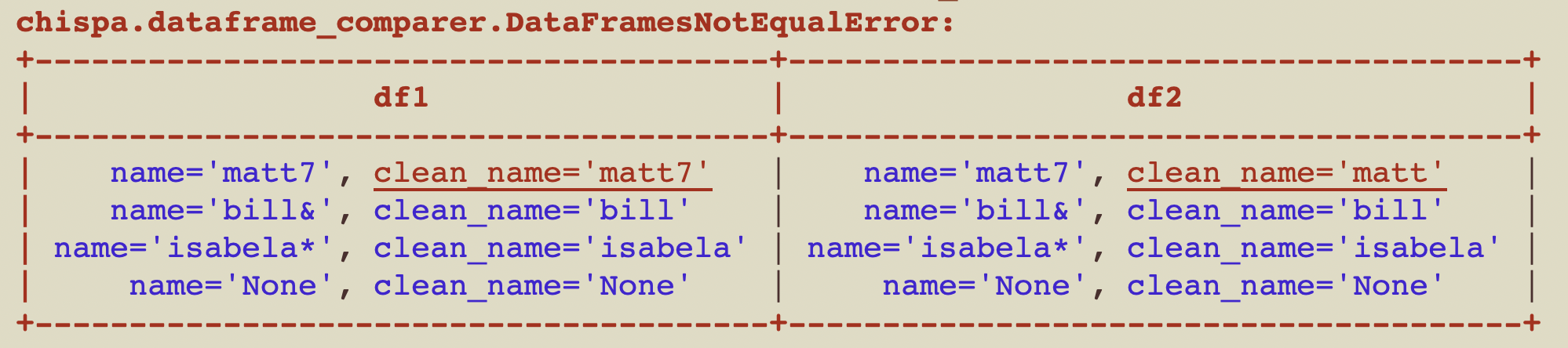
Here's the nicely formatted error message:
Ignore row order
You can easily compare DataFrames, ignoring the order of the rows. The content of the DataFrames is usually what matters, not the order of the rows.
Here are the contents of df1:
+--------+
|some_num|
+--------+
|       1|
|       2|
|       3|
+--------+
Here are the contents of df2:
+--------+
|some_num|
+--------+
|       2|
|       1|
|       3|
+--------+
Here's how to confirm df1 and df2 are equal when the row order is ignored.
assert_df_equality(df1, df2, ignore_row_order=True)
If you don't specify to ignore_row_order then the test will error out with this message:
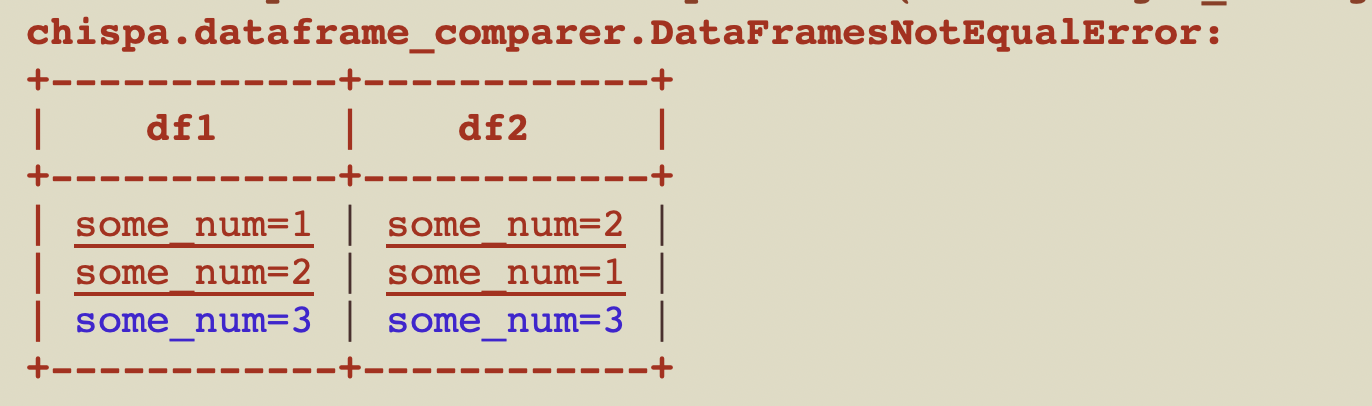
The rows aren't ordered by default because sorting slows down the function.
Ignore column order
This section explains how to compare DataFrames, ignoring the order of the columns.
Suppose you have the following df1:
+----+----+
|num1|num2|
+----+----+
|   1|   7|
|   2|   8|
|   3|   9|
+----+----+
Here are the contents of df2:
+----+----+
|num2|num1|
+----+----+
|   7|   1|
|   8|   2|
|   9|   3|
+----+----+
Here's how to compare the equality of df1 and df2, ignoring the column order:
assert_df_equality(df1, df2, ignore_column_order=True)
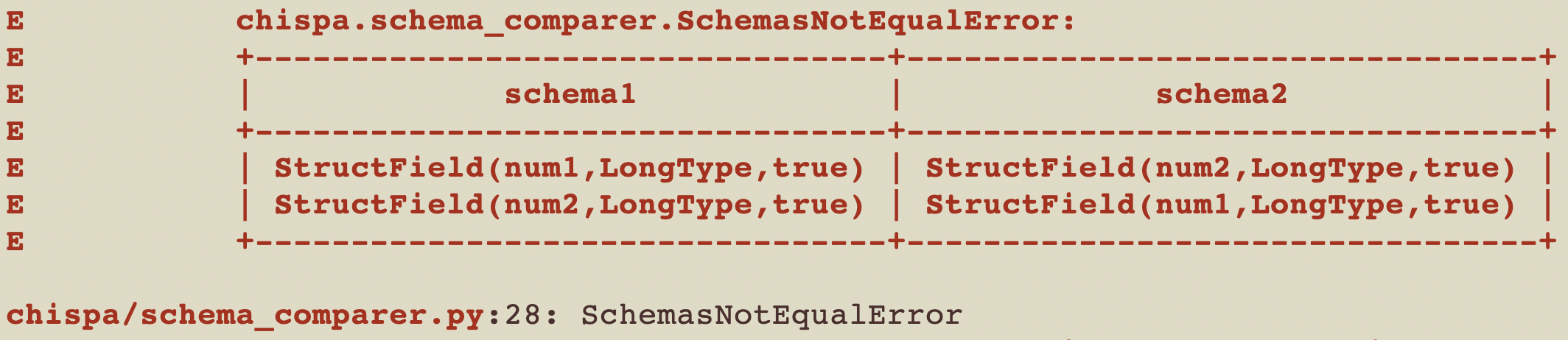
Here's the error message you'll see if you run assert_df_equality(df1, df2), without ignoring the column order.
Ignore specific columns
This section explains how to compare DataFrames, ignoring specific columns.
Suppose you have the following df1:
+------------+-------------+
|    name    | clean_name  |
+------------+-------------+
| "matt7"    |   "matt7"    |
| "bill&"    |   "bill"    |
| "isabela*" |   "isabela" |
| "None"     |   "None"    |
+------------+-------------+
Here are the contents of df2:
+------------+-------------+
|    name    | clean_name  |
+------------+-------------+
| "matt7"    |   "matt"    |
| "bill&"    |   "bill"    |
| "isabela*" |   "isabela" |
| "None"     |   "None"    |
+------------+-------------+
Here's how to compare the equality of df1 and df2, ignoring the column clean_name:
assert_df_equality(df1, df2, ignore_columns=["clean_name"])
Here's the error message you'll see if you run assert_df_equality(df1, df2), without ignoring the column clean_name.
Ignore nullability
Each column in a schema has three properties: a name, data type, and nullable property. The column can accept null values if nullable is set to true.
You'll sometimes want to ignore the nullable property when making DataFrame comparisons.
Suppose you have the following df1:
+-----+---+
| name|age|
+-----+---+
| juan|  7|
|bruna|  8|
+-----+---+
And this df2:
+-----+---+
| name|age|
+-----+---+
| juan|  7|
|bruna|  8|
+-----+---+
You might be surprised to find that in this example, df1 and df2 are not equal and will error out with this message:
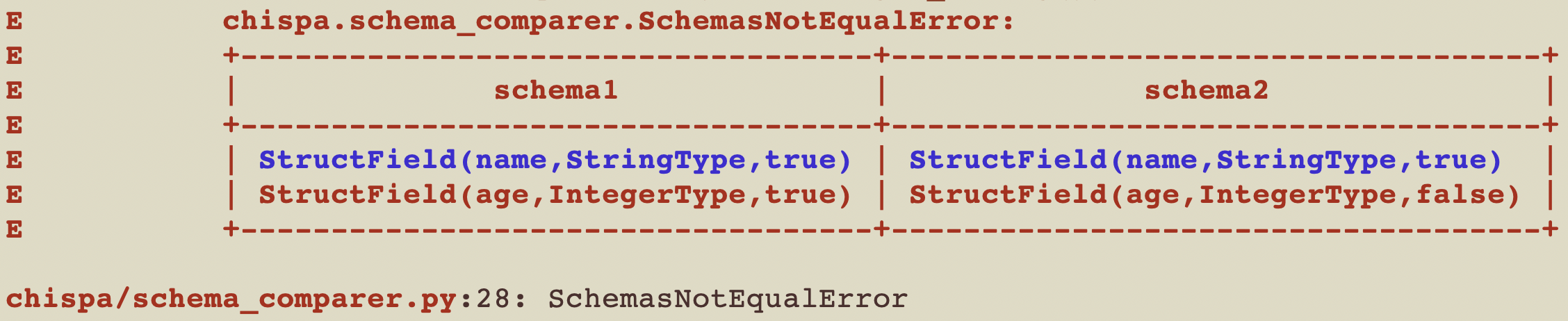
Examine the code in this contrived example to better understand the error:
def ignore_nullable_property():
    s1 = StructType([
       StructField("name", StringType(), True),
       StructField("age", IntegerType(), True)])
    df1 = spark.createDataFrame([("juan", 7), ("bruna", 8)], s1)
    s2 = StructType([
       StructField("name", StringType(), True),
       StructField("age", IntegerType(), False)])
    df2 = spark.createDataFrame([("juan", 7), ("bruna", 8)], s2)
    assert_df_equality(df1, df2)
You can ignore the nullable property when assessing equality by adding a flag:
assert_df_equality(df1, df2, ignore_nullable=True)
Other public DataFrame comparison options
assert_df_equality also supports additional public options that are useful in real-world test suites:
ignore_metadata=Trueignores schema metadata differences when data and field types are otherwise equivalent.transforms=[...]applies the same transform pipeline to both DataFrames before comparison.underline_cells=Truehighlights mismatched cells in error output for faster debugging.
Example:
assert_df_equality(
    actual_df,
    expected_df,
    transforms=[lambda df: df.orderBy("id")],
    ignore_metadata=True,
    underline_cells=True,
)
Elements contained within an ArrayType() also have a nullable property, in addition to the nullable property of the column schema. These are also ignored when passing ignore_nullable=True.
Again, examine the following code to understand the error that ignore_nullable=True bypasses:
def ignore_nullable_property_array():
    s1 = StructType([
        StructField("name", StringType(), True),
        StructField("coords", ArrayType(DoubleType(), True), True),])
    df1 = spark.createDataFrame([("juan", [1.42, 3.5]), ("bruna", [2.76, 3.2])], s
