
Scylla
Intelligent proxy pool for Humans™ to extract content from the internet and build your own Large Language Models in this new AI era
Install / Use
/learn @MikeChongCan/ScyllaREADME





Scylla
An intelligent proxy pool for humanities, to extract content from the internet and build your own Large Language Models in this new AI era.
Key features:
- Automatic proxy ip crawling and validation
- Easy-to-use JSON API
- Simple but beautiful web-based user interface (eg. geographical distribution of proxies)
- Get started with only 1 command minimally
- Simple HTTP Forward proxy server
- Scrapy and requests integration with only 1 line of code minimally
- Headless browser crawling
Get started
Installation
Install with Docker (highly recommended)
docker run -d -p 8899:8899 -p 8081:8081 -v /var/www/scylla:/var/www/scylla --name scylla wildcat/scylla:latest
Install directly via pip
pip install scylla
scylla --help
scylla # Run the crawler and web server for JSON API
Install from source
git clone https://github.com/imWildCat/scylla.git
cd scylla

pip install -r requirements.txt

cd frontend
npm install
cd ..

make assets-build

python -m scylla
Usage
This is an example of running a service locally (localhost), using
port 8899.
Note: You might have to wait for 1 to 2 minutes in order to get some proxy ips populated in the database for the first time you use Scylla.
JSON API
Proxy IP List
http://localhost:8899/api/v1/proxies
Optional URL parameters:
| Parameters | Default value | Description |
| ----------- | ------------- | ------------------------------------------------------------ |
| page | 1 | The page number |
| limit | 20 | The number of proxies shown on each page |
| anonymous | any | Show anonymous proxies or not. Possible values:true, only anonymous proxies; false, only transparent proxies |
| https | any | Show HTTPS proxies or not. Possible values:true, only HTTPS proxies; false, only HTTP proxies |
| countries | None | Filter proxies for specific countries. Format example: US, or multi-countries: US,GB |
Sample result:
{
    "proxies": [{
        "id": 599,
        "ip": "91.229.222.163",
        "port": 53281,
        "is_valid": true,
        "created_at": 1527590947,
        "updated_at": 1527593751,
        "latency": 23.0,
        "stability": 0.1,
        "is_anonymous": true,
        "is_https": true,
        "attempts": 1,
        "https_attempts": 0,
        "location": "54.0451,-0.8053",
        "organization": "AS57099 Boundless Networks Limited",
        "region": "England",
        "country": "GB",
        "city": "Malton"
    }, {
        "id": 75,
        "ip": "75.151.213.85",
        "port": 8080,
        "is_valid": true,
        "created_at": 1527590676,
        "updated_at": 1527593702,
        "latency": 268.0,
        "stability": 0.3,
        "is_anonymous": true,
        "is_https": true,
        "attempts": 1,
        "https_attempts": 0,
        "location": "32.3706,-90.1755",
        "organization": "AS7922 Comcast Cable Communications, LLC",
        "region": "Mississippi",
        "country": "US",
        "city": "Jackson"
    },
    ...
    ],
    "count": 1025,
    "per_page": 20,
    "page": 1,
    "total_page": 52
}
System Statistics
http://localhost:8899/api/v1/stats
Sample result:
{
    "median": 181.2566407083,
    "valid_count": 1780,
    "total_count": 9528,
    "mean": 174.3290085201
}
HTTP Forward Proxy Server
By default, Scylla will start a HTTP Forward Proxy Server on port
8081. This server will select one proxy updated recently from the
database and it will be used for forward proxy. Whenever an HTTP request
comes, the proxy server will select a proxy randomly.
Note: HTTPS requests are not supported at present.
The example for curl using this proxy server is shown below:
curl http://api.ipify.org -x http://127.0.0.1:8081
You could also use this feature with requests:
requests.get('http://api.ipify.org', proxies={'http': 'http://127.0.0.1:8081'})
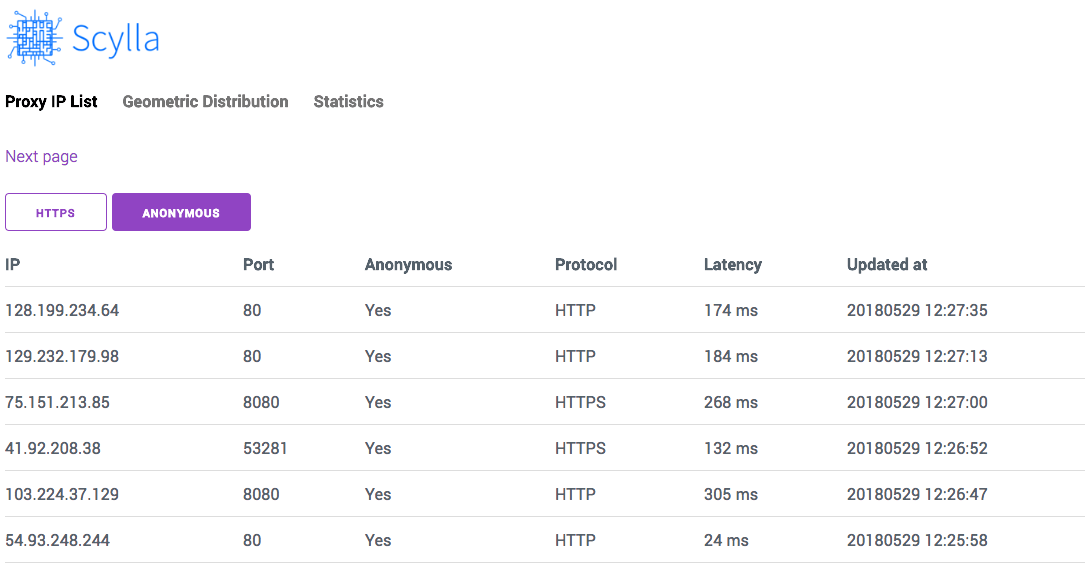
Web UI
Open http://localhost:8899 in your browser to see the Web UI of this
project.
Proxy IP List
http://localhost:8899/
Screenshot:
Globally Geographical Distribution Map
http://localhost:8899/#/geo
Screenshot:

API Documentation
Please read Module Index.
Roadmap
Please see Projects.
Development and Contribution
git clone https://github.com/imWildCat/scylla.git
cd scylla

pip install -r requirements.txt

npm install
make assets-build
Testing
If you wish to run tests locally, the commands are shown below:
pip install -r tests/requirements-test.txt
pytest tests/
You are welcomed to add more test cases to this project, increasing the robustness of this project.
Naming of This Project
Scylla is derived from the name of a group of memory chips in the American TV series, Prison Break. This project was named after this American TV series to pay tribute to it.
Help
How to install Python Scylla on CentOS7
Donation
If you find this project useful, could you please donate some money to it?
No matter how much the money is, Your donation will inspire the author to develop new features continuously! 🎉 Thank you!
The ways for donation are shown below:
GitHub Sponsor
I super appreciate if you can join my sponsors here.
https://github.com/sponsors/imWildCat
PayPal

License
Apache License 2.0. For more details, please read the LICENSE file.
Related Skills
qqbot-channel
344.1kQQ 频道管理技能。查询频道列表、子频道、成员、发帖、公告、日程等操作。使用 qqbot_channel_api 工具代理 QQ 开放平台 HTTP 接口,自动处理 Token 鉴权。当用户需要查看频道、管理子频道、查询成员、发布帖子/公告/日程时使用。
claude-opus-4-5-migration
96.8kMigrate prompts and code from Claude Sonnet 4.0, Sonnet 4.5, or Opus 4.1 to Opus 4.5
docs-writer
99.8k`docs-writer` skill instructions As an expert technical writer and editor for the Gemini CLI project, you produce accurate, clear, and consistent documentation. When asked to write, edit, or revie
model-usage
344.1kUse CodexBar CLI local cost usage to summarize per-model usage for Codex or Claude, including the current (most recent) model or a full model breakdown. Trigger when asked for model-level usage/cost data from codexbar, or when you need a scriptable per-model summary from codexbar cost JSON.
