
UserChrome.js
Firefox userChrome.js scripts: Multi Tab Rows, History Submenus II, Page Title in URL Bar, and more...
Install / Use
/learn @Merci-chao/UserChrome.jsREADME
🇯🇵 日本語版紹介
💡🐞 You're welcome to post your suggestions and bug reports here.
Multi Tab Rows

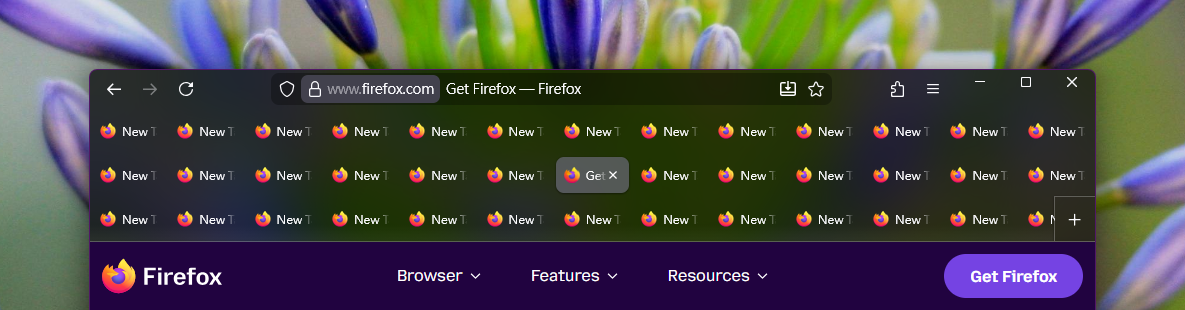
Make Firefox support multiple rows of tabs.
Introduction
Check out the introduction page to explore the highlights with screenshots and detailed descriptions.
Compatibility
-
Firefox 115, 148 to 150 (excluding ESR versions)
-
Windows 7 to 11, Ubuntu
-
Supports general
userChrome.jsscript loaders, such as:
Cautions
🚨 Please read the following notes carefully before using this script:
-
This script is developed for Windows and has been lightly tested on Ubuntu (Linux). It has not been tested on macOS and probably does not work there.
-
Since this script contains many sensitive layout calculations designed for native Firefox, any tab-related legacy extensions (e.g. Tab Mix Plus), user scripts (
*.uc.js) or CSS styles (userChrome.css) can cause weird glitches and bugs. <br>⚠️ Please follow the installation steps below carefully. -
This is an unofficial and complex script maintained solely by me. It may contain unforeseen bugs, and if unexpected issues occur, restarting Firefox may be required. In extreme cases — especially when using an outdated version of the script with a newly updated Firefox — the browser may become unusable, potentially resulting in the permanent loss of your previous browsing session. You may need to disable the script in such situations. Please use this script only if you are capable of and prepared to handle these risks.
-
This script needs to override the tab functions of Firefox and requires
security.allow_unsafe_dangerous_privileged_evil_evalto be enabled on Firefox 139+ for this purpose. The said setting is enabled automatically once you are applying this script, and it requires a manual disabling throughabout:configafter disabling or removing the script. Please note that and use this script with understanding. -
This script is more like a meticulous tab extension than a simple multi-row tweak. It consolidates thousands of lines of logic and styling into a single file, yet remains as manageable as a typical script. It is a hardcore implementation built with perfection and performance in mind. The number of lines is never a concern during development — just as Tab Mix Plus could never be achieved with only a few hundred lines of code. However, if you prefer something simple and fully understandable in coding — providing a stronger sense of safety and allowing you to easily make changes at will — this may not be your favorite choice.
-
Always use scripts and files from sources you trust.
Installation
-
Install the script loader. Skip this step if you already have some scripts in use. There are several script loaders available:
firefox-scriptsby xiaoxiaoflood, maintained by onemenfx-autoconfigby MrOtherGuyuserChrome.jsby alice0775 <br><br>There is no difference among them for applying this script, so simply choose your preferred one. If you have no preference, you can follow the instructions in the 📘 Tab Mix Plus - Docs to install thefirefox-scripts. ⛔ DO NOT install Tab Mix Plus as it will cause conflict. <br>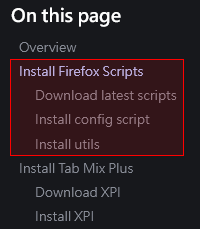 <br>📝 The file placement location may slightly vary depending on the loader. The following steps assume the use of
 firefox-scripts.
-
Make sure that no other tab-related scripts and CSS styles are currently in use. Just in case, temporarily move all other
*.uc.jsanduserChrome.cssfiles out ofchrome. <br>⚠️ There are many reports of issues caused by conflicts with customized styles. -
Download the 📥 script file and place it into
chrome. -
Restart Firefox to apply.
-
If you moved some files out of
chromein step 2, please confirm that this script works as expected. Once verified, you can move the files back. If any conflicts arise, modify the scripts and style rules accordingly. If you need help, please provide the information 🛟 here.
[!IMPORTANT] If the script loader stops working after updating Firefox, please visit the page above and reinstall the latest version of the script loader.
Settings
Open about:config and search for the prefix userChromeJS.multiTabRows@Merci.chao.. Settings shown in gray are disabled due to dependency on other preferences.
If configuring via user.js (not recommended), be sure to include the prefix userChromeJS.multiTabRows@Merci.chao.. Example:
user_pref("userChromeJS.multiTabRows@Merci.chao.maxTabRows", 5);
[!NOTE] Many of these settings may not take effect due to dependencies with other preferences. It is strongly recommended to configure them via
about:configrather than usinguser.js.
Interactions
| Name (w/ prefix) | Description |
| ------------- | ------------- |
| animateTabMoveMaxCount<span title="Defective">🐞</span> | When the number of dragged tabs exceeds this value, disable the drag & drop animation, and show the drop indicator instead. Minimum: 0. If dragging too many tabs causes lag, consider lowering this value.<br>📝 Note: Some tab grouping operations may be unavailable, and the final drop position is determined by Firefox's native behavior, which may not behave as expected in certain scenarios (e.g. Firefox bug #1985434, #1988159, #1988162, #1988194). |
| animateTabMoveShiftKeyToPause<span title="Defective">🐞</span> | When pressing Shift key, pause the drag & drop animation and show the drop indicator instead. |
| animationDuration | Duration of animations in milliseconds (valid range: 0 - 1000). Note: Lengthy animations could strain system performance. |
| ~~disableDragToPinOrUnpin~~<span title="Removed">🗑</span> | Use the built-in preference browser.tabs.dragDrop.dragToPin.enabled instead. |
| dragStackPreceding | Stack the preceding selected tabs of the dragged one (see browser.tabs.dragDrop.multiselectStacking). When dragging the middle tab among selected ones, the following ones of the selected tabs may move forward undesirably. Disabling this setting can avoid the issue. |
| ~~dragToGroupTabs~~<span title="Removed">🗑</span> | Use the built-in preference browser.tabs.dragDrop.createGroup.enabled instead. |
| dynamicMoveOverThreshold | Make tab-dragging movement smoother in certain scenarios, e.g. dragging pinned or grouped tabs. Not available on Firefox 115, or browser.tabs.dragDrop.createGroup.enabled is false. |
| hideDragPreview | Hide the drag preview that appears next to the cursor during dragging:<ul><li>0 - never</li><li>1 - tab groups only</li><li>2 - tabs only</li><li>3 - both</li></ul> |
| <span id="hidePinnedDropIndicator">hidePinnedDropIndicator</span> | Hide the indicator that appears when dragging a tab to pin it, if there are no existing pinned tabs. Not available on Firefox 115. |
| hideScrollButtonsWhenDragging | Visually hide the up/down scroll buttons when dragging. |
| linesToDragScroll | How many rows to scroll when dragging tabs to top/bottom edge. Minimum: 1. |
| linesToScroll | How many rows to scroll when using the mouse wheel. Minimum: 1. |
| previewPanelNoteEditable | Allows the tab preview panel to be hovered, and the note inside to be editable (Firefox 148+). |
| previewPanelShifted | Shift the preview panel when there are multiple rows, reducing the effect of the panel blocking items in the rows underneath. Affects tabs only when previewPanelNoteEditable is true. Not available on Firefox 115.<ul><li>0 - never</li><li>1 - for groups</li><li>2 - for tabs</li><li>3 - for both</li></ul> |
| previewPanelShiftedAlways | Shift the preview panel even when there is only one row. |
| scrollButtonsSize | The size (in pixels) of the scroll buttons during dragging. Minimum: 0, but it will be rendered as at least 2 device pixels in height; the maximum is limited to half the tab height. |
Tab Bar Layout
| Name (w/ prefix) | Description |
| ------------- | ------------- |
| autoCollapse<span title="Experimental">🧪</span> | Tabs will collapse to a single row when the cursor is not hovering. Enabling this feature will forcibly disable tabsUnderControlButtons and positionPinnedTabs. On Firefox 115, setting layout.css.has-selector.enabled
Related Skills
node-connect
345.4kDiagnose OpenClaw node connection and pairing failures for Android, iOS, and macOS companion apps
frontend-design
104.6kCreate distinctive, production-grade frontend interfaces with high design quality. Use this skill when the user asks to build web components, pages, or applications. Generates creative, polished code that avoids generic AI aesthetics.
openai-whisper-api
345.4kTranscribe audio via OpenAI Audio Transcriptions API (Whisper).
qqbot-media
345.4kQQBot 富媒体收发能力。使用 <qqmedia> 标签,系统根据文件扩展名自动识别类型(图片/语音/视频/文件)。
