
MWTool
A debug tool for developers to visualize the raw data of Maxustech mw series radar.
Install / Use
/learn @MaxusDev/MWToolREADME
MWTool for mw series radar
<p align="center"> <img src="https://i.loli.net/2020/02/11/dX38gLZmTO5hI9F.png"> </p>This repo is a debug tool for developers to visualize the raw data of Maxustech mw series radar. MW series radar is a highly integrated signle chip motion sensor.
Interested users are welcome to join this slack group for further support.
Introduction
The MW0582TR11 is a highly integrated single chip 5.8GHz microwave motion sensor developed by Maxustech. The MW0582TR11 simplifies the implementation of non-contact detection applications and is an ideal solution for smart lighting, surveillance, automation and any self-monitored radar system.
The module achieves broad sensing coverage given the well-designed 1Tx, 1Rx transceiver antenna and robust performance in anti-interference with built-in PLL. Simple programming model changes can enable a wide variety of sensor implementation (Short, Mid, Long) with the possibility of dynamic reconfiguration for implementing a multimode sensor.
Working Principle
<p align="center"> <img src="https://i.loli.net/2020/02/11/gK6ABj3mEyiMaUl.jpg"> </p>MW0582TR11 is based on doppler principle. It emits 5.8GHz radio signal and collects the echo. Mixing is already done by the device and the raw data is sampled at the rate of 625Hz. If there's no motion, the raw data will stay around a constant number. However, if there's motion detected, the raw data will start to fluctuate. Users can set a threshold at the raw data for simple detection application.
Usage
Python (Only tested on v3.7.4)
Dependencies:
- Matplotlib
- Numpy
- Tkinter
python mw0582_gui.py
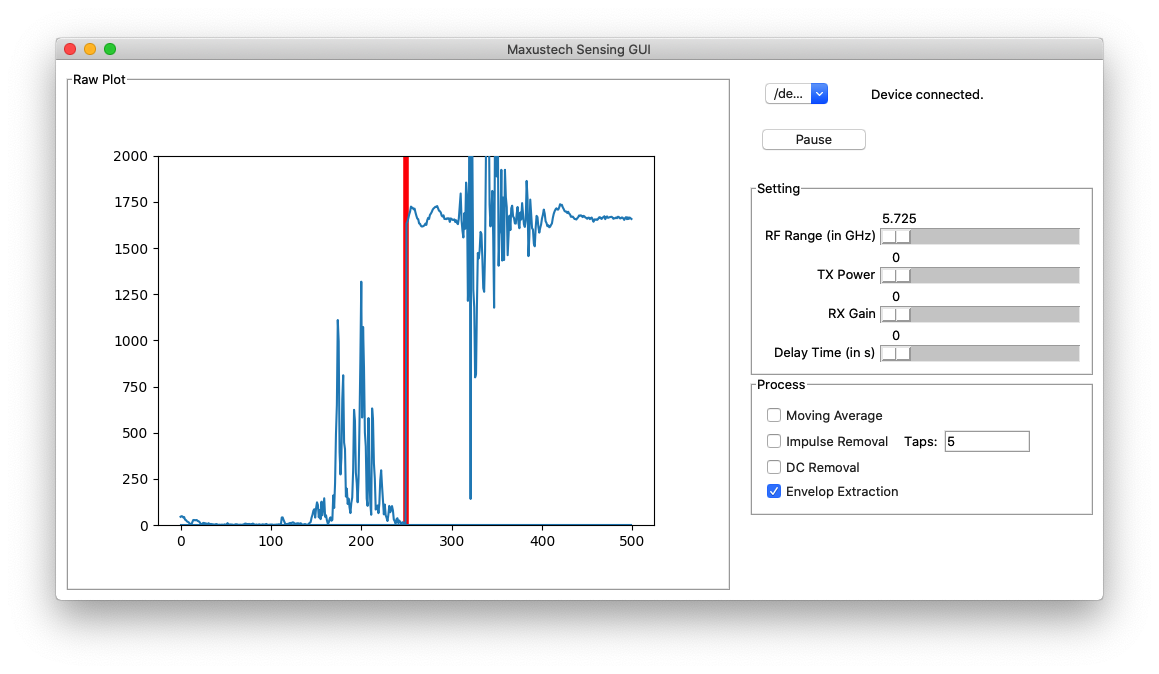
Note:
- Impulse removal algorithm is yet to finish
- RF setting is not available at in this version
Node
Dependencies:
- serialport
- Install Node v8.9.1 and above
- Run
npm installto install the project dependencies specified inpackage.json - Run
node mwSerial.js <portName>to capture the raw data output
Other serial tools
Recommended serial tools include:
-
Baudrate at 512000
-
CH340/CP2102 USB-TTL adapter are recommended
-
For mac,
cooltermis recommended. To change the baudrate simply goto "Option-Serial Port-Baudrate(Custom)"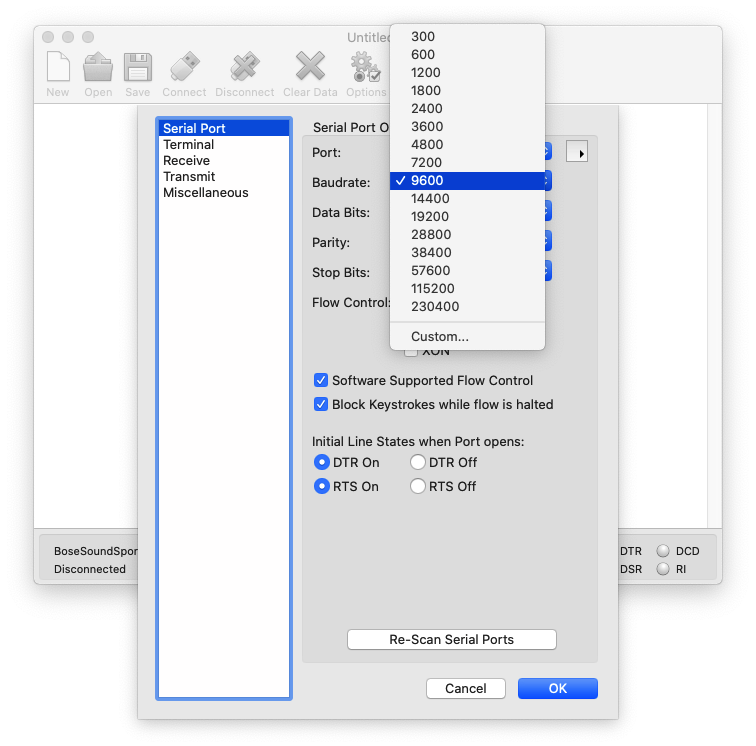
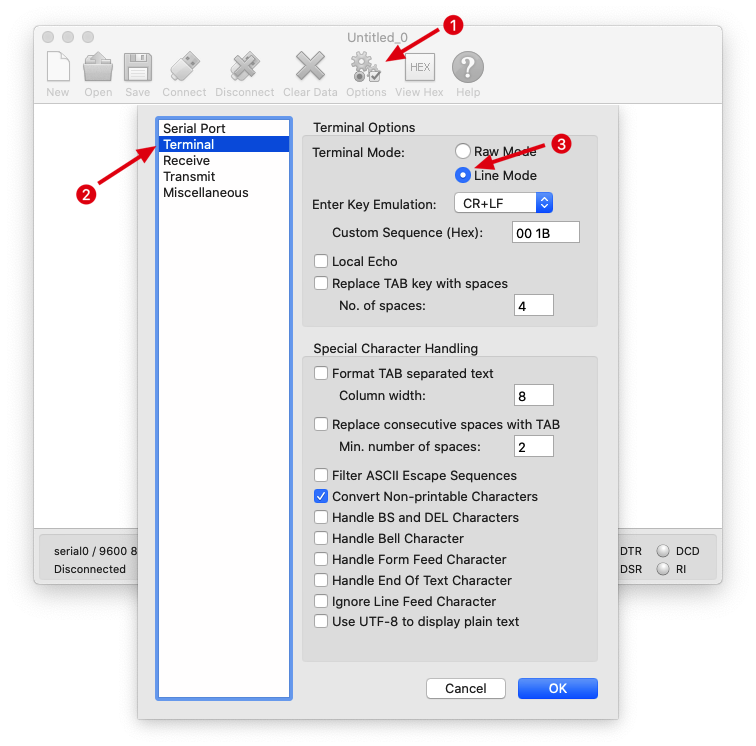
While using Coolterm, follow the instruction to set the terminal to Line mode. Line mode doesn't send data until enter has been pressed. Raw mode sends characters directly to the screen.
-
For windows,
sscom32will be a nice choice. The language is set to Chinese by default. Check the checkbox to change to english and set baudrate to 512000.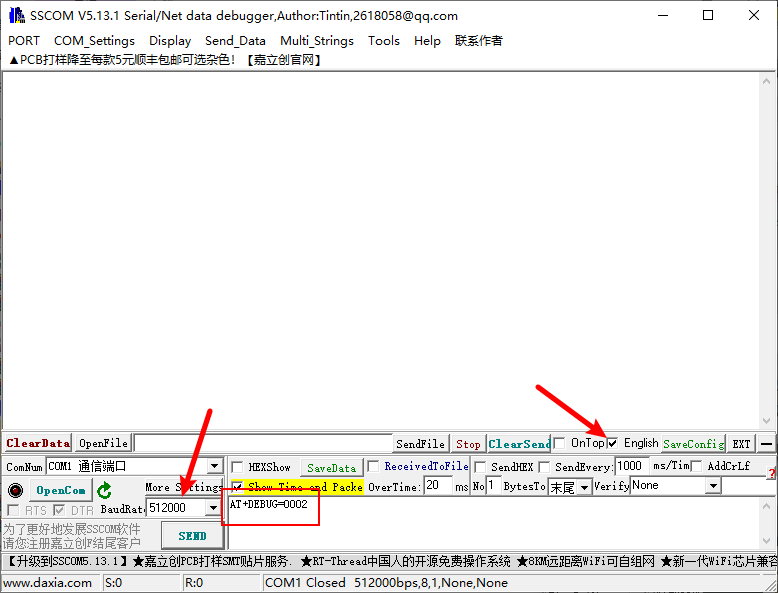
Debug commands
- Radiated power
AT+PA=xThe radiated power has 7 levels (0000~0007) for developer to choose. With the bigger number the device radiated more power. - Receive gain
AT+REVGAIN=xThe receive gain has 7 levels (0000~0007) for developer to choose. With the bigger number the device becomes more sensitive. - Time delay
AT+DELAY=xThe time delay represent how long VOUT stays high after the device detects object. Developers can choose number from 0001~3599 (unit in second). - Working mode
AT+DEBUG=xBy default the device works at normal mode, x = 0000. Developer can use x = 0002 to fetch raw radar data. - Detect threshold
AT+THRES=xThe threshold (0001~0099) represents how easy the device to trigger detection. With lower number the device is more inclined to trigger detection which could be a false alarm.
Radiated power, receive gain and detection threshold have a complicated relationship and should be set probably according to your situation to ensure proper functioning of the device.
