
Claude-Code-Usage-Monitor
Real-time Claude Code usage monitor with predictions and warnings
Install / Use
npx skills add Maciek-roboblog/Claude-Code-Usage-MonitorInstalls into whichever agent you are using.
CLAUDE.md
Claude Code project instructions
Quality Score
Category
OperationsSupported Platforms
Tags
Our assessment of Claude-Code-Usage-Monitor
Claude-Code-Usage-Monitor scores 80/100 on our quality scale, 676th of 754 Operations skills we index.
Its CLAUDE.md is 41 KB long, well organised into 219 sections with 48 code examples: long enough that it reads more like full documentation than a focused instruction file, which agents can find harder to follow.
With 8,792 GitHub stars, it is one of the more widely adopted skills in the catalogue.
Maintenance, license and trust
- The repository was last updated about 4 months ago. That is recent enough to be usable, but agent tooling moves fast, so check the instructions against your agent's current version.
- Our last check on 2026-10-17 found the source still online.
- It is released under the MIT license, a permissive license that allows use, modification and commercial use with attribution.
- Its trust signals score 93/100, with 1 caution from licensing, adoption, age or documentation. These come from repository metadata, not a code audit — read the skill file before letting an agent act on it.
Safety scan
No issues foundOur scan of the whole file found no instruction hijacking, hidden characters, credential access, data exfiltration or destructive commands (3 minor notes below). An AI review of the same text found nothing harmful.
- noteInstalls by piping a downloaded script into a shellline 116
curl -LsSf https://astral.sh/uv/install.sh | sh - noteInstalls by piping a downloaded script into a shellline 119
powershell -ExecutionPolicy ByPass -c "irm https://astral.sh/uv/install.ps1 | iex" - noteInstalls by piping a downloaded script into a shellline 1084
curl -LsSf https://astral.sh/uv/install.sh | sh
AI review by kimi-k2.7-code on 2026-09-24. Automated pattern scan on 2026-09-24. It catches known dangerous patterns, not every risk — read a skill before letting an agent act on it.
Claude-Code-Usage-Monitor compared with similar skills
All 4 of these similar skills score higher than Claude-Code-Usage-Monitor; compare them before choosing.
| Skill | Score | Stars | Updated | Format |
|---|---|---|---|---|
| Claude-Code-Usage-Monitor (this skill)by Maciek-roboblog | 80 | 8.8k | 4mo ago | CLAUDE.md |
| claude-memby thedotmack | 100 | 113.6k | today | CLAUDE.md |
| taste-skillby Leonxlnx | 100 | 110.8k | 1d ago | CLAUDE.md |
| Agent-Reachby Panniantong | 100 | 109.3k | today | CLAUDE.md |
| Understand-Anythingby Egonex-AI | 100 | 91.0k | 10d ago | CLAUDE.md |
Frequently asked questions
- How do I install Claude-Code-Usage-Monitor?
- Run
npx skills add Maciek-roboblog/Claude-Code-Usage-Monitor. The install tabs above show the steps for each supported agent. - Which AI agents does Claude-Code-Usage-Monitor work with?
- It is written for Claude Code, as a CLAUDE.md file. Other agents that read the same format can often use it too.
- Is Claude-Code-Usage-Monitor safe to use?
- Our scan of the whole file found no instruction hijacking, hidden characters, credential access, data exfiltration or destructive commands (3 minor notes below). An AI review of the same text found nothing harmful. It is MIT-licensed and scores 93/100 on trust signals. Skills are instructions an agent will follow, so read the file before installing it and do not approve commands you do not understand.
- Is Claude-Code-Usage-Monitor still maintained?
- The repository was last updated about 4 months ago. That is recent enough to be usable, but agent tooling moves fast, so check the instructions against your agent's current version.
Skill content
View source on GitHub🎯 Claude Code Usage Monitor



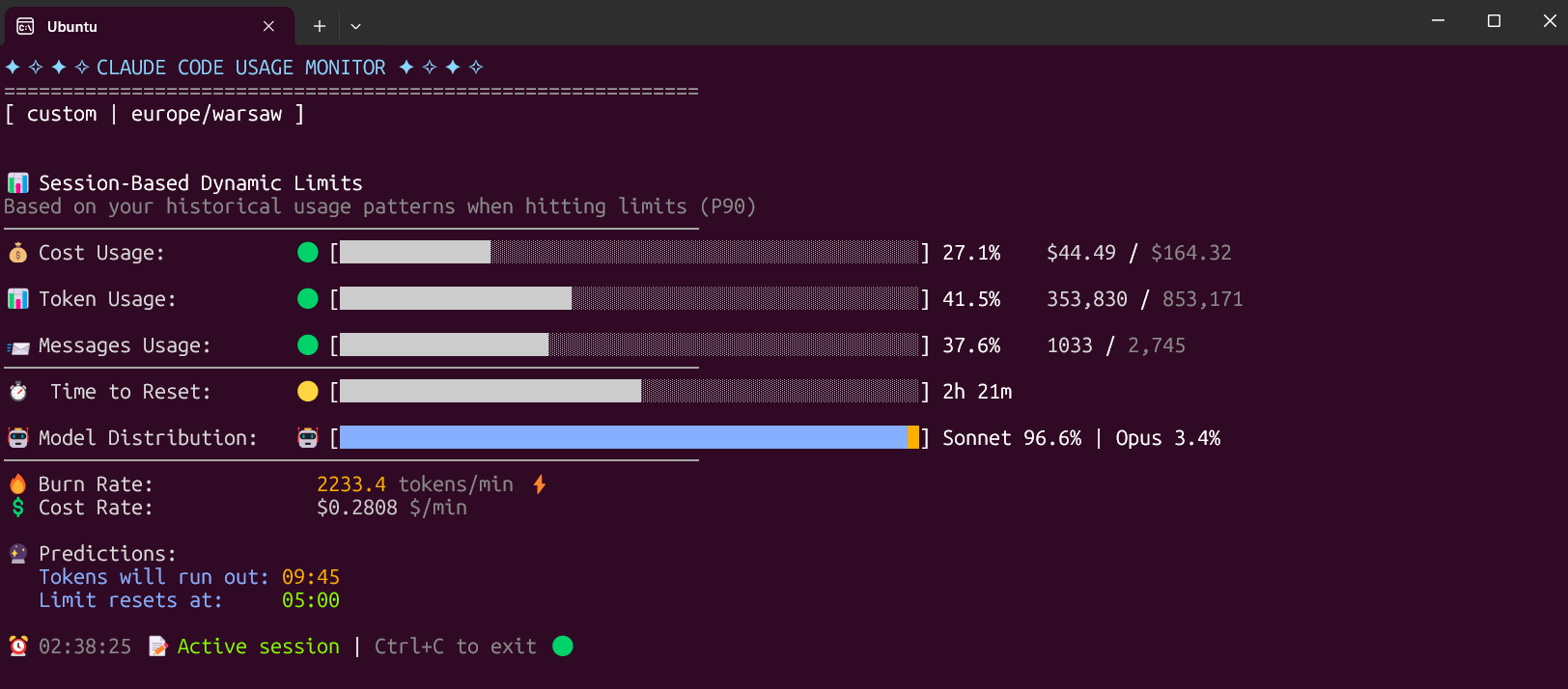
A privacy-first Claude Usage-Ops companion for Claude Code. It combines a Rich live terminal monitor with official statusline rate_limits, machine-readable state/export output, provenance labels, forecasting, and an opt-in local usage warehouse.
📑 Table of Contents
- ✨ Key Features
- 🚀 Installation
- 📖 Usage
- 🙏 Please Help Test This Release!
- ✨ Features & How It Works
- 🚀 Usage Examples
- 🔧 Development Installation
- Troubleshooting
- 📞 Contact
- Related Tools
- 📚 Additional Documentation
- 📝 License
- 🤝 Contributors
- 🙏 Acknowledgments
✨ Key Features
🚀 v4.0.0 Major Update - Usage Ops Companion
- 🔎 Official-limit trust layer -
--statuslinecaptures Claude Code's officialrate_limits; stale or expired captures fall back to labeled local estimates. - 📦 Machine-readable protocol -
--once,--compact, and--write-stateall use one versioned snapshot builder with automation exit codes. - 🏷️ Provenance labels - exported and displayed numbers distinguish
official,local_estimate,experimental, andunknownconfidence. - 📈 Persistent usage warehouse - opt-in local history survives Claude's 30-day cleanup with project/model/day dimensions and CSV/JSON reports.
- 🧭 Forecasting and pace - reset-aware pace, date-context forecasts, official-only weekly percentages, and limit-hit freeze behavior.
- 🧩 Multi-source input -
--data-paths,CLAUDE_CONFIG_DIR, and WSL discovery can scan multiple directories without merging unrelated accounts into one 5-hour window. - 🖥️ Rich UI parity - live Rich output, rich one-shot output, compact output, state files, and exports use the same snapshot contract.
- 🧰 External companion boundary - GUIs, trays, provider adapters, and status bars should consume
--write-stateor--once --output json. - 🧪 Regression coverage - the non-integration suite now covers the trust layer, state protocol, warehouse, reports, title updates, multi-source paths, and timezone edge cases.
📋 Default Custom Plan
The Custom plan is now the default option, specifically designed for 5-hour Claude Code sessions. It monitors three critical metrics:
- Token usage - Tracks your token consumption
- Messages usage - Monitors message count
- Cost usage - The most important metric for long sessions
The Custom plan automatically adapts to your usage patterns by analyzing all your sessions from the last 192 hours (8 days) and calculating personalized limits based on your actual usage. This ensures accurate predictions and warnings tailored to your specific workflow.
🚀 Installation
⚡ Modern Installation with uv (Recommended)
Why uv is the best choice:
- ✅ Creates isolated environments automatically (no system conflicts)
- ✅ No Python version issues
- ✅ No "externally-managed-environment" errors
- ✅ Easy updates and uninstallation
- ✅ Works on all platforms
The fastest and easiest way to install and use the monitor:
Install from PyPI
# Install directly from PyPI with uv (easiest)
uv tool install claude-monitor

# Run from anywhere
claude-monitor  # or cmonitor, ccmonitor for short
Install from Source
# Clone and install from source
git clone https://github.com/Maciek-roboblog/Claude-Code-Usage-Monitor.git
cd Claude-Code-Usage-Monitor
uv tool install .

# Run from anywhere
claude-monitor
First-time uv users
If you don't have uv installed yet, get it with one command:
# On Linux/macOS:
curl -LsSf https://astral.sh/uv/install.sh | sh

# On Windows:
powershell -ExecutionPolicy ByPass -c "irm https://astral.sh/uv/install.ps1 | iex"

# After installation, restart your terminal
📦 Installation with pip
# Install from PyPI
pip install claude-monitor

# If claude-monitor command is not found, add ~/.local/bin to PATH:
echo 'export PATH="$HOME/.local/bin:$PATH"' >> ~/.bashrc
source ~/.bashrc  # or restart your terminal

# Run from anywhere
claude-monitor  # or cmonitor, ccmonitor for short
⚠️ PATH Setup: If you see WARNING: The script claude-monitor is installed in '/home/username/.local/bin' which is not on PATH, follow the export PATH command above.
⚠️ Important: On modern Linux distributions (Ubuntu 23.04+, Debian 12+, Fedora 38+), you may encounter an "externally-managed-environment" error. Instead of using --break-system-packages, we strongly recommend:
- Use uv instead (see above) - it's safer and easier
- Use a virtual environment - python3 -m venv myenv && source myenv/bin/activate
- Use pipx - pipx install claude-monitor
See the Troubleshooting section for detailed solutions.
🛠️ Other Package Managers
pipx (Isolated Environments)
# Install with pipx
pipx install claude-monitor

# Run from anywhere
claude-monitor  # or claude-code-monitor, cmonitor, ccmonitor, ccm for short
conda/mamba
# Install with pip in conda environment
pip install claude-monitor

# Run from anywhere
claude-monitor  # or cmonitor, ccmonitor for short
📖 Usage
Get Help
# Show help information
claude-monitor --help
Available Command-Line Parameters
| Parameter | Type | Default | Description | |-----------|------|---------|-------------| | --plan | string | custom | Plan type: pro, max5, max20, team, or custom | | --custom-limit-tokens | int | None | Token limit for custom plan (must be > 0) | | --view | string | realtime | View type: realtime, daily, monthly, session, entries, sessions, or burn-rate | | --output | string | rich | Output format: rich, json, text, or csv | | --once | flag | False | Measure once, print a snapshot, and exit | | --compact | flag | False | Single-line compact output for status bars | | --write-state | flag | False | Write the snapshot to a state file for external tools | | --state-file | path | None | State file path for --write-state | | --statusline | flag | False | Run as a Claude Code statusline hook and capture official rate_limits | | --api | flag | False | Enable the opt-in experimental Anthropic OAuth usage API | | --data-paths | list | [] | Claude data directories to scan; repeat or comma-separate values | | --warehouse | flag | False | Persist usage entries to the opt-in local warehouse | | --warehouse-file | path | None | Usage warehouse file path | | --warehouse-retention-days | int | 365 | Days of warehouse records to retain | | --timezone | string | auto | Timezone (auto-detected). Examples: UTC, America/New_York, Europe/London | | --time-format | string | auto | Time format: 12h, 24h, or auto | | --theme | string | auto | Display theme: light, dark, classic, or auto | | --refresh-rate | int | 10 | Data refresh rate in seconds (1-60) | | --refresh-per-second | float | 0.75 | Display refresh rate in Hz (0.1-20.0) | | --reset-hour | int | None | Daily reset hour (0-23) | | --date-format | string | None | Date format for daily/monthly table periods | | --abbreviate-tokens | flag | False | Abbreviate token counts in table views | | --sparklines | flag | False | Show opt-in sparklines in table views | | --filter-models | string | all | Use all models, or anthropic to exclude routed non-Claude models | | --set-terminal-title | flag | False | Set the terminal title from the usage snapshot | | --title-format | string | "{pct}% {plan}" | Terminal title template using pct, plan, used, limit, cost, reset | | --hide-model-distribution | flag | False | Hide the model distribution bar | | --no-header | flag | False | Hide the header banner | | --no-emoji | flag | False | Render plain output without emoji | | --log-level | string | INFO | Logging level: DEBUG, INFO, WARNING, ERROR, CRITICAL | | --log-file | path | None | Log file path | | --debug | flag | False | Enable debug logging | | --version, -v | flag | False | Show version information | | --clear | flag | False | Clear saved configuration |
Plan Options
| Plan | Token Limit | Cost Limit | Description | |------|-------------|------------------|-------------| | pro | 19,000 | $18.00 | Claude Pro subscription | | max5 | 88,000 | $35.00 | Claude Max5 subscription | | max20 | 220,000 | $140.00 | Claude Max20 subscription | | team | estimate | unverified | Team label; prefer official statusline or --plan custom | | custom | P90-based | (default) $50.00 | Auto-detection with ML analysis |
Command Aliases
The tool can be invoked using any of these commands:
- claude-monitor (primary)
- claude-code-monitor (full name)
- cmonitor (short)
- ccmonitor (short alternative)
- ccm (shortest)
Save Flags Feature
The monitor automatically saves your preferences to avoid re-specifying them on each run:
What Gets Saved:
- View type (--view)
- Plan (--plan)
- Theme preferences (--theme)
- Timezone settings (--timezone)
- Time format (--time-format)
- Refresh rates (--refresh-rate, --refresh-per-second)
- Reset hour (--reset-hour)
- Custom token limits (--custom-limit-tokens)
Configuration Location: ~/.claude-monitor/last_used.json
Usage Examples:
# First run - specify preferences
claude-monitor --plan pro --theme dark --timezone "America/New_York"

# Subsequent runs - preferences automatically restored
claude-monitor --plan pro

# Override saved settings for this session
claude-monitor --plan pro --theme light

# Clear all saved preferences
claude-monitor --clear
Key Features:
- ✅ Automatic parameter persistence between sessions
- ✅ CLI arguments always override saved settings
- ✅ Atomic file operations prevent corruption
- ✅ Graceful fallback if config files are damaged
- ✅ Plan is saved and restored between sessions (override any time with
--plan) - ✅ An explicitly chosen theme is kept and not overwritten by auto-detection
Basic Usage
With uv tool installation (Recommended)
# Default (Custom plan with auto-detection)
claude-monito
Truncated for display — read the full file on GitHub.
Related Skills
claude-mem
113.6kPersistent Context Across Sessions for Every Agent – Captures everything your agent does during sessions, compresses it with AI, and injects relevant context back into future sessions. Works with Claude Code, OpenClaw, Codex, Gemini, Hermes, Copilot, OpenCode + More
taste-skill
110.8kAgent skills that give coding agents taste: art direction, reference images and a browser check instead of generic AI pages
Agent-Reach
109.3kGive your AI agent eyes to see the entire internet. Read & search Twitter, Reddit, YouTube, GitHub, Bilibili, XiaoHongShu — one CLI, zero API fees.
Understand-Anything
91.0kGraphs that teach > graphs that impress. Turn any code into an interactive knowledge graph you can explore, search, and ask questions about. Works with Claude Code, Codex, Cursor, Copilot, Gemini CLI, and more.

Languages
Trust signals
From repository metadata: license, adoption, age and documentation. Not a code audit — see the Safety scan above for what the skill file itself contains.