
EasyFormGenerator
create amazing forms without coding : form editor based on angular formly
Install / Use
/learn @MacKentoch/EasyFormGeneratorREADME
Easy form generator (AngularJS)





Generate advanced and unique boostrap forms without typing a single line of code!
— easy form generator website here —
What is it?
Easy form generator (step way or drag and drop way):
- Create forms in a matter of minutes :hourglass:
- (you may not need to add "s" to minutes).
- Don't limit your form to a single column template
- (up to 3 controls per line).
- generated forms use bootstrap
- (until now the most popular front end framework)
- based on amazing and :sparkles: angular formly
- (see angular formly website and documentation then you'll understand the :sparkles: behind)
Complementary information to better understand easy form generator
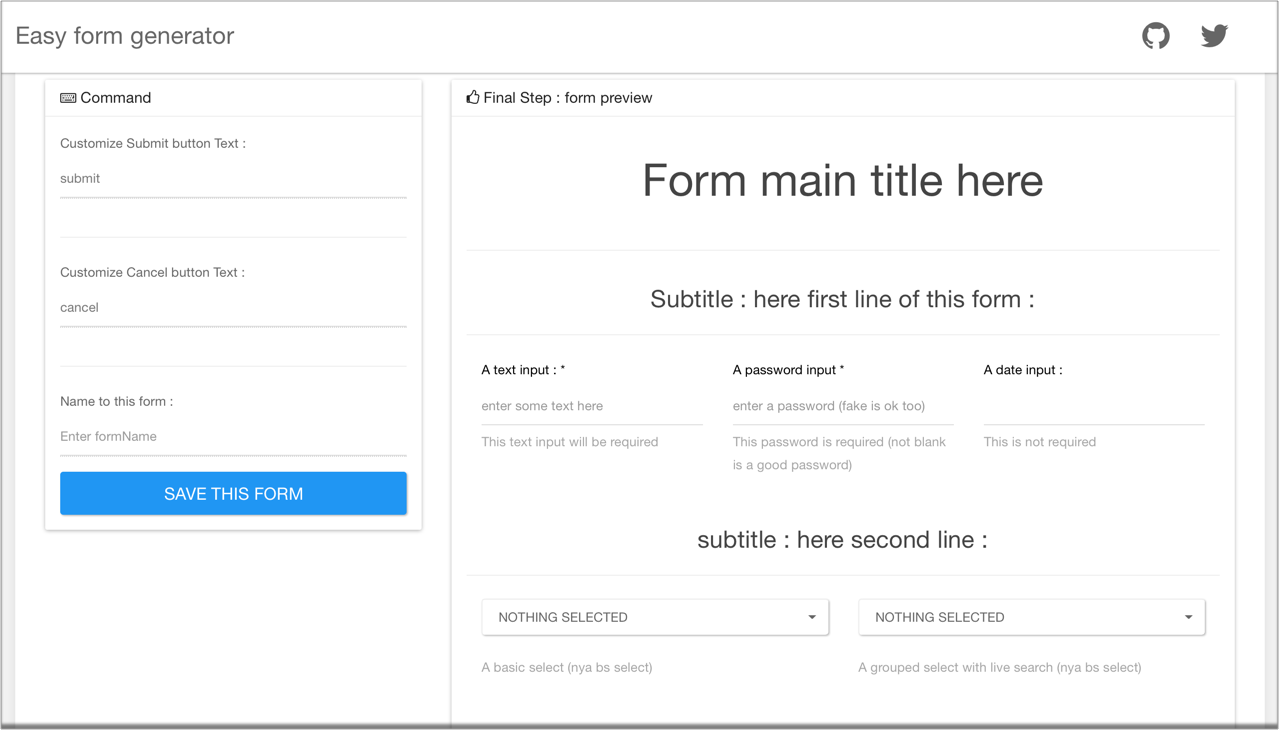
Easy Form Generator: Step way
IMPORTANT: easyFormGenerator v2.1.1 introduced a breaking change to fix angular formly upgrade compatibility issue. This breaking change impacts Header control only. Header control field model now needs header value to be in
templateOptions.placeholder(rather than intemplateOptions.description). To help to ensure the right property is used by your previously saved fields model, description input is now added in Header edit modal (so just cut / paste description into header text input).
Step way version is the most accomplished and stable version.
- cross browser compatible
- responsive (not sure it will be used a lot but you could create a form on your smartphone with the step way version).
- multi-language support
- friendly configurable thanks to a single provider
easyFormSteWayConfigprovider- enable / disable modal animation
- enable / disable controls (ex: hide rich text from editor)
- set current language (default is english)
- show hide preview model and / or preview panel in editor
- production friendly
Have a try here: Easy for generator step way version
- Step way visual preview here:
Easy Form Generator: drag and drop way (BETA)
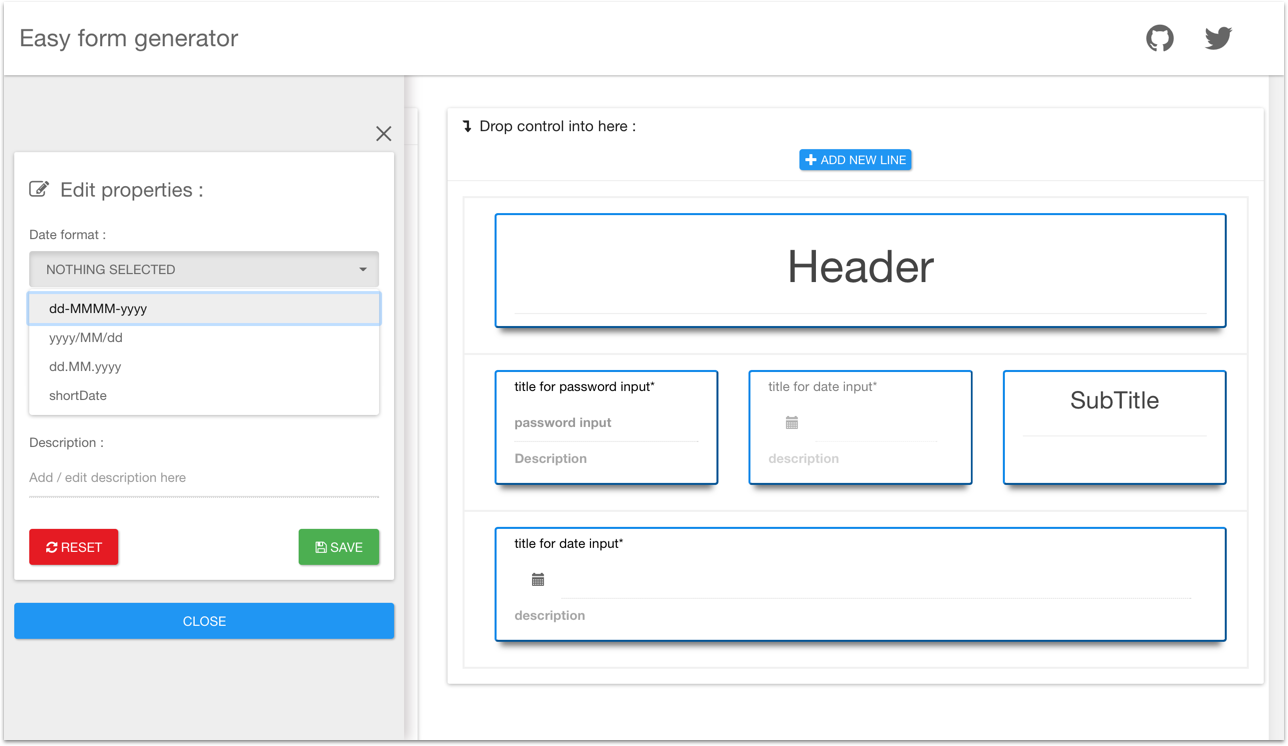
Drag and drop way version (currently in BETA) is more fun and faster to design a form
- drag control then drop control
- right click to open edit panel
Drag and drop way is still in development.
Chromewill give you the best experience with drag and drop version. You may encounter unexpected behaviours with other navigators.
have a try here: Easy for generator drag and drop way version
- Drag and drop way visual preview here:
Easy form viewer: production ready
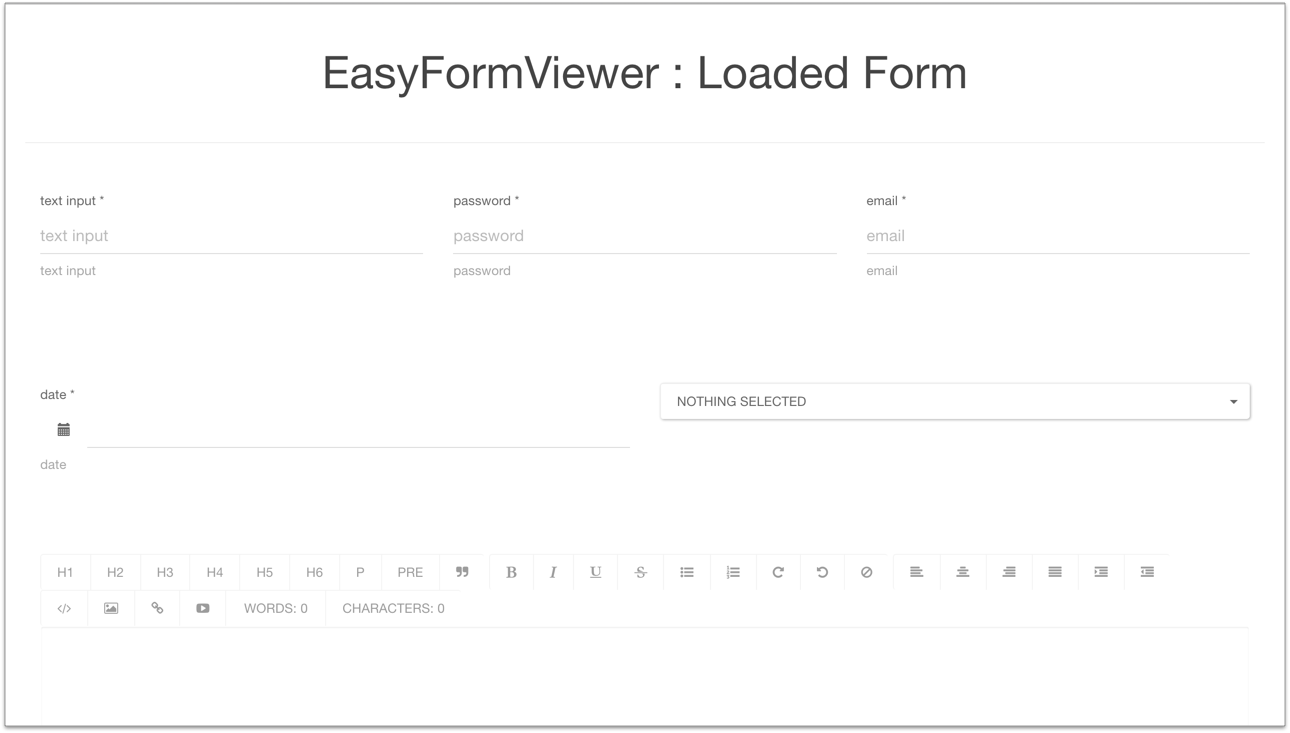
Easy form viewer is a directive which helps you using your created forms
- when you saved your form you saved
edaFieldsModel: easy form generator fields model - just bind it to easy form viewer directive, then it will render (without all unecessary decoration — generator useful only —):
How to use?
Using Step way version (production friendly)
Check demo:
stepway.htmlinpreviewdirectory
Install
Installing easyFormGenerator will install in a row:
- step way
- drag and drop way
- form viewer
Install:
npm install --save easy-form-generator
or
yarn install easy-form-generator
dependencies
Easy form generator creates amazing bootstrap forms thanks to these dependencies:
| dependency | npm install | from dist/vendors |
| :-------------------- | :---------------------------------------------- | :--------------------------------------------------------------------------------------- |
| bootstrap (css / js) | npm i --save bootstrap | dist/vendors |
| bootswatch | npm i --save bootswatch | dist/vendors |
| jquery | npm i --save jquery | dist/vendors |
| angular js (>= 1.3.X) | npm i --save angular | dist/vendors |
| ngAnimate | npm i --save angular-animate | dist/vendors |
| angular-translate | npm i --save angular-translate | dist/vendors |
| angular-ui-bootstrap | npm i --save angular-ui-bootstrap | dist/vendors |
| textAngular | npm i --save textangular | dist/vendors |
| angular-strap | npm i --save angular-strap | dist/vendors |
| nya-bootstrap-select | npm i --save @lordfriend/nya-bootstrap-select | dist/vendors |
| angular toaster | npm i --save angularjs-toaster | dist/vendors |
They are not include in easyFormGenerator bundle to avoid side effects / collisions in your application.
It is up to you to include them in your application depending on your dev workflow.
It will be far more talkative be checking demo:
stepway.htmlinpreviewdirectory- OR this project example (ES6+ and webpack based)
Inject easy form generator in your app
Just inject eda.easyformGen.stepway in you application:
angular.module("YOUR_APP", [
  "eda.easyformGen.stepway" //injects easy form generator-step way
]);
All easy form generator just by this small html:
<eda-step-way-easy-form-gen></eda-step-way-easy-form-gen>
Want to Load/save models?
Add these attributes to interact with your own controller:
eda-easy-form-generator-model: attribute to bind your modeleda-save-form-event: attribute to bind save form event
<eda-step-way-easy-form-gen
      eda-easy-form-generator-model="_MODEL_"
      eda-save-form-event="_SAVE_FUNCTION_">
</eda-step-way-easy-form-gen>
eda-easy-form-generator-model properties are:
| field name | field format | field description |
| :-------------------------- | :----------- | :---------------------------------------------------------------------------------- |
| formName | string | stores form name, default is empty string |
| btnSubmitText | string | stores submit button name, default is 'Submit' |
| btnCancelText | string | stores submit button name, default is 'Cancel' |
| edaFieldsModel | array | easy form generator fields model that describe form |
| edaFieldsModelStringified | string | edaFieldsModel but stringified (then easy to save fields model to any database) |
| formlyFieldsModel | object | angular formly fields model (filled by easy form generator from edaFieldsModel) |
| dataModel | object | filling the form feeds dataModel |
eda-save-form-event function:
//your controller save function should have `edaEasyFormGeneratorModel` parameter
//it will be filled by easy form generator model
saveForm(edaEasyFormGeneratorModel);
Customize easyFormGenerator
Multilanguage support:
Default or fallback language is set to english **by defa
Related Skills
node-connect
341.6kDiagnose OpenClaw node connection and pairing failures for Android, iOS, and macOS companion apps
frontend-design
84.6kCreate distinctive, production-grade frontend interfaces with high design quality. Use this skill when the user asks to build web components, pages, or applications. Generates creative, polished code that avoids generic AI aesthetics.
openai-whisper-api
341.6kTranscribe audio via OpenAI Audio Transcriptions API (Whisper).
commit-push-pr
84.6kCommit, push, and open a PR
