
Nkocr
🔎📝 This is a module to make specifics OCRs at food products and nutritional tables.
Install / Use
/learn @Lucs1590/NkocrREADME
Nkocr: The OCR tool for nutritional tables







This is a module to make specifics OCRs at food products and nutritional tables.
Contents
📝 Prerequisites <a id="prerequisites"></a>
As a prerequisite of this project, we have the tesseract library and OpenCV, so next we will install this preßsites.
Tesseract OCR <a id="tesseract"></a>
The installation of tesseract on the Linux system can be done in a few commands:
sudo apt install tesseract-ocr libtesseract-dev
And the same goes for macOS. There is a variation between MacPorts and Homebrew, but in this post I will only quote the version of Homebrew:
brew install tesseract
After performing the tesseract installation, it is possible to perform OCR in just one command, thus already extracting some words from the image.
OpenCV <a id="opencv"></a>
The installation of opencv on the Linux system can be done in a command:
sudo apt install python3-opencv
And to macOS running the following command:
brew install opencv
⚙️ Installation <a id="install"></a>
Now, assuming the prerequisites have already been installed, you're ready to install the Nkocr environment to modify, contribute and work!
But, if you just want to use the project, go to the usage part.
Pip <a id="pip"></a>
You can install the project requirements in a Python environment by running:
pip install -r requirements.txt --user
Conda <a id="conda"></a>
But if you are used to using a conda environment to keep everything organized, or if you want to test using it this time, feel free to run the following command and have a unique environment for Nkocr.
conda env create -f environment.yml
👨💻 Usage <a id="usage"></a>
To use this package, it's very easy, first you need to install it by running:
pip install nkocr --user
And after installing, you can import the packages in a Python script like the example below.
from nkocr import OcrTable, OcrProduct
Example <a id="example"></a>
To make it even easier, below is an example of code snippet.
from nkocr import OcrTable

text = OcrTable("paste_image_url_here")
print(text) # or print(text.text)
ℹ️ Under the Hood <a id="uth"></a>
From now on we will be talking about a little more technical details of the library.
Changing Language <a id="lang"></a>
The default language is English, so depending on the text, it will not be possible to capture the desired words / phrases. Therefore, if you want to work with another language, you will need to make some changes inherent to the language that the algorithm executes.
The first thing is to download the desired language with tesseract support, and on Linux this can be done by running the following command:
Don't forget to change <lang> with the desired language. If you would like more details, please feel free to access the tesseract documentation.
sudo apt install tesseract-ocr-<lang>
If you are a macOS user, your command will be a little different. You will need to run the following command, and don't worry about the language, after running this command you will have access to all languages.
brew install tesseract-lang
After downloading the support languages, to perform the translations in the desired language you will have to change the code in the ocr_product.py, ocr_table.py and auxiliary.py.
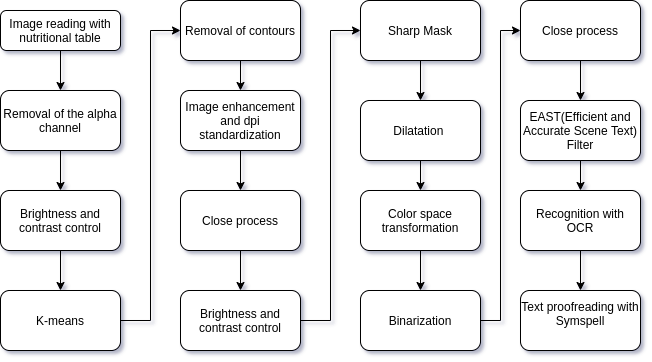
Operating Pipeline <a id="pipeline"></a>
The main algorithm was built working, mainly, with structures and methods of computer vision and digital image processing. The image below clearly depicts the line followed for the operational pipeline combinations.
🤝 Supporting <a id="sup"></a>
Many hours of hard work have gone into this project. Your support will be very appreciated!
<a href="https://www.buymeacoffee.com/Lucs1590" target="_blank"><img src="https://www.buymeacoffee.com/assets/img/custom_images/orange_img.png" alt="Buy Me A Coffee" style="height: auto !important;width: auto !important;" ></a>
Related Skills
claude-opus-4-5-migration
82.7kMigrate prompts and code from Claude Sonnet 4.0, Sonnet 4.5, or Opus 4.1 to Opus 4.5
model-usage
335.8kUse CodexBar CLI local cost usage to summarize per-model usage for Codex or Claude, including the current (most recent) model or a full model breakdown. Trigger when asked for model-level usage/cost data from codexbar, or when you need a scriptable per-model summary from codexbar cost JSON.
TrendRadar
49.7k⭐AI-driven public opinion & trend monitor with multi-platform aggregation, RSS, and smart alerts.🎯 告别信息过载,你的 AI 舆情监控助手与热点筛选工具!聚合多平台热点 + RSS 订阅,支持关键词精准筛选。AI 智能筛选新闻 + AI 翻译 + AI 分析简报直推手机,也支持接入 MCP 架构,赋能 AI 自然语言对话分析、情感洞察与趋势预测等。支持 Docker ,数据本地/云端自持。集成微信/飞书/钉钉/Telegram/邮件/ntfy/bark/slack 等渠道智能推送。
mcp-for-beginners
15.6kThis open-source curriculum introduces the fundamentals of Model Context Protocol (MCP) through real-world, cross-language examples in .NET, Java, TypeScript, JavaScript, Rust and Python. Designed for developers, it focuses on practical techniques for building modular, scalable, and secure AI workflows from session setup to service orchestration.
