
Fbmessenger
Integration with Facebook messenger API. You will be able to chat with Facebook page users directly in lhc back office.
Install / Use
/learn @LiveHelperChat/FbmessengerREADME
Features
- Facebook Messenger
- Message delivery status indication
- Reactions
- Bot support
Demo
Just ask anything on our Facebook page ask messenger :)
Requirements
- Min 4.46 Live Helper Chat version. 1.8v
- Webhooks has to be enabled - https://github.com/LiveHelperChat/livehelperchat/blob/master/lhc_web/settings/settings.ini.default.php#L86
Changes
- All messenger workflow will be handled by lhc core, so fewer bugs.
- Instagram support added
- Required scopes are defined in the settings file.
To manage Instagram and WhatsApp, both must be linked to your Facebook Page/Meta Business Account.
If you add your personal phone number to a WhatsApp Business account and the status still shows "Pending" after you have connected and subscribed, open the Live Helper Chat back office and click "Register in Cloud-API". This button appears after the phone number is subscribed.
Permissions we request from facebook during login
Default scopes. You can change those in settings/settings.ini.php file
'email','pages_show_list','pages_messaging','instagram_manage_messages',
'instagram_basic','pages_manage_metadata','pages_read_engagement',
'whatsapp_business_management','whatsapp_business_messaging','business_management'
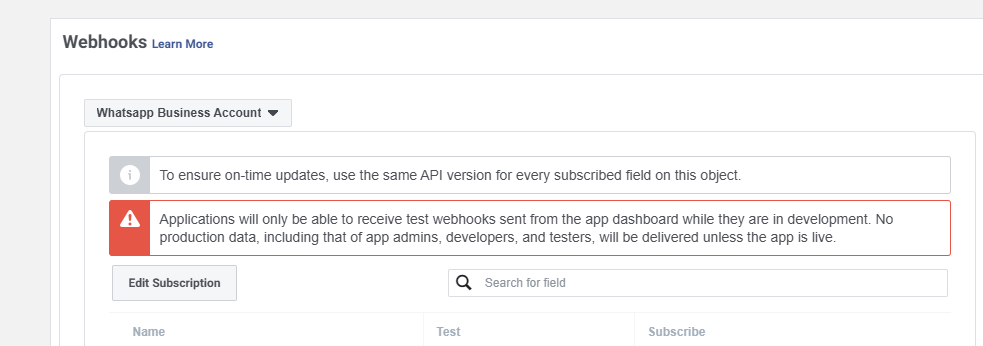
Webhook configuration and subscription fields
Webhooks configuration place
Products you should have
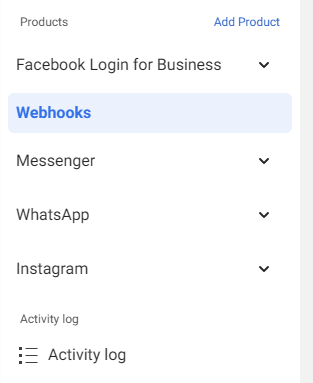
Facebook messenger
In webhooks page you have to choose Page and subscribe to those fields
Subscribed fields - message_deliveries,message_echoes,message_edits,message_reactions,message_reads,messages,messaging_postbacks
- Messages
new- supported and working - Messages
unsend- not supported by webhooks. Meta limitation. - Messages
reply- supported and working. - Messages
edits- are not sent by webhooks. Meta limitation. Perhaps I'm missing something there, because there is a webhook subscription, but it does not send anything.
In webhooks page you have to choose Instagram and subscribe to those fields
Subscribed fields - messages,messages,messaging_postbacks,messaging_seen
- Messages
new- supported and working. - Messages
edits- are not sent by webhooks. Meta limitation. - Messages
unsend- supported and fully working. - Messages
repy- supported and fully working.
In webhooks page you have to choose Whatsapp Business Account and subscribe to those fields
Subscribed fields - messages
- Messages
new- supported and working. - Messages
unsend- not supported by WhatsApp. Meta limitation. - Messages
reply- supported and working. - Messages
edits- not supported by WhatsApp. Meta limitation.
Most common URL
Data Deletion Requests
Just enter URL. Change example.com to your domain.
https://example.com/fbmessenger/deleterequest
It will
- Delete user leads
- Delete it's own pages if it's user after login requesting data deletion.
URL if you are using Facebook Login flow WITHOUT automated hosting environment
This is the most common installation method and you choose what page you managed during login flow.
Webhook URL's. Use same URL for webhook verification calls.
- Facebook Messenger -
https://example.com/fbmessenger/callbackgeneral - WhatsApp -
https://example.com/fbmessenger/callbackwhatsapp - Instagram -
https://example.com/fbmessenger/callbackinstagram
Valid OAuth Redirect URIs
https://example.com/site_admin/fbmessenger/fbcallback
Quick settings
app_idhttps://github.com/LiveHelperChat/fbmessenger/blob/master/settings/settings.ini.default.php#L29 | App IDapp_secrethttps://github.com/LiveHelperChat/fbmessenger/blob/master/settings/settings.ini.default.php#L29 | App Secretverify_tokenyou have to put in https://github.com/LiveHelperChat/fbmessenger/blob/master/settings/settings.ini.default.php#L31 file. | Facebook Messengerwhatsapp_verify_tokenhttps://github.com/LiveHelperChat/fbmessenger/blob/master/settings/settings.ini.default.php#L32C10-L32C31 file. | WhatsAppinstagram_verify_tokenhttps://github.com/LiveHelperChat/fbmessenger/blob/master/settings/settings.ini.default.php#L33 file. | Instagram
Webhook URL for facebook messenger if you define independent page
You create a facebook app and add pages manually to lhc back office without login flow.
- Facebook Messenger -
https://example.com/fbmessenger/callback/<page_id> - Verify token you enter manually in back office in that case
- You can register manually multiple pages and just keep the same webhook. https://www.youtube.com/watch?v=nIExwuWeb3E (You still most likely will have callback URL like
https://example.com/fbmessenger/callback/1, but it will work for consecutive pages also.)
URL if you are using Facebook Login flow WITH automated hosting environment
Valid OAuth Redirect URIs. master.example.com in this scenario is our manager address
https://master.example.com/site_admin/fbmessenger/fbcallbackstandalone
Webhook URL's. Use same URL for webhook verification calls.
- Facebook Messenger -
https://master.example.com/fbmessenger/callbackstandalone - WhatsApp -
https://master.example.com/fbmessenger/callbackstandalonewhatsapp - Instagram -
https://master.example.com/fbmessenger/callbackstandaloneinstagram
Quick settings
app_idhttps://github.com/LiveHelperChat/fbmessenger/blob/master/settings/settings.ini.default.php#L29 | App IDapp_secrethttps://github.com/LiveHelperChat/fbmessenger/blob/master/settings/settings.ini.default.php#L29 | App Secretverify_tokenyou have to put in https://github.com/LiveHelperChat/fbmessenger/blob/master/settings/settings.ini.default.php#L31 file. | Facebook Messengerwhatsapp_verify_tokenhttps://github.com/LiveHelperChat/fbmessenger/blob/master/settings/settings.ini.default.php#L32C10-L32C31 file. | WhatsAppinstagram_verify_tokenhttps://github.com/LiveHelperChat/fbmessenger/blob/master/settings/settings.ini.default.php#L33 file. | Instagram- Put any random string there https://github.com/LiveHelperChat/fbmessenger/blob/master/settings/settings.ini.default.php#L25
- Set
enabledto true https://github.com/LiveHelperChat/fbmessenger/blob/master/settings/settings.ini.default.php#L24 file.
Facebook messenger extension
Integration with Facebook messenger API. You will be able to chat with Facebook page users directly in lhc back office.
- Bot support. [New] https://www.youtube.com/watch?v=_rLPJAdn4Us Supported bot elements
- Text messages including Quick Replies -
Send Text - Typing -
Send typing - Carrousel -
Send Carrousel - Buttons -
Button list - All other triggers including internal operations also will work.
- To listed for "Get Started" button action just listen for text message with content "GET_STARTED" also see demo bot in official demo.
- Text messages including Quick Replies -
- Support multiple pages without creating new app for each page.
- Supports multiple pages at once.
- Each page chat can be assigned to custom department.
Update instructions
- Make sure you have most recent Live Helper Chat version.
- Update database via
php cron.php -s site_admin -e fbmessenger -c cron/update_structurecommand Modules -> Facebook chat -> Save and Activate WhatsAppconfiguration. Click it if you are using WhatsApp integration.
Installation in your LHC server
- Upload the files to your
lhc_web/extension/fbmessengerfolder - Install database either by executing
doc/install.sqlfile or executing this commandphp cron.php -s site_admin -e fbmessenger -c cron/update_structure - Install dependencies using composer
- Make sure your composer.json file looks like https://github.com/LiveHelperChat/livehelperchat/blob/master/lhc_web/composer.json 4.41v
- Just for newbies if your web hosting does not have composer see https://www.vultr.com/docs/install-composer-on-centos-7
- don't run composer as root, login in your ssh as your hosting normal user.
- Activate extension in main settings file
lhc_web/settings/settings.ini.phpextension sectionfbmessengerby Adding lines:
'extensions' => array ( 'fbmessenger', ),
- If you don't see this in Module, check your
lhc_web/settings/settings.ini.phpand also clickClean Cachefrom back office - copy
extension/fbmessenger/settings/settings.ini.default.phptoextension/fbmessenger/settings/settings.ini.php
WhatsApp configuration WITHOUT facebook login
Notice - WhatsApp campaigns etc are supported only for statically defined WhatsApp accounts. Login based WhatsApp phone numbers for campaigns will be added later.
Webhook URL you will find once you click Save and Activate WhatsApp configuration it will be in a field Callback URL for Facebook WhatsApp integration.
This configuration option is available with Permanent Access Token. In facebook Extension settings you have to enter
- Permanent WhatsApp access token - Permanent Access Token.
- WhatsApp Business Account ID - You will find it in
WhatsApp-> GettingStarted section of the facebook app - WhatsApp
Verify Token- just put any random string. - Click
Save and Activate WhatsApp configurationit will install and configure all the required webhooks etc. - Go to Facebook App
WhatsApp-> Configurationsection and set Callback URL while enteringVerify Tokenyou have put in settings page. - Subscribe to messages field.
- Bot sample what is supported can be found here
- If you
