
Vocalis
Speech-to-speech AI assistant with natural conversation flow, mid-speech interruption, vision capabilities and AI-initiated follow-ups. Features low-latency audio streaming, dynamic visual feedback, and works with local LLM/TTS services via OpenAI-compatible endpoints.
Install / Use
/learn @Lex-au/VocalisREADME

Vocalis





A sophisticated AI assistant with speech-to-speech capabilities built on a modern React frontend with a FastAPI backend. Vocalis provides a responsive, low-latency conversational experience with advanced visual feedback.
Video Demonstration of Setup and Usage
Changelog
v1.5.0 (Vision Update) - April 12, 2025
- 🔍 New image analysis capability powered by SmolVLM-256M-Instruct model
- 🖼️ Seamless image upload and processing interface
- 🔄 Contextual conversation continuation based on image understanding
- 🧩 Multi-modal conversation support (text, speech, and images)
- 💾 Advanced session management for saving and retrieving conversations
- 🎨 Improved UI with central call button and cleaner control layout
- 🔌 Simplified sidebar without redundant controls
v1.0.0 (Initial Release) - March 31, 2025
- ✨ Revolutionary barge-in technology for natural conversation flow
- 🔊 Ultra low-latency audio streaming with adaptive buffering
- 🤖 AI-initiated greetings and follow-ups for natural conversations
- 🎨 Dynamic visual feedback system with state-aware animations
- 🔄 Streaming TTS with chunk-based delivery for immediate responses
- 🚀 Cross-platform support with optimised setup scripts
- 💻 CUDA acceleration with fallback for CPU-only systems
Features
🎯 Advanced Conversation Capabilities
- 🗣️ Barge-In Interruption - Interrupt the AI mid-speech for a truly natural conversation experience
- 👋 AI-Initiated Greetings - Assistant automatically welcomes users with a contextual greeting
- 💬 Intelligent Follow-Ups - System detects silence and continues conversation with natural follow-up questions
- 🔄 Conversation Memory - Maintains context throughout the conversation session
- 🧠 Contextual Understanding - Processes conversation history for coherent, relevant responses
- 🖼️ Image Analysis - Upload and discuss images with integrated visual understanding
- 💾 Session Management - Save, load, and manage conversation sessions with customisable titles
⚡ Ultra-Responsive Performance
- ⏱️ Low-Latency Processing - End-to-end latency under 500ms for immediate response perception
- 🔊 Streaming Audio - Begin playback before full response is generated
- 📦 Adaptive Buffering - Dynamically adjust audio buffer size based on network conditions
- 🔌 Efficient WebSocket Protocol - Bidirectional real-time audio streaming
- 🔄 Parallel Processing - Multi-stage pipeline for concurrent audio handling
🎨 Interactive Visual Experience
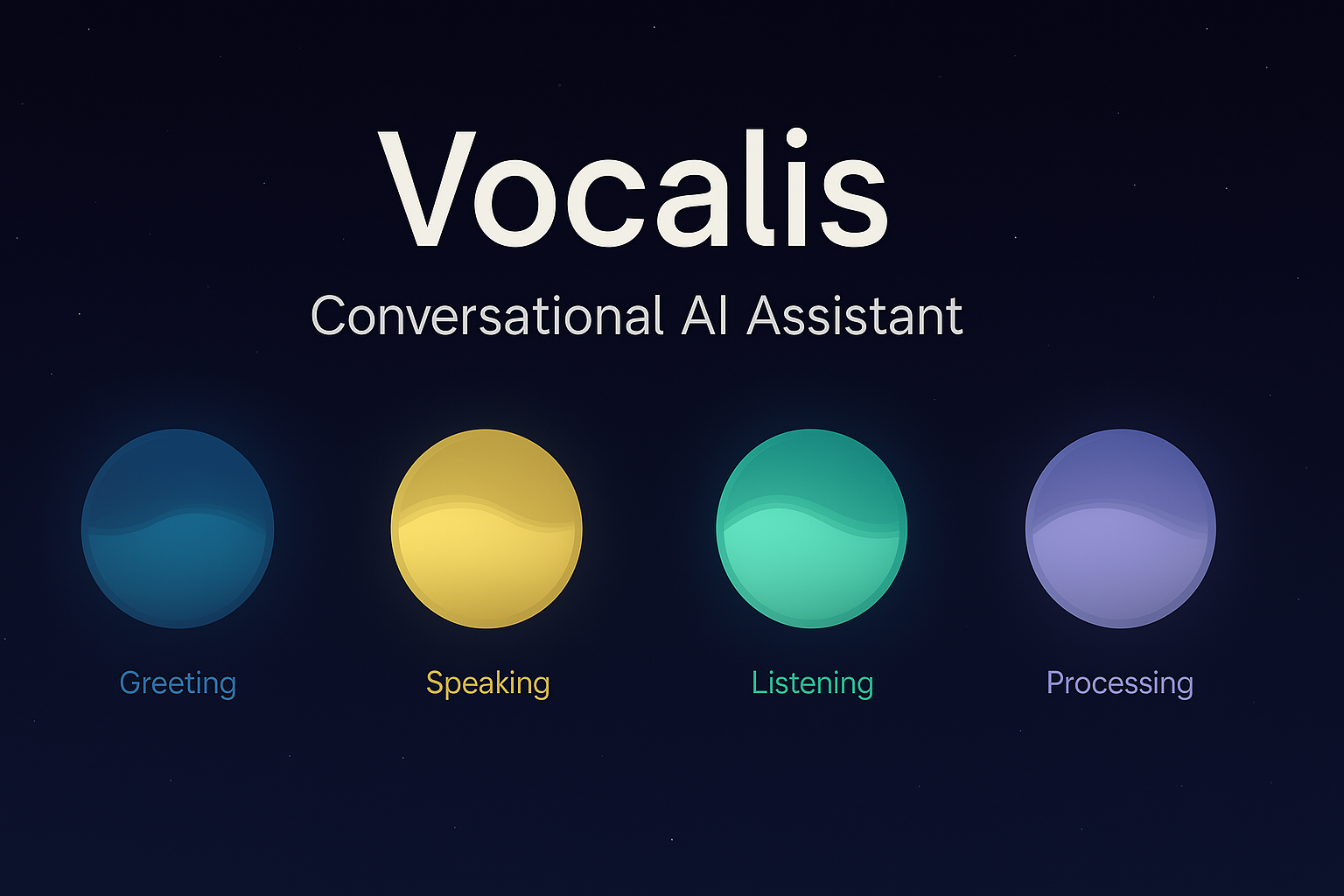
- 🔮 Dynamic Assistant Orb - Visual representation with state-aware animations:
- Pulsing glow during listening
- Particle animations during processing
- Wave-like motion during speaking
- 📝 Live Transcription - Real-time display of recognised speech
- 🚦 Status Indicators - Clear visual cues for system state
- 🌈 Smooth Transitions - Fluid state changes with appealing animations
- 🌙 Dark Theme - Eye-friendly interface with cosmic aesthetic
🛠️ Technical Excellence
- 🔍 High-Accuracy VAD - Superior voice activity detection using custom-built VAD
- 🗣️ Optimised Whisper Integration - Faster-Whisper for rapid transcription
- 🔊 Real-Time TTS - Chunked audio delivery for immediate playback
- 🖥️ Hardware Flexibility - CUDA acceleration with CPU fallback options
- 🔧 Easy Configuration - Environment variables and user-friendly setup
Quick Start
Prerequisites
Windows
- Python 3.10+ installed and in your PATH
- Node.js and npm installed
macOS
- Python 3.10+ installed
- Install Homebrew (if not already installed):
/bin/bash -c "$(curl -fsSL https://raw.githubusercontent.com/Homebrew/install/HEAD/install.sh)" - Install Node.js and npm:
brew install node - Apple Silicon (M1/M2/M3/M4) Notes:
- The setup will automatically install a compatible PyTorch version
- If you encounter any PyTorch-related errors, you may need to manually install it:
Then continue with the regular setup.pip install torch
One-Click Setup (Recommended)
Windows
- Run
setup.batto initialise the project (one-time setup)- Includes option for CUDA or CPU-only PyTorch installation
- Run
run.batto start both frontend and backend servers - If you need to update dependencies later, use
install-deps.bat
macOS/Linux
- Make scripts executable:
chmod +x *.sh - Run
./setup.shto initialise the project (one-time setup)- Includes option for CUDA or CPU-only PyTorch installation
- Run
./run.shto start both frontend and backend servers - If you need to update dependencies later, use
./install-deps.sh
Manual Setup (Alternative)
If you prefer to set up the project manually, follow these steps:
Backend Setup
-
Create a Python virtual environment:
cd backend python -m venv env # Windows: .\env\Scripts\activate # macOS/Linux: source env/bin/activate -
Install the Python dependencies:
pip install -r requirements.txt -
If you need CUDA support, install PyTorch with CUDA:
pip install torch torchvision torchaudio --index-url https://download.pytorch.org/whl/cu124 -
Start the backend server:
python -m backend.main
Frontend Setup
-
Install Node.js dependencies:
cd frontend npm install -
Start the development server:
npm run dev
Personalising Vocalis
After launching Vocalis, you can customise your experience through the sidebar:
- Click the sidebar icon to open the navigation panel
- Under the "Settings" tab, click "Preferences" to access personalisation options
The preferences modal offers several ways to tailor Vocalis to your needs:
User Profile
- Your Name: Enter your name to personalise greetings and make conversations more natural
- This helps Vocalis address you properly during interactions
System Prompt
- Modify the AI's behaviour by editing the system prompt
- The default prompt is optimised for natural voice interaction, but you can customise it for specific use cases
- Use the "Restore Default" button to revert to the original prompt if needed
Vision Capabilities
- Toggle vision capabilities on/off using the switch at the bottom of the preferences panel
- When enabled, Vocalis can analyse images shared during conversations
- This feature allows for rich multi-modal interactions where you can discuss visual content
These settings are saved automatically and persist between sessions, ensuring a consistent experience tailored to your preferences.
External Services
Vocalis is designed to work with OpenAI-compatible API endpoints for both LLM and TTS services:
-
LLM (Language Model): By default, the backend is configured to use LM Studio running locally. This provides a convenient way to run local language models compatible with OpenAI's API format.
Custom Vocalis Model: For optimal performance, Vocalis includes a purpose-built fine-tuned model: lex-au/Vocalis-Q4_K_M.gguf. This model is based on Meta's LLaMA 3 8B Instruct and specifically optimised for immersive conversational experiences with:
- Enhanced spatial and temporal context tracking
- Low-latency response generation
- Rich, descriptive language capabilities
- Efficient resource utilisation through Q4_K_M quantisation
- Seamless integration with the Vocalis speech-to-speech pipeline
-
Text-to-Speech (TTS): For voice generation, the system works out of the box with:
- Orpheus-FASTAPI: A high-quality TTS server with OpenAI-compatible endpoints providing rich, expressive voices.
You can adjust the endpoint in
.envto any opensource TTS project. For a lightning-fast alternative:- Kokoro-FastAPI: A lightning-fast TTS alternative, optimised for minimal latency when speed is the priority over maximum expressiveness.
Both services can be configured in the backend/.env file. The system requires these external services to function properly, as Vocalis acts as an orchestration layer combining speech recognition, language model inference, and speech synthesis.
Visual Demo
Session Management
Vocalis includes a robust session management system that allows users to save, load, and organise their conversations:
Key Features
- Save Conversations: Save the current conversation state with a custom title
- Load Previous Sessions: Return to any saved conversation exactly as you left it
- Edit Session Titles: Rename sessions for better organisation
- Delete Unwanted Sessions: Remove conversations you no longer need
- Session Metadata: View additional information like message count
- Automatic Timestamps: Sessions track both creation and l
Related Skills
node-connect
337.7kDiagnose OpenClaw node connection and pairing failures for Android, iOS, and macOS companion apps
frontend-design
83.3kCreate distinctive, production-grade frontend interfaces with high design quality. Use this skill when the user asks to build web components, pages, or applications. Generates creative, polished code that avoids generic AI aesthetics.
openai-whisper-api
337.7kTranscribe audio via OpenAI Audio Transcriptions API (Whisper).
commit-push-pr
83.3kCommit, push, and open a PR
