
Chronicle-MCP
Local, private AI chat history search & memory MCP server: index Cursor, Claude, ChatGPT and Cline transcripts with BM25 and save tokens.
Install / Use
claude mcp add Leviathan0x0 -- npx -y github:Leviathan0x0/Chronicle-MCPIf the server publishes to npm under a different name, use that package instead — check the repo README.
MCP Server
Model Context Protocol server
Quality Score
Category
AI & Machine LearningSupported Platforms
Our assessment of Chronicle-MCP
Chronicle-MCP scores 83/100 on our quality scale, 658th of 925 AI & Machine Learning skills we index.
Its MCP Server is 38 KB long, well organised into 54 sections with 15 code examples: a thorough specification that gives an agent plenty to work with.
It has 3 GitHub stars, so there is little community track record yet; judge it on its content.
Maintenance, license and trust
- The repository was last updated 3 days ago, so Chronicle-MCP is actively maintained.
- It is released under the MIT license, a permissive license that allows use, modification and commercial use with attribution.
- Its trust signals score 92/100, with 1 caution from licensing, adoption, age or documentation. These come from repository metadata, not a code audit — read the skill file before letting an agent act on it.
Chronicle-MCP compared with similar skills
All 4 of these similar skills score higher than Chronicle-MCP; compare them before choosing.
| Skill | Score | Stars | Updated | Format |
|---|---|---|---|---|
| Chronicle-MCP (this skill)by Leviathan0x0 | 83 | 3 | 3d ago | MCP Server |
| Agent-Reachby Panniantong | 100 | 105.5k | 3d ago | CLAUDE.md |
| claude-memby thedotmack | 100 | 104.0k | today | CLAUDE.md |
| Understand-Anythingby Egonex-AI | 100 | 88.7k | 2d ago | CLAUDE.md |
| headroomby headroomlabs-ai | 100 | 78.1k | today | CLAUDE.md |
Frequently asked questions
- How do I install Chronicle-MCP?
- Run
claude mcp add Leviathan0x0 -- npx -y github:Leviathan0x0/Chronicle-MCP. The install tabs above show the steps for each supported agent. - Which AI agents does Chronicle-MCP work with?
- It is written for Claude Code, Claude Desktop, Cursor and Cline, as a MCP Server file. Other agents that read the same format can often use it too.
- Is Chronicle-MCP safe to use?
- It is MIT-licensed and scores 92/100 on trust signals. Skills are instructions an agent will follow, so read the file before installing it and do not approve commands you do not understand.
- Is Chronicle-MCP still maintained?
- The repository was last updated 3 days ago, so Chronicle-MCP is actively maintained.
Skill content
View source on GitHubChronicle MCP: Local AI Chat History Search & Memory
Private, offline memory for your AI coding agents. Chronicle MCP (chronicle-mcp-server) is a local stdio MCP server that indexes your Cursor, Claude, ChatGPT and Cline chat transcripts on your own machine and serves BM25 search over them, so agents can recall past conversations without re-pasting them, using up to 40% fewer context tokens. Your archive and index stay on disk: no cloud service, account, or API key.
Chronicle is a Model Context Protocol (MCP) server that syncs, cleans, formats, and indexes AI chat transcripts entirely on your machine. By bridging the gap between local editor history and large language model contexts, Chronicle allows agents to search, compare, retrieve, and reference past conversation logs. It features optimized token-saving heuristics that compress code blocks and limit message lengths, reducing context window utilization by up to 40 percent.
Listed on
What's new in 1.6.2
- Fixes fresh installs. Earlier releases let pip install mcp 2.x, which the server cannot run on. The dependency is now
mcp>=1.22,<2. - Rewritten tool definitions. Every tool has a title, a description of what it does and when to use it, side effects and return value, and annotations (
readOnlyHint,destructiveHint, ...). Every parameter is documented and every operation selector is an enum. - Real error results. Failures now come back with
isError: true, and unknown operation names are rejected instead of silently running a different operation. - New ways to run it:
uvx chronicle-mcp-server,chronicle serve,chronicle --versionand a Dockerfile. - Server instructions, a
recall_past_workprompt, and two resources:chronicle://capabilitiesandchronicle://chats.
What's new in 1.6.1
- CI on Python 3.10 to 3.13, plus build and
twine checkon every push and pull request. - Accurate tool catalog: 8 tools plus the
start_sessionprompt, whichmaintain_storage(op_type="capabilities")now reports too. - Richer PyPI metadata (project links, keywords, classifiers) and a cleaner repository with no committed build artifacts.
See the full CHANGELOG for earlier releases.
Key Architectural Capabilities
Format Normalization Engine
AI providers and editor clients save conversation logs in diverse formats. Chronicle normalizes these structures into a standard role-and-content message format:
- ChatGPT Exports: ChatGPT exports conversation histories in recursive mapping node structures. Chronicle traverses and flattens these maps, sorts messages chronologically by creation timestamp, and extracts the plain-text message threads.
- Claude Exports: Claude structures messages as flat lists nested under the chat_messages field. Chronicle parses these lists, maps custom sender roles (such as human and assistant) to standard roles, and cleans the text strings.
- Generic and Markdown Formats: Chronicle includes parsers for flat JSON message lists (such as Cline or Continue) and structured Markdown logs (mapping headers like User and Assistant to message boundaries).
Context Token Optimization
Large chat logs can quickly exhaust context windows and increase API costs. Chronicle implements proactive token-saving mechanisms:
- Code Block Summarization: Automatically replaces verbose code blocks with metadata summaries indicating the programming language and line count. This behavior can be disabled on demand to read full code snippets.
- Length Limiting: Truncates extremely long individual messages at a configurable character threshold, appending a notice that the user can re-run the tool with expanded limits if necessary.
Context Window Token Savings Graph
To verify these savings, we executed multi-turn conversation benchmarks. The graph below displays total token usage over a sequence of message turns:
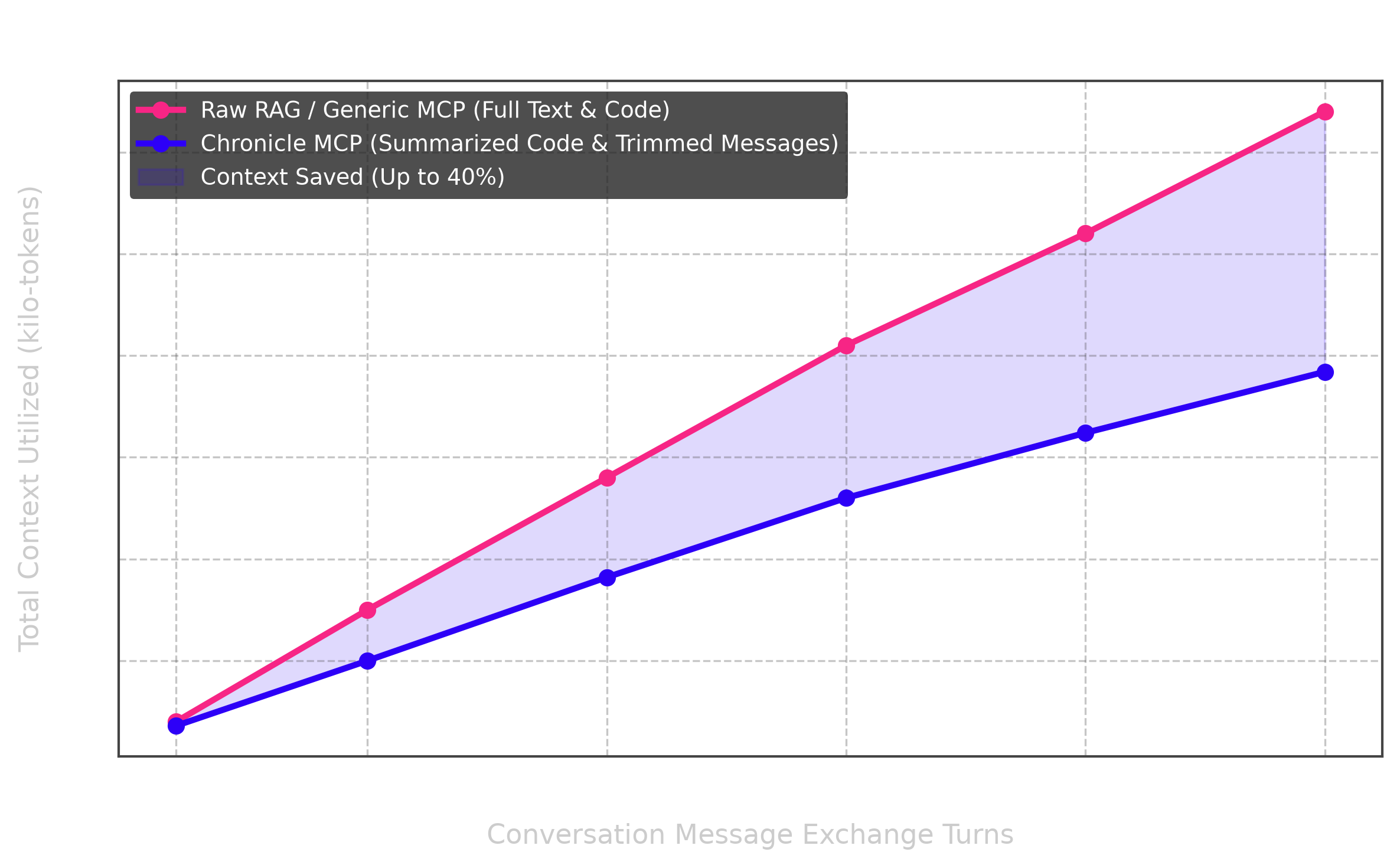
By condensing repetitive syntax and large raw code snippets, Chronicle achieves up to 40 percent token savings, directly lowering API usage costs and preventing context-window exhaustion.
Hybrid Splitting & BM25 Scoring Search Engine
To make workspace searches extremely sharp and retrieve context-aware answers, Chronicle incorporates a state-of-the-art retrieval pipeline:
- Hybrid Document Splitting: Slices long conversations into logical parts at indexing time. Splits are triggered temporally if a gap of more than 1800 seconds (30 minutes) occurs between consecutive messages, or lexically if the Jaccard similarity of vocabulary sliding groups of 4 messages drops below 0.12. Each split is stored and queried as a virtual document (
filename__chunk_idx). - Okapi BM25 Scorer: Replaces naive keyword matching and raw TF-IDF with Okapi BM25 scoring (
k1 = 1.5andb = 0.85). The parameterb = 0.85enforces an aggressive length penalty, which ensures long, rambling chat logs do not overshadow short, precise bug fixes. - Handoff Receipts Prioritization: Integrates a direct tool to save compact agent state files documenting modified paths, commitments, skipped tests, and next actions. Active handoff receipts are automatically prioritized and bubbled to the very top of search results.
Command Line Interface Mechanics
The cli.py file serves as the system's entry point, registering a unified chronicle command on the system path via the pyproject.toml configuration (chronicle = "cli:main").
1. Interactive Setup Wizard
Chronicle features an interactive, zero-dependency TTY setup wizard. Running chronicle setup or executing chronicle without arguments in an interactive terminal starts the setup flow:
[!TIP] The setup wizard is styled with a premium purple theme, supporting arrow-key navigation, spacebar toggles, inline input editing, and real-time path validation!
<u><h4>Keyboard Navigation & Controls</h4></u>
Use the following controls when interacting with the select menu:
| Command / Action | Key Control | Description |
| :--- | :--- | :--- |
| Move Highlight | ▲ Up / ▼ Down Arrow Keys | Navigates the interactive list focus |
| Toggle Checkbox | Spacebar | Selects or deselects the highlighted app |
| Enter Custom IDE | Navigate to Other & type | Type custom app directory directly inline |
| Erase Character | Backspace | Removes characters inside the custom entry |
| Confirm & Inject | Enter | Validates target existence and runs config injection |
| Cancel Setup | Ctrl + C or Escape | Aborts setup process cleanly |
<u><h4>Wizard Phases & Actions</h4></u>
The wizard guides you through the following phases:
| Step | Phase Name | What You Do | Result & Behavior |
| :--- | :--- | :--- | :--- |
| Step 1 | Monolithic Split Engine | Input JSON file path (or press Enter to skip) | Automatically partitions unified chat history exports |
| Step 2 | Storage Directory Configuration | Specify directory path (or press Enter for default) | Creates local storage folder for transcripts |
| Step 3 | Interactive IDE Selection | Toggle checkboxes, navigate submenus, type custom targets | Performs TTY selection and checks path validation |
| Step 4 | Config Injection & Live Dashboard | Review final summary configuration | Injects server configs into target IDE settings |
<details> <summary><b>Click to expand step-by-step Setup Walkthrough</b></summary>[!IMPORTANT] HOW TO USE THE WIZARD — A STEP-BY-STEP SHOWCASE GUIDE
- Start the Process: Launch the wizard with
chronicle setupin your terminal.- Split Monolithic Files: Paste the path to your exported
conversations.json(from ChatGPT or Claude). This splits them into clean individual threads inside your chats folder.- Define Your Chats Directory: Keep the default
~/universal-chatsfolder or type a custom path.- Select Your Target IDEs:
- Press
Down Arrowto scroll down to VS Code, Trae, etc.- Press
Spaceto toggle selections.- If you select Antigravity, checking it will automatically expand sub-choices (Antigravity IDE, Antigravity 2.0, Antigravity CLI) right underneath!
- Scroll down to Other (Enter custom entry) and type any system-specific folder name to add emerging editors.
- Real-time Path Validation: If the custom configuration path parent doesn't exist, a warning alerts you at the bottom:
⚠ App/IDE "<name>" was not found on your system.. Erase it withBackspaceor type a valid path to proceed.- Complete and Launch: Press
Enterto write the JSON configuration file for all selected apps. The Live Environment Dashboard will display a complete summary of your workspace configs.
Step 1: Launch the Setup Wizard
Run the setup command:
chronicle setup
Step 2: The Monolithic Split Engine
The wizard asks if you want to partition any monolithic chat logs (such as the single conversations.json from ChatGPT/Claude exports) into separate files in your new storage folder:
── Chronicle Archive Setup ─────────────────────────────────────
Do you want to split a single conversations.json file?
Enter path to export file (or press ENTER to skip):
Step 3: Configure Storage Path
Define the folder path where Chronicle will clean and store all conversation history:
Enter path to folder containing your conversations [Default: ~/universal-chats]:
✓ Using existing storage directory: /Users/username/universal-chats
Successfully set chats directory to: /Users/username/universal-chats
Step 4: Interactive IDE Selector
An interactive selection menu with a premium purple theme. Navigate with the arrow keys, toggle checkboxes with the Spacebar, edit custom inputs
Truncated for display — read the full file on GitHub.
Related Skills
Agent-Reach
105.5kGive your AI agent eyes to see the entire internet. Read & search Twitter, Reddit, YouTube, GitHub, Bilibili, XiaoHongShu — one CLI, zero API fees.
claude-mem
104.0kPersistent Context Across Sessions for Every Agent – Captures everything your agent does during sessions, compresses it with AI, and injects relevant context back into future sessions. Works with Claude Code, OpenClaw, Codex, Gemini, Hermes, Copilot, OpenCode + More
Understand-Anything
88.7kGraphs that teach > graphs that impress. Turn any code into an interactive knowledge graph you can explore, search, and ask questions about. Works with Claude Code, Codex, Cursor, Copilot, Gemini CLI, and more.
headroom
78.1kCompress tool outputs, logs, files, and RAG chunks before they reach the LLM. 20% fewer tokens for coding agents, 60-95% fewer tokens for JSON, same answers. Library, proxy, MCP server.

Languages
Trust signals
From repository metadata: license, adoption, age and documentation. Not a code audit — see the Safety scan above for what the skill file itself contains.