
Flow.Launcher.Plugin.DateDiff
A plugin for Flow Launcher for Windows to compute difference between two dates
Install / Use
/learn @LeoDupont/Flow.Launcher.Plugin.DateDiffREADME
DateDiff plugin for Flow Launcher for Windows
This plugin allows you to compute the difference in days, months or years between two dates with Flow Launcher for Windows.
Usage
This plugin takes the following form of input:
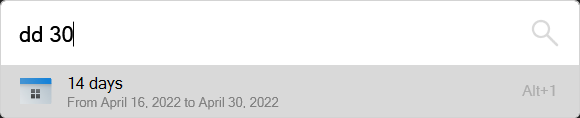
dd <fromDate?> <toDate> <unit?>
Where:
ddis the default keyword of this plugin for Flow Launcher (can be changed in the settings)<fromDate>is the date to start from (optional, default totoday)<toDate>is the date to end at<unit>is the unit of time to compute the difference in (optional) (see Units below)
Date formats
This plugin supports several types of date formats:
| Format | Description | Examples |
| ------ | ----------- | ------- |
| today | The current date | today |
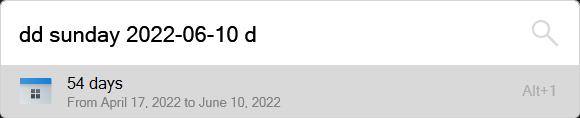
| A weekday name | A day of the current week.<br/>Names depend on your computer's locale.<br/> Case insensitive. | monday<br/>tues<br/>Sund |
| An ISO 8601 date | Format YYYY-MM-DD.<br/> Month and day are optional and default to 01. | 2022-04-16<br/>2022-04<br/>2022 |
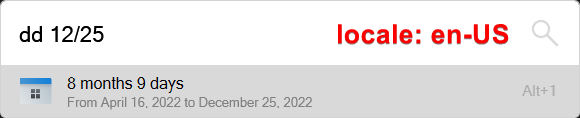
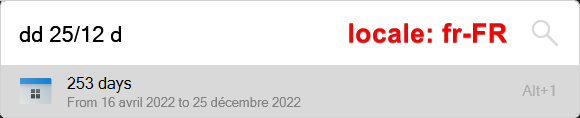
| D/M/Y<br/>or M/D/Y | The order of month and day depends on your computer's locale, <br/>both won't work at the same time and won't conflict.<br/>Separators can be / or -<br/>The month and year are optional and default to the current ones.<br/>Years 0 to 99 will be set in 2000's. | 16/04/2022 (fr-FR)<br/>04/16/2022 (en-US)<br/>16-4<br/>16 |
Units
The last parameter is an optional unit of time to compute the difference in.
| Unit | Description |
| ----- | ----------- |
| d | Number of full days |
| m | Number of months, possibly decimal |
| y | Number of years, possibly decimal |
| default | Number of full years + full months + full days |
Installation
1. Install Node.js
This plugin is written in JavaScript, so you need to install Node.js to use it with Flow Launcher.
Just go to https://nodejs.org/ and download the LTS ("Long Term Support") version of Node.js.
2. Install the plugin
You can find this plugin in Flow's Plugin Store (in the app's settings), or by directly running this command in Flow Launcher:
pm install DateDiff
Credits
Icon downloaded from https://freeicons.io/regular-life-icons/calendar-icon-17781
