
NestedSelectionRadioGroup
可无限嵌套选择的RadioGroup,以及可以随意自定义布局的RadioButton
Install / Use
/learn @LatoAndroid/NestedSelectionRadioGroupREADME
NestedSelectionRadioGroup
可无限嵌套选择、可多行选择的RadioGroup,以及可以随意自定义布局的RadioButton
github地址:https://github.com/LatoAndroid/NestedSelectionRadioGroup
优势
-
NestedSelectionRadioGroup:可嵌套ViewGroup,可多层嵌套,可多行单选
-
NestedRadioLayout:继承RelativeLayout的RadioButton,这样你可以定义UI更丰富的RadioButton,更方便的是RadioButton的子控件也会完全跟随NestedRadioLayout的选中状态,不需要你做任何处理
项目来源
之前在做一个需求的时候,产品经理要求在不同的列,不同的行的一些控件全部联动单选,而且每一个控件的样式都不一样,另外,在这些控件内部,子控件也要跟随变化。所以就有了这个库
网上有很多类似的文章,但我看了几篇和几个github分享后,一是感觉不够全面(无法满足所有需求),二是引入的RadioGroup太老,三是都是在RadioButton上面做文章,我无法定义UI更丰富的RadioButton,所以后面懒得找了就自己实现了
这个库的很大一部分代码来自RadioGroup、RadioButton和CompoundLayout,但是他们要不就是无法嵌套,要不就无法多行单选,所以在他的基础上进行了一些修改与适配
项目效果
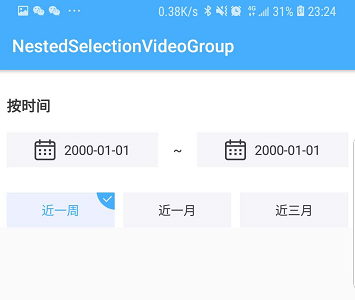

项目用法
1.NestedRadioGroup继承LinearLayout,必须作为整体的父控件
2.如果子控件需要被选中,放入NestedRadioLayout中就可以了,其他不用处理
3.其他用法和radiogroup类似,每个NestedRadioLayout都有自己的setOnCheckedChangeListener方法
引入:
compile 'com.kyle.nestedradiogrouplib:radiogrouplib:1.0.1'
在布局中
<com.kyle.radiogrouplib.NestedRadioGroup
        android:id="@+id/nestedGroup"
        android:layout_width="match_parent"
        android:layout_height="wrap_content"
        android:orientation="vertical"
        >

        <TextView
            android:layout_width="wrap_content"
            android:layout_height="wrap_content"
            android:text="不进行选择的text头部"/>

        <!--extends Relativelayout-->
        <com.kyle.radiogrouplib.NestedRadioLayout
            android:layout_width="match_parent"
            android:layout_height="50dp"
            android:background="@drawable/selector_solid_f5f5f9_corner_1dp_solod_ebf1ff_corner_1dp">

            <TextView
                android:layout_width="wrap_content"
                android:layout_height="wrap_content"
                android:layout_centerVertical="true"
                android:text="test"
                android:textColor="@color/selector_47aefe_3f3f3f"/>
        </com.kyle.radiogrouplib.NestedRadioLayout>

        <LinearLayout
            android:layout_width="match_parent"
            android:layout_height="wrap_content"
            android:orientation="vertical">

            <com.kyle.radiogrouplib.NestedRadioLayout
                android:layout_width="match_parent"
                android:layout_height="50dp"
                android:background="@drawable/selector_solid_f5f5f9_corner_1dp_solod_ebf1ff_corner_1dp">

                <TextView
                    android:layout_width="wrap_content"
                    android:layout_height="wrap_content"
                    android:layout_centerVertical="true"
                    android:text="test"
                    android:textColor="@color/selector_47aefe_3f3f3f"/>
            </com.kyle.radiogrouplib.NestedRadioLayout>
        </LinearLayout>

</com.kyle.radiogrouplib.NestedRadioGroup>
如果需要选择效果,需要写带selected的drawble文件
<?xml version="1.0" encoding="utf-8"?>
<selector xmlns:android="http://schemas.android.com/apk/res/android">
    <item android:drawable="@drawable/pop_type_selected" android:state_selected="true"/>
    <item android:drawable="@drawable/pop_type_not_selected"/>
</selector>
监听事件
group.setOnCheckedChangeListener(new NestedRadioGroup.OnCheckedChangeListener() {
            @Override
            public void onCheckedChanged(NestedRadioGroup group, int checkedId) {
                Log.d("MainActivity", checkedId + "");
            }
        });

private void bindListener(final NestedRadioLayout compoundLayout) {
        compoundLayout.setOnCheckedChangeListener(new NestedRadioLayout.OnCheckedChangeListener() {
            @Override
            public void onCheckedChanged(BaseRadioLayout baseRadioLayout, boolean checked) {
                if (checked) {
                    if (compoundLayout.getId() == R.id.rl_start_time) {

                    } else if (compoundLayout.getId() == R.id.rl_end_time) {

                    } else if (compoundLayout.getId() == R.id.rl_week) {


                    } else if (compoundLayout.getId() == R.id.rl_month) {

                    } else if (compoundLayout.getId() == R.id.rl_three_month) {

                    }
                }
            }


        });
    }
我的简书:https://www.jianshu.com/u/bb187b559365
我的掘金:https://juejin.im/user/58cd4b02128fe1006c8e8b81/posts
我的github:https://github.com/LatoAndroid
主要思路来自:https://github.com/Jaouan/CompoundLayout https://github.com/fodroid/XRadioGroup
欢迎star~
Related Skills
node-connect
345.4kDiagnose OpenClaw node connection and pairing failures for Android, iOS, and macOS companion apps
frontend-design
104.6kCreate distinctive, production-grade frontend interfaces with high design quality. Use this skill when the user asks to build web components, pages, or applications. Generates creative, polished code that avoids generic AI aesthetics.
openai-whisper-api
345.4kTranscribe audio via OpenAI Audio Transcriptions API (Whisper).
qqbot-media
345.4kQQBot 富媒体收发能力。使用 <qqmedia> 标签,系统根据文件扩展名自动识别类型(图片/语音/视频/文件)。
