
Spotatui
A fully standalone Spotify client for the terminal. Native streaming included, no daemon required.
Install / Use
/learn @LargeModGames/SpotatuiREADME
spotatui
A Spotify client for the terminal written in Rust, powered by Ratatui.
A community-maintained fork of spotify-tui, actively developed with new features like native streaming, synced lyrics, and real-time audio visualization.






Song History
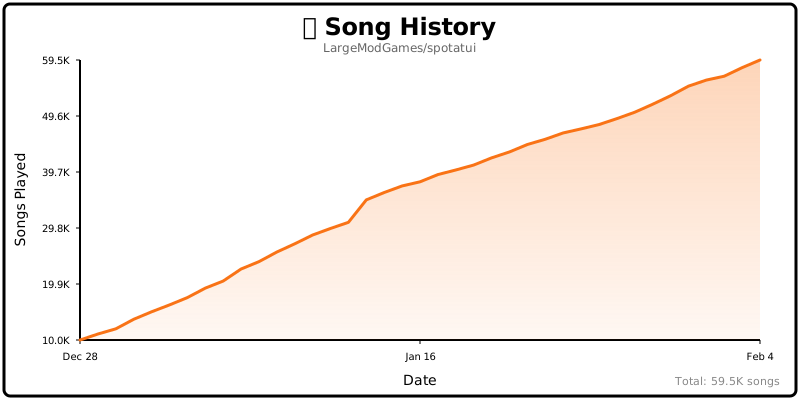
Table of Contents
- Help Wanted
- Performance
- Privacy Notice
- Migrating from spotify-tui
- Installation
- Connecting to Spotify
- Usage
- Native Streaming
- Configuration
- Limitations
- Using with spotifyd
- Libraries used
- Development
- Maintainer
- spotatui Contributors
- Upstream Contributors (spotify-tui)
- Star History
- Roadmap
Help Wanted
spotatui is currently maintained by a solo developer. More contributors would be hugely appreciated! Here's how you can help:
- Star the repo to help others discover the project
- Report bugs or request features in Issues
- Join the community in Discussions
- Submit a PR for code, docs, or themes
See CONTRIBUTING.md for more details!
Performance
spotatui is extremely lightweight compared to the official Electron client.
| Mode | RAM Usage | | :------------------------------ | :-------- | | Native Streaming (Base) | ~78 MB | | With Synced Lyrics | ~78 MB | | With System-Wide Visualizer | ~80 MB |
Tested on Arch Linux (Hyprland).
Privacy Notice
Anonymous Global Counter: spotatui includes an opt-in feature that contributes to a global counter showing how many songs have been played by all users worldwide. This feature:
- Is completely anonymous - no personal information, song names, artists, or listening history is collected
- Only sends a simple increment when a new song starts playing
- Is enabled by default but can be opted out at any time
- Can be disabled by setting
enable_global_song_count: falsein~/.config/spotatui/config.yml
We respect your privacy. This is purely a fun community metric with zero tracking of individual users.
Migrating from spotify-tui
If you used the original spotify-tui before:
- The binary name changed from
spttospotatui. - Config paths changed:
- Old:
~/.config/spotify-tui/ - New:
~/.config/spotatui/
- Old:
You can copy your existing config:
mkdir -p ~/.config/spotatui
cp -r ~/.config/spotify-tui/* ~/.config/spotatui/
You may be asked to re-authenticate with Spotify the first time.
Installation
Important: Spotify Premium is required for playback features (native streaming and Web API playback controls).
# Homebrew (macOS only)
brew tap LargeModGames/spotatui
brew install spotatui

# Winget (Windows)
winget install spotatui

# Cargo
cargo install spotatui

# Arch Linux (AUR) - pre-built binary (faster)
yay -S spotatui-bin

# Arch Linux (AUR) - build from source
yay -S spotatui

# Void Linux (Unoffical Repo)
echo repository=https://raw.githubusercontent.com/Event-Horizon-VL/blackhole-vl/repository-x86_64 | sudo tee /etc/xbps.d/20-repository-extra.conf
sudo xbps-install -S spotatui
# NixOS (Flake)

# Add spotatui to your flake inputs:
inputs = {
  spotatui = {
    url = "github:LargeModGames/spotatui";
    inputs.nixpkgs.follows = "nixpkgs";
  };
}

# Add the spotatui package from your inputs to your config:
{ inputs, ...}:{
  # Your other configurations
  environment.systemPackages = with pkgs; [
    inputs.spotatui.packages.${pkgs.stdenv.hostPlatform.system}.default
  ];
}
Or download pre-built binaries from GitHub Releases.
See the Installation Wiki for platform-specific requirements and building from source.
Connecting to Spotify
Run spotatui and follow the on-screen instructions to connect your Spotify account.
You'll need to create a Spotify Developer app at the Spotify Dashboard.
See the Installation Wiki for step-by-step setup.
Usage
The binary is named spotatui.
Running spotatui with no arguments will bring up the UI. Press ? to bring up a help menu that shows currently implemented key events and their actions.
There is also a CLI that is able to do most of the stuff the UI does. Use spotatui --help to learn more.
See Keybindings Wiki for the full list of keyboard shortcuts.
Here are some example to get you excited.
spotatui --completions zsh # Prints shell completions for zsh to stdout (bash, power-shell and more are supported)

spotatui play --name "Your Playlist" --playlist --random # Plays a random song from "Your Playlist"
spotatui play --name "A cool song" --track # Plays 'A cool song'

spotatui playback --like --shuffle # Likes the current song and toggles shuffle mode
spotatui playback --toggle # Plays/pauses the current playback

spotatui list --liked --limit 50 # See your liked songs (50 is the max limit)

# Looks for 'An even cooler song' and gives you the '{name} from {album}' of up to 30 matches
spotatui search "An even cooler song" --tracks --format "%t from %b" --limit 30
Native Streaming
spotatui can play audio directly without needing spotifyd or the official Spotify app. Just run spotatui and it will appear as a Spotify Connect device.
- Works with media keys, MPRIS (Linux), and macOS Now Playing
- Premium account required
See the Native Streaming Wiki for setup details.
Configuration
A configuration file is located at ${HOME}/.config/spotatui/config.yml.
See the Configuration Wiki for the full config file reference.
You can also configure spotatui in-app by pressing Alt-, to open Settings.
See Themes Wiki for built-in presets (Spotify, Dracula, Nord, etc.).
Discord Rich Presence
Discord Rich Presence is enabled by default and uses the built-in spotatui application ID, so no extra setup is required.
Overrides (optional):
behavior:
  enable_discord_rpc: true
  discord_rpc_client_id: "your_client_id"
You can also override via SPOTATUI_DISCORD_APP_ID or disable in the setting or by setting behavior.enable_discord_rpc: false in ~/.config/spotatui/config.yml.
Limitations
This app uses the Web API from Spotify, which doesn't handle streaming itself. You have three options for audio playback:
- Native Streaming (NEW!) - spotatui can now play audio directly using its built-in streaming feature. See Native Streaming below.
- Official Spotify Client - Have the official Spotify app open on your computer
- Spotifyd - Use a lightweight alternative like spotifyd
If you want to play tracks, Spotify requires that you have a Premium account.
With a free account, spotatui can still authenticate and browse your library/search results, but playback actions (play/pause/seek/transfer) will not work in either:
- Native Streaming (librespot)
- Web API playback control mode
Deprecated Spotify API Features
Note: As of November 2024, Spotify deprecated and removed access to certain API endpoints for new applications. The following features are included in this app but will only work if your Spotify Developer application was created before November 27, 2024:
-
Audio Visualization (press
v): Now uses local real-time FFT analysis of your system audio. The visualization no longer depends on Spotify's deprecated Audio Analysis API.Platform Support: | Platform | Status | Notes
Related Skills
himalaya
343.3kCLI to manage emails via IMAP/SMTP. Use `himalaya` to list, read, write, reply, forward, search, and organize emails from the terminal. Supports multiple accounts and message composition with MML (MIME Meta Language).
node-connect
343.3kDiagnose OpenClaw node connection and pairing failures for Android, iOS, and macOS companion apps
frontend-design
92.1kCreate distinctive, production-grade frontend interfaces with high design quality. Use this skill when the user asks to build web components, pages, or applications. Generates creative, polished code that avoids generic AI aesthetics.
coding-agent
343.3kDelegate coding tasks to Codex, Claude Code, or Pi agents via background process
