
AutoplayVideos
Android library to auto-play/pause videos from url in recyclerview.
Install / Use
/learn @Krupen/AutoplayVideosREADME
AutoplayVideos




Show some :heart: and star the repo to support the project





This library is created with the purpose to implement recyclerview with videos easily.
It is targeted at solving following problems:
- Flicker when scrolling.
- Lag or skipping frames when video starts.
- OutOfMemory errors.
And it has following features:
- Auto-play videos when in view.
- Auto-pause videos when not in view or partially in view.
- Mute/Un-mute videos.
- Option to play only first visible video.
- Download videos to local storage in background for faster loading.
Demo
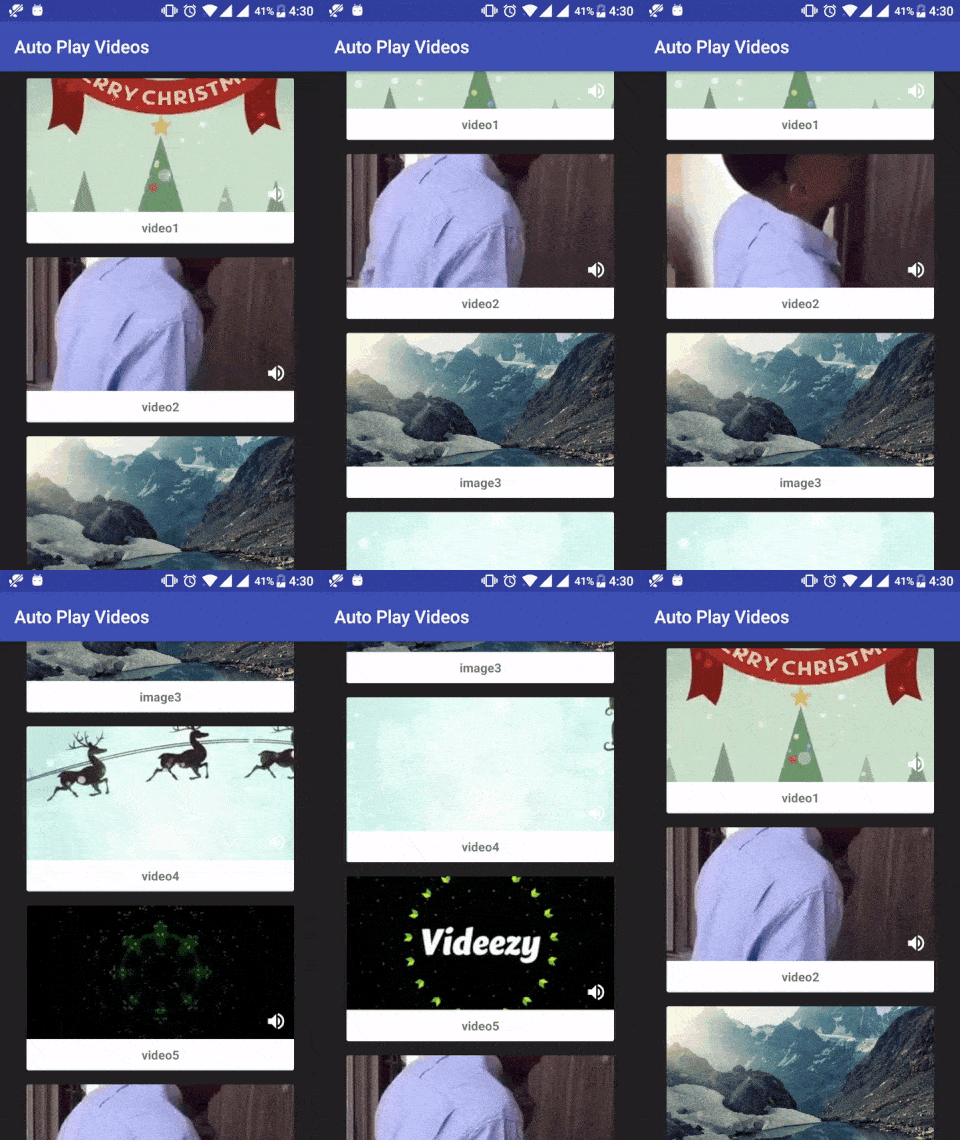
Download
Gradle
Step 1. Add the jCenter repository to your project-level build.gradle file
allprojects {
	repositories {
		jcenter()
	}
}
Step 2. Add the dependency to your app-level build.gradle file:
dependencies {
	 compile 'com.allattentionhere:autoplayvideos:0.2.0'
}
Or Maven
<dependency>
  <groupId>com.allattentionhere</groupId>
  <artifactId>autoplayvideos</artifactId>
  <version>0.2.0</version>
  <type>pom</type>
</dependency>
Permissions
Add below permissions to AndroidManifest.xml
<uses-permission android:name="android.permission.INTERNET" />
<uses-permission android:name="android.permission.ACCESS_NETWORK_STATE" />
Usage
Add AAH_VideoImage to your xml file for single list item single_card.xml:
<?xml version="1.0" encoding="utf-8"?>
<LinearLayout xmlns:android="http://schemas.android.com/apk/res/android"
    xmlns:card_view="http://schemas.android.com/apk/res-auto"
    android:layout_width="match_parent"
    android:layout_height="wrap_content">

    <android.support.v7.widget.CardView
        android:id="@+id/card_view"
        android:layout_width="wrap_content"
        android:layout_height="wrap_content">

       <LinearLayout
            android:layout_width="wrap_content"
            android:layout_height="wrap_content"
            android:orientation="vertical">

             <FrameLayout
                android:layout_width="300dp"
                android:layout_height="150dp">

                <com.allattentionhere.autoplayvideos.AAH_VideoImage
                    android:layout_width="match_parent"
                    android:layout_height="match_parent" />

                <ImageView
                    android:id="@+id/img_vol"
                    android:layout_width="wrap_content"
                    android:layout_height="wrap_content"
                    android:layout_gravity="right|bottom"
                    android:layout_margin="8dp"
                    android:src="@drawable/ic_unmute"/>
            </FrameLayout>

            <TextView
                android:id="@+id/tv"
                android:layout_width="match_parent"
                android:layout_height="wrap_content"
                android:gravity="center" />

        </LinearLayout>
    </android.support.v7.widget.CardView>
</LinearLayout>
Add AAH_CustomRecyclerView to your Activity layout xml MainActivity.xml:
<?xml version="1.0" encoding="utf-8"?>
<LinearLayout xmlns:android="http://schemas.android.com/apk/res/android"
    android:layout_width="match_parent"
    android:layout_height="match_parent"
    android:orientation="vertical">

    <com.allattentionhere.autoplayvideos.AAH_CustomRecyclerView
        android:id="@+id/rv_home"
        android:layout_width="wrap_content"
        android:layout_height="wrap_content" />

</LinearLayout>
Set Adapter with following specifics:
- Adapter should extend
AAH_VideosAdapter. - ViewHolder should extend
AAH_CustomViewHolder. - Set thumbnail image url and video url in
onBindViewHoldermethod.
public class MyVideosAdapter extends AAH_VideosAdapter {

    private List<MyModel> list;
    Picasso picasso;

    public class MyViewHolder extends AAH_CustomViewHolder {
        final TextView tv;
	final ImageView img_vol,img_playback;
        boolean isMuted; //to mute/un-mute video (optional)

        public MyViewHolder(View x) {
            super(x);
            tv = ButterKnife.findById(x, R.id.tv);
	    img_vol = ButterKnife.findById(x, R.id.img_vol);
	    img_playback = ButterKnife.findById(x, R.id.img_playback);
        }
    }

    public MyVideosAdapter(List<MyModel> list_urls, Picasso p) {
        this.list = list_urls;
        this.picasso = p;
    }

    @Override
    public AAH_CustomViewHolder onCreateViewHolder(ViewGroup parent, int viewType) {
        View itemView = LayoutInflater.from(parent.getContext())
                .inflate(R.layout.single_card, parent, false);
        return new MyViewHolder(itemView);
    }

    @Override
    public void onBindViewHolder(AAH_CustomViewHolder holder, int position) {
        ((MyViewHolder) holder).tv.setText(list.get(position).getName());

        //todo
        holder.setImageUrl(list.get(position).getImage_url());
        holder.setVideoUrl(list.get(position).getVideo_url());
        //load image/thumbnail into imageview
        if (list.get(position).getImage_url() != null && !list.get(position).getImage_url().isEmpty())
            picasso.load(holder.getImageUrl()).config(Bitmap.Config.RGB_565).into(holder.getAAH_ImageView());
    }

    @Override
    public int getItemCount() {
        return list.size();
    }

    @Override
    public int getItemViewType(int position) {
        return 0;
    }
}
Finally setActivity in your Activity before setting the adapter and (Optional) scroll programmatically to initiate videos on initial screen:
    recyclerView.setActivity(this); //todo before setAdapter
    recyclerView.setAdapter(mAdapter);
Play videos initially (Optional)
Call these two functions to start video playback when the screen launches and user hasn't scrolled.
recyclerView.smoothScrollBy(0,1);
recyclerView.smoothScrollBy(0,-1);
Play only 1st video (Optional)
Setting this parameter will play video only in 1st completely visible RecyclerView ViewHolder.
recyclerView.setPlayOnlyFirstVideo(true); // false by default
Download videos to local storage (Optional)
You can start downloading video in background on viewholder loaded. You can change download path.
recyclerView.setDownloadPath(Environment.getExternalStorageDirectory() + "/MyVideo"); //optional
recyclerView.setDownloadVideos(true); // false by default
Optionally you can start pre-downloading all the videos by passing list of URLs to function as below:
List<String> urls = new ArrayList<>();
 for (MyModel object : modelList) {
     if (object.getVideo_url() != null && object.getVideo_url().endsWith(".mp4"))
         urls.add(object.getVideo_url());
 }
recyclerView.preDownload(urls);
Add below permission to AndroidManifest.xml. Ask for runtime permission in devices on Marshmallow and above.
<uses-permission android:name="android.permission.WRITE_EXTERNAL_STORAGE" />
Remove check for .mp4 (Optional)
By default it checks for url to end with .mp4 else it is not considered as video URL. You can override this by setting parameter as below. Please use this with caution and make sure you provide video URL only.
recyclerView.setCheckForMp4(false); // true by default
Pause videos manually (Optional)
Call the following method to stop the videos when Activity/Fragment stops (User receives call, minimizes app etc)
    @Override
    protected void onStop() {
        super.onStop();
        recyclerView.stopVideos();
    }
Resume videos when app resumes (Optional)
Call the following method to resume videos when App resumes (opening app after minimizing it, etc)
    @Override
    protected void onResume() {
        super.onResume();
        recyclerView.playAvailableVideos(0);
    }
Play partially visible video (Optional)
Call the following method to set the percentage of view that needs to be visible for video to start playing.
recyclerView.setVisiblePercent(50);
Get callbacks when videos starts and pauses
You can override the below methods of AAH_CustomViewHolder to get callback when video starts to play or pauses.
	@Override
        public void videoStarted() {
            super.videoStarted();
            img_playback.setImageResource(R.drawable.ic_pause);
            if (isMuted) {
                muteVideo();
                img_vol.setImageResource(R.drawable.ic_mute);
            } else {
                unmuteVideo();
                img_vol.setImageResource(R.drawable.ic_unmute);
            }
        }
        @Override
        public void pauseVideo() {
            super.pauseVideo();
            img_pla
Related Skills
docs-writer
99.6k`docs-writer` skill instructions As an expert technical writer and editor for the Gemini CLI project, you produce accurate, clear, and consistent documentation. When asked to write, edit, or revie
model-usage
342.0kUse CodexBar CLI local cost usage to summarize per-model usage for Codex or Claude, including the current (most recent) model or a full model breakdown. Trigger when asked for model-level usage/cost data from codexbar, or when you need a scriptable per-model summary from codexbar cost JSON.
arscontexta
2.9kClaude Code plugin that generates individualized knowledge systems from conversation. You describe how you think and work, have a conversation and get a complete second brain as markdown files you own.
cursor-agent-tracking
134A repository that provides a structured system for maintaining context and tracking changes in Cursor's AGENT mode conversations through template files, enabling better continuity and organization of AI interactions.
