
kong
🦍 The API and AI Gateway
Install / Use
claude mcp add Kong -- npx -y github:Kong/kongIf the server publishes to npm under a different name, use that package instead — check the repo README.
MCP Server
Model Context Protocol server
Quality Score
Category
AI & Machine LearningSupported Platforms
Tags
Our assessment of kong
kong scores 85/100 on our quality scale, 567th of 953 AI & Machine Learning skills we index.
Its MCP Server is 9.1 KB long, well organised into 9 sections with 3 code examples: a thorough specification that gives an agent plenty to work with.
With 44,365 GitHub stars, it is one of the more widely adopted skills in the catalogue.
Maintenance, license and trust
- The repository was last updated 18 days ago, so kong is actively maintained.
- Our last check on 2026-10-20 found the source still online.
- It is released under the Apache-2.0 license, a permissive license that allows use, modification and commercial use with attribution.
- Its trust signals score 95/100, with 1 caution from licensing, adoption, age or documentation. These come from repository metadata, not a code audit — read the skill file before letting an agent act on it.
Safety scan
No issues foundOur scan of the whole file found no instruction hijacking, hidden characters, credential access, data exfiltration or destructive commands. An AI review of the same text found nothing harmful.
AI review by kimi-k2.7-code on 2026-09-24. Automated pattern scan on 2026-09-24. It catches known dangerous patterns, not every risk — read a skill before letting an agent act on it.
kong compared with similar skills
All 4 of these similar skills score higher than kong; compare them before choosing.
| Skill | Score | Stars | Updated | Format |
|---|---|---|---|---|
| kong (this skill)by Kong | 85 | 44.4k | 18d ago | MCP Server |
| claude-memby thedotmack | 100 | 113.8k | today | CLAUDE.md |
| Agent-Reachby Panniantong | 100 | 109.5k | 1d ago | CLAUDE.md |
| Understand-Anythingby Egonex-AI | 100 | 91.0k | today | CLAUDE.md |
| headroomby headroomlabs-ai | 100 | 79.0k | today | CLAUDE.md |
Frequently asked questions
- How do I install kong?
- Run
claude mcp add Kong -- npx -y github:Kong/kong. The install tabs above show the steps for each supported agent. - Which AI agents does kong work with?
- It is written for Claude Code and Claude Desktop, as a MCP Server file. Other agents that read the same format can often use it too.
- Is kong safe to use?
- Our scan of the whole file found no instruction hijacking, hidden characters, credential access, data exfiltration or destructive commands. An AI review of the same text found nothing harmful. It is Apache-2.0-licensed and scores 95/100 on trust signals. Skills are instructions an agent will follow, so read the file before installing it and do not approve commands you do not understand.
- Is kong still maintained?
- The repository was last updated 18 days ago, so kong is actively maintained.
Skill content
View source on GitHub





Kong or Kong Gateway is a cloud-native, platform-agnostic, scalable API 𖧹 LLM 𖧹 MCP Gateway distinguished for its high performance and extensibility via plugins. It also provides advanced AI traffic capabilities with multi-LLM support, semantic security, MCP traffic security and analytics, and more.
By providing functionality for proxying, routing, load balancing, health checking, authentication (and more), Kong serves as the central layer for orchestrating microservices or conventional API traffic - and agentic LLM and MCP as well - with ease.
Kong runs natively on Kubernetes thanks to its official Kubernetes Ingress Controller.
<br />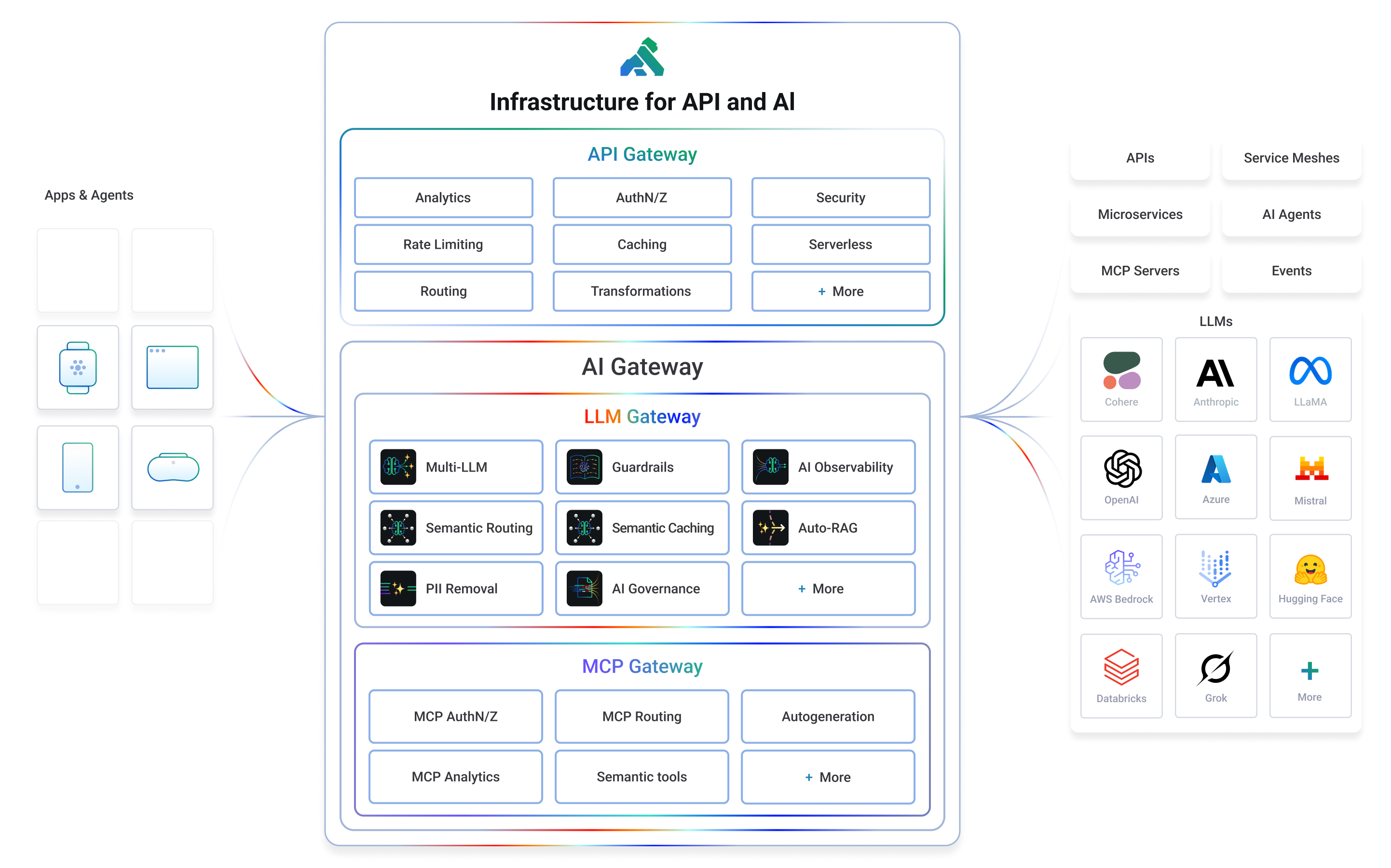
Installation | Documentation | Discussions | Forum | Blog | Builds | AI Gateway | Cloud Hosted Kong
Getting Started
If you prefer to use a cloud-hosted Kong, you can sign up for a free trial of Kong Konnect and get started in minutes. If not, you can follow the instructions below to get started with Kong on your own infrastructure.
Let’s test drive Kong by adding authentication to an API in under 5 minutes.
We suggest using the docker-compose distribution via the instructions below, but there is also a docker installation procedure if you’d prefer to run the Kong Gateway in DB-less mode.
Whether you’re running in the cloud, on bare metal, or using containers, you can find every supported distribution on our official installation page.
- To start, clone the Docker repository and navigate to the compose folder.
  $ git clone https://github.com/Kong/docker-kong
  $ cd docker-kong/compose/
- Start the Gateway stack using:
$ KONG_DATABASE=postgres docker-compose --profile database up
The Gateway is now available on the following ports on localhost:
:8000- send traffic to your service via Kong:8001- configure Kong using Admin API or via decK:8002- access Kong's management Web UI (Kong Manager) on localhost:8002
Next, follow the quick start guide to tour the Gateway features.
Getting started with AI Gateway for LLM and MCP
If you would like to get started with Kong AI Gateway capabilities including LLM and MCP features, please refer to the official AI documentation.
Features
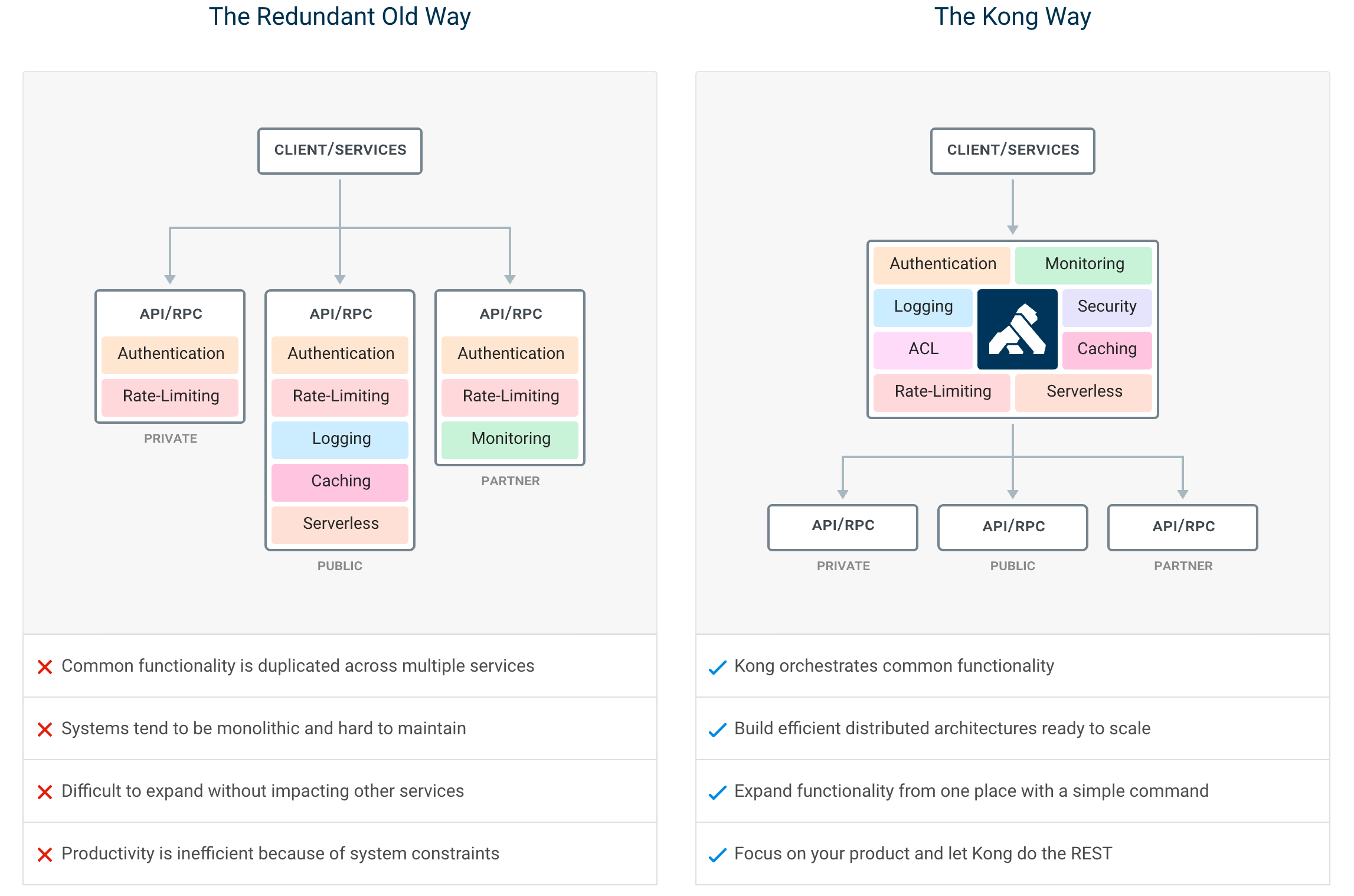
By centralizing common API, AI and MCP functionality across all your organization's services, Kong Gateway creates more freedom for engineering teams to focus on the challenges that matter most.
The top Kong features include:
- Advanced routing, load balancing, health checking - all configurable via a RESTful admin API or declarative configuration.
- Authentication and authorization for APIs using methods like JWT, basic auth, OAuth, ACLs and more.
- Universal LLM API to route across multiple providers like OpenAI, Anthropic, GCP Gemini, AWS Bedrock, Azure AI, Databricks, Mistral, Huggingface and more.
- MCP traffic governance, MCP security and MCP observability in addition to MCP autogeneration from any RESTful API.
- 60+ AI features like AI observability, semantic security and caching, semantic routing and more.
- Proxy, SSL/TLS termination, and connectivity support for L4 or L7 traffic.
- Plugins for enforcing traffic controls, rate limiting, req/res transformations, logging, monitoring and including a plugin developer hub.
- Sophisticated deployment models like Declarative Databaseless Deployment and Hybrid Deployment (control plane/data plane separation) without any vendor lock-in.
- Native ingress controller support for serving Kubernetes.
Plugin Hub
Plugins provide advanced functionality that extends the use of the Gateway. Many of the Kong Inc. and community-developed plugins like AWS Lambda, Correlation ID, and Response Transformer are showcased at the Plugin Hub.
Contribute to the Plugin Hub and ensure your next innovative idea is published and available to the broader community!
Contributing
We ❤️ pull requests, and we’re continually working hard to make it as easy as possible for developers to contribute. Before beginning development with the Kong Gateway, please familiarize yourself with the following developer resources:
- Community Pledge (COMMUNITY_PLEDGE.md) for our pledge to interact with you, the open source community.
- Contributor Guide (CONTRIBUTING.md) to learn about how to contribute to Kong.
- Development Guide (DEVELOPER.md): Setting up your development environment.
- CODE_OF_CONDUCT and COPYRIGHT
Use the Plugin Development Guide for building new and creative plugins, or browse the online version of Kong's source code documentation in the Plugin Development Kit (PDK) Reference. Developers can build plugins in Lua, Go or JavaScript.
Releases
Please see the Changelog for more details about a given release. The SemVer Specification is followed when versioning Gateway releases.
Join the Community
- Check out the docs
- Join the Kong discussions forum
- Join the Kong discussions at the Kong Nation forum: https://discuss.konghq.com/
- Join our Community Slack
- Read up on the latest happenings at our blog
- Follow us on X
- Subscribe to our YouTube channel
- Visit our homepage to learn more
Konnect Cloud
Kong Inc. offers commercial subscriptions that enhance the Kong Gateway in a variety of ways. Customers of Kong's Konnect Cloud subscription take advantage of additional gateway functionality, commercial support, and access to Kong's managed (SaaS) control plane platform. The Konnect Cloud platform features include real-time analytics, a service catalog, developer portals, and so much more! Get started with Konnect Cloud.
License
Copyright 2016-2026 Kong Inc.

Licensed under the Apache License, Version 2.0 (the "License");
you may not use this file except in compliance with the License.
You may obtain a copy of the License at

   https://www.apache.org/licenses/LICENSE-2.0

Unless required by applicable law or agreed to in writing, software
distributed under the License is distributed on an "AS IS" BASIS,
WITHOUT WARRANTIES OR CONDITIONS OF ANY KIND, either express or implied.
See the License for the specific language governing permissions and
limitations under the License.
Related Skills
claude-mem
113.8kPersistent Context Across Sessions for Every Agent – Captures everything your agent does during sessions, compresses it with AI, and injects relevant context back into future sessions. Works with Claude Code, OpenClaw, Codex, Gemini, Hermes, Copilot, OpenCode + More
Agent-Reach
109.5kGive your AI agent eyes to see the entire internet. Read & search Twitter, Reddit, YouTube, GitHub, Bilibili, XiaoHongShu — one CLI, zero API fees.
Understand-Anything
91.0kGraphs that teach > graphs that impress. Turn any code into an interactive knowledge graph you can explore, search, and ask questions about. Works with Claude Code, Codex, Cursor, Copilot, Gemini CLI, and more.
headroom
79.0kCompress tool outputs, logs, files, and RAG chunks before they reach the LLM. 20% fewer tokens for coding agents, 60-95% fewer tokens for JSON, same answers. Library, proxy, MCP server.

Languages
Trust signals
From repository metadata: license, adoption, age and documentation. Not a code audit — see the Safety scan above for what the skill file itself contains.