
CraftyDialogues
The Crafty component adds an entity a ability to carry conversation. As data source it uses JSON file. For building data structure you can use prepared Dialogues builder (http://kibo.github.com/dialoguesBuilder/).
Install / Use
/learn @Kibo/CraftyDialoguesREADME
Dialogues v0.6
The Crafty component that adds an entity a ability to carry conversation. As data source it uses JSON file. For building data source structure you can use prepared Dialogues builder tool.
###Type of dialogues:
- Linear
- Linear interrupted
- Linear dialogue with questions
- Branched dialogue with different results
- Fake branched dialogue with the same end
- Procedural dialogue
- Combined dialogue
###Advantage:
- no depending on the third party library
- documented code
- tested code
###Usage: Set source data to entity.
Crafty.e("2D, DOM, Dialogues").setDialogues( DIALOGUES_DATA_SOURCE );
Make sure that there is a container for dialogs. Default container for views is #chat, but you can change it.
<div id="chat"></div>
Show dialogue
Crafty.e("2D, DOM, Dialogues").showDialogue();
At the end of conversation you can catch a ConversationIsOver event.
Crafty.e("2D, DOM, Dialogues")
.bind("ConversationIsOver", function(){
	this.endOfConversation();
});
Helper method
Close the conversation
Crafty.e("2D, DOM, Dialogues").endOfConversation();
Clear chat container
Crafty.e("2D, DOM, Dialogues").emptyChatContainer();
Get actual dialogue
Crafty.e("2D, DOM, Dialogues").getDialogue();
Find dialogue by id
Crafty.e("2D, DOM, Dialogues").findDialogueById(id);
Root of dialogues
Crafty.e("2D, DOM, Dialogues").getRoot();
Get actor
Crafty.e("2D, DOM, Dialogues").getActor( id );
###How it work
Dialogue as data
{
	"id": 41,
	"parent": 40,
	"isChoice": false,
	"actor": 20,
	"conversant": 10,
	"menuText": "",
	"dialogueText": "Over the gate is hell.",
	"conditionsString": "",
	"codeBefore": "",
	"codeAfter": "",
	"outgoingLinks": [
		42
	]
}
Order of execution of code
- codeBefore
- conditionsString
- codeAfter
Scope of code
Execute code on the current dialogue
"codeAfter": "this.getDialogue().passThrough=true",
Evaluate the condition on the current dialogue
"conditionsString": "this.getDialogue().passThrough==true",
Execute code on "this" scope of the entity with Dialogues component
"codeBefore": "this.experience = 1000",
Execute code on an remote entity
"codeBefore": "Crafty("RemoteEntityName").isReady = true",
Evaluate the condition on an remote entity
"conditionsString": "Crafty("RemoteEntityName").isReady == true",
Chat container
For appearance of chat container use CSS. There are helper class.
Sentence
Note the class. You will need it. "Ogre" is the actor name from your source JSON file. This create class name with actor name.
<div id="chat">
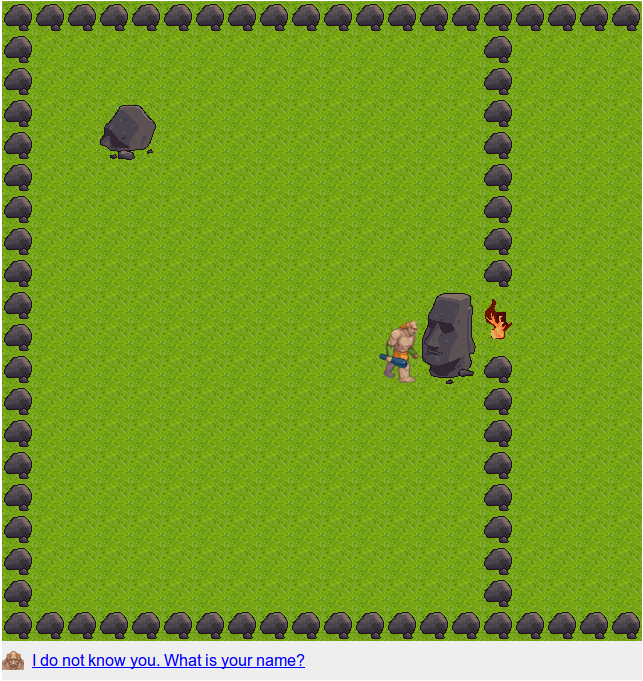
	<p class="dialogue Ogre" data-outgoinglink="20">I do not know you. What is your name?</p>
</div>
Choice
<div id="chat">
	<ul>
		<li data-outgoinglink="40">Ask at the entrance.</li>
		<li data-outgoinglink="60">Leave</li>
	</ul>
</div>
###Work procedure:
-
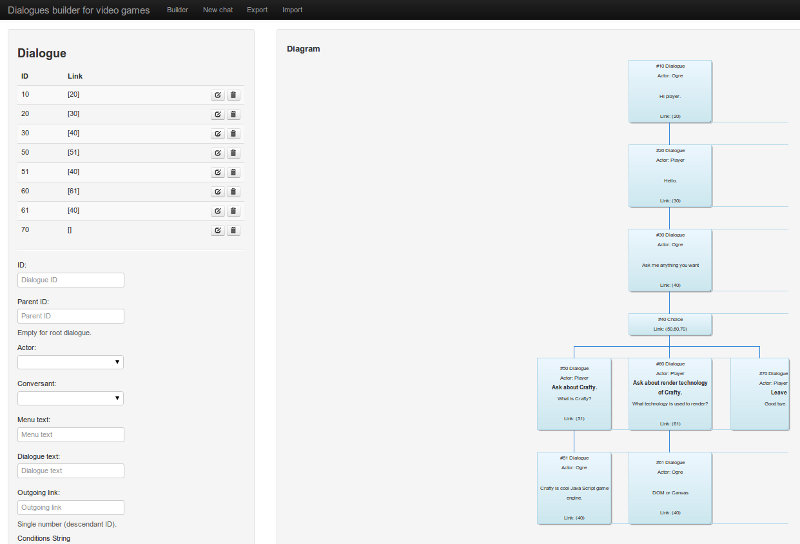
Use Dialogues builder tool to create conversation tree.
-
Export your conversation as JSON (example)
-
Use Crafty.js for building your amazing HTML5 game based on conversation.
###Examples
###Documentation
###It may interest you to know
- Tiled map builder module for Crafty game engine
###Contact me I will be grateful for constructive comments.
- Crafty group thread
- tomasjurman@gmail.com
Related Skills
node-connect
350.8kDiagnose OpenClaw node connection and pairing failures for Android, iOS, and macOS companion apps
frontend-design
110.4kCreate distinctive, production-grade frontend interfaces with high design quality. Use this skill when the user asks to build web components, pages, or applications. Generates creative, polished code that avoids generic AI aesthetics.
openai-whisper-api
350.8kTranscribe audio via OpenAI Audio Transcriptions API (Whisper).
qqbot-media
350.8kQQBot 富媒体收发能力。使用 <qqmedia> 标签,系统根据文件扩展名自动识别类型(图片/语音/视频/文件)。
