
DropzoneFileExplorer
Dropzone File Explorer is a simple, self-hosted file manager designed for performance, usability and security. It allows you to browse, upload, manage and share files directly in the browser – without a database and without external dependencies.
Install / Use
/learn @KeepCoolCH/DropzoneFileExplorerREADME
📤 Dropzone File Explorer
Dropzone File Explorer is a simple, self-hosted file manager designed for performance, usability and security. It allows you to browse, upload, manage and share files directly in the browser – without a database and without external dependencies. Version 1.1 – developed by Kevin Tobler 🌐 www.kevintobler.ch – 🌐 github.com/KeepCoolCH/DropzoneFileExplorer – 🌐 hub.docker.com/r/keepcoolch/dropzonefileexplorer
🔄 Changelog
🆕 Version 1.x
- 1.1
- 📦 Improved ZIP creation & extraction (more reliable, faster, better edge-case handling)
- 📊 File & folder size calculation with automatic total size display
- 👥 User management with per-folder access rights
- 🔗 Share links with dedicated share page
- 👁️ File preview directly inside share page
- 🎨 Multiple UI / UX improvements
- 🔧 API improvements & internal refactoring
- 🐞 Various bug fixes and stability improvements
- 1.0
- First Release, details below
🚀 Features
- 📂 File & folder browser with tree navigation
- 🖱️ Drag & drop upload (files & entire folders)
- 📦 Automatic chunked uploads (large files supported)
- ⏸️ Pause & resume uploads
- 📊 Upload progress with speed indicator
- 📏 File & folder size display (including total folder size)
- 🔍 Live search (search in folders, name contains)
- 🗂️ Create, rename, move, copy and delete files & folders
- 📎 ZIP creation & extraction
- 👁️ Preview support (Images, Videos, Audio, PDF, Text files)
- ✏️ Inline text editor with save support
- 🔗 Share links for files & folders
- 📄 Dedicated share page with preview support
- 👥 Optional login & user management
- 🔐 Per-user folder permissions
- 🚫 No database required – pure PHP
- ⚡ Optimized for modern browsers
- 📱 Responsive UI
📸 Screenshot
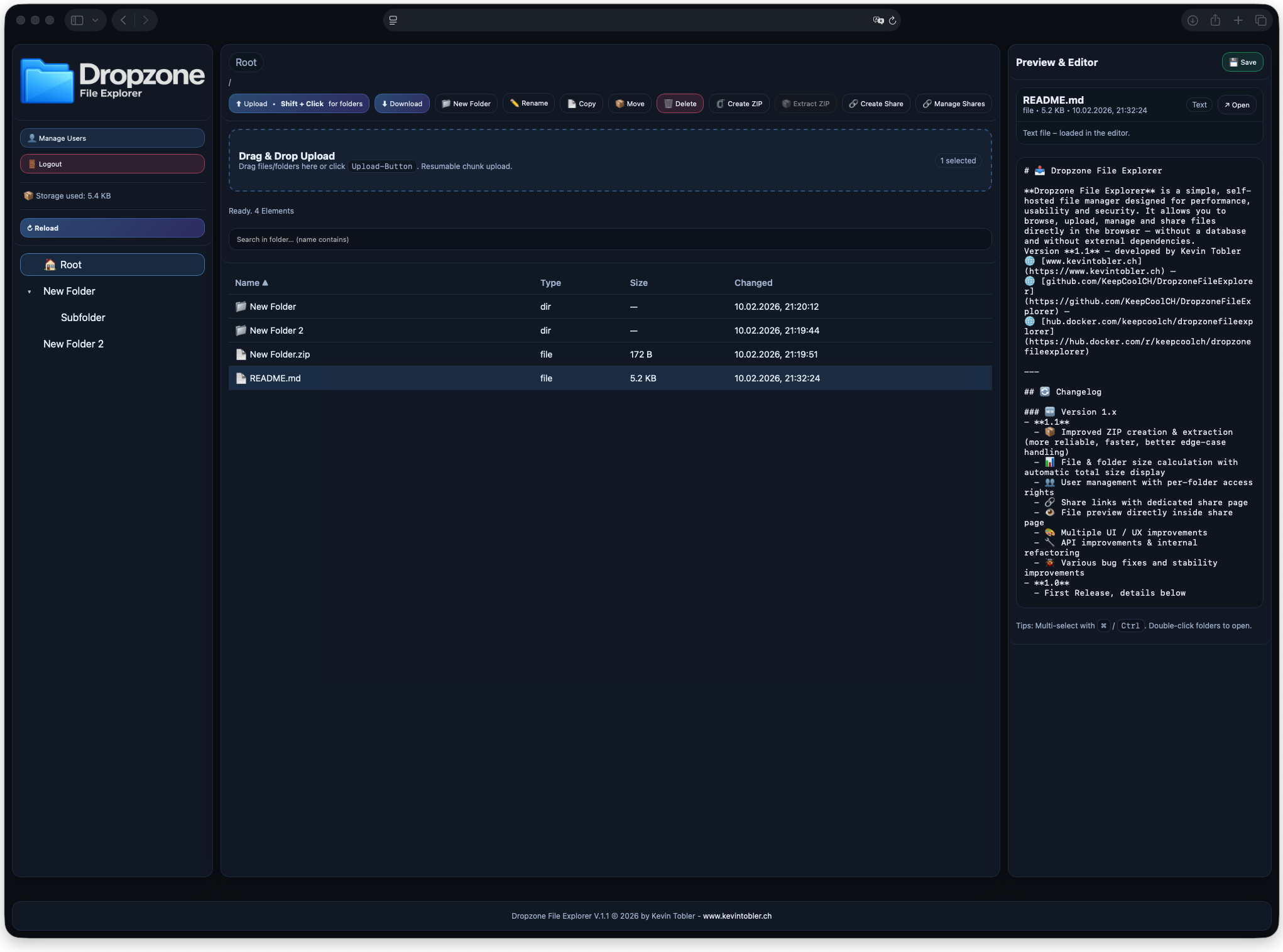
🐳 Docker Installation (Version 1.1)
Dropzone File Explorer V.1.1 is available as a Docker image:
docker pull keepcoolch/dropzonefileexplorer:latest
Start the container:
docker run -d \
  --name dropzonefileexplorer \
  --restart=unless-stopped \
  -p 8080:80 \
  keepcoolch/dropzonefileexplorer:latest
Then open: 👉 http://localhost:8080
Uploads, settings, JSON files etc. are stored inside the container.
📁 Optional: Volume mount - Map the directories to a folder on your host (Mac, Linux, NAS):
You can store all files and data outside the container (persistent on your host system). This is useful for:
- keeping files and configuration when recreating/updating the container
- mounting external storage
-v ~/dropzonefileexplorer/files:/var/www/files
-v ~/dropzonefileexplorer/data:/var/www/data
Full docker run example:
docker run -d \
  --name dropzonefileexplorer \
  --restart unless-stopped \
  -p 8080:80 \
  -v ~/dropzonefileexplorer/files:/var/www/files \
  -v ~/dropzonefileexplorer/data:/var/www/data \
  keepcoolch/dropzonefileexplorer:latest
Full docker-compose.yml example:
services:
  dropzonefileexplorer:
    image: keepcoolch/dropzonefileexplorer:latest
    container_name: dropzonefileexplorer
    restart: unless-stopped
    ports:
      - "8080:80"
    volumes:
      - ~/dropzonefileexplorer/files:/var/www/files
      - ~/dropzonefileexplorer/data:/var/www/data
Run docker compose:
docker compose up -d
🔧 Manual Installation (non-Docker)
- Upload all files to your web server
- Open the application in your browser
- Create Admin Account
⚠️ Requires PHP 8.0 or higher. No database needed.
🧩 Architecture
- Backend: PHP (no database)
- Storage: Filesystem + JSON metadata
- Frontend: Vanilla JavaScript (no framework)
- Security: Session-based auth, path validation, controlled API endpoints
📦 Upload Handling
- Chunked uploads for large files
- Automatic resume if upload is interrupted
- Parallel upload queue
- Optional overwrite / rename handling
- Folder uploads supported via browser APIs
🔎 Search
- Search files and folders by name
- Live filtering while typing
👁️ Preview & Editor
Supported previews
- 🖼️ Images (PNG, JPG, WebP, SVG, HEIC, …)
- 🎥 Videos (MP4, WebM, MOV, …)
- 🎧 Audio (MP3, WAV, AAC, …)
- 📝 Text files (code & config files supported)
Text Editor
- Edit text files directly in the browser
- Save changes back to disk
🔗 Sharing
Generate share links for:
- files
- folders
Share links can be:
- copied to clipboard
- opened directly
Shares can be revoked at any time
- Central overview of all active share links
🔐 Authentication
- Session-based login
- Passwords are securely hashed
- Supports: admin account, additional users
- User management via UI
- Change passwords via UI
🧑💻 Developer
Kevin Tobler
🌐 www.kevintobler.ch
📜 License
This project is licensed under the MIT License – feel free to use, modify, and distribute.
