
KProgressHUD
An implement of ProgressHUD for Android, similar to MBProgressHUD, SVProgressHUD for iOS.
Install / Use
/learn @Kaopiz/KProgressHUDREADME
KProgressHUD



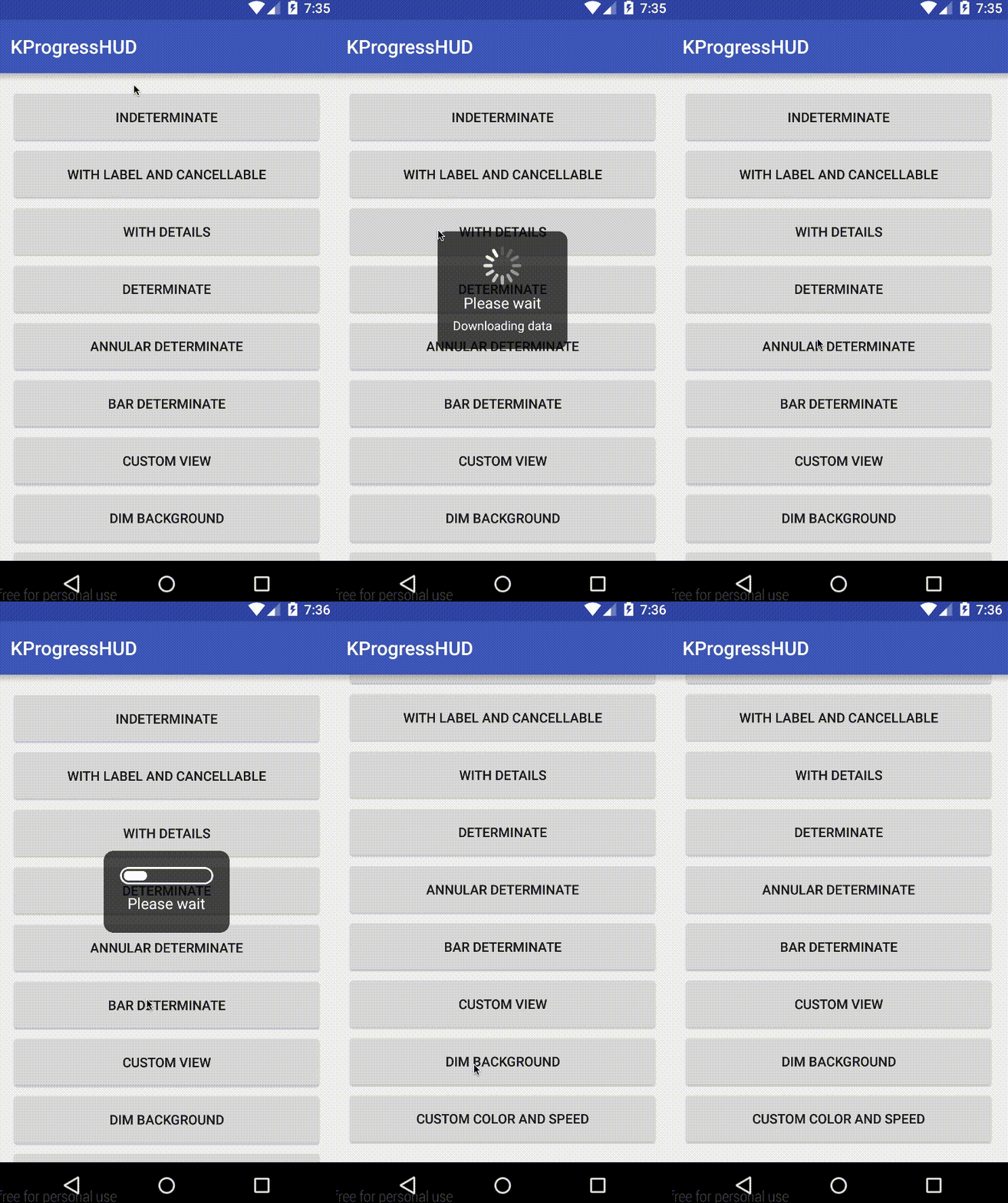
A progress HUD implementation for Android. Inspired by MBProgressHUD for iOS.
Compatibility
Android 2.3 and later
Adding KProgressHUD to your project
Gradle
Include this in your app build.gradle
dependencies {
    // Other dependencies
    implementation 'com.kaopiz:kprogresshud:1.2.0'
}
Source code
If you want more control over the implementation, download and import the kprogresshud folder as a module to your project and modify according to your need.
Usage
The usage of KProgressHUD is pretty straight forward.
- Create the HUD, customize its style and show on the UI thread.
- Fire a background worker to handle long-running tasks.
- When done, call
dismiss()to close (or if you use a determinate style, the HUD will automatically dismiss when progress reaches its max).
Indeterminate HUD
KProgressHUD.create(MainActivity.this)
	.setStyle(KProgressHUD.Style.SPIN_INDETERMINATE)
	.setLabel("Please wait")
	.setDetailsLabel("Downloading data")
	.setCancellable(true)
	.setAnimationSpeed(2)
	.setDimAmount(0.5f)
	.show();
Determinate HUD
KProgressHUD hud = KProgressHUD.create(MainActivity.this)
					.setStyle(KProgressHUD.Style.ANNULAR_DETERMINATE)
					.setLabel("Please wait")
					.setMaxProgress(100)
					.show();
hud.setProgress(90);
You can also create a custom view to be displayed.
ImageView imageView = new ImageView(this);
imageView.setBackgroundResource(R.drawable.spin_animation);
AnimationDrawable drawable = (AnimationDrawable) imageView.getBackground();
drawable.start();
KProgressHUD.create(MainActivity.this)
   .setCustomView(imageView)
   .setLabel("This is a custom view")
   .show();
Optionally, the custom view can implement Determinate or Indeterminate interface, which make the HUD treats this view like the default determinate or indeterminate one.
See Javadocs or sample for more information.
Contributing
- Fork it ( https://github.com/Kaopiz/KProgressHUD/fork )
- Create your feature branch (
git checkout -b my-new-feature) - Commit your changes (
git commit -am 'Add some feature') - Push to the branch (
git push origin my-new-feature) - Create new Pull Request
License
   Copyright 2015 Kaopiz Software Co., Ltd.

   Licensed under the Apache License, Version 2.0 (the "License");
   you may not use this file except in compliance with the License.
   You may obtain a copy of the License at

       http://www.apache.org/licenses/LICENSE-2.0

   Unless required by applicable law or agreed to in writing, software
   distributed under the License is distributed on an "AS IS" BASIS,
   WITHOUT WARRANTIES OR CONDITIONS OF ANY KIND, either express or implied.
   See the License for the specific language governing permissions and
   limitations under the License.
Related Skills
node-connect
351.8kDiagnose OpenClaw node connection and pairing failures for Android, iOS, and macOS companion apps
frontend-design
110.9kCreate distinctive, production-grade frontend interfaces with high design quality. Use this skill when the user asks to build web components, pages, or applications. Generates creative, polished code that avoids generic AI aesthetics.
openai-whisper-api
351.8kTranscribe audio via OpenAI Audio Transcriptions API (Whisper).
qqbot-media
351.8kQQBot 富媒体收发能力。使用 <qqmedia> 标签,系统根据文件扩展名自动识别类型(图片/语音/视频/文件)。
