
OpenMagic
AI coding toolbar for any web app — run npx openmagic, select any element, describe a change, review the diff, and it edits your real source code (verified & self-correcting). Visual element editor + AI UI/UX design review. 14 LLM providers (OpenAI, Claude, Gemini…), BYOK, MIT.
Install / Use
npx skills add Kalmuraee/OpenMagicInstalls into whichever agent you are using.
Other
Other agent config
Quality Score
Category
AI & Machine LearningSupported Platforms
Our assessment of OpenMagic
OpenMagic scores 86/100 on our quality scale, 535th of 949 AI & Machine Learning skills we index.
Its Other is 14 KB long, well organised into 23 sections with 7 code examples: a thorough specification that gives an agent plenty to work with.
It has 22 GitHub stars, so there is little community track record yet; judge it on its content.
Maintenance, license and trust
- The repository was last updated 33 days ago, so OpenMagic is actively maintained.
- It is released under the MIT license, a permissive license that allows use, modification and commercial use with attribution.
- Its trust signals score 97/100, with no cautions. These come from repository metadata, not a code audit — read the skill file before letting an agent act on it.
OpenMagic compared with similar skills
All 4 of these similar skills score higher than OpenMagic; compare them before choosing.
| Skill | Score | Stars | Updated | Format |
|---|---|---|---|---|
| OpenMagic (this skill)by Kalmuraee | 86 | 22 | 33d ago | Other |
| claude-memby thedotmack | 100 | 102.3k | today | CLAUDE.md |
| taste-skillby Leonxlnx | 100 | 101.1k | 2d ago | CLAUDE.md |
| Understand-Anythingby Egonex-AI | 100 | 87.7k | today | CLAUDE.md |
| headroomby headroomlabs-ai | 100 | 77.5k | today | CLAUDE.md |
Frequently asked questions
- How do I install OpenMagic?
- Run
npx skills add Kalmuraee/OpenMagic. The install tabs above show the steps for each supported agent. - Which AI agents does OpenMagic work with?
- It is written for Claude Code and Gemini CLI, as a Other file. Other agents that read the same format can often use it too.
- Is OpenMagic safe to use?
- It is MIT-licensed and scores 97/100 on trust signals. Skills are instructions an agent will follow, so read the file before installing it and do not approve commands you do not understand.
- Is OpenMagic still maintained?
- The repository was last updated 33 days ago, so OpenMagic is actively maintained.
Skill content
View source on GitHubOpenMagic
Add an AI coding toolbar to any web app. One command. Zero code changes.








OpenMagic injects a floating AI toolbar into your running web app via reverse proxy. Select any element, describe what you want, review the diff, approve — your code updates and HMR refreshes the page. No framework plugin. No IDE extension. No account. Bring your own API key.
It's the AI coding agent that edits your real source from the browser — every change is verified (typecheck/lint + runtime) and self-correcting, with a visual element editor (live CSS/text/attribute preview) and a one-click AI UI/UX design review. Works with Next.js, Remix/React Router, Nuxt, SvelteKit, SolidStart, Angular, Astro, Vite, Vue, and plain static sites — across 14 providers (OpenAI, Anthropic Claude, Google Gemini, xAI Grok, DeepSeek, and more) and 70+ models.
Website · Quick Start · How It Works · Providers · GitHub
</div><div align="center">
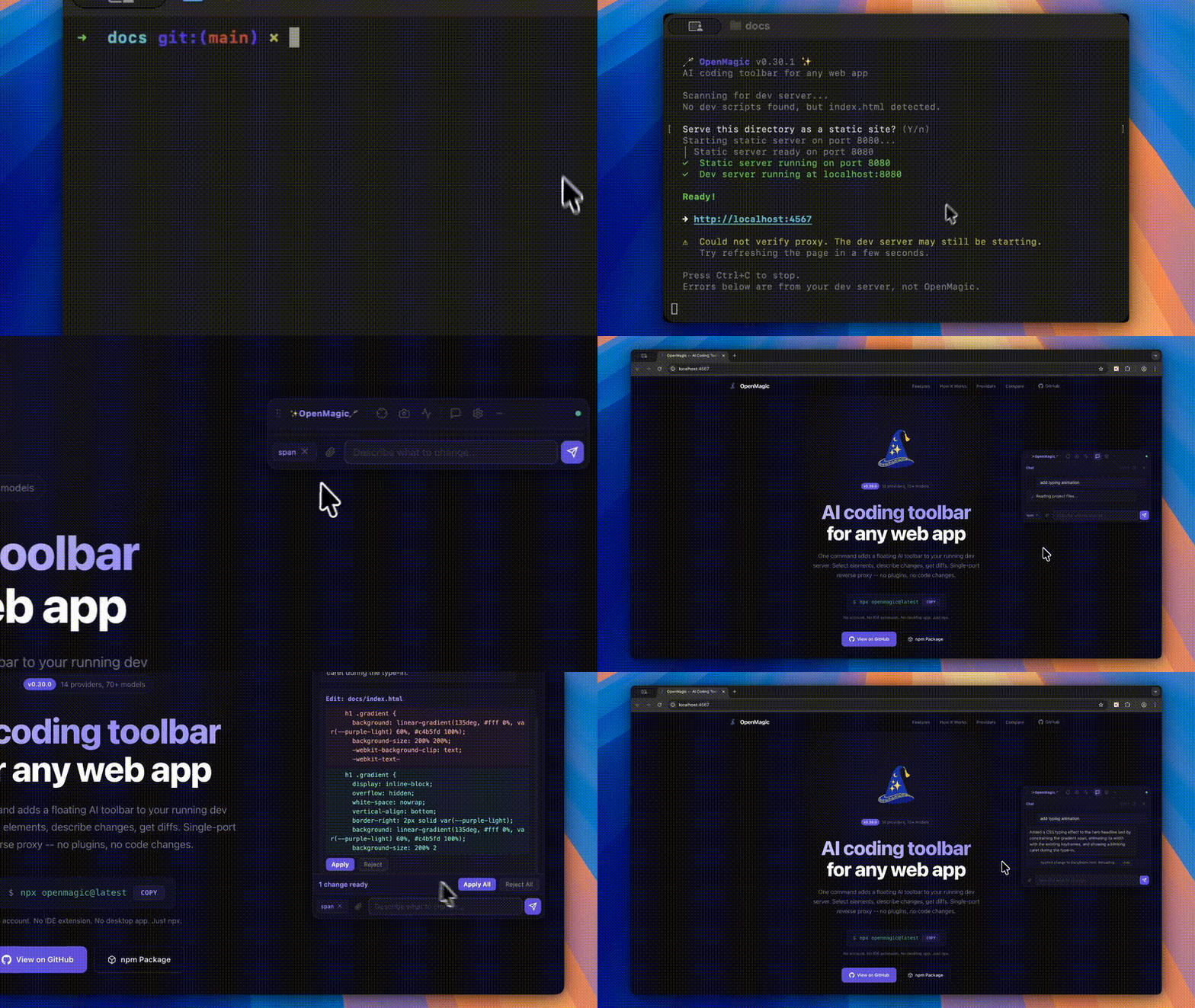
Quick Start
# 1. Start your dev server as usual
npm run dev

# 2. In your project folder, run OpenMagic (auto-detects your dev server)
npx openmagic@latest
Run this from your project folder so OpenMagic can find your source files and dev server. A proxied version of your app opens with the toolbar overlaid.
Prefer a permanent install? Install it globally and run openmagic directly:
npm install -g openmagic      # install once
openmagic                     # then run from any project folder
openmagic --version           # check your version
OpenMagic checks npm on startup and prints a one-line notice when a newer version
is available (with the right update command for how you launched it). Disable the
check with OPENMAGIC_NO_UPDATE_CHECK=1.
Requires Node.js 20.19 or newer.
Use it to…
- Change a running web app by clicking an element and describing the edit in plain English — no need to hunt for the file.
- Let an AI fix your UI without a designer — one click audits hierarchy, spacing, contrast, accessibility, and consistency, then proposes brand-consistent fixes.
- Edit your real source code from the browser, safely — every change is shown as a diff, verified against the build, auto-reverted if it breaks, and undoable.
- Tweak CSS, text, and attributes live, see the result instantly, then push it to your codebase.
- Use one AI coding tool across every framework and any LLM — React/Next.js, Vue/Nuxt, Svelte, Angular, Astro, and static sites; 14 providers and 70+ models with your own key.
Features
| | Feature | Description | |---|---------|-------------| | Select | Element Selection | Click any element to capture its DOM, computed styles, parent layout, siblings, React props, and component name | | Ground | Smart File Grounding | Server-side route, component, import, and stylesheet matching sends the most relevant files first | | Diff | Atomic Patch Preview | Approve or reject each change. Patch groups apply server-side with rollback support | | Retry | Auto-Retry | If the LLM requests more files, OpenMagic reads them transparently and retries — no manual intervention | | Chat | Markdown Chat | Streaming responses, copy buttons, session persistence across HMR reloads | | Net | Network Profiling | Captures page load timing, TTFB, FCP, and flags slow resources | | Img | Image Attachments | Drag-drop, paste from clipboard, or use the file picker — vision models analyze screenshots | | Keys | Per-Provider Keys | Store a key for each provider. Switch models without re-entering credentials | | Plan | Plan Before Editing | Review an implementation plan before asking the model to generate patches | | KB | Keyboard Shortcuts | Toggle, send, close, minimize — all from the keyboard | | Min | Minimize to Icon | Collapse the toolbar to a small floating button when you do not need it |
How It Works
OpenMagic is a single-port reverse proxy. It sits between your browser and your dev server, injecting the toolbar script into HTML responses. Your project is never modified at install time.
                        +-----------------------+
                        |      Your Browser     |
                        |  localhost:4567        |
                        +---+---------------+---+
                            |               |
                      HTTP proxy        WebSocket
                            |               |
  +----------------+    +---+---------------+---+
  | Your Dev Server|    |   OpenMagic Server    |
  | localhost:3000  |<---|                       |
  +----------------+    |  File Read/Write      |
                        |  LLM API Proxy        |
                        |  (your key, localhost) |
                        +-----------------------+
- Proxy -- All requests forward to your dev server. HTML responses get the toolbar
<script>tag appended automatically. - Toolbar -- A Shadow DOM Web Component. Fully isolated from your app's styles.
- Server -- Local Node.js process handling file I/O and proxying LLM calls. API keys never leave your machine.
- HMR -- When the AI modifies source files, your dev server's hot module replacement picks up changes automatically.
Stop with Ctrl+C. Nothing stays behind.
Supported Providers
14 providers, 70+ models. Providers ship with a static fallback list, and OpenMagic fetches live model lists from the local server when the provider supports it. API keys stay server-side and are never sent to the toolbar.
| Provider | Notable Models | Vision | Thinking / Reasoning | |----------|---------------|--------|---------------------| | OpenAI | GPT-5.5, GPT-5.4 Pro/Mini/Nano, o3, o4-mini, Codex Mini | Yes | reasoning_effort | | Anthropic | Claude Opus 4.6, Sonnet 4.6, Haiku 4.5 | Yes | Extended thinking (budget_tokens) | | Google Gemini | Gemini 3.1 Pro, 3 Flash, 2.5 Pro, 2.5 Flash | Yes | thinking_level | | xAI (Grok) | Grok 4.20, Grok 4.20 Reasoning, Grok 4.1 Fast | Yes | reasoning_effort | | DeepSeek | DeepSeek V4 Flash/Pro, DeepSeek V3.2, DeepSeek R1 | -- | V4 Pro/R1: reasoning_effort | | Mistral | Large 3, Small 4, Codestral, Devstral 2, Magistral | Yes | Magistral: reasoning_effort | | MiniMax | MiniMax models | Varies | -- | | Kimi | Kimi models | Varies | -- | | Qwen | Qwen models | Varies | -- | | Zhipu | Zhipu (GLM) models | Varies | -- | | Doubao | Doubao models | Varies | -- | | Groq | Llama 4 Scout, Llama 3.3 70B, Qwen 3 32B | Llama 4 | -- | | Ollama | Any local model (free, private) | Varies | -- | | OpenRouter | 200+ models from all providers | Varies | Varies |
Model lists are labeled internally as live, cached, or static. Cloud provider live lists are cached for 12 hours; local providers such as Ollama use a short cache so newly pulled models appear quickly.
Use Test model in Settings to verify a provider key/model combination before sending a real request. OpenMagic classifies common failures such as invalid keys, unavailable models, quota/rate limits, and provider errors.
Enable Plan before editing when you want the model to produce an implementation plan first. After reviewing the plan, choose Generate changes to ask for patches.
Keyboard Shortcuts
| Shortcut | Action |
|----------|--------|
| Ctrl+Shift+O | Toggle toolbar open/close |
| Ctrl+Enter | Send message |
| Escape | Close toolbar |
| Minimize button | Collapse to floating icon |
Configuration
CLI Options
| Option | Description | Default |
|--------|-------------|---------|
| -p, --port <port> | Dev server port to proxy | Auto-detect |
| -l, --listen <port> | OpenMagic proxy port | 4567 |
| -r, --root <paths...> | Project root directories | Current directory |
| --host <host> | Dev server host | localhost |
| --no-open | Do not auto-open browser | false |
Multi-Repo Support
npx openmagic --port 3000 --root ./frontend --root ./backend
Config File
Settings persist in ~/.openmagic/config.json (your home directory, never in your project):
{
  "provider": "anthropic",
  "model": "claude-opus-4-6",
  "apiKey": "sk-ant-..."
}
Using Ollama (Free, Local)
ollama pull llama3.3
npx openmagic --port 3000
# Select "Ollama (Local)" as your provider
Security
- Localhost only -- The proxy and WebSocket bind to
localhost. Not accessible from the network. - Session tokens -- Each session generates a random token. The toolbar authenticates before accessing any API.
- Path sandboxing -- File operations are restricted to configured root directories. Symlinks that escape the root are rejected.
- API keys stay local -- Keys live in
~/.openmagic/config.json. They are proxied through the local server, never exposed to the browser or any third party. - Zero project modification -- OpenMagic never touches your
package.json, config files, or source code during installation. The toolbar exists only in the proxy layer. - Diff preview -- AI-proposed changes are shown as diffs with Approve/Reject buttons. Nothing is auto-applied without your consent.
Known Limitations
- Origin change -- Your app runs on
:3000but you access it via:4567. This can break OAuth redirect URIs,localStorageisolation, and Service Worker scope. Most dev setups work fine, but if your app checkswindow.location.origin, you may need to adjust your dev config. - CSP via meta tags -- OpenMagic strips CSP response headers so the toolbar script can load, but
<meta>tag CSP can't be modified at the proxy level and may still block it. - Same-page trust boundary -- The toolbar runs inside your proxied development page so it can inspect selected DOM elements. Do not use OpenMagic with untrusted third-party scripts running in that page.
- Not for production -- This is a dev tool. Don't deploy the proxy to production.
Comparison
| Feature | OpenMagic | Stagewise | Frontman | Agentation |
|---------|-----------|-----------|----------|------------|
| Install | npx openmagic | npm + Electron | Framework middleware | npm package |
| Framework support | Any (reverse proxy) | React, Vue, Angular, Svelte | Next.js, Astro, Vite | React |
| Code modification | Yes (diff + approve) | Yes (via IDE) | Yes | No (clipboard)
Truncated for display — read the full file on GitHub.
Related Skills
claude-mem
102.3kPersistent Context Across Sessions for Every Agent – Captures everything your agent does during sessions, compresses it with AI, and injects relevant context back into future sessions. Works with Claude Code, OpenClaw, Codex, Gemini, Hermes, Copilot, OpenCode + More
taste-skill
101.1kAgent skills that give coding agents taste: art direction, reference images and a browser check instead of generic AI pages
Understand-Anything
87.7kGraphs that teach > graphs that impress. Turn any code into an interactive knowledge graph you can explore, search, and ask questions about. Works with Claude Code, Codex, Cursor, Copilot, Gemini CLI, and more.
headroom
77.5kCompress tool outputs, logs, files, and RAG chunks before they reach the LLM. 20% fewer tokens for coding agents, 60-95% fewer tokens for JSON, same answers. Library, proxy, MCP server.

Languages
Trust signals
From repository metadata: license, adoption, age and documentation. Not a code audit — see the Safety scan above for what the skill file itself contains.