
causly-server
Open-source MCP server that turns any AI agent into your technical co-founder: ship code, find leads, track deals, take meeting notes, manage calendar and reminders. Local-first. Works with Claude Desktop, Cursor and Windsurf.
Install / Use
claude mcp add KNIHAL -- npx -y github:KNIHAL/causly-serverIf the server publishes to npm under a different name, use that package instead — check the repo README.
MCP Server
Model Context Protocol server
Quality Score
Category
AutomationSupported Platforms
Our assessment of causly-server
causly-server scores 83/100 on our quality scale, 2130th of 2,775 Automation skills we index.
Its MCP Server is 22 KB long, well organised into 20 sections with 12 code examples: a thorough specification that gives an agent plenty to work with.
It has 3 GitHub stars, so there is little community track record yet; judge it on its content.
Maintenance, license and trust
- The repository was last updated 5 days ago, so causly-server is actively maintained.
- It is released under the MIT license, a permissive license that allows use, modification and commercial use with attribution.
- Its trust signals score 92/100, with 1 caution from licensing, adoption, age or documentation. These come from repository metadata, not a code audit — read the skill file before letting an agent act on it.
Safety scan
No issues foundOur scan of the whole file found no instruction hijacking, hidden characters, credential access, data exfiltration or destructive commands (1 minor note below). An AI review of the same text found nothing harmful.
- noteInstalls by piping a downloaded script into a shellline 285
… risk checks.** Drive wipes, formatting and shutdown commands are blocked. Force-pushes, `DROP TABLE`, `curl | bash` and `sudo` are flagged.
AI review by kimi-k2.7-code on 2026-11-16. Automated pattern scan on 2026-11-16. It catches known dangerous patterns, not every risk — read a skill before letting an agent act on it.
causly-server compared with similar skills
All 4 of these similar skills score higher than causly-server; compare them before choosing.
| Skill | Score | Stars | Updated | Format |
|---|---|---|---|---|
| causly-server (this skill)by KNIHAL | 83 | 3 | 5d ago | MCP Server |
| Agent-Reachby Panniantong | 100 | 112.4k | 9d ago | CLAUDE.md |
| rufloby ruvnet | 100 | 81.9k | today | CLAUDE.md |
| headroomby headroomlabs-ai | 100 | 79.9k | today | CLAUDE.md |
| CowAgentby zhayujie | 100 | 48.0k | today | CLAUDE.md |
Frequently asked questions
- How do I install causly-server?
- Run
claude mcp add KNIHAL -- npx -y github:KNIHAL/causly-server. The install tabs above show the steps for each supported agent. - Which AI agents does causly-server work with?
- It is written for Claude Code, Claude Desktop, Cursor and Windsurf, as a MCP Server file. Other agents that read the same format can often use it too.
- Is causly-server safe to use?
- Our scan of the whole file found no instruction hijacking, hidden characters, credential access, data exfiltration or destructive commands (1 minor note below). An AI review of the same text found nothing harmful. It is MIT-licensed and scores 92/100 on trust signals. Skills are instructions an agent will follow, so read the file before installing it and do not approve commands you do not understand.
- Is causly-server still maintained?
- The repository was last updated 5 days ago, so causly-server is actively maintained.
Skill content
View source on GitHubCausly Server
The open-source MCP server that turns any AI agent into your technical co-founder.
<p> <a href="https://www.npmjs.com/package/causly-server"><img src="https://img.shields.io/npm/v/causly-server.svg?color=FF9A1F" alt="npm version"></a> <a href="./LICENSE"><img src="https://img.shields.io/badge/License-MIT-blue.svg" alt="MIT license"></a> <a href="https://github.com/KNIHAL/causly-server/actions/workflows/ci.yml"><img src="https://github.com/KNIHAL/causly-server/actions/workflows/ci.yml/badge.svg" alt="CI"></a> <img src="https://img.shields.io/badge/node-%E2%89%A5%2022.13-339933.svg" alt="Node 22.13 or newer"> <a href="./CONTRIBUTING.md"><img src="https://img.shields.io/badge/PRs-welcome-brightgreen.svg" alt="PRs welcome"></a> </p>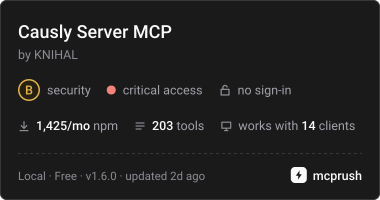

Most agents can write text. Causly Server gives them hands: they ship code, hunt for clients, track deals, take meeting notes, handle your calendar and remind you on Telegram, all from one conversation, all on your own machine.
npm install -g causly-server
causly-server init
Contents
- Why Causly Server
- Quick start
- What you can ask
- How it works
- Tool packs
- Workflow tools
- Configuration
- Google setup
- Works with
- Security and privacy
- Command reference
- Troubleshooting
- FAQ
- Compatibility
- Contributing, roadmap, license
Why Causly Server
A founder's week is not only code. It is also finding clients, following up, remembering what was promised in a call, and shipping without breaking things. Causly Server puts all of that behind one MCP server.
- One server for build, sell, operate and grow. Git, GitHub, CI and deploys, but also leads, a sales pipeline, meeting notes, calendar, reminders and SEO.
- Memory that survives the chat. Your pipeline, meetings and reminders live in a local SQLite file, so the agent can pick up tomorrow where it stopped today.
- Local-first. Keys and data stay on your machine. There is no Causly cloud in the loop.
- Safe by default. Risky actions need explicit confirmation, file access can be limited to one folder, and secrets are redacted from logs.
- Light on your agent's context. Tools load in packs on demand instead of flooding the agent with hundreds of definitions.
- One command setup.
initfinds Claude Desktop, Cursor and Windsurf and wires them up.
Quick start
Requires Node.js 22.13 or newer. Full guide: Getting started.
1. Install
npm install -g causly-server
2. Connect your editors
causly-server init
init adds Causly Server to Claude Desktop, Cursor and Windsurf, whichever you have. It also prints the one-line command for Claude Code. Restart the editor afterwards.
3. Check everything
causly-server doctor
4. Add keys for the services you use (optional)
causly-server setup
Files, git, shell, Docker and Terraform work with no keys at all. Add keys only for the services you want. Each key is checked live as you enter it.
Useful init options:
causly-server init --client cursor                    # pick editors instead of auto-detecting
causly-server init --workspace D:\my-project          # limit file tools to one folder
causly-server init --toolsets research,pipeline,meetings   # choose which packs load at startup
What you can ask
- "Find companies hiring React developers and add the best three to my pipeline."
- "Save notes from my call with Acme: they want a demo next week, follow up on Friday."
- "What is due this week? Include meeting action items and reminders."
- "Prep me for my next meeting." (needs Google Calendar)
- "Transcribe this recording and list the action items." (needs a Groq key)
- "Ship this change: run the checks, open a pull request, tell me when CI is green."
- "Audit this page for SEO and suggest keywords."
- "Find a free slot on Thursday and create the event."
How it works
<p align="center"> <img src="https://raw.githubusercontent.com/KNIHAL/causly-server/master/assets/architecture.png" alt="Architecture: your AI agent talks MCP to Causly Server, which has a tool router, a safety layer, tool packs and a local store, and calls your services over their APIs." width="100%"> </p>Your agent talks to Causly Server over MCP (stdio). Inside the server:
- Tool router.
search_tools,load_toolsetanduse_toollet the agent find a tool and call it by name. Packs load on demand, anduse_toolworks even in editors that do not refresh their tool list mid-chat, so you do not need to restart. - Safety layer. Permission levels, confirmation for risky actions, an optional workspace limit, secret redaction and an activity log.
- Tool packs. About 245 tools grouped into packs (below).
- Local store. SQLite for pipeline, meetings and reminders in
~/.causly, encrypted secrets, and your API keys in~/.causly/.env. - Your services. GitHub, Vercel, Docker, Terraform, Postgres, Slack, Notion, Linear, Gmail, Google Calendar, Telegram and more, reached with your own keys.
Tool packs
These packs load at startup by default:
| Pack | Tools | What it does | | --- | --- | --- | | files | 9 | Read, write, edit, copy, move and inspect files | | directory | 5 | List, create and delete directories; search file names | | command | 1 | Run shell commands with safety checks | | project | 7 | Detect project type and health; run build, tests, lint and typecheck | | research | 2 | Search the web and read pages as clean text | | leads | 3 | Find companies hiring (Hacker News, remote job boards) and public company contact details | | pipeline | 9 | Local sales pipeline: leads, deals, contacts, activity log, report, CSV export | | meetings | 9 | Transcribe recordings, save summaries, track action items, link to deals and calendar, prep for calls | | reminders | 3 | Follow-ups saved locally; ask what is due |
These load on demand, or you can add them to startup with causly-server toolsets add <name>:
| Pack | Tools | What it does |
| --- | --- | --- |
| calendar | 8 | Google Calendar: events, free/busy, find meeting slots, create, update, delete |
| gmail | 8 | Search, read, send, reply and forward |
| telegram | 5 | Alert yourself, read messages sent to your bot |
| seo | 4 | Keyword ideas, page audit, draft check, Search Console |
| git | 20 | Status, diff, commit, branch, merge, stash, tags, remotes |
| github | 27 | Repos, issues, pull requests, reviews, Actions |
| workflow | 4 | ship_change, fix_ci, verify_ci_fix, deploy_project |
| vercel | 11 | Projects, deployments, HTTP health checks |
| docker | 18 | Build, run, logs, images, exec, Compose |
| terraform | 20 | Init, plan, apply, state, workspaces, PR plan comments |
| database | 8 | Postgres and MySQL queries and schema inspection |
| supabase | 6 | Projects, organizations and SQL |
| slack | 8 | Channels, messages and threads |
| notion | 15 | Pages, databases, blocks and comments |
| linear | 7 | List, read, create, update and comment on issues |
| sentry | 8 | Projects and issues |
| secrets | 6 | Encrypted local secrets store |
Manage startup packs:
causly-server toolsets                      # show what loads at startup
causly-server toolsets add github,gmail
causly-server toolsets remove seo
causly-server toolsets reset                # back to the defaults
Workflow tools
Single tools are building blocks. These combine them into verified outcomes:
ship_change: inspects changes, creates a branch, runs project checks, commits, pushes and opens a pull request.fix_ci: finds a failing GitHub Actions run and fetches the real failure output.verify_ci_fix: commits and pushes the fix, polls the workflow and confirms CI is green.deploy_project: checks health, runs tests and build, deploys, polls, and HTTP-verifies the live URL.
flowchart TD
    A["You describe a task"] --> B["Agent edits files"]
    B --> C["ship_change runs checks"]
    C --> D["Commit, push, open PR"]
    D --> E{"CI passes?"}
    E -- "No" --> F["fix_ci gets failure logs"]
    F --> G["Agent fixes the code"]
    G --> H["verify_ci_fix pushes and confirms CI"]
    H --> E
    E -- "Yes" --> I["deploy_project deploys"]
    I --> J["HTTP verification"]
    J --> K["Shipped"]
Configuration
Settings live in ~/.causly/.env (on Windows, C:\Users\<you>\.causly\.env). Manage them with the CLI instead of editing by hand:
causly-server setup            # step by step, each key checked live
causly-server keys list        # which keys are set (never the full value)
causly-server keys set NAME    # hidden prompt
causly-server keys unset NAME
causly-server doctor --test    # check every configured service live
Changes are picked up without restarting your editor.
| Service | Variables | Notes |
| --- | --- | --- |
| GitHub | GITHUB_TOKEN | Fine-grained token: contents, issues, pull requests |
| Vercel | VERCEL_TOKEN | Project must be Git-linked for deploys |
| Supabase | SUPABASE_ACCESS_TOKEN | Management API |
| Slack | SLACK_BOT_TOKEN | search:read needs a user token |
| Notion | NOTION_API_KEY | Share each page or database with the integration |
| Linear | LINEAR_API_KEY | Personal API key |
| Sentry | SENTRY_AUTH_TOKEN | Add event:write to resolve or comment |
| Gmail | GMAIL_CLIENT_ID, GMAIL_CLIENT_SECRET, GMAIL_REFRESH_TOKEN | Run causly-server login google |
| Google Calendar | CALENDAR_REFRESH_TOKEN | Same Google client as Gmail |
| Telegram | TELEGRAM_BOT_TOKEN, TELEGRAM_CHAT_ID | Create a bot with @BotFather, message it, then find your chat id with telegram_get_updates |
| Groq (meeting transcription) | GROQ_API_KEY | Free tier available. Audio is uploaded to Groq only when you confirm a transcription |
| Secrets manager | SECRETS_MASTER_KEY | 32-byte hex key you generate and keep |
| Timezone (optional) | CAUSLY_TIMEZONE | IANA name, e.g. Asia/Kolkata; defaults to your machine's zone |
| Safety (optional) | CAUSLY_WORKSPACE, CAUSLY_READ_ONLY, CAUSLY_PASSTHROUGH_ENV | One folder only, read tools only, extra variables for child processes. See Security |
Docker and Terraform need no key, only the CLI on your PATH. Postgres and MySQL take a connection string on each call. Transcribing recordings over 25 MB needs ffmpeg on your PATH.
Google setup (Gmail, Calendar, Search Console)
Google needs a one-time OAuth client that you own. It takes about five minutes.
- Open Google Cloud Console and create or pick a project.
- Enable the APIs you want: Gmail API, Google Calendar API, and optionally Google Search Console API.
- Open Google Auth Platform. Under Branding, fill in the app name and your support email. Under Audience, choose External and add your own Google account as a test user.
- Under Clients, choose Create client and pick Desktop app. A "Web application" client fails with
redirect_uri_mismatch. Copy the client
Truncated for display — read the full file on GitHub.
Related Skills
Agent-Reach
112.4kGive your AI agent eyes to see the entire internet. Read & search Twitter, Reddit, YouTube, GitHub, Bilibili, XiaoHongShu — one CLI, zero API fees.
ruflo
81.9k🌊 The original agent harness. Deploy intelligent multi-player swarms, coordinate autonomous workflows, and build conversational AI systems. Features adaptive memory, self-learning intelligence, federation, vector RAG integration, and native Claude Code / Codex / Hermes and many more Integrated
headroom
79.9kCompress tool outputs, logs, files, and RAG chunks before they reach the LLM. 20% fewer tokens for coding agents, 60-95% fewer tokens for JSON, same answers. Library, proxy, MCP server.
CowAgent
48.0kOpen-source personal AI assistant & Agent Harness. Plans tasks, runs tools and skills, self-evolves with memory and knowledge. Multi-agent, multi-model, multi-channel. Lightweight, extensible, one-line install.

Languages
Trust signals
From repository metadata: license, adoption, age and documentation. Not a code audit — see the Safety scan above for what the skill file itself contains.