
SampledSignals.jl
Core types for regularly-sampled multichannel signals like Audio, RADAR and Software-Defined Radio
Install / Use
/learn @JuliaAudio/SampledSignals.jlREADME
SampledSignals


SampledSignals is a collection of types intended to be used on multichannel sampled signals like audio or radio data, EEG signals, etc., to provide better interoperability between packages that read data from files or streams, DSP packages, and output and display packages.
SampledSignals provides several types to stream and store sampled data: SampleBuf, SpectrumBuf, SampleSource, SampleSink which make use of IntervalSets that can be used to represent contiguous ranges using a convenient a..b syntax, this feature is copied mostly from the AxisArrays package, which also inspired much of the implementation of this package.
We also use the Unitful package to enable indexing using real-world units like seconds or hertz. SampledSignals re-exports the relevant Unitful units (ns, ms, µs, s, Hz, kHz, MHz, GHz, THz, and dB) so you don't need to import Unitful explicitly.
Because these buffer and stream types are sample-rate and channel-count aware, this package can automatically handle situations like writing a mono source into a stereo buffer, or resampling to match sample rates. This greatly simplifies the process of writing new streaming sample back-ends, because you only need to implement a small number of fundamental read/write operations, and SampledSignals will handle the plumbing.
Types
SampleBuf/SpectrumBuf
SampleBufs and SpectrumBufs represent multichannel, regularly-sampled data, providing handy indexing operations. The only difference between them is that SampleBufs are time-domain and SpectrumBufs are frequency-domain, which affects how they can be indexed and how they are displayed. They subtypes AbstractArray and should be drop-in compatible with raw arrays, with the exception that indexing a row (a single frame of multiple channels) will result in a 1xN result (a 1-frame multichannel buffer) instead of a 1D Vector, which is the Array behavior as of 0.5. The two main advantages of these types are they are sample-rate aware and that they support indexing with real-world units like seconds or hertz (depending on the domain). When defining methods on these types you can use the AbstractSampleBuf type to refer to both of them collectively.
Methods
sampleratesamplerate!nchannelsnframesdomainchannelptr
SampleSource
SampleSource is an abstract type representing a source of samples, which might for instance represent a microphone input. The read method just gives you a single frame (an 1xN N-channel SampleBuf), but you can also read an integer number of samples or an amount of time given in seconds. This package includes the SampleBufSource type that is a useful example and also can be used to test your implementations of the stream interface.
Methods
sampleratenchannelsblocksize
SampleSink
SampleSink is an abstract type representing a sink for samples to be written to, for instance representing your laptop speakers. The main method used here is write which writes a SampleBuf to a SampleSink. This package includes the SampleBufSink type that is a useful example and also can be used to test your implementations of the stream interface.
Methods
sampleratenchannelsblocksize
Stream Read/Write Semantics
SampledSignals tries to keep the semantics of reading and writing simple and consistent. If a read or write is attempted and there's not enough space or samples available (but the stream is still open), the operation will block the task until it can proceed. If the stream is closed, you can always check the return value of the operation for a partially-completed read or write.
Rather than specifying read and write durations in terms of frames, you can also specify in seconds. In this case read! and write will return seconds as well. If the operation completes fully, the returned duration will exactly match the given duration, so you can still check for equality.
read!(source, buf) reads from source and places the data in buf. It returns the number of frames that were read. If the number returned is less than the length of buf, you know that source was closed before the read was complete.
read(source, n) reads n frames from the source and returns a new buffer filled with their contents. If the length of the returned buffer is shorter than n then you know that source was closed before the read was complete.
write(sink, buf) writes the contents of buf into sink, and returns the number of frames that were written. If fewer frames were written than the length of buf, you know that sink was closed before the write was complete.
write(sink, source) reads from source and writes to sink a block at a time, and returns the number of frames written to sink.
write(sink, source, n) reads from source and writes to sink a block at a time, and returns the number of frames written to sink. If both the streams stay open it will return after writing n frames.
read!(source, sink) reads from source and writes to sink a block at a time, and returns the number of frames read from source. This method is not currently implemented.
Note that when connecting sources to sinks, the only difference between read! and write is the return value. If the sampling rates match then the value returned should be the same in both cases, but will be different in the case of a samplerate conversion.
Plotting Support
SampledSignals adds the domain function for SampleBufs, which gives you the domain in real-world units at the buffer's sampling rate. This is especially useful for plotting because you can simply run plot(domain(buf), buf) and see your x axis in seconds. This also works for frequency-domain buffers, so you can do:
spec = fft(buf)
plot(domain(spec), abs.(spec.data))
and see the magnitude spectrum plotted against actual frequencies.
REPL Display
When displaying a buffer at the REPL, SampledSignals shows the length, channel count, sample rate, and duration. It also shows a coarse audio waveform, which shows the signal amplitude in dB.
julia> [buf[1:44100] buf[44100:88199]]
44100-frame, 2-channel SampleBuf{PCM16Sample, 2}
1.0s sampled at 44100Hz
▁▁▁▁▁▁▁▁▂▁▁▁▃▂▅▅▅▅▅▅▅▅▆▅▅▅▄▃▃▄▅▅▄▄▄▃▄▃▂▅▅▅▄▃▁▂▄▄▄▄▄▄▄▄▅▅▅▅▅▄▃▂▄▅▅▅▅▅▅▅▅▅▅▅▅▄▃▂▄▄
▃▃▄▄▄▃▂▂▂▂▄▃▄▄▄▄▄▄▅▅▅▅▅▅▅▅▅▅▄▂▂▁▁▅▃▃▂▄▂▄▃▃▄▃▄▂▁▃▂▂▃▃▃▃▃▃▃▃▃▃▃▄▄▄▅▅▄▄▄▆▆▄▃▅▄▂▁▁▂▁
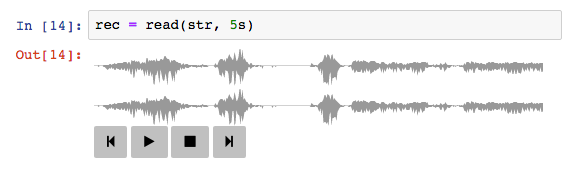
Jupyter Notebook Display
When working in a Jupyter notebook (which can display rich HTML representations), SampleBufs will show a waveform display and allow you to listen to the buffer using your browser's WebAudio support.
Defining Custom Sink/Source types
Say you have a library that moves audio over a network, or interfaces with some software-defined radio hardware. You should be able to easily tap into the SampledSignals infrastructure by doing the following:
- Subtype
SampleSinkorSampleSource - Implement
SampledSignals.unsafe_read!(source::YourSource, buf::Array, frameoffset, framecount)(for sources) orSampledSignals.unsafe_write(sink::YourSink, buf::Array, frameoffset, framecount)(for sinks), which can assume that the channel count, sample rate, and type match between your stream type and the buffer type. The methods listed above in the "Stream Read/Write Semantics" section are implemented in terms of these baseunsafe_read!andunsafe_writecalls. SampledSignals will call these methods with a 1D or 2D (nframes x nchannels)Array, with each channel in its own column. Note that theseunsafe_*methods might be called many times for a given high-levelreadorwrite, so you'll want to avoid allocating buffers within them, and instead store any temporary buffers you need inside of your stream type, so they're only created once. - Implement
SampledSignals.samplerate,SampledSignals.nchannels, andBase.eltypefor your type. SampledSignals uses your stream's reported properties through these methods to decide what conversions it needs to do when plugging together streams, so for instance if your stream type only supports writing 16-bit integer data, you might just haveSampledSignals.eltype(sink::MySink) = PCM16Sample, and then SampledSignals will make sure that by the time it calls yourunsafe_writemethod it will have converted things to the right datatype. - If your type has a preferred blocksize, implement
SampledSignals.blocksize. Otherwise the fallback implementation will return0, meaning there's no preferred blocksize.
For example, to define a MySource type, you would implement:
Base.read!(src::MySource, buf::Array)
Base.eltype(source::MySource)
SampledSignals.samplerate(source::MySource)
SampledSignals.nchannels(source::MySource)
Other methods, such as the non-modifying read, sample-rate converting versions, and time-based indexing are all handled by SampledSignals. You can see the implementation of DummySampleSink and DummySampleSource in DummySampleStream.jl, or the JACKAudio.jl or PortAudio.jl packages for more complete examples.
Connecting Streams
In addition to reading and writing buffers to streams, you can also set up direct st
Related Skills
node-connect
349.0kDiagnose OpenClaw node connection and pairing failures for Android, iOS, and macOS companion apps
frontend-design
109.4kCreate distinctive, production-grade frontend interfaces with high design quality. Use this skill when the user asks to build web components, pages, or applications. Generates creative, polished code that avoids generic AI aesthetics.
openai-whisper-api
349.0kTranscribe audio via OpenAI Audio Transcriptions API (Whisper).
qqbot-media
349.0kQQBot 富媒体收发能力。使用 <qqmedia> 标签,系统根据文件扩展名自动识别类型(图片/语音/视频/文件)。
