
AspNetReactSamples
Template/Sample ASP.NET projects to develop/build/test React.js apps
Install / Use
/learn @JonPSmith/AspNetReactSamplesREADME
AspNetReactSamples
Wecome to this ASP.NET solution which contains examples of how to incorporate, build and Unit Test React front-end inside an ASP.NET Core (1.0.0) and ASP.NET MVC5 application.
Licence: MIT
UPDATE: Now in Visual Studio 2017 format (.csproj)
This solution is supported by the article React Templates that goes through the examples in detail.
The example projects are designed to be scalable up to a real-world, production-ready applications with full build, test, and deployment capabilities.
UPDATE: Three new article are out now, with the code updated:
1. Using Redux in React.js app
This new article covers the changes made to the ReactWebPack.CoreRC2 Kanban application to use the Redux store instead of the Flux store.
2. Adding mocking to React.js Unit Tests
This is about improving the Unit Test to test some of the parts of the ReactWebPack.CoreRC2 application, which requires the mocking of the async KanbanApi module and handling the JavaScript promises that it uses.
3. Unit Testing React components that use Redux
This gives some guidance on how to test React components in a React application that uses Redux.
What is included in this solution
The solution contains three projects:
- ReactJsNet.MVC5: A simple example of using the ReactJS.Net package to on-the-fly convert React JSX files to currently supported standards, e.g. ES5, JavaScript. (Note: Also available for ASP.NET Core, see this NuGet package).
- ReactWebPack This is a more complex React application which is built using the WebPack module bundler and Babel Transpiler
- ReactWebPack.CoreRC2
is an ASP.NET Core MVC (1.0.3) version using Redux store. - Ignore the RC2 part in the name - I have updated it the 1.0.3
NOTE: Has been updated to Visual Studio 2017 .NET Core format - with help from GitHub user @innerjoin - ReactWebPack.MVC5
is a ASP.NET MVC5 version using the Flux store.
Note: This now contains the Unit Tests.
- ~~ReactTests: A separate project containing a setup for running Unit Tests on React components and libraries.~~ This was removed because having a separate project causes a problem of having multiple copies of React. Now found as part of ReactWebPack.CoreRC2.
NOTE: The ReactWebPack.Core project used to be at Core version RC2, but has been updated to Core 1.0.0. While I changed the namespace I haven't changed the folder names as it would mean updating every link to this project from the acticles I ahve written.
How to try the examples
If you clone/copy this GitHub Repository then you need to:
1. Make sure your computer is set up properly
-
I assume you are running Visual Studio ~~2015~~ now 2017 (VS2017), which includes a version of Node.js just for VS2017.
-
If you want to build the application that uses ASP.NET Core then you need to download and install Visual Studio 2017 and ensure you have included the .NET Core cross-platform development - See Visual Studio 2017 for the latest links.
-
I recommend you use Visual Studio Code (VSCode) to run the build/test React command scripts. You will need to:
- Install VSCode
- Install proper Node.js if not already loaded.
Typenode --versionto check if nodejs is already installed. - Install the the extension VSCode NPM Scripts extension.
-
If you want to run the React command scripts from Visual Studio load the NPM Task Runner extension through Tools -> Extensions and Updates -> Online -> search for NPM Task Runner.
2. Set up the specific project
You should set the specific project you want to try as the startup application.
Simply right-click the project and select Set as Startup Project.
If you want to run any of the MVC versions to see how it works 'out-of-the-box' then press F5 (Start Debugging).
Note: ReactWebPack.CoreRC2 or ReactWebPack.MVC5 it will run with the last build I did on that project's React code. ReactJsNet.MVC5 transpiles on the fly anyway, so will always be up to date.
3. Running the React Build/Test commands
These sections apply to:
NOTE: ReactJsNet.MVC5 doesn't need a build.
If you want to run any of the build/test processes then you need to ensure the NPM packages are loaded
in that specific project. To do that load the solution into Visual Studio and
right-click the packages.json file in the project
you are interested in. Then click Restore Packages at the top of the context menu.
Note: If you restore all the packages and compile all the projects the solution takes up a LOT of disk space.
3a. React Build/Test with VSCode
VSCode is a great way to handle the React code because it understands JSX and ES6 syntax. Its also very lightweight, i.e. it has a small memory footprint and is fast. Because the AspNetReactSamples solution has multiple package.json files I have added some user setting to help the VSCode npm Scripts extension work with all of the projects. The process is:
- Make sure you have VSCode setup properly - see 1. How to setup.
- Open the outer directory of the samples, e.g. AspNetReactSamples, with VSCodes
Open Foldercommand. - Type
F1key, thennpmand selectnpm: Run Script(shortcut: cntrl-R shift-R) - You are then presented with scripts for the project ReactWebPack.Core.
Pick the one you want to run e.g.
dev-build.
*NOTE: commands withwatchin them stay running and will rebuild the files and re-run the command if a .js file is saved. Very useful when debugging/developing. - The output of the process is shown in a new console window, including any errors.
NOTE: To stop awatchtask type cntrl-C in the console window.
3b. React Build/Test with Visual Studio
If you don't want to learn VSCode then you can run the React build/test commands from Visual Studio:
- Make sure you have Visual Studio setup properly, especially that you have installed the NPM Task Runner extension - see 1. How to setup.
- Open the Task Runner Explorer window (found via Views->Other Windows->Task Runner Explorer)
select the package.json of the project you want to run commands for in the top dropdown
and then click the command you want to run. See example screenshot below:
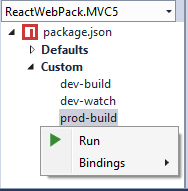
The results will appear in the Task Runner Explorer output pane.
*NOTES:
- commands with
watchin them stay running and will rebuild the files and re-run the command if a *.js file is saved. Very useful when debugging/developing. - I have sometimes found that Task Runner NOT show the
ReactWebPack.CoreNPM commands commands. I found out the NPM Task Runner tool was disabled (not sure why). If you can't see the build commands then check that it is enabled via Tools->Extensions and Updates->Installed and search for NPM.*
4c. Notes about the Unit Tests
I have now written quite a few Unit Tests and the way I set this up has changed. It used to be in a separate project, but that caused a problem of multiple copies of React. The Unit Tests are therefore now part of ReactWebPack.CoreRC2.
The key files for Unit Testing are:
- karam.config.js which holds all
