
Busylight
Control USB connected presence lights from multiple vendors via the command-line or web API.
Install / Use
/learn @JnyJny/BusylightREADME
 <br>
<br>







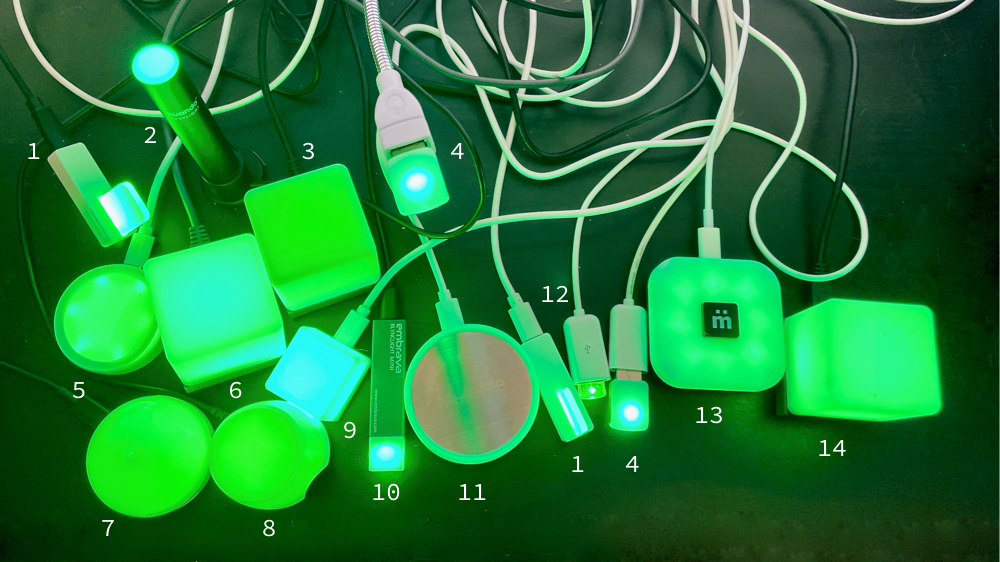
BusyLight for Humans controls USB LED lights from multiple vendors. Use the command-line interface or HTTP API to turn lights on/off, change colors, and apply effects.
What is BusyLight?
BusyLight provides simple control over USB LED status lights to show your availability, build status, system health, or any other visual indicator. Perfect for home offices, development workflows, and team collaboration.
Key Features:
- 26 supported devices from 9 vendors (Blink1, BlinkStick, Luxafor, etc.)
- Command-line interface with intuitive color and effect controls
- HTTP API with full documentation for automation and integration
- Multi-LED targeting for devices with multiple independent LEDs
- Cross-platform support for macOS and Linux (and maybe Windows, it's spotty).
Supported Hardware
| Vendor | Models | LED Support | |------------|------------|-----------------| | Agile Innovative | BlinkStick, BlinkStick Pro, BlinkStick Square, BlinkStick Strip, BlinkStick Nano, BlinkStick Flex | Multi-LED targeting | | Compulab | fit-statUSB | Single LED | | EPOS | Busylight | Single LED | | Embrava | Blynclight, Blynclight Mini, Blynclight Plus, Blynclight BLYNCUSB10, Blynclight BLYNCUSB20 | Single LED | | Kuando | Busylight Alpha, Busylight Omega | Single LED | | Luxafor | Flag, Orb, Mute, Busy Tag, Bluetooth variants | Flag: Multi-LED, Others: Single LED | | MuteMe | MuteMe Original, Mute Mini, MuteSync | Single LED | | Plantronics | Status Indicator | Single LED | | ThingM | Blink(1), Blink(1) mk2 | mk2: Multi-LED |
Installation
Basic Install (CLI only)
# Using uvx (recommended)
uvx --from busylight-for-humans busylight list
# Using pip
pip install busylight-for-humans
Web API Install
# Using uvx
uvx --from "busylight-for-humans[webapi]" busyserve
# Using pip
pip install busylight-for-humans[webapi]
Linux Setup
Linux requires udev rules for USB device access:
busylight udev-rules -o 99-busylights.rules
sudo cp 99-busylights.rules /etc/udev/rules.d/
sudo udevadm control -R
# Unplug and reconnect your device
Quick Start
Command Line
# Basic usage
busylight on              # Green light
busylight on red          # Red light
busylight blink blue      # Blinking blue
busylight off             # Turn off

# Multi-LED devices (Blink1 mk2, BlinkStick, etc.)
busylight on red --led 1          # First LED only
busylight on blue --led 2         # Second LED only
busylight rainbow --led 1         # Rainbow on first LED
busylight pulse green --led 2     # Pulse on second LED
Web API
# Start the server
busyserve

# Control via HTTP
curl "http://localhost:8000/light/0/on?color=red"
curl "http://localhost:8000/light/0/blink?color=blue&count=5"
curl "http://localhost:8000/lights/off"

# Multi-LED targeting
curl "http://localhost:8000/lights/on?color=red&led=1"
curl "http://localhost:8000/lights/rainbow?led=2"
Documentation
- Installation Guide - Detailed setup for all platforms
- CLI Reference - All commands, options, and examples
- Web API Guide - REST endpoints and integration examples
- Device Support - Full compatibility matrix and LED targeting
- Integration Examples - CI/CD, monitoring, and automation
Contributing
- Development environment setup
- Testing and code quality guidelines
- Architecture overview and design patterns
- Pull request process and coding standards
Support
- Report Issues - Bug reports and feature requests
- Request Device Support - New hardware support
- Discussions - Community help and questions
Gratitude
Thank you to @todbot and ThingM for graciously gifting
blink(1) mk3 lights to support this project!
