
Pygui
Dear ImGui in Python! A dynamically generated Cython wrapper of dear_bindings
Install / Use
/learn @JaedanC/PyguiREADME
pygui
Pygui is a dynamic wrapper for Dear ImGui using Cython.
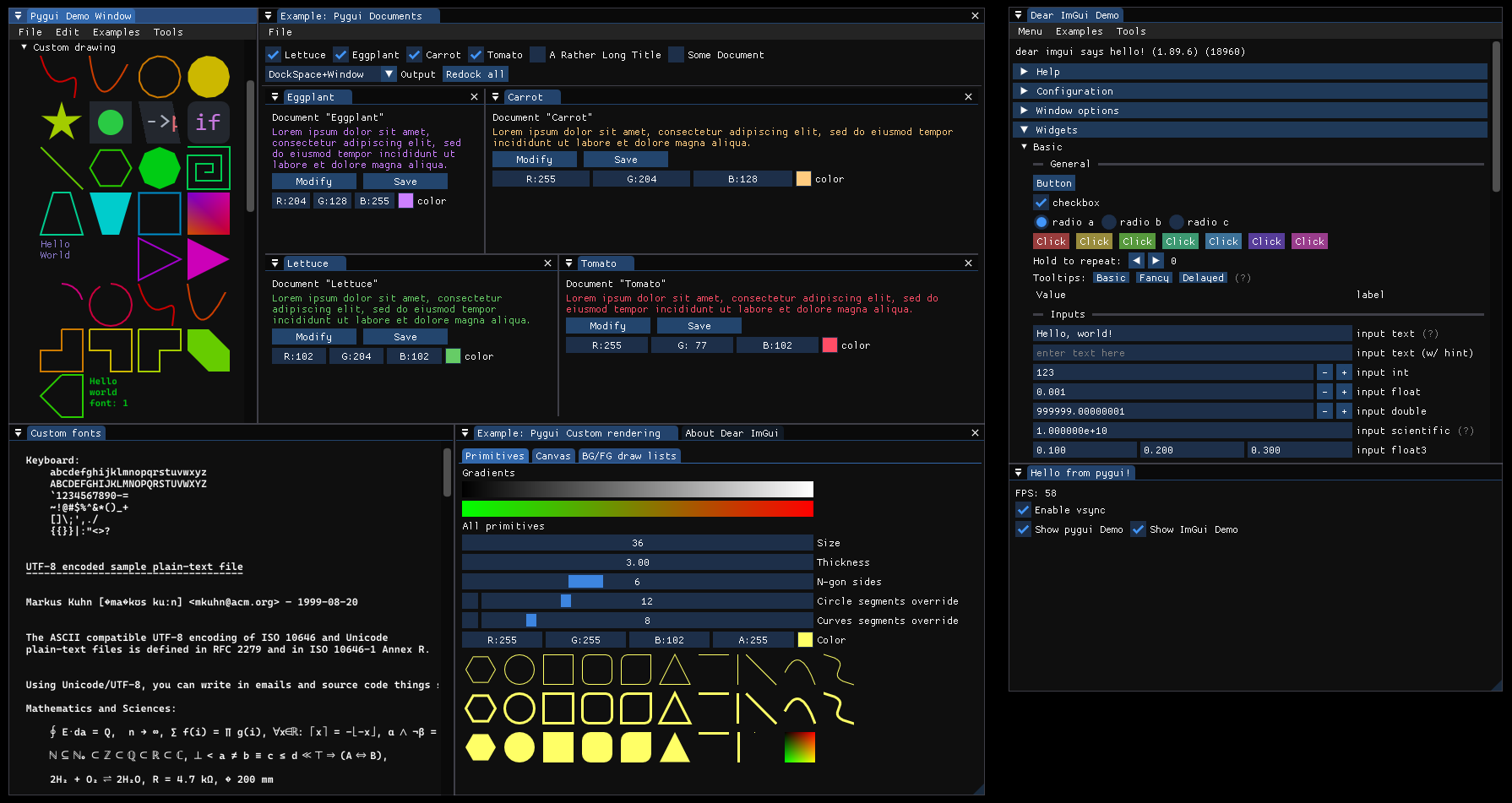
ImGui Version: v1.92.6-docking
Python Version: Python 3.12.10
Features
- Imgui Docking Support.
- Imgui Multi-Viewport Support.
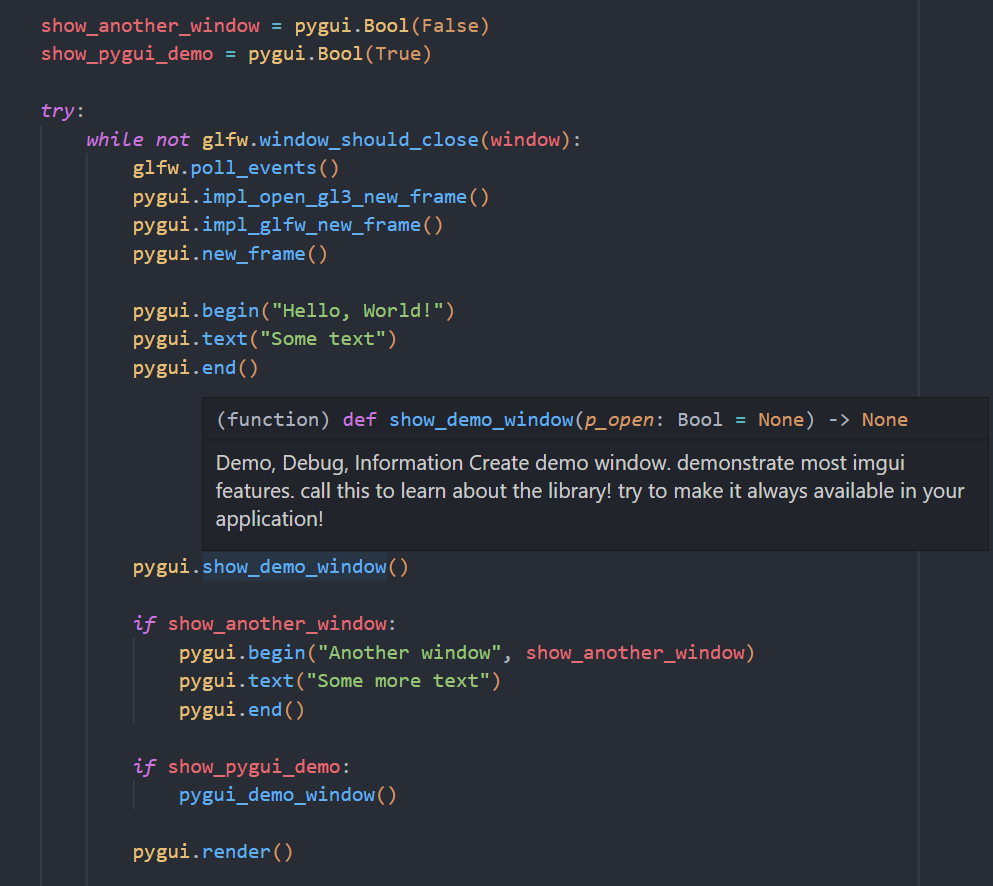
- Intellisense Support. (
__init__.pyifile) - Uses Imgui's
glfw_opengl3backend. Minimal understanding of OpenGL is needed. - Includes an extensive pygui example (and a minimal c example).
This project uses dear_bindings as the C base.
Getting Started
The easiest way to get started with pygui is to install using pip:
pip install pygui
You may will then need to setup the pygui environment. Use app.py as a starting point.
Note: Using pip requires the same Python version as stated above as the pre-compiled binaries link to the Python development module to raise custom exceptions.
Alternatively
If you are running a different Python version, add this repository to your project and install from pip that way.
git submodule add https://github.com/JaedanC/pygui.git
cd pygui
pip install .
Legacy way
You may also download the precomplied binary which includes the minimal app example already. Just extract the contents to your Python project folder.
Make sure you have installed the Latest Microsoft Visual C++ Redistributable Version.
Open a terminal to the same directory as app.py and run:
pip install -r requirements.txt
python app.py
Why choose pygui over other ImGui python wrappers?
-
The binding is auto-generated:
Over time, the API for ImGui will change, and so keeping the wrapper up the date can be tedious. Pygui fixes this by dynamically generating the binding between dear_bindings and Python to significantly reduce the manual work required.
Every struct and function in dear_bindings can be mapped to Python through Cython. You as a user can then choose to activate and/or modify a default wrapper of the function. In a majority of cases the default implementation will work out-of-the-box, but for more complicated functions (like mapping Python lists to c arrays), some manual work is required.
This also meant that including docking and multi-viewport support was easy. I just switched branch and rebuilt the binding!
-
Writing pygui code is almost exactly the same as writing imgui code.
A deliberate choice for pygui was to match ImGui's API as much as possible. Pygui does NOT have, an
Appclass with a main function,withclauses for autobegin()andend(), odd behaviour that removes the immediately-mode-ness of ImGui. Pygui is just a wrapper! Setting up the glfw context is left to user exactly like ImGui's minimal examples!Consequently, pygui codes looks extremely similar to ImGui code. Where ImGui expects (for example)
int*parameters, these have been replaced with pygui wrappers, so that theinput_style functions work exactly like they do in imgui. There is no weird returning of multiple values in a tuple to retrieve inputs.The only additions are designing around C complexity. For example, functions that expected arrays can now take python lists, callbacks functions now take python functions pointers, and userdata can be supplied with arbitrary python objects, to name a few. Basically, you leverage what makes Python a great language; It's ease of use!
-
An
__init__.pyifile is included with comments from dear_bindings.This makes developing pygui much easier than other wrappers because many code editors will perform intellisense on
__init__.pyi. No red squiggly lines, no guessing of function parameters, and no need to checkimgui.hfor comments. -
An extensive pygui demo window is included (
pygui_demo.py).Some other wrappers don't include an example. My demo window tests many functions, methods, and fields from the wrapper. You will be surprised that even the most complicated of features is not only possible with pygui, but often much simpler to create than ImGui.
-
It's performant, because you spend a minimal amount of time inside Python.
Pygui uses ImGui's backend so all of the rendering is in c++. You don't need to maintain a rendering context inside Python. The ImGui devs have done it for us. But, you can still write your own renderer if you need, because the draw data is still available to be read from Python.
Limitations
- The current build assumes windows as the platform. Some work would be required to enable linux/mac builds.
- glfw and dcimgui (the auto-generated binding) are linked at runtime with a DLL which may hurt performance.
- Not all ImGui functions are activated, but with some work more can be. This is by design so that I can verify a function's template implementation works before activating it. See "Developing pygui" down below for more information.
- More work would be required to enable additional backends. Since dear_bindings also wraps backends too, this should be possible to do as long as you have a way to write the c++ minimal example in Python.
- I wish I could call this
pygui! But Python wouldn't let me use that name. Internally this module is calledpygui. Therefore all examples assume you import this module asimport pygui_cython as pygui.
Compiling pygui
A simple complation of pygui is done like so:
pip install .
This will automatically use the scikit_build_core backend to compile all the required objects.
To compile the old way you will need to make cmake installed yourself.
And these are the steps we will complete:
- Install python dependecies.
- Checkout the desired ImGui version.
- Run
dear_bindings's binding generation script. - (Optionally) Develop/Generate Cython bindings
- Compile dcimgui, and generate the
pygui_cythonmodule.
First, download this repository recursively:
git clone --recursive https://github.com/JaedanC/pygui.git
1. Install python dependencies
Run:
pip install -r requirements.txt
Note: Using a venv is recommended.
2. Install python dependencies
Then, I checkout out the ImGui branch that you wish to compile. I recommend checking out the docking branch, but any commit/tag can be used.
cd src/external/imgui
git checkout docking
3. Running dear_binding
Navigate to src/external/dear_bindings and run:
.\BuildAllBindings.bat
4. (Optionally) Create new pygui function definitions
See Developing pygui
5. Compiling dcimgui
Finally run the following:
pip install .
This step will compile:
- dcimgui
- glfw
- ImGuis minimal cpp example
- A minimal c example that uses the DLLs
It is very important that glfw is NOT compiled statically. If it is compiled statically then python's glfw will refer do a different instance, causing ImGui to crash on startup.
You may use Visual Studio to compile specific targets if you would like.
To run the minimal examples, run ./src/deploy/pygui_cython/my_program_cpp.exe and ./src/deploy/pygui_cython/my_program_c.exe. my_program_c.exe is compiled using dear_bindings to demonstrate the DLL's in action. If this program does not run correctly, then the DLL's are not ready for python.
A helper script has been included portable.py that copies all the files to the directory portable. This is for legacy pygui installations that use the release binaries.
Developing pygui
To develop pygui, it's important that steps 1-3 are completed.
After that, you can then begin to modify the bindings. More on that in the next section. But for now, let's look at how you would generate the bindings:
cd src
python model_creator.py --trial
# Solve any conflicts
python model_creator.py --all
Then run the cython compiler again:
pip install .
You can test the application with:
python app_venv.py
How are bindings created?
Bindings are creating by reading the output of dear_binding's dcimgui.json that contains information about the dear_bindings implementation. This file is parsed and then used to create three files:
pxd: (Located atsrc/binding/core/dcimgui.pxd) This files contains all the 1 to 1 definitions that are defined insidedcimgui.h(Located atsrc/external/dear_bindings/generated/dcimgui.h) and any defined backends. This file does not need to be touched if the API changes.pyx: (Located atsrc/binding/core/core.pyx) This file contains the generated cython that will be compiled. This file can be editted if you want, but new additions should instead be put insidesrc/core/core_template.pyx. More on this later.pyi: (Located atsrc/deploy/pygui_cython/__init__.pyi) This file contains the Cython function definitions so that intellisense on editors work correctly with pygui. Cython does not export any symbols so this file is required if you don't want squiggly lines everywhere in your editor, (and if you want comments!).
The src/binding/core/core_template.pyx is the file that should be editted if you want to change any implementation between Python and dcimgui. This file is the go-between, needing to marshall types between Python and C. Functions are disabled by default, but then can be turned on by changing active to True. Example:
Quick no
Related Skills
node-connect
341.8kDiagnose OpenClaw node connection and pairing failures for Android, iOS, and macOS companion apps
claude-opus-4-5-migration
84.6kMigrate prompts and code from Claude Sonnet 4.0, Sonnet 4.5, or Opus 4.1 to Opus 4.5
frontend-design
84.6kCreate distinctive, production-grade frontend interfaces with high design quality. Use this skill when the user asks to build web components, pages, or applications. Generates creative, polished code that avoids generic AI aesthetics.
model-usage
341.8kUse CodexBar CLI local cost usage to summarize per-model usage for Codex or Claude, including the current (most recent) model or a full model breakdown. Trigger when asked for model-level usage/cost data from codexbar, or when you need a scriptable per-model summary from codexbar cost JSON.
