
compose-bridge
Real-time on-device visual editor for Jetpack Compose + MCP Server for AI agents. Live UI tuning, AST-guided surgical source splicing, and standalone AI-driven code edits — no phone needed.
Install / Use
claude mcp add JALAL591 -- npx -y github:JALAL591/compose-bridgeIf the server publishes to npm under a different name, use that package instead — check the repo README.
MCP Server
Model Context Protocol server
Quality Score
Category
Development & EngineeringSupported Platforms
Our assessment of compose-bridge
compose-bridge scores 83/100 on our quality scale, 2579th of 4,529 Development & Engineering skills we index.
Its MCP Server is 10 KB long, well organised into 27 sections with 9 code examples: a thorough specification that gives an agent plenty to work with.
It has 10 GitHub stars, so there is little community track record yet; judge it on its content.
Maintenance, license and trust
- The repository was last updated today, so compose-bridge is actively maintained.
- It is released under the Apache-2.0 license, a permissive license that allows use, modification and commercial use with attribution.
- Its trust signals score 97/100, with no cautions. These come from repository metadata, not a code audit — read the skill file before letting an agent act on it.
Safety scan
No issues foundOur scan of the whole file found no instruction hijacking, hidden characters, credential access, data exfiltration or destructive commands.
Automated pattern scan on 2026-10-01. It catches known dangerous patterns, not every risk — read a skill before letting an agent act on it.
compose-bridge compared with similar skills
All 4 of these similar skills score higher than compose-bridge; compare them before choosing.
| Skill | Score | Stars | Updated | Format |
|---|---|---|---|---|
| compose-bridge (this skill)by JALAL591 | 83 | 10 | today | MCP Server |
| Agent-Reachby Panniantong | 100 | 87.2k | 16d ago | CLAUDE.md |
| headroomby headroomlabs-ai | 100 | 74.2k | today | CLAUDE.md |
| rufloby ruvnet | 100 | 73.6k | today | CLAUDE.md |
| CowAgentby zhayujie | 100 | 47.2k | today | CLAUDE.md |
Frequently asked questions
- How do I install compose-bridge?
- Run
claude mcp add JALAL591 -- npx -y github:JALAL591/compose-bridge. The install tabs above show the steps for each supported agent. - Which AI agents does compose-bridge work with?
- It is written for Claude Code and Claude Desktop, as a MCP Server file. Other agents that read the same format can often use it too.
- Is compose-bridge safe to use?
- Our scan of the whole file found no instruction hijacking, hidden characters, credential access, data exfiltration or destructive commands. It is Apache-2.0-licensed and scores 97/100 on trust signals. Skills are instructions an agent will follow, so read the file before installing it and do not approve commands you do not understand.
- Is compose-bridge still maintained?
- The repository was last updated today, so compose-bridge is actively maintained.
Skill content
View source on GitHubComposeBridge 🌉
Real-time on-device visual editor for Jetpack Compose + MCP Server for AI agents. Live UI tuning, AST-guided surgical source splicing, and standalone AI-driven code edits — no phone needed..






📰 Featured In
<p align="left"> <a href="https://androidweekly.net/issues/issue-746" title="Android Weekly Issue #746"> <img alt="Android Weekly" src="https://androidweekly.net/issues/issue-746/badge" height="24"> </a> </p>ComposeBridge is a developer tooling suite that bridges a running Android app on a physical device with your IDE over a local WebSocket. You can:
- 🎯 Tap any Composable on the phone to inspect it in real time
- 🎨 Tune colors, dimensions, and paddings live at 60fps — no Gradle build required
- 💾 Persist tweaks to your Kotlin source (
AppDimens.kt,AppColors.kt) via a surgical byte-splice that preserves file formatting - 🧩 Generate full Compose screens from a declarative JSON schema
- 🔍 Navigate the runtime tree — tap a parent, drill into children
Live preview is truly zero-rebuild. Persisting the change into the final APK artifact still requires one standard rebuild, after which the new value becomes the source of truth.
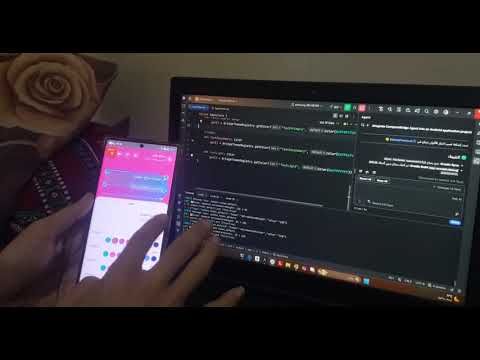
🎬 See it in action
Click the preview below to watch ComposeBridge visually edit a running Jetpack Compose UI and persist the change back to Kotlin source.
🚀 Key Features
| Feature | Description |
|---------|-------------|
| ⚡ Zero-Rebuild Preview | Tweak colors, paddings, corner radii, and font sizes at <50ms latency while the app runs. |
| 🎯 On-Device Visual Inspector | Tap any Composable to see its source file, line number, and used design tokens. |
| 💾 AST-Guided Source Splicing | Locates the exact byte range via Tree-sitter, then performs a surgical replace that keeps a single-line git diff. |
| 🧩 Dynamic UI Compiler | Feed it a JSON schema (dashboard.json) — get a full, production-ready Compose screen with theme, components, and tokens wired up. |
| 🌳 Runtime Tree Navigation | Walk the composition tree from parent to children — no XML, no reflection. |
| 🔌 Local WebSocket Daemon | A lightweight Python bridge between the runtime agent and your file system. |
📦 Repository Structure
composebridge/
├── cli/         # JSON → Compose screen compiler
├── agent/       # Android runtime library (:composebridge-agent)
├── server/      # Python WebSocket daemon + source byte-splicer
├── examples/    # Complete reference app (StudentApp)
└── docs/        # Architecture + setup guides
Three components, one workflow:
- CLI — generates a full project from JSON
- Agent — captures touches and pushes live updates on the device
- Server — coordinates messages + writes changes back to
.ktfiles
✅ Compatibility
| Component | Version | |-----------|---------| | Kotlin | 2.1.20+ | | Jetpack Compose | 1.7.3+ | | Compose Multiplatform | 1.7.3+ | | Gradle | 8.5+ | | Android Gradle Plugin | 8.5+ | | Min SDK | 24 | | Python | 3.10+ | | Target | Android (real device or emulator) |
🛠️ Quick Start
1. Start the local server
cd server
pip install -r requirements.txt
python server.py
2. Generate a Compose project
cd cli
python generate.py screens/dashboard.json
The CLI will produce a full Android project under output/ — including:
- ✅ Theme files (
AppColors.kt,AppDimens.kt,AppTypography.kt,AppStrings.kt) - ✅ UI components (
HeroCard,StatCard,DashboardHeader, ...) - ✅ The full
DashboardPage.kt - ✅ The
composebridge-agentmodule - ✅ The
bridge/Python server, wired to the new project's path - ✅
MainActivity.ktwith the agent already wired up - ✅
AndroidManifest.xmlwithINTERNETpermission
3. Open in Android Studio
Open the generated project, deploy it to a physical device, then:
adb reverse tcp:8711 tcp:8711
Tap the 🔧 floating button → Design Mode ON. Tap any element → the panel opens → slide/tap to tune live.
🤔 Why not just wait for Compose Hot Reload?
| | Compose Hot Reload (JetBrains) | ComposeBridge |
|---|---|---|
| Availability | Preview / experimental | ✅ Works today |
| Target | Emulator-first | ✅ Real device |
| Persistence | Preview only | ✅ Writes back to source |
| Interaction | Textual | ✅ Visual — tap elements |
| Code safety | Full reload | ✅ Single-line git diff |
⚡ Performance
| Metric | Value | |--------|-------| | Live preview latency | <50ms (localhost WebSocket) | | Recomposition scope | Localized — only targeted Composable re-executes | | AST splicing | Asynchronous — doesn't block UI thread | | Source diff | Single-line — byte-offset patch via Tree-sitter |
Runtime tuning and disk persistence are fully decoupled.
🧠 Under the Hood
- Bidirectional runtime-to-source mapping — every visual change is traceable to its exact Kotlin byte range.
- AST-guided inspection and byte-splice editing — Tree-sitter locates the exact edit site; regex and byte replacement update the file without disturbing formatting.
- Deterministic layout compilation — the CLI emits structured, tokenized Compose code with stable output.
- Low-latency WebSocket daemon — sub-50ms round-trip between the device and the local editing server.
🤖 MCP Server (AI Agents)
ComposeBridge exposes its tools to AI agents via the Model Context Protocol (MCP).
🆕 v0.4.0 — MCP works independently of the phone
Important: As of v0.4.0, the MCP Server operates standalone — it does not require the phone, the WebSocket bridge, or
adb reverse.Use it directly from Antigravity IDE, Claude Desktop, or any MCP-compatible client to edit your Compose project files.
Two Operation Modes
| Mode | Requires Phone? | Use Case | |------|-----------------|----------| | Manual (WebSocket) | ✅ Yes | Live UI tuning on device | | MCP (Standalone) | ❌ No | AI-driven code edits |
Supported Clients
- ✅ Antigravity IDE (Gemini)
- ✅ Claude Desktop
- ✅ Cursor
- ✅ Cline / Continue
Setup
1. Install dependencies
cd server
pip install -r requirements.txt
2. Configure your AI client
Antigravity IDE — edit ~/.gemini/config/mcp_config.json:
{
  "mcpServers": {
    "composebridge": {
      "command": "python",
      "args": ["C:\path\to\composebridge-en\server\mcp_server.py"]
    }
  }
}
Claude Desktop — edit %APPDATA%\Claude\claude_desktop_config.json:
{
  "mcpServers": {
    "composebridge": {
      "command": "python",
      "args": ["C:\path\to\composebridge-en\server\mcp_server.py"]
    }
  }
}
3. Restart your AI client
Available Tools
| Tool | Description |
|------|-------------|
| find_token_by_color | Reverse lookup: hex → token name |
| set_token | Surgically edit a token value (single-line diff) |
| rollback_last | Undo last edit (persistent across restarts) |
Example
In Antigravity chat:
@composebridge set_token("welcomeCardHeight", "300")
Result in AppDimens.kt:
- val welcomeCardHeight: Dp get() = BridgeDimensionRegistry.get("welcomeCardHeight", 240.dp)
+ val welcomeCardHeight: Dp get() = BridgeDimensionRegistry.get("welcomeCardHeight", 300.dp)
= Single-line git diff. No phone required.
Persistent Journal
Every edit is journaled to .composebridge-journal.json.
If your AI client crashes or restarts, rollback_last still works.
Why Standalone MCP Matters
- No need to build & deploy the app to edit code
- AI can work on Compose projects during design phase
- Fully local — no network, no telemetry
⚠️ Status: v0.4.0-alpha — under active development.
🔒 Security
- Debug Builds Only: Agent bundled with
debugImplementation - Token Authentication: WebSocket requires token on handshake
- ⚠️ v0.4.0 uses a fixed local token. QR-based pairing planned for v0.5.0.
- Journal Rollback: Auto-rollback on AST validation failure
⚠️ Limitations
- AST Validation: Surgical edits are restricted to simple literal values (
integer_literal,float_literal,string_literal,simple_identifier,long_literal) to prevent parser syntax corruption. - Correspondence: ~70% on production apps (inline composables may misalign). Compose Compiler plugin is on the roadmap.
- UTF-16/UTF-8: Edge cases with emoji-heavy files are still being handled. Full precision on the roadmap.
- Generated Code: Files from KSP/Kapt may need manual exclusion today. Auto-detection is on the roadmap.
🤖 Coming Soon
- AI-Powered Suggestions (Qwen integration) — describe a change in natural language; the tool finds the right token and applies it.
- Natural Language Editing — "Make this card taller." "Use the gold accent here."
- MCP Server — expose ComposeBridge as a tool for Claude Desktop, Cursor, and other AI agents.
- More component templates — e-commerce, forms, profile screens.
- Typography tokens — full typography token live editing.
🔎 Search Terms This Project Solves
If you've searched for any of these, this project is for you:
- Jetpack Compose edit without recompile
- Compose hot reload alternative
- Interactive layout inspector for Android
- Live UI tweaking on a real Android device
- Sync design tokens to Kotlin source
- Generate Compose UI from a JSON schema
📜 License
Distributed under the Apache License 2.0.
Related Skills
Agent-Reach
87.2kGive your AI agent eyes to see the entire internet. Read & search Twitter, Reddit, YouTube, GitHub, Bilibili, XiaoHongShu — one CLI, zero API fees.
headroom
74.2kCompress tool outputs, logs, files, and RAG chunks before they reach the LLM. 20% fewer tokens for coding agents, 60-95% fewer tokens for JSON, same answers. Library, proxy, MCP server.
ruflo
73.6k🌊 The original agent harness. Deploy intelligent multi-player swarms, coordinate autonomous workflows, and build conversational AI systems. Features adaptive memory, self-learning intelligence, federation, vector RAG integration, and native Claude Code / Codex / Hermes and many more Integrated
CowAgent
47.2kOpen-source personal AI assistant & Agent Harness. Plans tasks, runs tools and skills, self-evolves with memory and knowledge. Multi-agent, multi-model, multi-channel. Lightweight, extensible, one-line install.

Languages
Trust signals
From repository metadata: license, adoption, age and documentation. Not a code audit — see the Safety scan above for what the skill file itself contains.