
ResultBoxes
An opinionated C# Results Library that focus on Railway Oriented Programming.
Install / Use
/learn @J-Tech-Japan/ResultBoxesREADME
ResultBoxes
C# Results Library that focus on Railway Oriented Programming.
How can you install?
dotnet add package ResultBoxes
Why Result type?
Some language, especially functional language has custom to use Result type, that express return type of the function is either return value or Error.
There is of course pros and cons of result type.
Pros
- Readability and Explicit Error Handling.
- It is slow to "throw and catch", faster to return as Result.
- Functional Style programming.
- Fully use of power of pattern matching.
- Error handling with simpler code.
- We can focus smaller scopes and focus implement each smaller function.
Cons
- Not build in language feature.
- C# is not pure functional language.
- It seems complex for someone not used to the functional programming.
This ResultBoxes try to be simple Result type, that fully use lately introduced pattern matching feature. And first class support of the Railway Oriented Programming that introduced with Scott Wlaschin with following article.
Usage
- Simple Function and Use Result Function
- Don't use nullable value as Type of the Value
- Wrapping throwing function that returns value.
- Wrapping void function.
- Railway Oriented Programming - Method Chain
- Railway Oriented Programming - Async Task Functions.
- Railway Oriented Programming - Combine Value
- Railway Oriented Programming with Wrapping Function with Try.
1. Simple Function and Use Result Function
Basic use for this library is use ResultBox<T> for the return type of the functions.
Then you can return value when success, and when you have any issue, you can return exception. (not throw.)
Like example below, you can either return Value itself or **Exception
**, and implicit operation can convert it to ResultBox<T> class in code.
internal class Program
{
    public static ResultBox<int> Increment(int target) => target switch
    {
        > 1000 => new ArgumentOutOfRangeException(nameof(target)),
        _ => target + 1
    };

    private static void Main(string[] args)
    {
        // Handle ResultBox<int> with switch expression
        // Value: 101
        var result = Increment(100);
        switch (result)
        {
            case { IsSuccess: false }:
                Console.WriteLine($"Error: {result.GetException().Message}");
                break;
            case { IsSuccess: true }:
                Console.WriteLine($"Value: {result.GetValue()}");
                break;
        }

        // Log() displays value.ToString() if IsSuccess is true, otherwise displays exception.Message
        // case2 Error: Specified argument was out of the range of valid values. (Parameter 'target')
        Increment(1001).Log("case2");

        // RunIncrement() is a method that handles ResultBox<int> with switch expression
        // Value: 101
        Console.WriteLine(RunIncrement(100));

        // Handle ResultBox with if statement
        // Error: Specified argument was out of the range of valid values. (Parameter 'target')
        var result4 = Increment(1001);
        if (result4.IsSuccess)
        {
            Console.WriteLine($"Value: {result4.GetValue()}");
        }
        else
        {
            Console.WriteLine($"Error: {result4.GetException().Message}");
        }

        // Handle ResultBox with ternary operator ?:
        // Value: 2
        var result5 = Increment(1);
        Console.WriteLine(
            result5.IsSuccess ? $"Value: {result5.GetValue()}"
                : $"Error: {result5.GetException().Message}");

    }
    // Handle ResultBox<int> with switch expression
    private static string RunIncrement(int target) =>
        Increment(target) switch
        {
            { IsSuccess: false } error => $"Error: {error.GetException().Message}",
            { IsSuccess: true } success => $"Value: {success.GetValue()}"
        };
}
Notes
ResultBox<T> does have IsSuccess property, which returns if it have error or not. We recommend you to use IsSuccess for the Pattern Matching handler, and using to check if it was success or not. And like code above, you can get Value with result.GetValue() or result.GetException() to get Exception.
Keep in mind,
result.GetValue() can only get when IsSuccess: true otherwise, it throws ResultsInvalidOperationException.
result.GetException() can only get when IsSuccess: false otherwise, it throws ResultsInvalidOperationException.
We use this because in some cases like primitive value int, value will be initiated with default value 0. In this case, when Success is false, Exception is not null, and also value is not null. This is why we hide accessing Value
property directory from user, and provide GetValue() method. Hopefully C# typing system improve and allow us to open up value object to the public...
2. Don't use nullable value as Type of the Value
C# has two different "nullable" types. Nullable Value Types and Nullable Reference Types.
ResultBox<TValue> has where TValue: notnull constraint. This is because if it allows null type, it will allow Value is null and Exception is null Result class. notnull prevent to use both
Nullable Value Types and Nullable Reference Types. But for the **Nullable Value Types
** only show warnings because it is wrapped with **Nullable
** generic type. ResultBox designed when Value is null, Value is Empty.
How can you write value is null in some case? You can use OptionalValue type.
internal class Program
{
    public static ResultBox<OptionalValue<string>> ConvertStringToHalfLength(string input)
        => input.Length switch
        {
            0 => new ApplicationException("Input string is empty"), // Exception
            1 => OptionalValue<string>.Empty, // Not error but Empty
            _ => OptionalValue<string>.FromValue(input[..^(input.Length / 2)]) // has value
        };
    private static void Main(string[] args)
    {
        // Error: Input string is empty
        ConvertStringToHalfLength("").Log();

        // Value: OptionalValue { Value = , HasValue = False }
        ConvertStringToHalfLength("H").Log();

        // Value: OptionalValue { Value = Hel, HasValue = True }
        ConvertStringToHalfLength("Hello").Log();
    }
}
3. Wrapping throwing function that returns value.
When I use Result type in C# project, often need in mixing with non-result functions which can be throw exception any time. When this happens, we need to write try/catch and convert throwable functions to Result
type. ResultBox has WrapTry function to do this conversion. When you use WrapTry, you need to pass Func as the argument.
internal class Program
{
    public static int Divide(int numerator, int denominator) =>
        denominator == 0
            ? throw new ApplicationException("can not divide by 0")
            : numerator / denominator;
    private static void Main(string[] args)
    {
        // This will return exception result
        // Error: can not divide by 0
        ResultBox.WrapTry(() => Divide(10, 0)).Log();

        // This will return value result
        // Value: 5
        ResultBox.WrapTry(() => Divide(10, 2)).Log();
    }
}
4. Wrapping void function.
When a function does not return value, C# can use void as a return (type). But you can not use ResultBox<void>
due to C# language definition. Instead, we made UnitValue
type, which means nothing inside but as a data class. UnitValue does not have any properties. You can wrap try with WrapTry void action, and it will return ResultBox<UnitValue> type.
internal class Program
{
    public static int Divide(int numerator, int denominator) =>
        denominator == 0
            ? throw new ApplicationException("can not divide by 0")
            : numerator / denominator;
    private static void Main(string[] args)
    {
        // This will return exception result
        // Error: can not divide by 0
        ResultBox<int>.WrapTry(() => Divide(10, 0)).Log();

        // This will return value result
        // Value: 5
        ResultBox<int>.WrapTry(() => Divide(10, 2)).Log();
    }
}
5. Railway Oriented Programming - Method Chain
Railway Oriented Programming (ROP) is a functional programming pattern that facilitates error handling and is often used in languages that support functional programming concepts, like F#, Haskell, and others. The analogy of a railway is used to describe the flow of data through a series of functions, similar to how a train travels along tracks.
ResultBoxes supports ROP by providing chain method to connect functions and simply write error handling code.
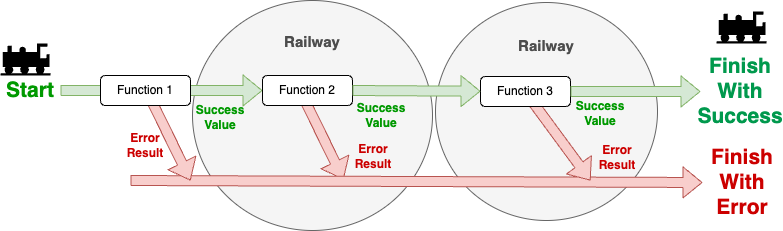
Like example below, you can use Conveyor(nextFunction) to method chain continuous functions.
It is like Result"Box" are carrying through Belt Conveyor and moving next checkpoint, at next checkpoint, contents will be adjusted and pack with different form, and also if error happens, it will convert to the Error Result.

If first method , in example Increment returns Exception, following functions Double and Triple will not executed, it will be just passing
Related Skills
node-connect
337.4kDiagnose OpenClaw node connection and pairing failures for Android, iOS, and macOS companion apps
frontend-design
83.2kCreate distinctive, production-grade frontend interfaces with high design quality. Use this skill when the user asks to build web components, pages, or applications. Generates creative, polished code that avoids generic AI aesthetics.
openai-whisper-api
337.4kTranscribe audio via OpenAI Audio Transcriptions API (Whisper).
commit-push-pr
83.2kCommit, push, and open a PR
