
Leaflet.Marker.Stack
A client-side implementation of CartoDB's "stacked chips" symbolizer
Install / Use
/learn @IvanSanchez/Leaflet.Marker.StackREADME
L.Marker.Stack & L.Icon.Chip
A client-side implementation of @CartoDB's idea of a stacked chips symbolizer.
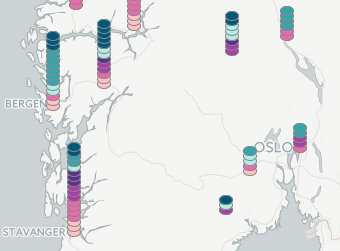
This is composed of two parts:
L.Marker.Stackallows displaying severalL.Icons on a stack top of each other, at the sameL.LatLng.L.Icon.Chipis a ellipse-shapedL.Icon.
L.Marker.Stack reference
Behaves like a L.Marker, but has the following options:
icons: Must be anArrayofL.Icons. The order of the icons in the array defines the stacking order. This deprecates theiconproperty.stackOffset: An instance ofL.Point. Defines how many pixels each icon is offset from the previous one. The default is[0, -5], which means each icon is offset 5 pixels vertically towards the top (it is possible to make downward-facing stacks).stackZOffset: An integer, affecting the z-index of the icons. Positive values display the last icon on top, negative values display the first icon on top. The default is a positive 1.
L.Icon.Chip reference
Behaves like a L.DivIcon, but has the following extra options:
border: A CSS definition theborderproperty. Defaults to"#888 solid 1px".color: A CSS color definition. Defaults to"blue".iconSize: Defaults to[12, 8]. Change it to make the ellipse bigger or smaller.iconAnchor: Defaults to[6, 4](the center of the ellipse).
Example
var stack = L.marker.stack(myCenter, {
	icons: [
		L.icon.chip({ color: 'red' }),
		L.icon.chip({ color: 'red' }),
		L.icon.chip({ color: 'blue' }),
		L.icon.chip({ color: 'lime' }),
	],
	stackOffset: [0, -5]
});

map.addLayer(stack);
Check out the live demos:
Legalese
"THE BEER-WARE LICENSE": ivan@sanchezortega.es wrote this file. As long as you retain this notice you can do whatever you want with this stuff. If we meet some day, and you think this stuff is worth it, you can buy me a beer in return.
Related Skills
node-connect
345.4kDiagnose OpenClaw node connection and pairing failures for Android, iOS, and macOS companion apps
frontend-design
104.6kCreate distinctive, production-grade frontend interfaces with high design quality. Use this skill when the user asks to build web components, pages, or applications. Generates creative, polished code that avoids generic AI aesthetics.
openai-whisper-api
345.4kTranscribe audio via OpenAI Audio Transcriptions API (Whisper).
qqbot-media
345.4kQQBot 富媒体收发能力。使用 <qqmedia> 标签,系统根据文件扩展名自动识别类型(图片/语音/视频/文件)。
