
mcp-context-forge
An AI Gateway, registry, and proxy that sits in front of any MCP, A2A, or REST/gRPC APIs, exposing a unified endpoint with centralized discovery, guardrails and management. Optimizes Agent & Tool calling, and supports plugins.
Install / Use
claude mcp add IBM -- npx -y github:IBM/mcp-context-forgeIf the server publishes to npm under a different name, use that package instead — check the repo README.
MCP Server
Model Context Protocol server
Quality Score
Category
AI & Machine LearningSupported Platforms
Our assessment of mcp-context-forge
mcp-context-forge scores 87/100 on our quality scale, 463rd of 965 AI & Machine Learning skills we index (top 48%).
Its MCP Server is 40 KB long, well organised into 107 sections with 29 code examples: long enough that it reads more like full documentation than a focused instruction file, which agents can find harder to follow.
With 4,757 GitHub stars, it is one of the more widely adopted skills in the catalogue.
Maintenance, license and trust
- The repository was last updated today, so mcp-context-forge is actively maintained.
- Our last check on 2026-10-17 found the source still online.
- It is released under the Apache-2.0 license, a permissive license that allows use, modification and commercial use with attribution.
- Its trust signals score 100/100, with no cautions. These come from repository metadata, not a code audit — read the skill file before letting an agent act on it.
Safety scan
No issues foundOur scan of the whole file found no instruction hijacking, hidden characters, credential access, data exfiltration or destructive commands. An AI review of the same text found nothing harmful.
AI review by kimi-k2.7-code on 2026-09-24. Automated pattern scan on 2026-09-24. It catches known dangerous patterns, not every risk — read a skill before letting an agent act on it.
mcp-context-forge compared with similar skills
All 4 of these similar skills score higher than mcp-context-forge; compare them before choosing.
| Skill | Score | Stars | Updated | Format |
|---|---|---|---|---|
| mcp-context-forge (this skill)by IBM | 87 | 4.8k | today | MCP Server |
| claude-memby thedotmack | 100 | 113.5k | today | CLAUDE.md |
| Agent-Reachby Panniantong | 100 | 109.2k | today | CLAUDE.md |
| Understand-Anythingby Egonex-AI | 100 | 90.9k | 10d ago | CLAUDE.md |
| headroomby headroomlabs-ai | 100 | 78.9k | today | CLAUDE.md |
Frequently asked questions
- How do I install mcp-context-forge?
- Run
claude mcp add IBM -- npx -y github:IBM/mcp-context-forge. The install tabs above show the steps for each supported agent. - Which AI agents does mcp-context-forge work with?
- It is written for Claude Code, Claude Desktop and Zed, as a MCP Server file. Other agents that read the same format can often use it too.
- Is mcp-context-forge safe to use?
- Our scan of the whole file found no instruction hijacking, hidden characters, credential access, data exfiltration or destructive commands. An AI review of the same text found nothing harmful. It is Apache-2.0-licensed and scores 100/100 on trust signals. Skills are instructions an agent will follow, so read the file before installing it and do not approve commands you do not understand.
- Is mcp-context-forge still maintained?
- The repository was last updated today, so mcp-context-forge is actively maintained.
Skill content
View source on GitHubContextForge
An open source registry and proxy that federates MCP, A2A, and REST/gRPC APIs with centralized governance, discovery, and observability. Optimizes Agent & Tool calling, and supports plugins.





ContextForge is an open source registry and proxy that federates tools, agents, and APIs into one clean endpoint for your AI clients. It provides centralized governance, discovery, and observability across your AI infrastructure:
- Tools Gateway — MCP, REST, gRPC-to-MCP translation, and TOON compression
- Agent Gateway — A2A protocol, OpenAI-compatible and Anthropic agent routing
- API Gateway — Rate limiting, auth, retries, and reverse proxy for REST services
- Plugin Extensibility — 40+ plugins for additional transports, protocols, and integrations
- Observability — OpenTelemetry tracing with Phoenix, Jaeger, Zipkin, and other OTLP backends
It runs as a fully compliant MCP server, deployable via PyPI or Docker, and scales to multi-cluster environments on Kubernetes with Redis-backed federation and caching.
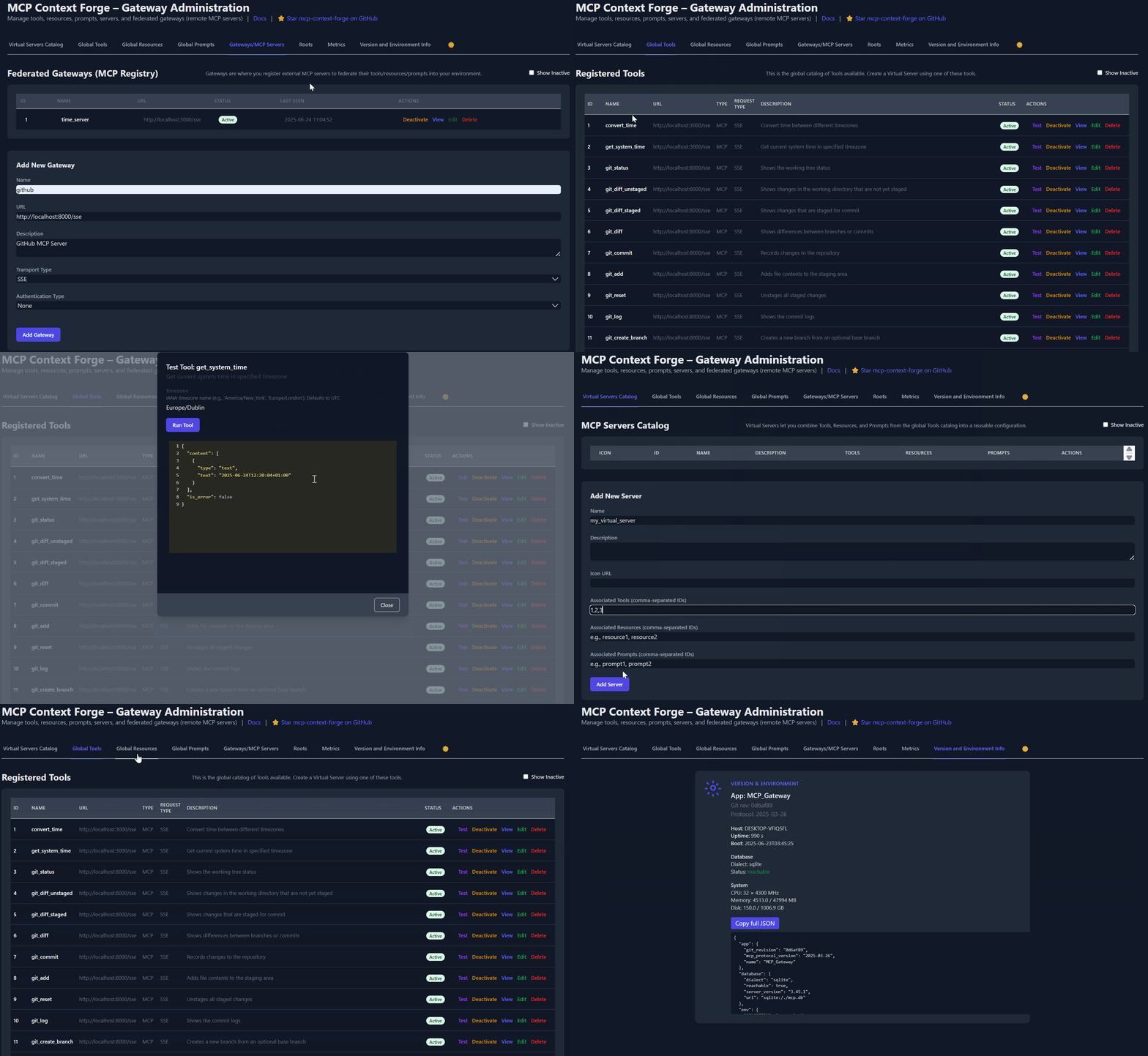
Table of Contents
- Overview & Goals
- Quick Start - PyPI
- Quick Start - Containers
- VS Code Dev Container
- Installation
- Upgrading
- Configuration
- Running
- Cloud Deployment
- API Reference
- Testing
- Project Structure
- Development
- Troubleshooting
- Contributing
📌 Quick Links
| Resource | Description | |----------|-------------| | 5-Minute Setup | Get started fast — uvx, Docker, Compose, or local dev | | Getting Help | Support options, FAQ, community channels | | Issue Guide | How to file bugs, request features, contribute | | Full Documentation | Complete guides, tutorials, API reference | | Deprecations | Deprecated runtime paths and migration guidance |
Overview & Goals
ContextForge is an open source registry and proxy that federates any Model Context Protocol (MCP) server, A2A server, or REST/gRPC API, providing centralized governance, discovery, and observability. It optimizes agent and tool calling, and supports plugins. See the project roadmap for more details.
It currently supports:
- Federation across multiple MCP and REST services
- A2A (Agent-to-Agent) integration for external AI agents (OpenAI, Anthropic, custom)
- gRPC-to-MCP translation via automatic reflection-based service discovery
- Virtualization of legacy APIs as MCP-compliant tools and servers
- Transport over HTTP, JSON-RPC, WebSocket, SSE (with configurable keepalive), and Streamable HTTP; stdio transport available for server-side use
- An Admin UI for real-time management, configuration, and log monitoring (with airgapped deployment support)
- Built-in auth, retries, and rate-limiting with user-scoped OAuth tokens and unconditional X-Upstream-Authorization header support
- OpenTelemetry observability with Phoenix, Jaeger, Zipkin, and other OTLP backends
- Scalable deployments via Docker or PyPI, Redis-backed caching, and multi-cluster federation

For a list of upcoming features, check out the ContextForge Roadmap
<details> <summary><strong>🔌 Gateway Layer with Protocol Flexibility</strong></summary>
- Federates any MCP server or REST API
- Lets you choose your MCP protocol version (e.g.,
2025-11-25) - Exposes a single, unified interface for diverse backends
- Wraps non-MCP services as virtual MCP servers
- Registers tools, prompts, and resources with minimal configuration
- gRPC-to-MCP translation via server reflection protocol
- Automatic service discovery and method introspection
-
Adapts REST APIs into tools with:
- Automatic JSON Schema extraction
- Support for headers, tokens, and custom auth
- Retry, timeout, and rate-limit policies
- Prompts: Jinja2 templates, multimodal support, rollback/versioning
- Resources: URI-based access, MIME detection, caching, SSE updates
- Tools: Native or adapted, with input validation and concurrency controls
- Admin UI built with HTMX 2.0.3 (bundled) + Alpine.js
- Real-time log viewer with filtering, search, and export capabilities
- Auth: Basic, JWT, or custom schemes
- Structured logs, health endpoints, metrics
- 7,000+ tests, Makefile targets, live reload, pre-commit hooks
- Vendor-agnostic tracing with OpenTelemetry (OTLP) protocol support
- Multiple backend support: Phoenix (LLM-focused), Jaeger, Zipkin, Tempo, DataDog, New Relic
- Distributed tracing across federated gateways and services
- Automatic instrumentation of tools, prompts, resources, and gateway operations
- LLM-specific metrics: Token usage, costs, model performance
- Zero-overhead when disabled with graceful degradation
See Observability Documentation for setup guides with Phoenix, Jaeger, and other backends.
</details>Quick Start - PyPI
ContextForge is published on PyPI as mcp-contextforge-gateway.
⚠️
JWT_SECRET_KEYandAUTH_ENCRYPTION_SECRETare required in every environment — including local development. The gateway will not start without them. Generate real secrets withpython3 -m mcpgateway.scripts.init_secretsbefore first run.
TLDR — single command using uv:
# 1️⃣  Generate secure secrets (creates .env.secrets)
python3 -m mcpgateway.scripts.init_secrets

# 2️⃣  Export the generated values
export JWT_SECRET_KEY="$(grep '^JWT_SECRET_KEY=' .env.secrets | cut -d= -f2)"
export AUTH_ENCRYPTION_SECRET="$(grep '^AUTH_ENCRYPTION_SECRET=' .env.secrets | cut -d= -f2)"

# 3️⃣  Start the gateway
JWT_SECRET_KEY="$JWT_SECRET_KEY" \
AUTH_ENCRYPTION_SECRET="$AUTH_ENCRYPTION_SECRET" \
MCPGATEWAY_UI_ENABLED=true \
MCPGATEWAY_ADMIN_API_ENABLED=true \
PLATFORM_ADMIN_EMAIL=admin@example.com \
uvx --from mcp-contextforge-gateway mcpgateway --host 0.0.0.0 --port 4444
- Python ≥ 3.11
- curl + jq - only for the last smoke-test step
1 - Install & run (copy-paste friendly)
# 1️⃣  Create an isolated env and install from PyPI
mkdir mcpgateway && cd mcpgateway
python3 -m venv .venv && source .venv/bin/activate
pip install --upgrade pip
pip install mcp-contextforge-gateway

# 2️⃣  Download .env.example and generate real secrets
curl -O https://raw.githubusercontent.com/IBM/mcp-context-forge/main/.env.example
cp .env.example .env

# Generate cryptographically secure secrets into .env.secrets
python3 -m mcpgateway.scripts.init_secrets

# Patch the generated secrets into .env (replaces __REPLACE_ME__ placeholders)
python3 -m mcpgateway.scripts.init_secrets --patch-env .env

# 3️⃣  Start the gateway
mcpgateway --host 0.0.0.0 --port 4444 &

# 4️⃣  Generate a bearer token and smoke-test
export JWT_SECRET_KEY=$(grep '^JWT_SECRET_KEY=' .env | cut -d= -f2)
export MCPGATEWAY_BEARER_TOKEN=$(python3 -m mcpgateway.utils.create_jwt_token \
    --username admin@example.com --exp 10080 --secret "$JWT_SECRET_KEY")

curl -s -H "Authorization: Bearer $MCPGATEWAY_BEARER_TOKEN" \
     http://127.0.0.1:4444/version | jq
# 1️⃣  Isolated env + install from PyPI
mkdir mcpgateway ; cd mcpgateway
python3 -m venv .venv ; .\.venv\Scripts\Activate.ps1
pip install --upgrade pip
pip install mcp-contextforge-gateway

# 2️⃣  Download .env.example and generate real secrets
Invoke-WebRequest -Uri "https://raw.githubusercontent.com/IBM/mcp-context-forge/main/.env.example" -OutFile ".env.example"
Copy-Item .env.example .env

# Generate cryptographically secure secrets into .env.secrets
python3 -m mcpgateway.scripts.init_secrets

# Patch the generated secrets into .env (replaces __REPLACE_ME__ placeholders)
python3 -m mcpgateway.scripts.init_secrets --patch-env .env

# 3️⃣  Launch the gateway
mcpgateway.exe --host 0.0.0.0 --port 4444

# 4️⃣  Bearer token and smoke-test
$Env:JWT_SECRET_KEY = (Get-Content .env | Select-String '^JWT_SECRET_KEY=').ToString().Split('=')[1]
$Env:MCPGATEWAY_BEARER_TOKEN = python3 -m mcpgateway.utils.create_jwt_token `
    --username admin@example.com --exp 10080 --secret $Env:JWT_SECRET_KEY

curl -s -H "Authorization: Bearer $Env:MCPGATEWAY_BEARER_TOKEN" `
     http://127.0.0.1:4444/version | jq
# 1️⃣  Isolated env + install from PyPI using uv
mkdir mcpgateway ; cd mcpgateway
uv venv
.\.venv\Scripts\activate
uv pip install mcp-contextforge-gateway

# Continue with steps 2️⃣-4️⃣ above...
Copy .env.example to .env and tweak any of the settings (or use them as env variables).
# 1️⃣  Spin up the sample MCP time server using mcpgateway.translate & docker (replace docker with podman if needed)
python3 -m mcpgateway.translate \
Truncated for display — read the full file on GitHub.
Related Skills
claude-mem
113.5kPersistent Context Across Sessions for Every Agent – Captures everything your agent does during sessions, compresses it with AI, and injects relevant context back into future sessions. Works with Claude Code, OpenClaw, Codex, Gemini, Hermes, Copilot, OpenCode + More
Agent-Reach
109.2kGive your AI agent eyes to see the entire internet. Read & search Twitter, Reddit, YouTube, GitHub, Bilibili, XiaoHongShu — one CLI, zero API fees.
Understand-Anything
90.9kGraphs that teach > graphs that impress. Turn any code into an interactive knowledge graph you can explore, search, and ask questions about. Works with Claude Code, Codex, Cursor, Copilot, Gemini CLI, and more.
headroom
78.9kCompress tool outputs, logs, files, and RAG chunks before they reach the LLM. 20% fewer tokens for coding agents, 60-95% fewer tokens for JSON, same answers. Library, proxy, MCP server.

Languages
Trust signals
From repository metadata: license, adoption, age and documentation. Not a code audit — see the Safety scan above for what the skill file itself contains.