
DiffuseKronA
DiffuseKronA: A Parameter Efficient Fine-tuning Method for Personalized Diffusion Models
Install / Use
/learn @IBM/DiffuseKronAREADME
🚀 DiffuseKronA (WACV-25 🎉)<br> webpage | paper | video | dataset | weights | demo (soon!) <br><br> <p align="left">💡 Highlight</p>
</div> ✔️ Parameter Efficient: A minimum 35% reduction in parameters. By changing Kronecker factors, we can even achieve up to a 75% reduction with results comparable to LoRA-DreamBooth.<br/> ✔️ Enhanced Stability: Our method is more stable compared to LoRA-DreamBooth. Stability refers to variations in images generated across different learning rates and Kronecker factor/ranks, which makes LoRA-DreamBooth harder to fine-tune.<br/> ✔️ Text Alignment and Fidelity: On average, DiffusekronA captures better subject semantics and large contextual prompts.<br/> ✔️ Interpretability: Leverages the advantages of the Kronecker product to capture structured relationships in attention-weight matrices. More controllable decomposition makes DiffusekronA more interpretable.<br/>⭐ Method Details
Overview of DiffuseKronA:</br> ✨ Fine-tuning process involves optimizing the multi-head attention parameters (Q, K, V , and O) using Kronecker Adapter, elaborated in the subsequent blocks. </br> ✨ During inference, newly trained parameters, denoted as θ, are integrated with the original weights Dϕ and images are synthesized using the updated personalized model D<sub>ϕ+θ</sub>.</br> ✨ We also present a schematic illustration of LoRA vs DiffuseKronA; LoRA is limited to one controllable parameter, the rank r; while the Kronecker product showcases enhanced interpretability by introducing two controllable parameters a<sub>1</sub> and a<sub>2</sub> (or equivalently b<sub>1</sub> and b<sub>2</sub>). Furthermore, we also showcase the advantages of the proposed method. <br>
<div class="gif"> <p align="center"> <img src='assets/diffusekrona.gif' align="center" width=800> </p> </div>🛠️ Installation Steps
- Create conda environment
conda create -y -n diffusekrona python=3.11
conda activate diffusekrona
- Package installation
pip install diffusers==0.21.0
pip install -r requirements.txt
pip install accelerator
- Install CLIP
pip install git+https://github.com/openai/CLIP.git
🔥 Quickstart
Note: For
diffusers=0.21.0, you will getImportError: cannot import name 'cached_download' from 'huggingface_hub'error. To solve it please remove the linefrom huggingface_hub import HfFolder, cached_download, hf_hub_download, model_infoin dyanamic_models_utils.py script.
- Clone the dataset and remove the
*subject/generatedsubfolders
git clone https://github.com/diffusekrona/data && rm -rf data/.git
mkdir outputs
cd diffusekrona/
python format_datasets.py       # To format the dataset (NOT mandatory)
- Finetune diffusekrona using script file
cd diffusekrona/                                        # RUN inside diffusekrona folder
CUDA_VISIBLE_DEVICES=$GPU_ID bash scripts/finetune_sdxl.sh      # Leveraging SDXL model
CUDA_VISIBLE_DEVICES=$GPU_ID bash scripts/finetune_sd.sh        # Leveraging SDXL model
- Generate images from the finetuned weights (RUN inside diffusekrona folder)
CUDA_VISIBLE_DEVICES=$GPU_ID accelerate launch scripts/inference_sdxl.sh    # Leveraging SDXL model
CUDA_VISIBLE_DEVICES=$GPU_ID accelerate launch scripts/inference_sd.sh      # Leveraging SD model
Note: Specify a single GPU index only (e.g.,
CUDA_VISIBLE_DEVICES=0) and avoid listing multiple IDs.
🎖️ Results
<details open> <summary><font size="4"> Generation Results on Human Faces 🗿 </font></summary> <img src="https://diffusekrona.github.io/static/images/front3.png" alt="COCO" width="100%"> </details> <details close> <summary><font size="4"> Generation Results on Animal (Cat), Teddy Bear, and Shoes </font></summary> <img src="https://diffusekrona.github.io/static/images/front1.png" alt="COCO" width="100%"> </details> <details close> <summary><font size="4"> Generation Results on Toy, Teddy Bear, and Anime Character </font></summary> <img src="https://diffusekrona.github.io/static/images/front2.png" alt="COCO" width="100%"> </details> <details close> <summary><font size="4"> Generation Results on Anime Characters and Animal (Cat) </font></summary> <img src="https://diffusekrona.github.io/static/images/front_anime.png" alt="COCO" width="100%"> </details> <details close> <summary><font size="4"> Generation Results on Car modifications and showcase 🚘 </font></summary> <img src="https://diffusekrona.github.io/static/images/front4.png" alt="COCO" width="100%"> </details> <details open> <summary><font size="4"> One-shot Image Generation Results on HuggingFace 🤗 </font></summary> <img src="https://diffusekrona.github.io/static/images/face_compressed.png" alt="COCO" width="100%"> </details><!-- One-shot Image Generation 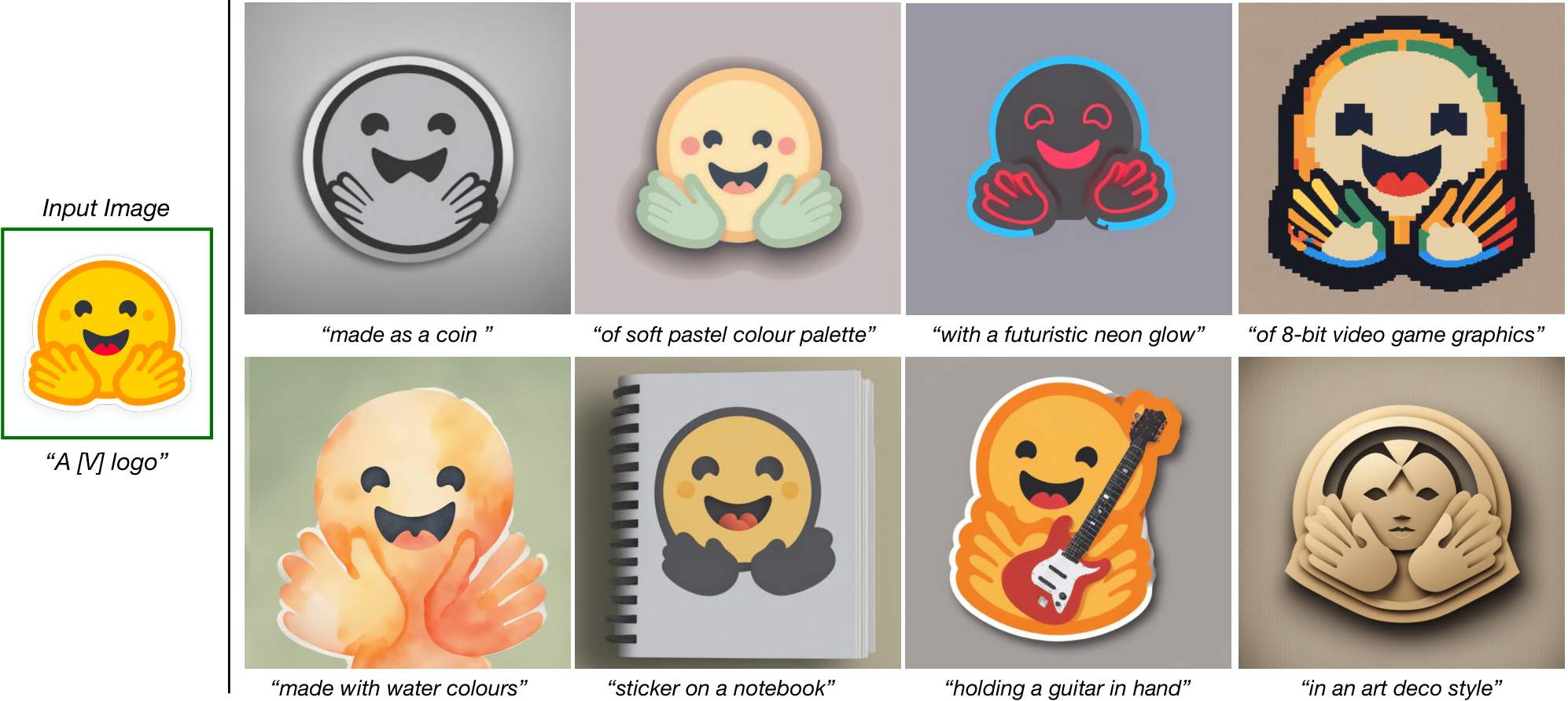 -->For more results, please visit here.
🙏🏼 Acknowledgement
Our codebase is built on top of the HuggingFace Diffusers library, and we’re incredibly grateful for their amazing work!
✏️ Citation
If you think this project is helpful, please feel free to leave a star⭐️ and cite our paper:
@InProceedings{Marjit_2025_WACV,
    author    = {Marjit, Shyam and Singh, Harshit and Mathur, Nityanand and Paul, Sayak and Yu, Chia-Mu and Chen, Pin-Yu},
    title     = {DiffuseKronA: A Parameter Efficient Fine-Tuning Method for Personalized Diffusion Models},
    booktitle = {Proceedings of the Winter Conference on Applications of Computer Vision (WACV)},
    month     = {February},
    year      = {2025},
    pages     = {3529-3538}
}
✉️ Contact
Shyam Marjit: marjitshyam@gmail.com or shyam.marjit@iiitg.ac.in
Related Skills
node-connect
352.5kDiagnose OpenClaw node connection and pairing failures for Android, iOS, and macOS companion apps
frontend-design
111.3kCreate distinctive, production-grade frontend interfaces with high design quality. Use this skill when the user asks to build web components, pages, or applications. Generates creative, polished code that avoids generic AI aesthetics.
openai-whisper-api
352.5kTranscribe audio via OpenAI Audio Transcriptions API (Whisper).
qqbot-media
352.5kQQBot 富媒体收发能力。使用 <qqmedia> 标签,系统根据文件扩展名自动识别类型(图片/语音/视频/文件)。
